Kumpli Compliance

Kumpli (“Compliance Obligations Monitoring”) is the app in the Paylalo suite that tracks a company’s statutory obligations. Accounting and admin staff use it to list every BIR return, LGU permit, SEC filing and similar duty, name who’s responsible, file proof when it’s done, and let the app work out the next due date.
The sign-in page lists four things it does: “Obligation & deadline tracking”, “Filing calendar & reminders”, “Evidence & audit trail”, and “Multi-company, multi-branch”. The main screen is the Obligations Register, which describes itself as “The digital F-MPL-005 — every statutory obligation, its status, and its evidence trail.” F-MPL-005 is the paper compliance form it replaces. Kumpli runs on its own at kumpli.paylalo.com, but it uses the same Paylalo sign-in and company list as the rest of the suite.
What’s in the app
- Obligations Register (
/app/register): the master list, filtered by Category, Status and Risk, with two tabs, Register and Audit Log. You add, edit and file obligations here. - Health Dashboard (
/app/dashboard): “Compliance posture for the active company — computed live from its obligation register.” It shows the compliance rate, status and risk breakdowns, a table by category and upcoming deadlines. - Recurring Deadlines (
/app/recurring): “Every repeating statutory obligation, grouped by cycle and ordered by the next due date. Use it as the responsibility check — what recurs, when it lands, and who owns it.” - Calendar (
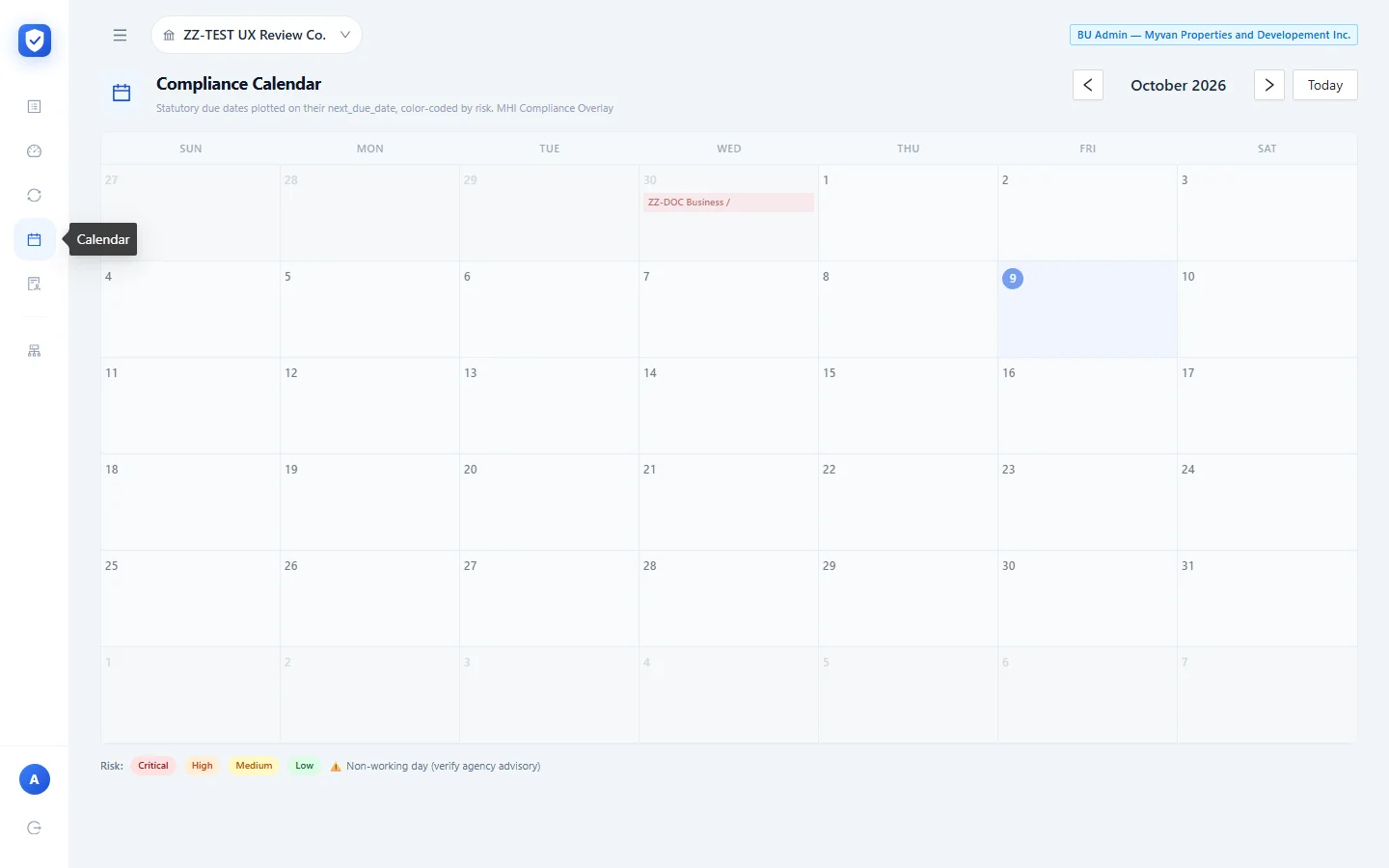
/app/calendar): “Statutory due dates plotted on their next_due_date, color-coded by risk”, with a flag when a due date falls on a non-working day. - Audit Log / Evidence Repository (
/app/audit): “Evidence Repository — Auditor View. Read-only. Every file open and download is logged as a VIEW-EVIDENCE audit event.” - Group Roll-up (
/app/group) is a placeholder that says “Expected: Fast-follow wave — In build queue”. - My Profile (
/app/profile) shows your Kumpli access for each company, your privileges in the active company, and your reward points and support tickets from across the suite.
A company switcher at the top of every page sets the active company, and each screen shows only that company’s data.

Obligations Register
Adding an obligation
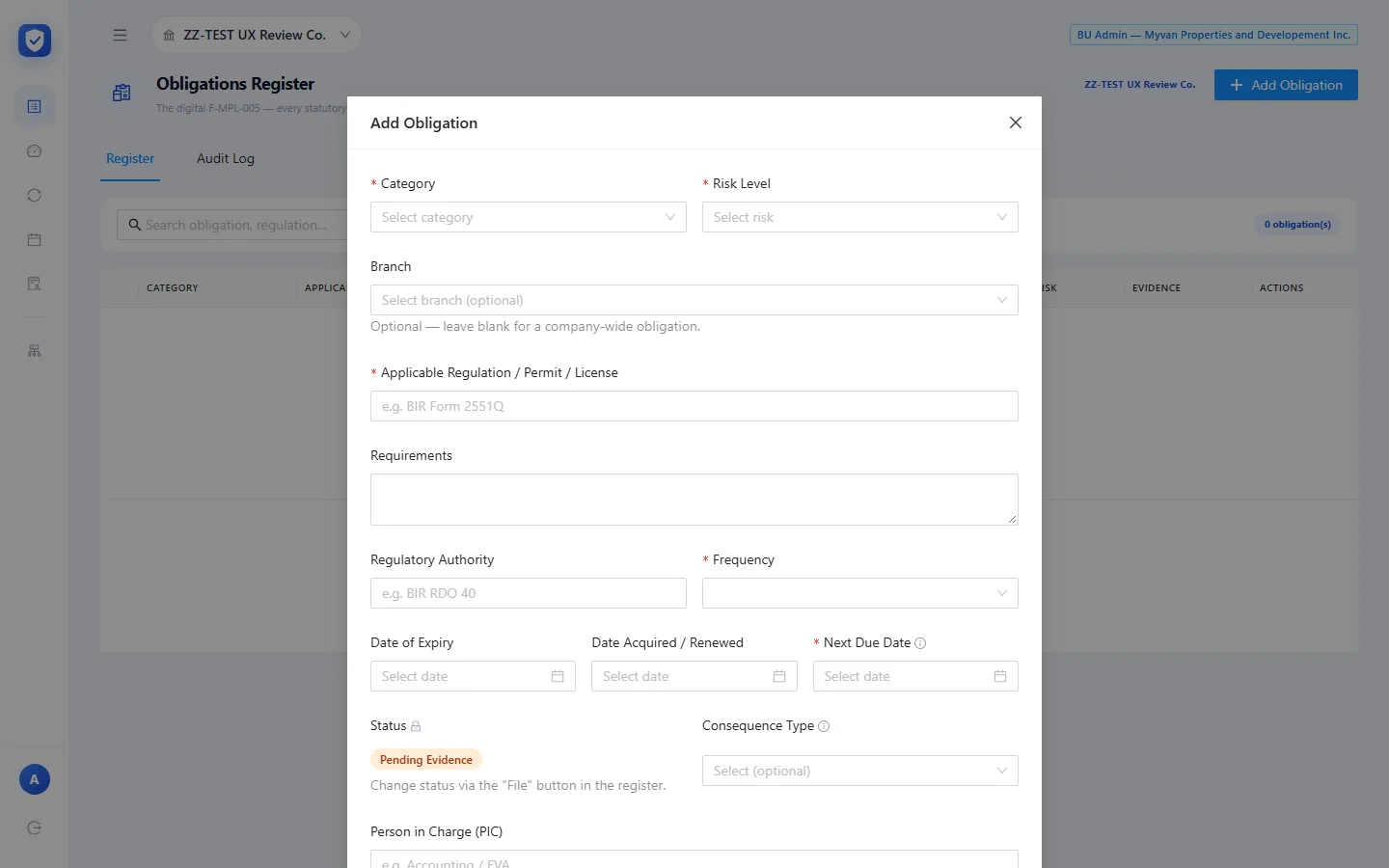
This adds one statutory duty to the company’s register. On an empty register the app says: “No obligations yet. Click Add Obligation to seed this register from the F-MPL-005.”
The fields:
- Category (required): BIR, SEC, LGU, BFP, DOLE, SSS, PhilHealth, HDMF, Loans, Lease, Insurance, Court or Other.
- Risk Level (required): Critical, High, Medium or Low.
- Branch is optional: “leave blank for a company-wide obligation.” The test company has one branch, ZZ CEBU MAIN.
- Applicable Regulation / Permit / License (required). The placeholder suggests “BIR Form 2551Q”.
- Requirements is free text. Regulatory Authority takes something like “BIR RDO 40”.
- Frequency (required): Monthly, Quarterly, Annual, Per-event or One-off.
- Date of Expiry, Date Acquired / Renewed, and Next Due Date (required). The tooltip on Next Due Date reads: “Auto-computed by statutory roll-forward (U-05) on evidence insert. Override manually if needed.”
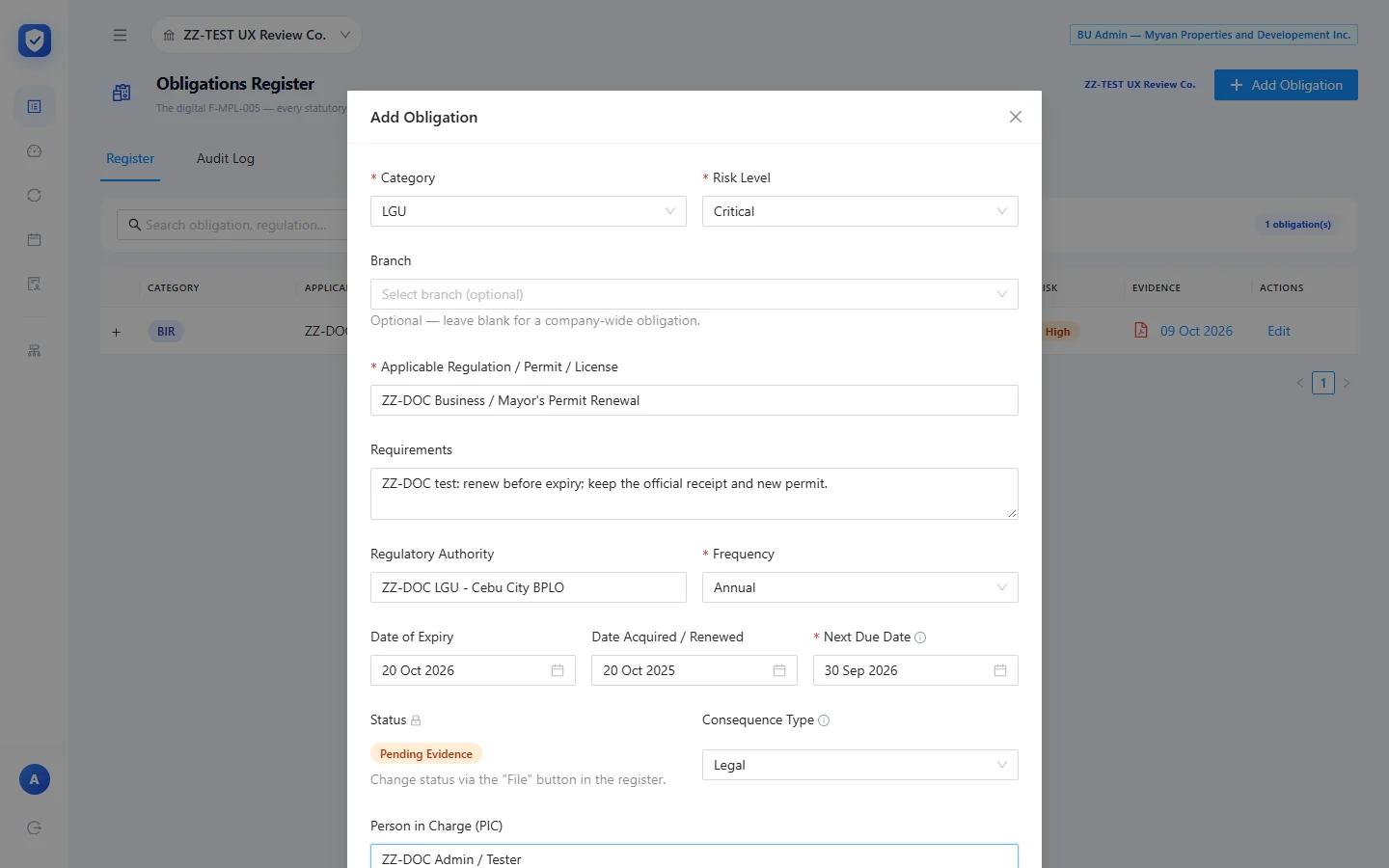
- Status is locked to Pending Evidence on a new record. Its tooltip: “Status can only be changed via the File Evidence flow or the automated alerts system. It cannot be edited here.”
- Consequence Type: Financial, Legal or Operational. Tooltip: “Captured for future auto-escalation (v1.1). No auto-routing in v1.”
- Person in Charge (PIC) is free text that “matches the F-MPL-005 form field, e.g. ‘Accounting / EVA’”.
- Record Link is an optional Drive link or other reference.
- Open the Obligations Register and click Add Obligation.
- Pick the category, risk and, if you want, a branch. Type the regulation name, requirements and authority.
- Choose the frequency and next due date. For a permit, add the expiry and renewal dates too.
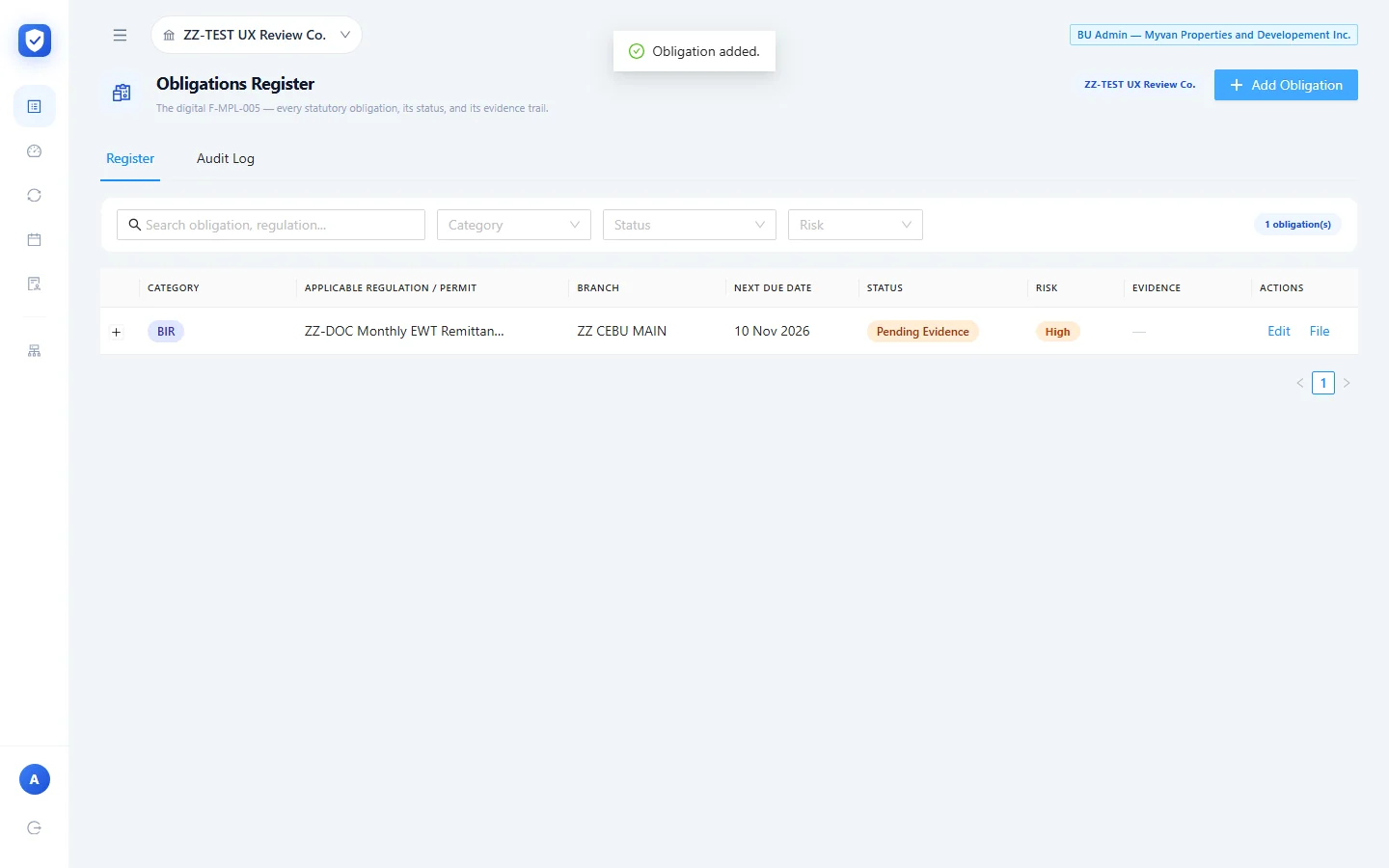
- Set the consequence type and the person in charge, then click Add Obligation. The app says “Obligation added.” and the new row appears as Pending Evidence, with no evidence and two actions, Edit and File.

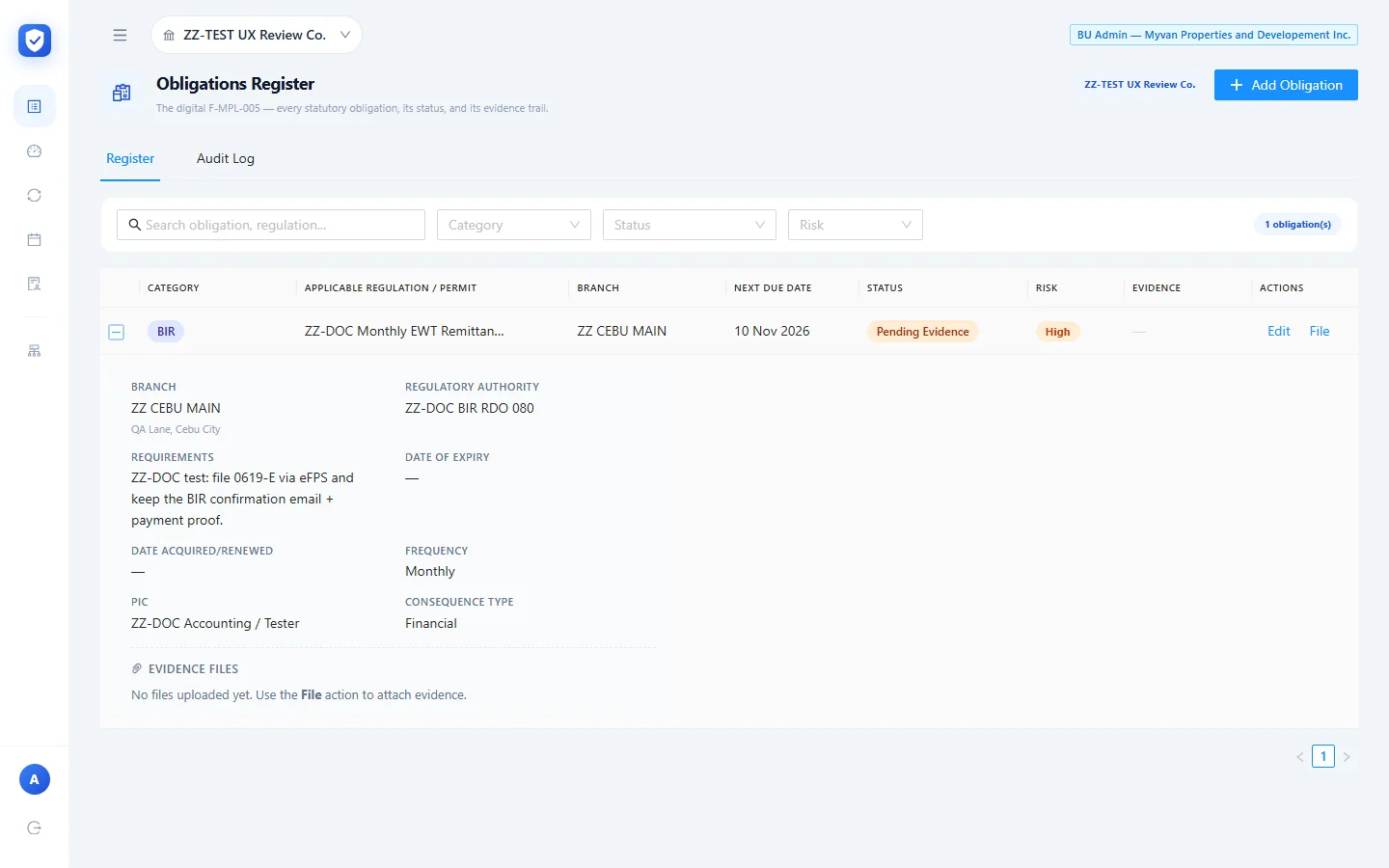
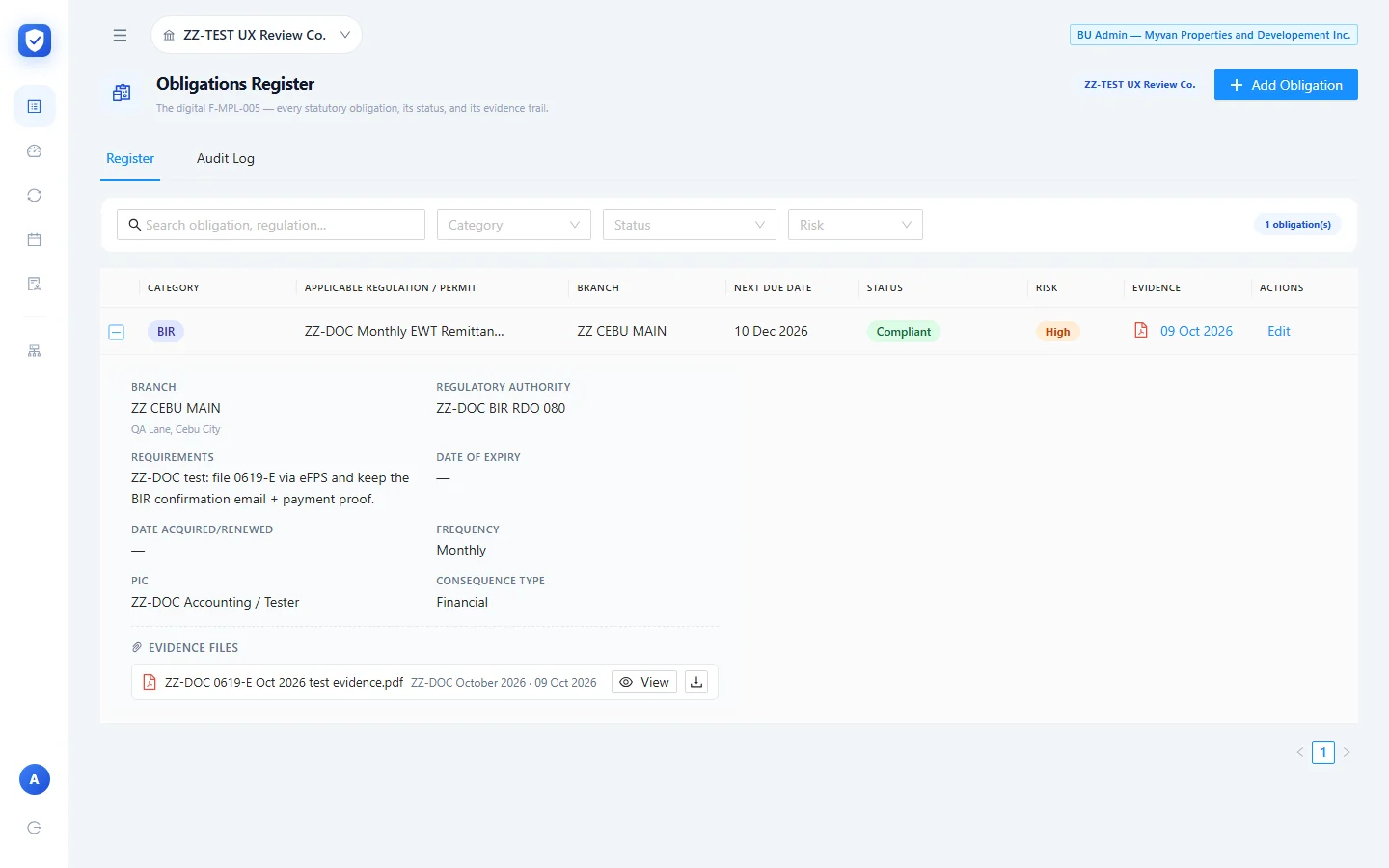
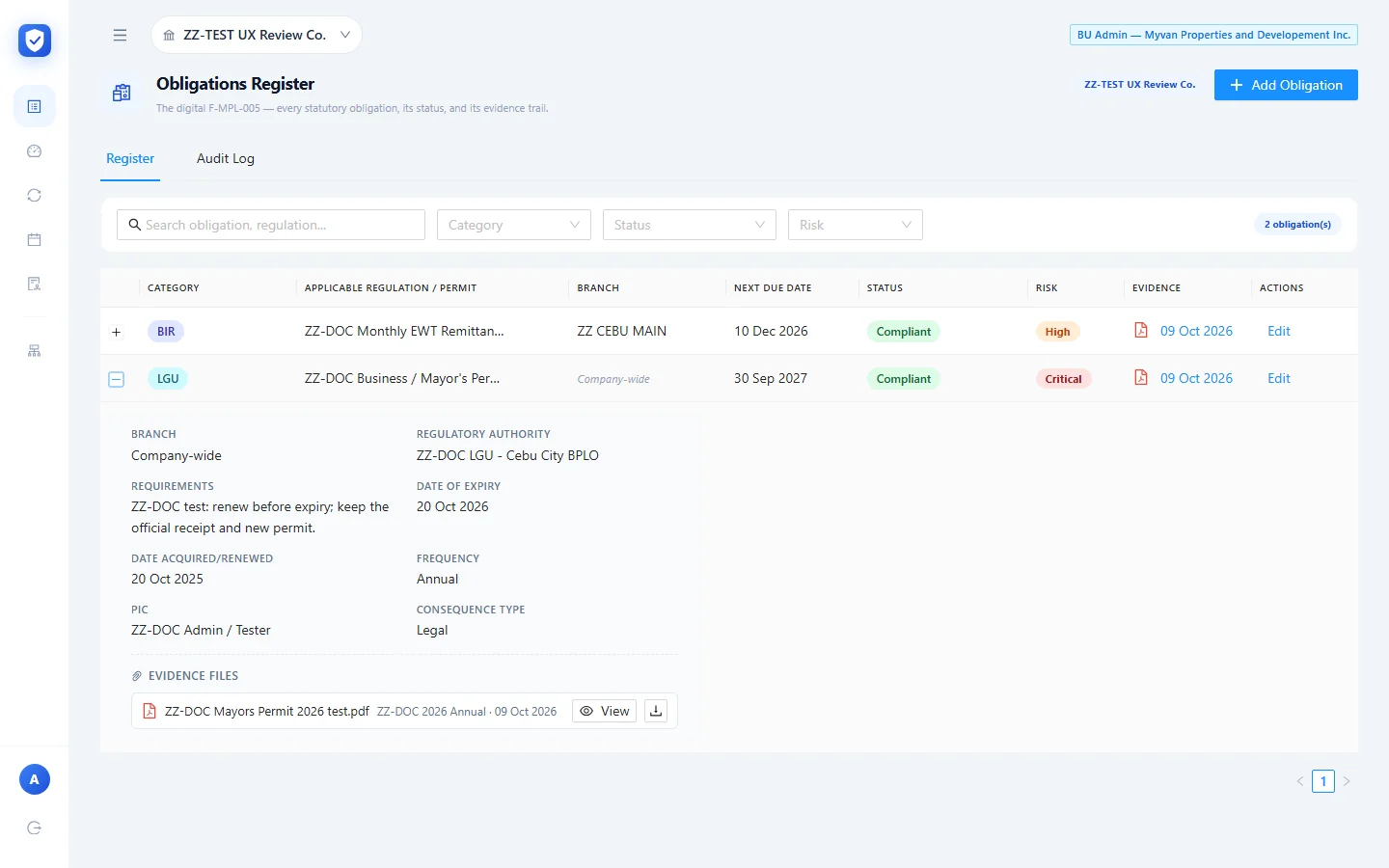
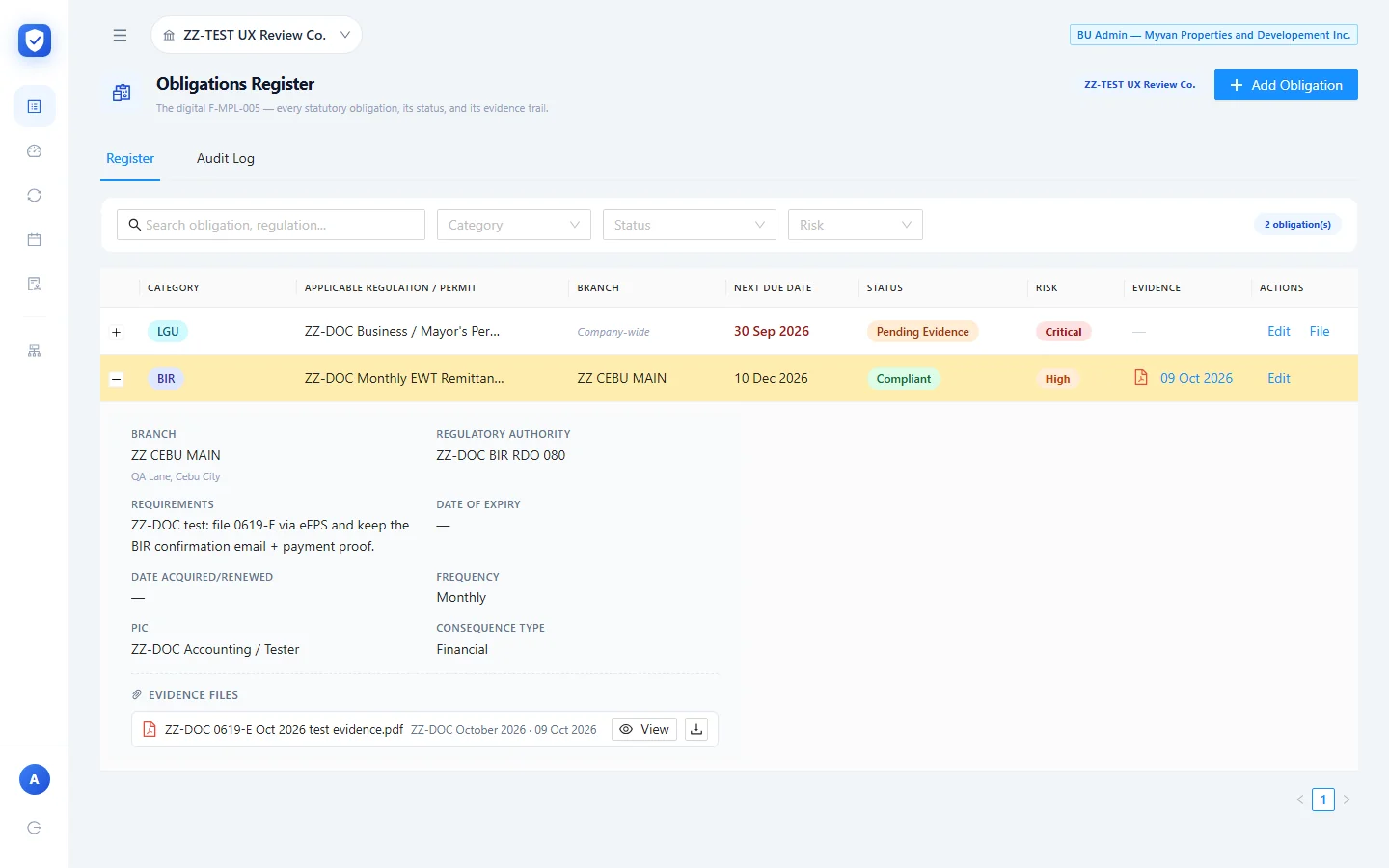
The + at the start of a row opens its details: branch and address, authority, requirements, expiry, date acquired, frequency, PIC, consequence type, and an Evidence Files list. Until something’s filed, that list says “No files uploaded yet. Use the File action to attach evidence.”
Filing evidence
Filing is how you record that an obligation has been met, by attaching proof. It’s the only way a user can change an obligation’s status.
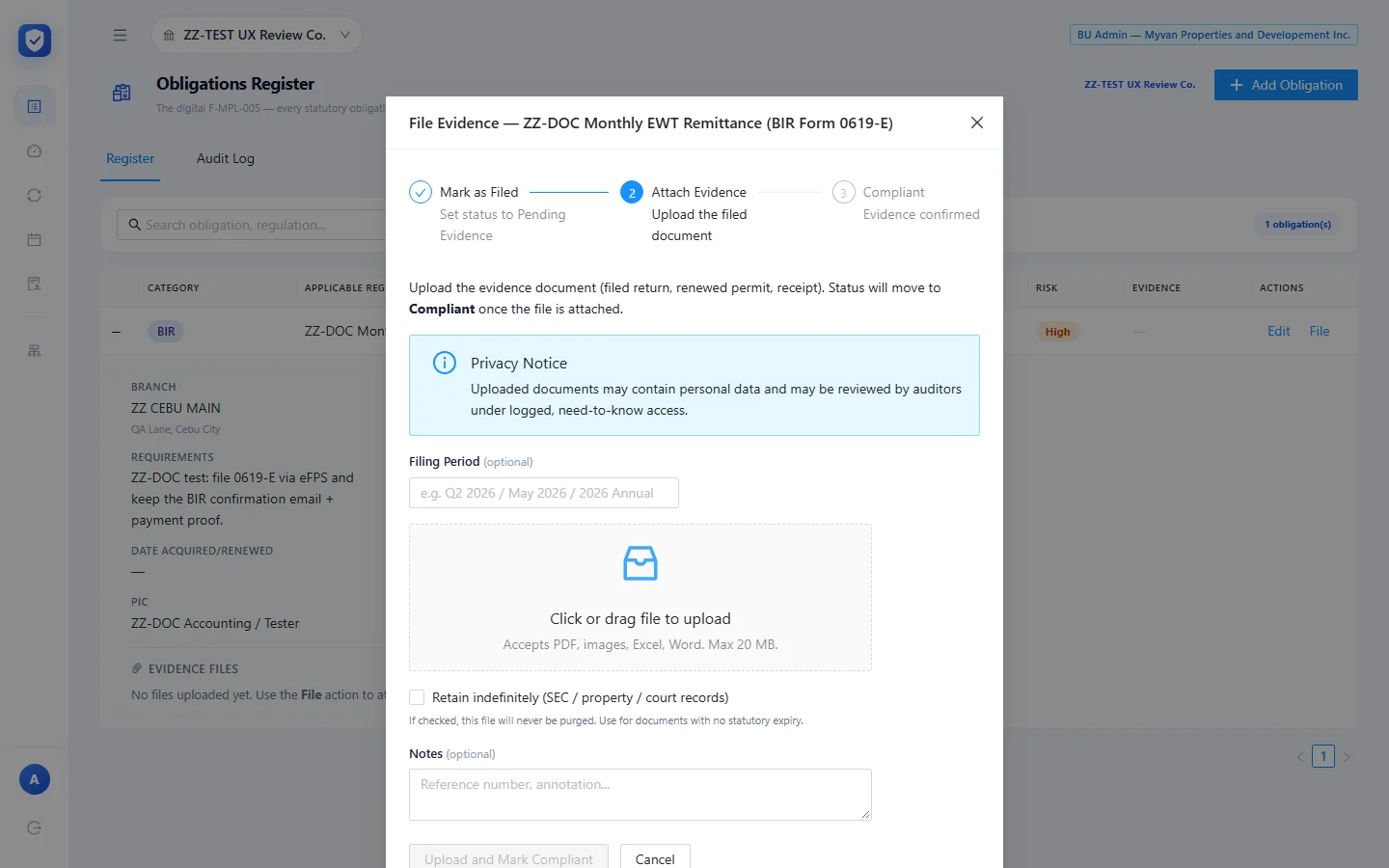
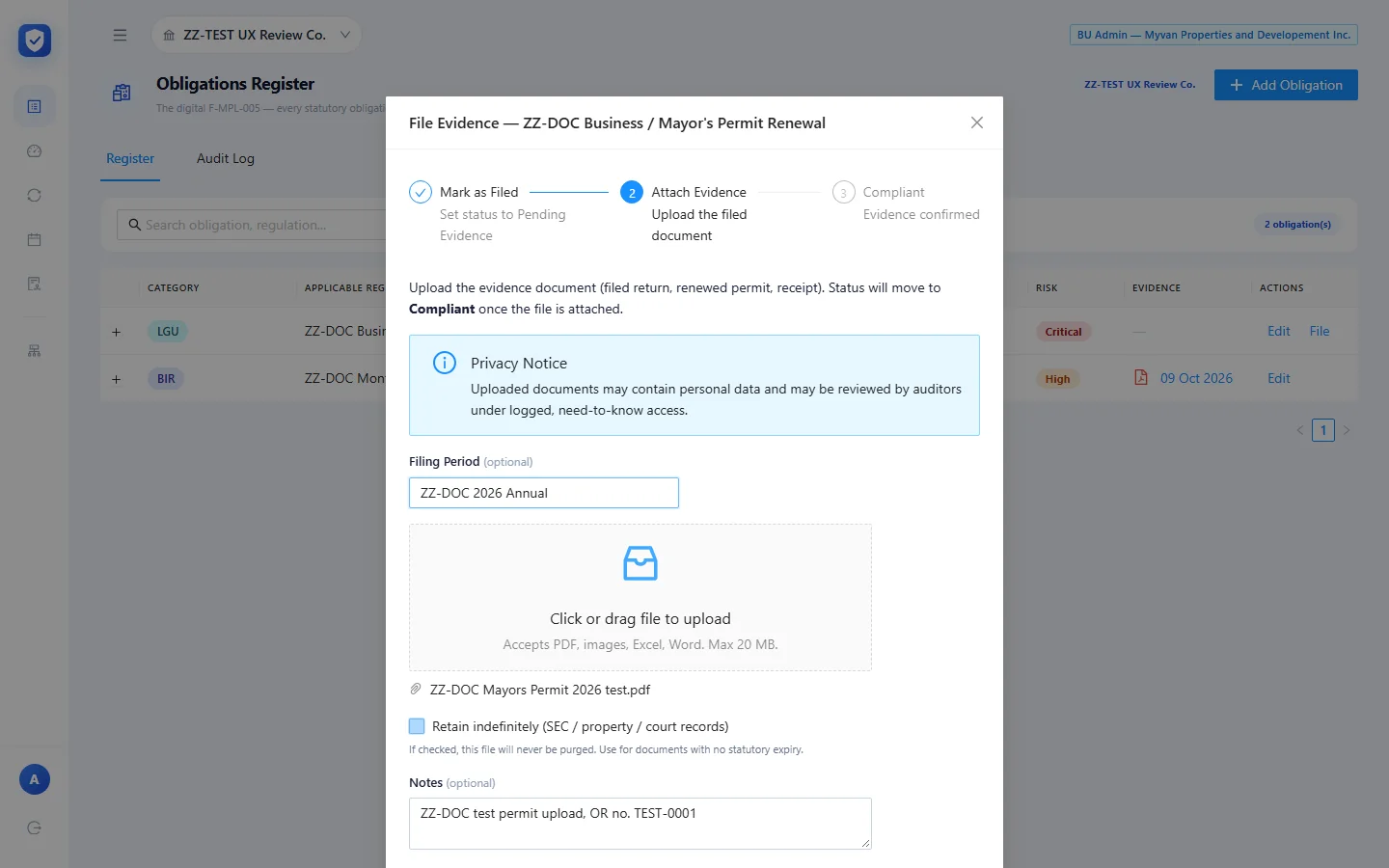
The File dialog shows three steps:
- Mark as Filed: “Set status to Pending Evidence”. This is already done when the obligation is created.
- Attach Evidence: “Upload the filed document”.
- Compliant: “Evidence confirmed”.
The dialog explains: “Upload the evidence document (filed return, renewed permit, receipt). Status will move to Compliant once the file is attached.” A privacy notice warns that uploaded documents “may contain personal data and may be reviewed by auditors under logged, need-to-know access.”
You fill in a Filing Period (optional, e.g. “Q2 2026 / May 2026 / 2026 Annual”) and attach the file (“Accepts PDF, images, Excel, Word. Max 20 MB.”). There’s a Retain indefinitely (SEC / property / court records) checkbox (“If checked, this file will never be purged”) and a Notes box. Upload and Mark Compliant stays disabled until a file is attached.
- Click File on a Pending Evidence row.
- Type the filing period, attach the file and add a note with the reference number.
- Click Upload and Mark Compliant. The app says “Evidence uploaded. Status is now Compliant.”

Here’s what filing changed:
- The status became Compliant. The Evidence column showed the upload date (09 Oct 2026) as a link, and the File action disappeared from the row.
- The due date moved forward on its own. The monthly 0619-E was due 10 Nov 2026. After filing, its Next Due Date became 10 Dec 2026, one cycle later.
- The file appeared under Evidence Files in the expanded row, with View and download buttons.

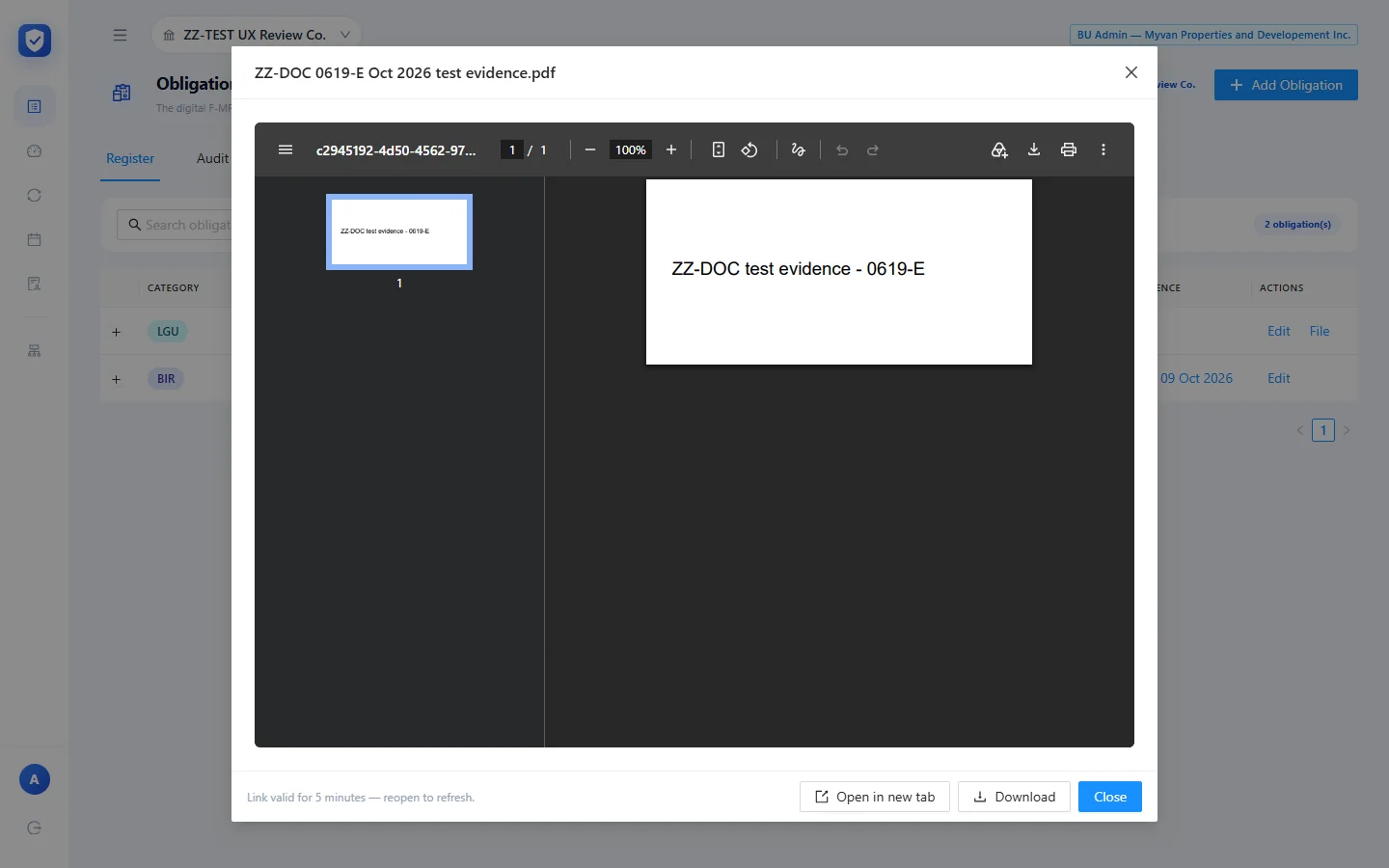
View opens the file in a built-in PDF viewer with Open in new tab and Download buttons. The footer says “Link valid for 5 minutes — reopen to refresh”, so files are served through short-lived signed links.
An overdue permit with an annual cycle
For the second test record I added ZZ-DOC Business / Mayor’s Permit Renewal: LGU, Critical risk, company-wide, Annual, expiry 20 Oct 2026, renewed 20 Oct 2025, consequence Legal. I set its next due date to 30 Sep 2026, already in the past, to see how Kumpli deals with something late.
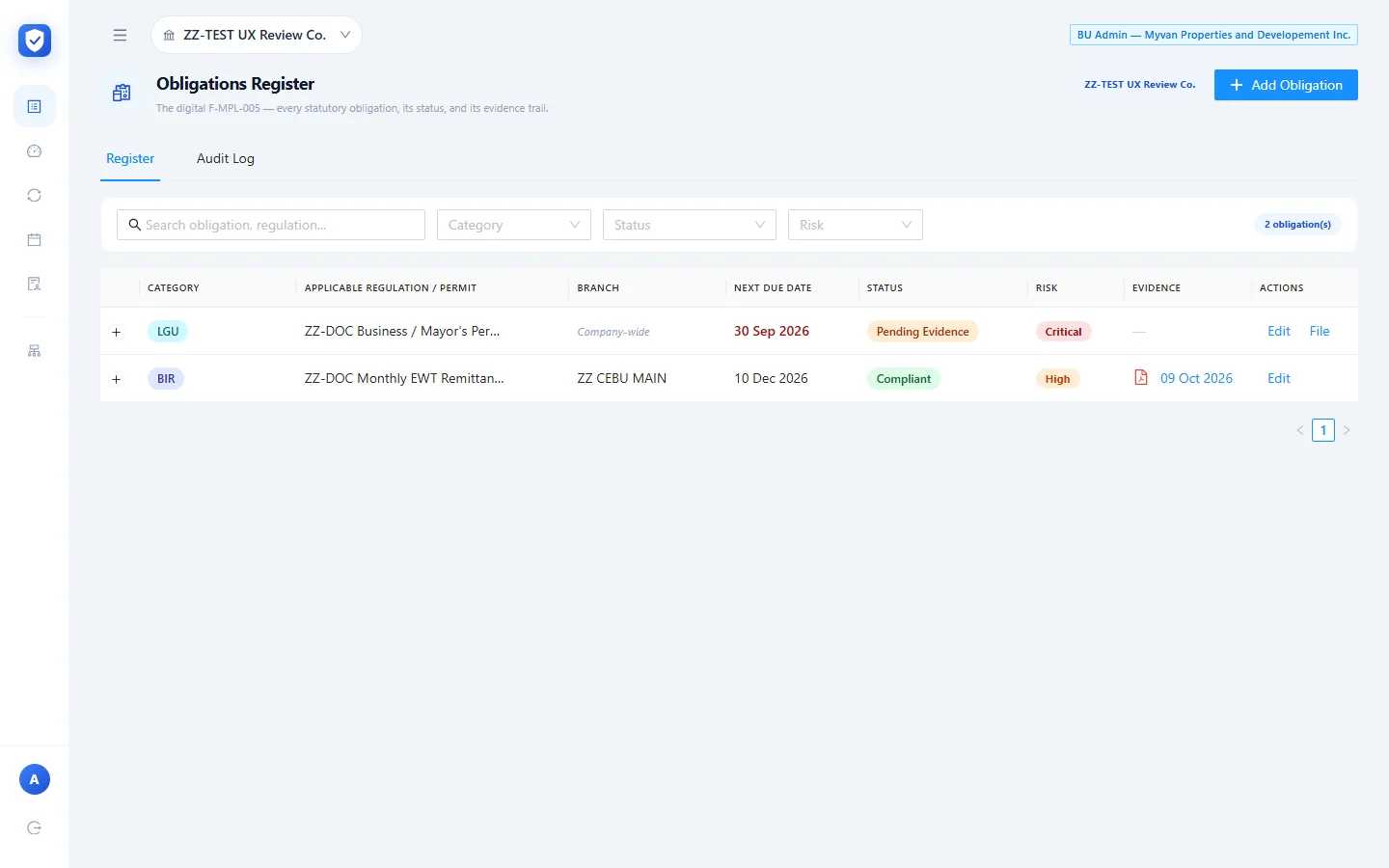
Right after saving, the register showed the past due date in red, but the status stayed Pending Evidence. Saving doesn’t set an “Overdue” status. The tooltip says only the automated alerts system can change it. At that point the other screens counted the permit differently:
- Recurring Deadlines counted it as “1 Overdue”, with “30 Sep 2026 — 9 days overdue”.
- The Health Dashboard listed it under Upcoming Deadlines as “9d overdue”, but its OVERDUE tile (“Past statutory due date”) still read 0, and the compliance rate was 50% (1 of 2 scorable).
Edit opens the same form as Add, filled in, with a Save Changes button. Status is locked here too.
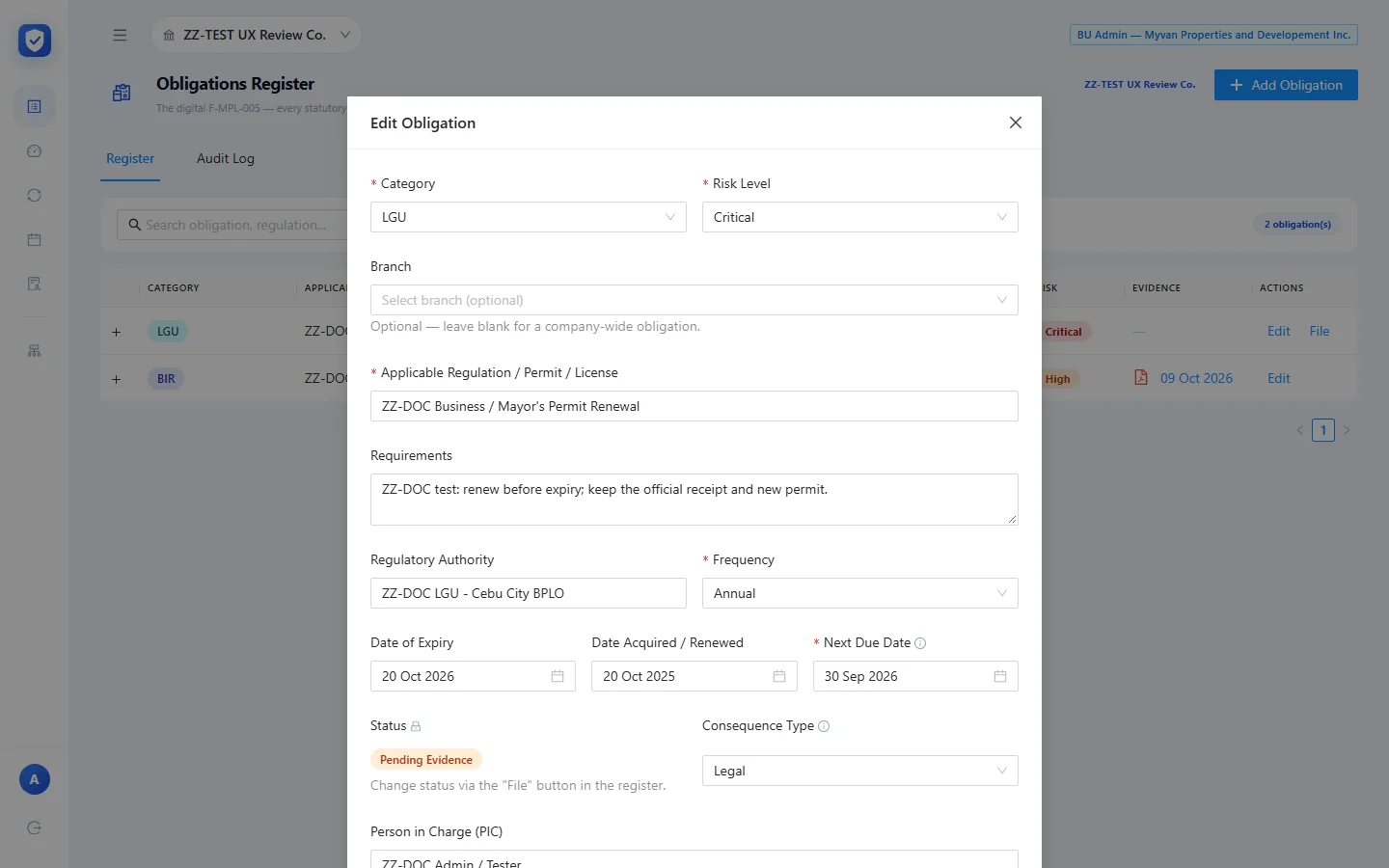
I then filed the permit with Retain indefinitely ticked. It moved to Compliant and its Next Due Date rolled forward a year, from 30 Sep 2026 to 30 Sep 2027. The Date of Expiry (20 Oct 2026) and Date Acquired / Renewed (20 Oct 2025) didn’t change. Filing only moves the next due date.
Statuses
The Status filter offers Compliant, For Renewal, Overdue, Pending Evidence and N/A. A user can only get to two of them: Pending Evidence when an obligation is created, and Compliant by filing evidence. For Renewal and Overdue are left to “the automated alerts system”. N/A shows up in the dashboard counts (“0 marked N/A”), but the admin has no way to set it. None of the automatic changes happened while I was testing.
The register’s Audit Log tab
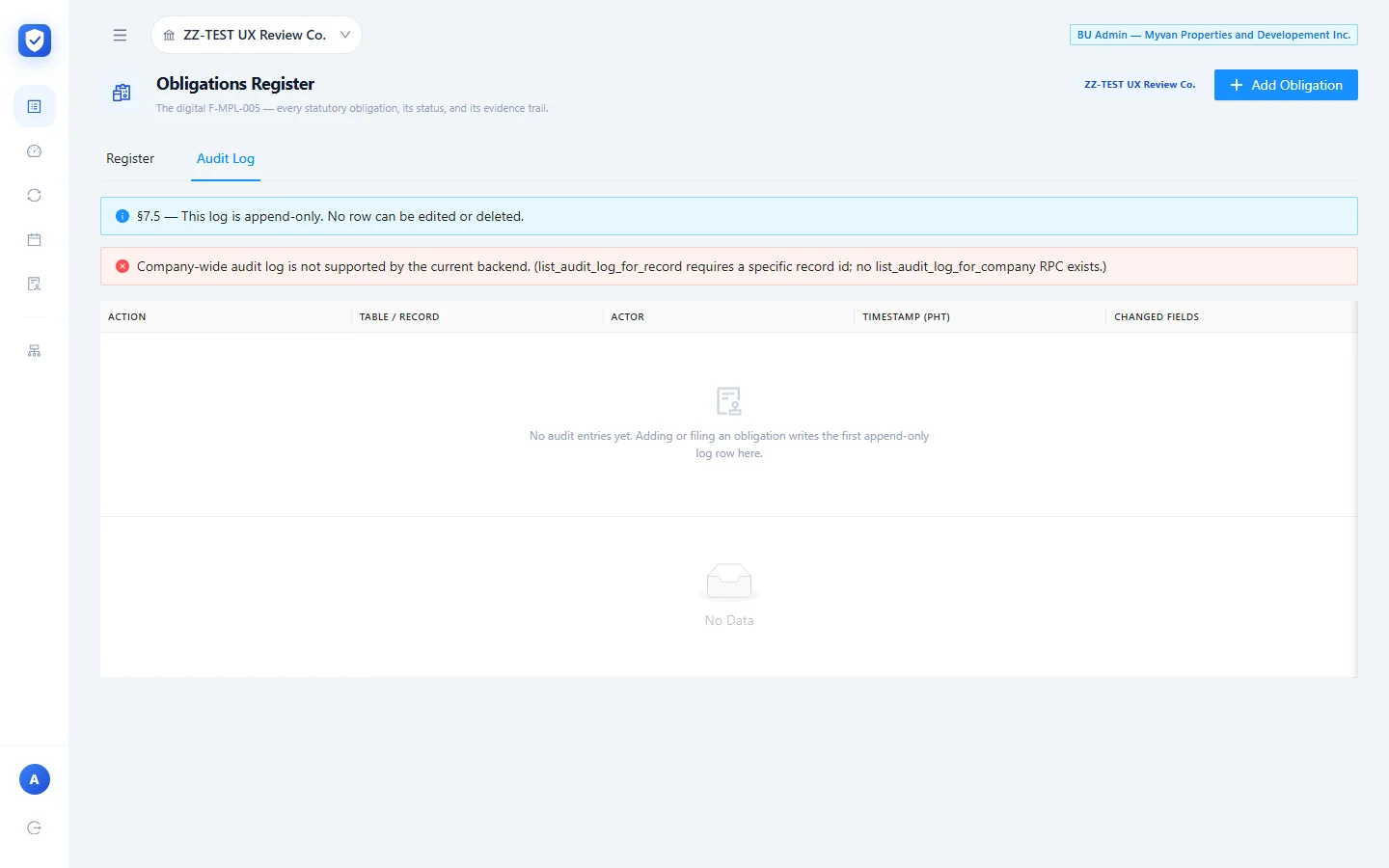
The tab promises “§7.5 — This log is append-only. No row can be edited or deleted.” For this company it shows a backend notice instead: “Company-wide audit log is not supported by the current backend. (list_audit_log_for_record requires a specific record id; no list_audit_log_for_company RPC exists.)” It stayed empty even after I’d added and filed two obligations.
Monitoring screens
Health Dashboard
Everything here is computed live from the register. The tiles are Compliance Rate (“Compliant of N scorable”), Total Obligations, Compliant (“Evidence on file”), Overdue (“Past statutory due date”) and Due in 30 Days. Below them are a status breakdown, a risk breakdown, a By Category table (total, overdue, compliance %), and Upcoming Deadlines with a relative “When” column, e.g. “In 62d”. Once both test items were filed, the test company read 100% compliant, 2 of 2.

Recurring Deadlines
This groups obligations by cycle, with buttons for All, Monthly, Quarterly, Annual and Per-event, and a Needs attention only toggle. The top tiles count recurring obligations, overdue ones, ones due within 30 days, and “No person in charge”, which checks that someone owns every item. Each row shows the authority under the obligation name, the next due date with a countdown or “N days overdue”, the PIC, status, risk, and an arrow that opens the obligation in the register. A due date on a non-working day gets a “⚠ Non-working day” flag. The Calendar legend explains the same marker as “verify agency advisory”.

Calendar
A month grid with Today and previous/next buttons. Each obligation sits on its next due date, coloured by risk (Critical, High, Medium, Low). The legend adds “⚠ Non-working day (verify agency advisory)”. The overdue permit showed on 30 Sep, and after filing, the 0619-E showed on 10 Dec. Clicking an entry opens the register with that row highlighted (/app/register?highlight=<id>).

Evidence Repository (Audit Log)
This is a read-only list of every evidence file for the active company. You can filter by category and by retention type, either Retain indefinitely or Standard (10-yr). The columns are File, Category, Obligation, Filing Period, Uploaded, Retention, Purge Date, and view and download actions.
The retention rules show up on screen. The 0619-E evidence uploaded on 09 Oct 2026 got 10-yr retention with a purge date of 06 Oct 2036. The permit I filed with the checkbox ticked shows Indefinite / Never. The page says every open and download is logged as a VIEW-EVIDENCE event, and notes “v1: internal MHI Reviewer/Auditor only.”

Group Roll-up
This will be a view across companies. For now it’s a placeholder that says “Expected: Fast-follow wave” and “In build queue”.

How it flows
- Add Obligation creates it as Pending Evidence, with a frequency and next due date.
- It then appears on the Health Dashboard, Recurring Deadlines and the Calendar. Past due dates show in red or are counted as overdue.
- File Evidence stores the upload with a filing period, a retention class and a purge date, and the status becomes Compliant.
- The next due date moves one cycle ahead (a month for Monthly, a year for Annual), and the cycle starts again from step 2.
- The file stays in the read-only Evidence Repository until its purge date, either 10 years or never.
- Kumpli shares the Paylalo sign-in and company list. My Profile shows reward points earned from postings in other suite apps (SCM, Accounting, Fixed Assets) and the user’s Paylalo help-desk tickets. In the screens I tested, Kumpli didn’t create or link to documents in any other app.
What didn’t work yet
- The company choice doesn’t stick. Every fresh page load opened on another group company, and I had to pick the test company from the switcher again each time. The badge at the top right also kept showing the default company while ZZ-TEST UX Review Co. was active.
- Overdue isn’t set right away. A past due date left the status at Pending Evidence. The dashboard’s Overdue tile showed 0 while its Upcoming list and the Recurring Deadlines page both said the item was 9 days overdue. The automatic status changes (Overdue, For Renewal) never happened during the session.
- The register’s Audit Log tab doesn’t work yet: “no list_audit_log_for_company RPC exists.”
- Group Roll-up isn’t built (“In build queue”).
- The sign-in page advertises “Filing calendar & reminders”, but I saw no reminder or notification settings as admin, and none fired during the test. Reminders seem to come from the automated alerts system the Status tooltip mentions.
- Consequence Type is stored, but there’s “No auto-routing in v1.”
- There’s no delete or un-file action. Once filed, an obligation only has Edit, so the two ZZ-DOC test records are still in the test company.
- Kumpli makes no GL, stock or other postings. It tracks obligations and holds evidence. It isn’t a ledger.