Paylalo Accounting (General Ledger)
Paylalo Accounting is the general ledger of the Paylalo suite. Supply Chain, Credit & Collection, Cash Center and Scan2Approve all send their documents here, and this is where they turn into posted debits and credits. Accounting staff and the treasurer use it to keep the chart of accounts, post journal vouchers, raise and pay supplier vouchers, bank collections, reconcile the bank and pull the financial statements.
I ran everything below in the test company ZZ-TEST UX Review Co., signed in as the admin user, on 9 October 2026. That covers the chart of accounts, a manual journal voucher, an APV paid by a CV and released (APV → CV → release), the CR → Deposit Slip path, the daily cash position, bank reconciliation, and the trial balance and statements.
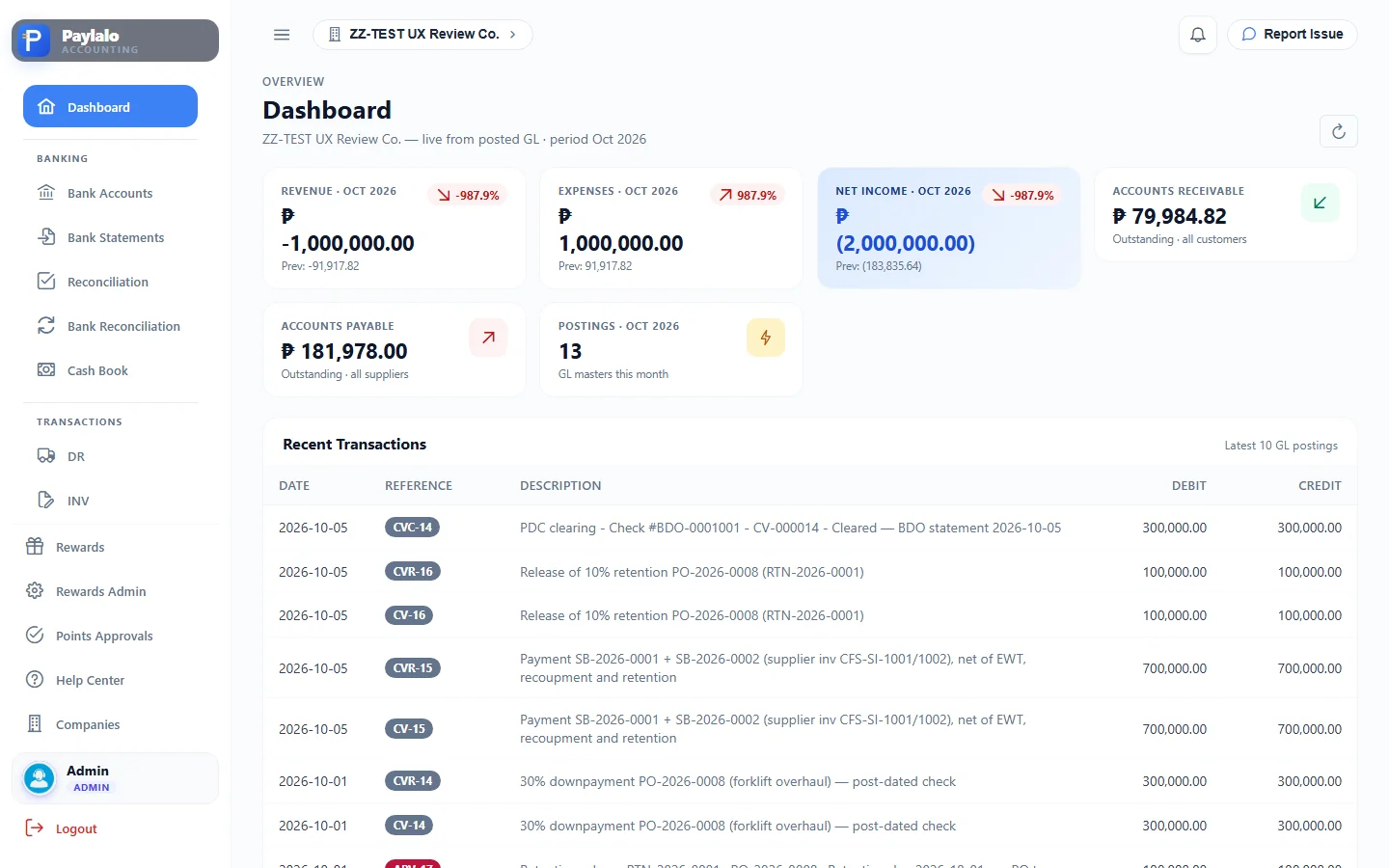
What’s in the sidebar
There are eight groups and about 72 routes.
- Dashboard: revenue, expenses, net income, AR and AP outstanding, postings this month, and the last 10 GL masters.
- Banking has Bank Accounts, Bank Statements (uploaded lines, read-only), the Reconciliation workbench, Bank Reconciliation (daily close) and the Cash Book.
- Transactions holds the legacy ERP registers: DR, INV, RR, CR, JO and STK proof lists with Post Selected and Print.
- Transactions New shows the Supabase apps’ registers: Supply Chain DR, RR and SI, plus Credit & Collection CR. They’re read-only here, and each one shows whether its GL entry is posted.
- Accounts Payable covers the APV List, General APV (non-PO), PO Advances, Supplier Invoices (three-way match), PRF/SFL from Cash Center, Petty Cash replenishment and the Supplier Ledger.
- Accounting has the Chart of Accounts, Journal Entries (JV), Importation Variance, the AR ledger, Customer Ledger, AP ledger, Inventory Ledger, and an “Accounting Entries” reference listing the 34 transactions / 76 situations the system can post.
- Treasury has DCP (the Daily Cash Position dashboard, Projected Inflows/Outflows, Upload Statement, Bank Statements, DCP Reports, DCP Settings), Funds Transfer, CV Creation, CV List, Supplier PDC Register, Deposit Slip, DS List and Posting Settings.
- Reports: Trial Balance, Balance Sheet, Income Statement, Cash Flow, Gross Profit by Item / per Invoice / per Product, AR Aging, AP Aging, General Ledger and Tax Center.
- Settings has Users & Privileges, Branches, Subsidiaries, Measurement (UoM), Inventory Accounts, Recompute Cost and Transaction Lock. Rewards / Points Approvals and a built-in Help Center sit alongside.
The books
Chart of Accounts
The chart is a four-level tree: Group › Class › Sub-Class › Title. ZZ-TEST has six groups. Assets, Liabilities and Equities are real accounts; Expenses, Revenue and Other Income are nominal. A title can carry a “subsidiary slot” (Supplier, Customer, Bank, Employee or Inventory), which turns that control account into a ledger. You can import and export the chart in Excel from the toolbar.

Journal Voucher (JV)
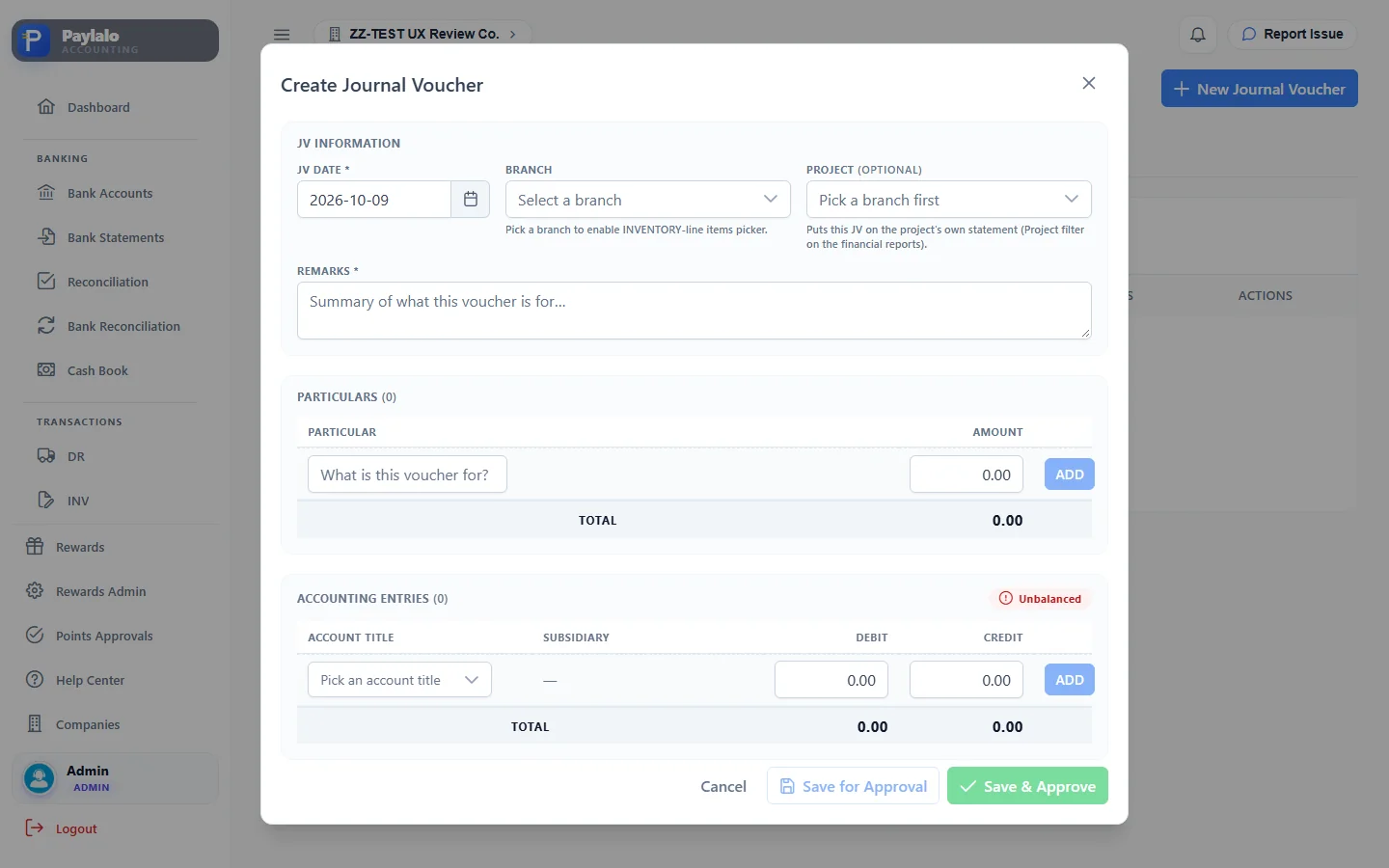
A JV is a manual entry. You set the JV date and the branch (picking a branch turns on the inventory item picker), an optional project and remarks. Then you add one or more Particulars, which say what the voucher is for and carry the amounts, and the Accounting Entries: account title, subsidiary where the account needs one, and debit or credit. A chip shows Balanced or Unbalanced as you type. A “Doesn’t match particulars” warning stays up until the entry total equals the particulars total.
Here’s the JV I posted:
- Accounting › Journal Entries › New Journal Voucher.
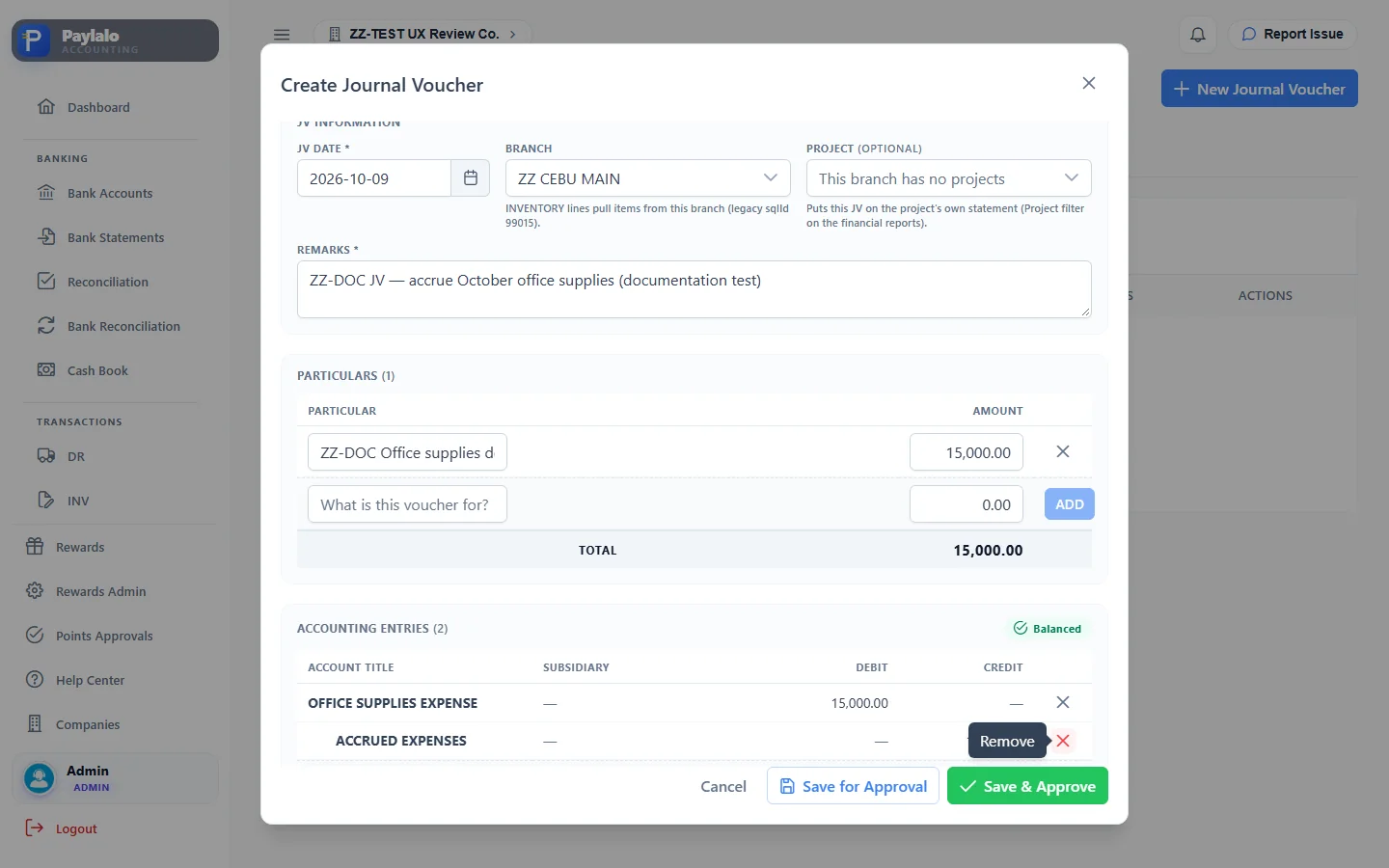
- Branch ZZ CEBU MAIN, remarks
ZZ-DOC JV — accrue October office supplies (documentation test). - Particular “ZZ-DOC Office supplies delivered Oct 2026, supplier bill not yet received”, 15,000.00, then ADD.
- Entry lines: Dr OFFICE SUPPLIES EXPENSE 15,000.00, Cr ACCRUED EXPENSES 15,000.00. The chip turned Balanced and both save buttons came on.
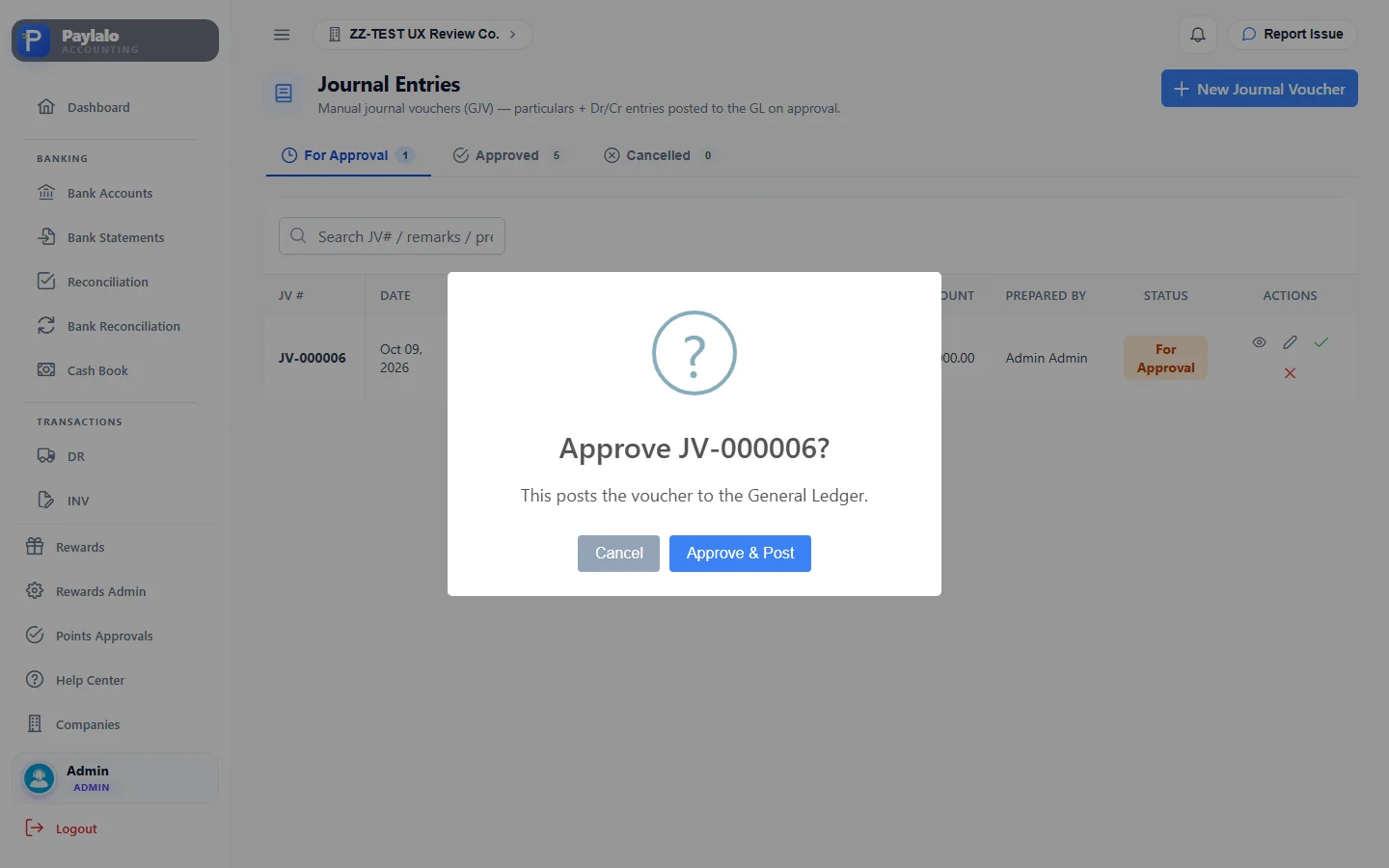
- Save for Approval. JV-000006 showed up on the For Approval tab with status For Approval. Its view dialog said “Not yet on the General Ledger — a journal voucher posts when it is approved” and GL Details (0).
- I clicked the green approve icon. The prompt read “Approve JV-000006? This posts the voucher to the General Ledger.” I clicked Approve & Post.
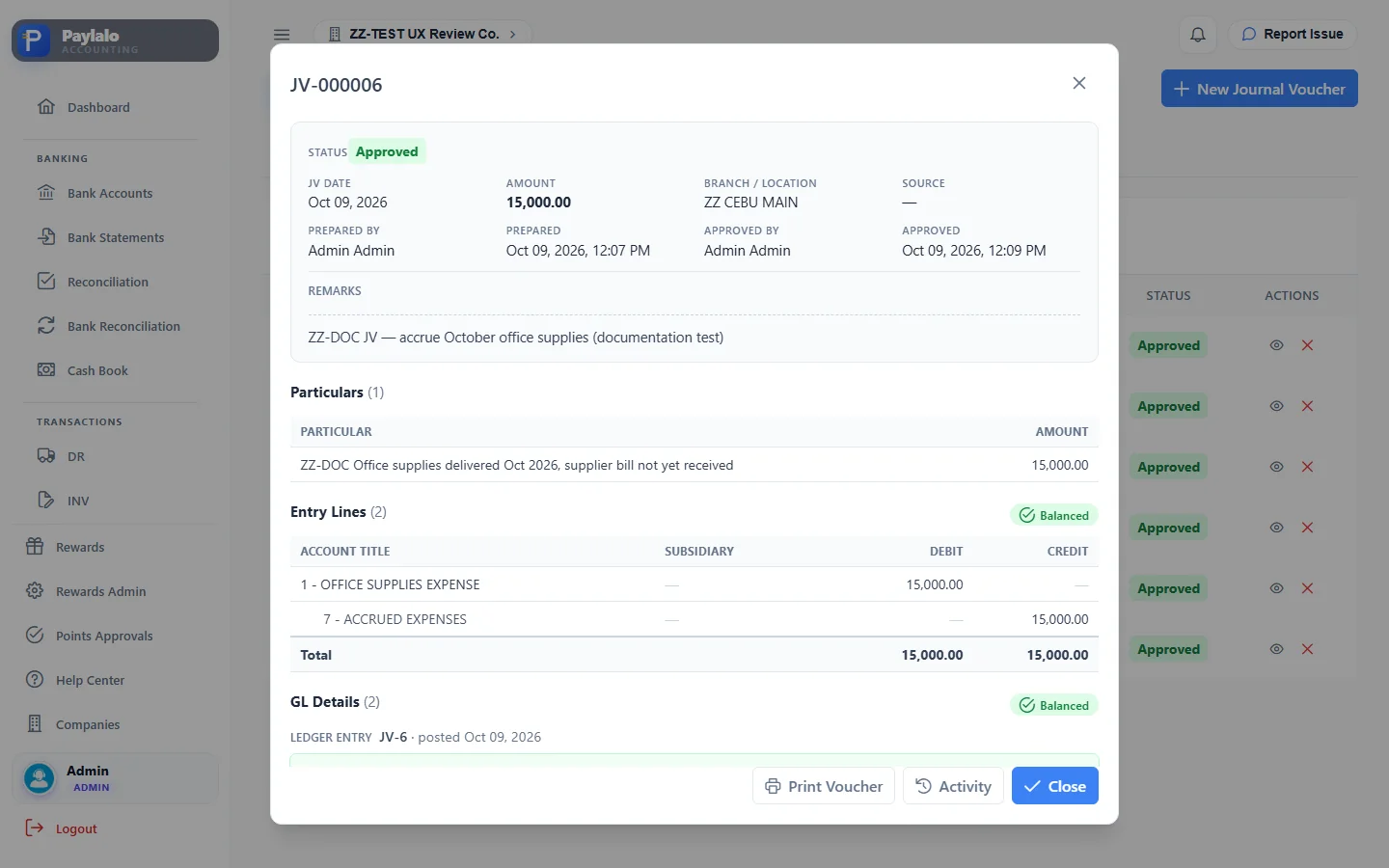
- JV-000006 moved to Approved. The dialog now showed Approved By and the approval time, “GL Details (2) · Ledger entry JV-6 · posted Oct 09, 2026”, and “The posted entry matches the voucher’s entry lines above, line for line.” Print Voucher and Activity buttons were there too.
A JV goes For Approval → Approved (posted), or to Cancelled. Users who are allowed to approve get a “Save & Approve” button that skips the queue.
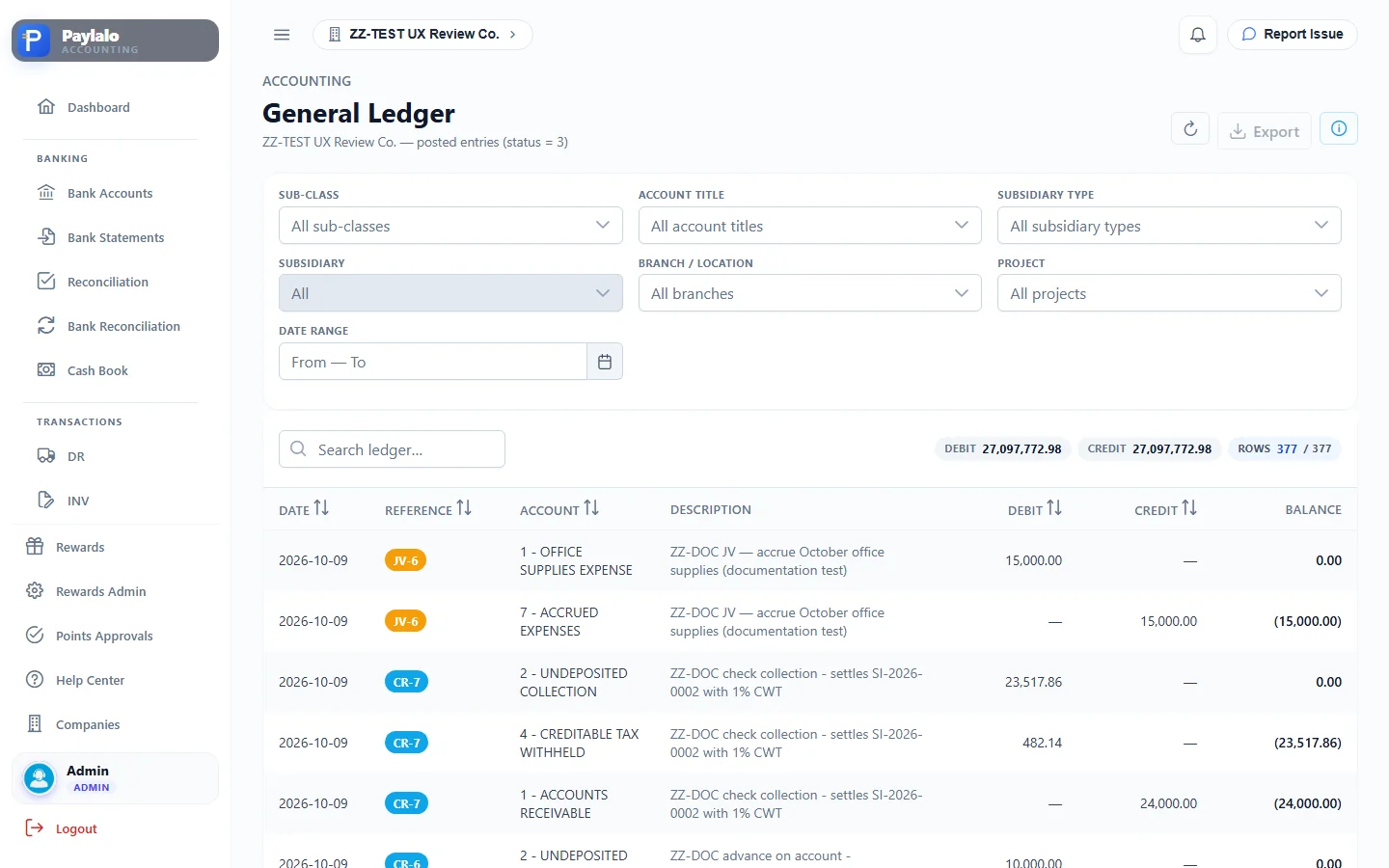
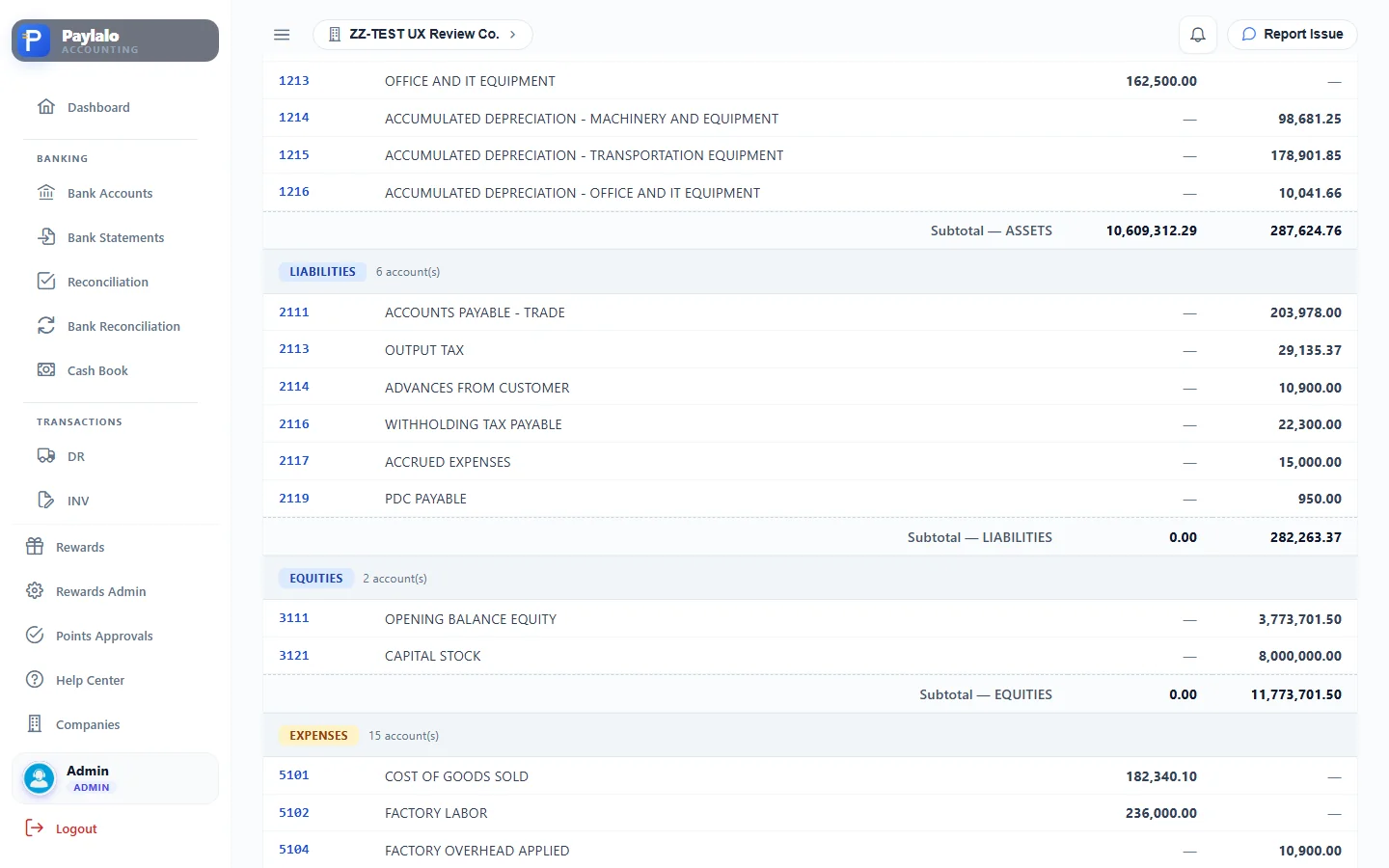
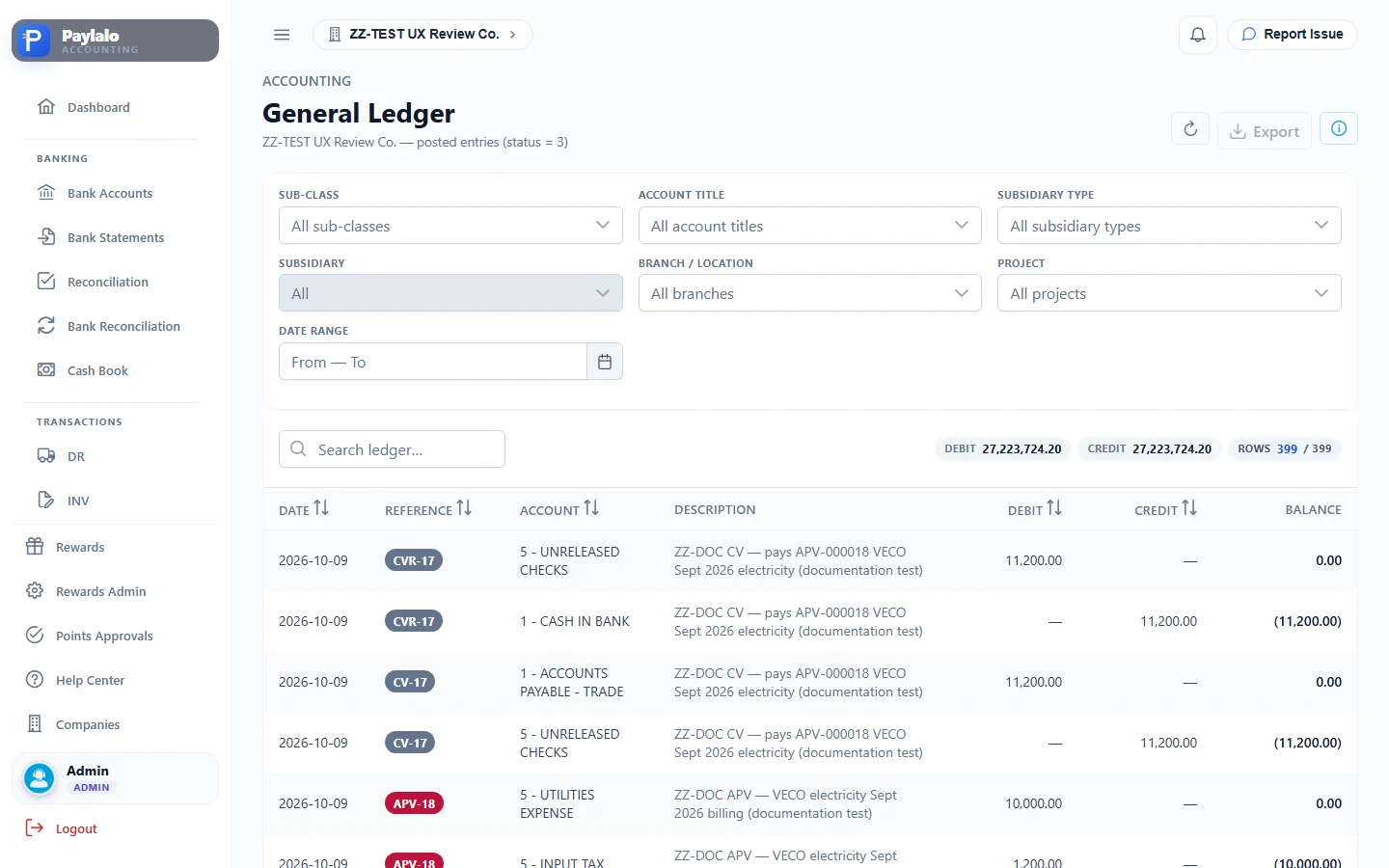
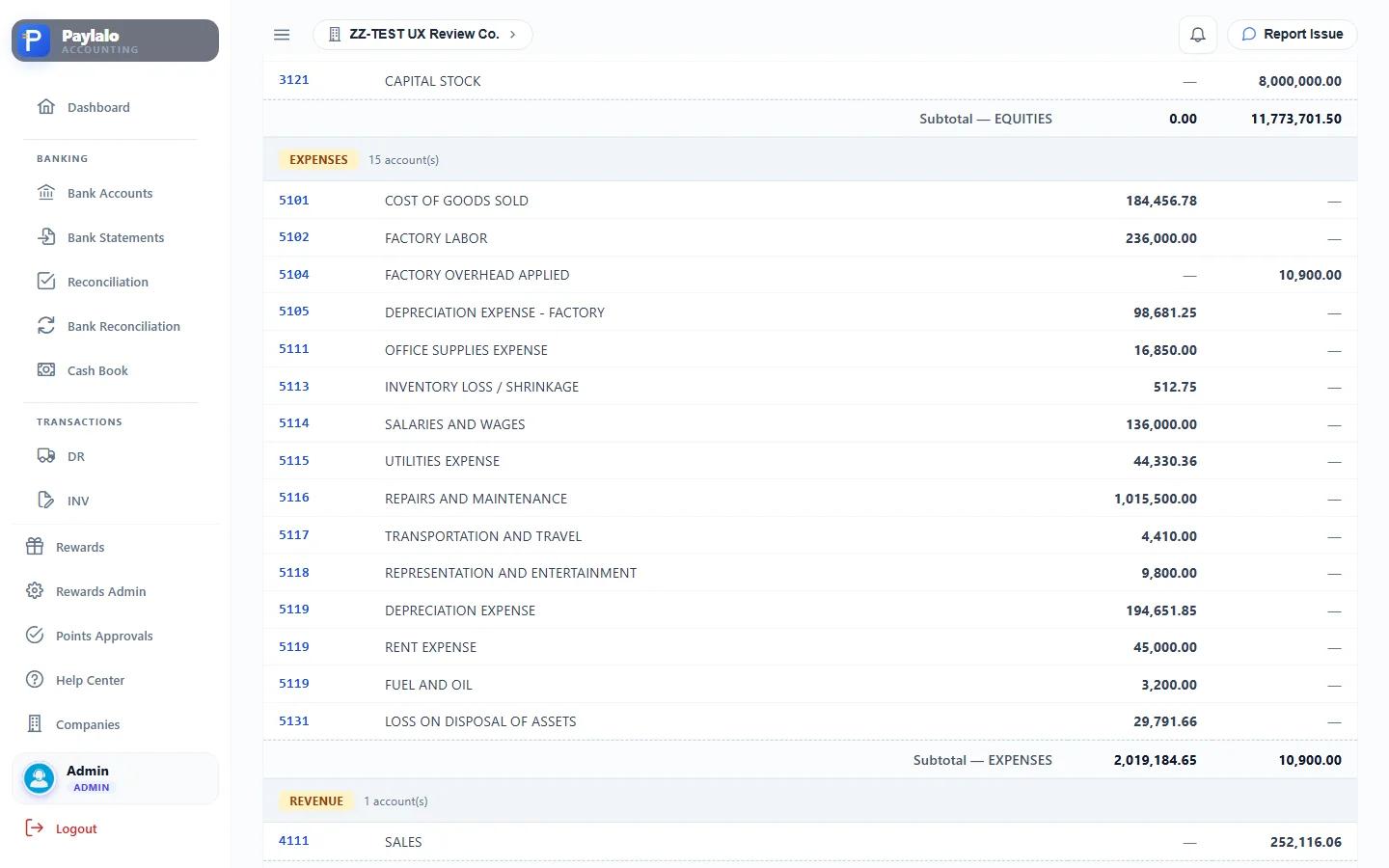
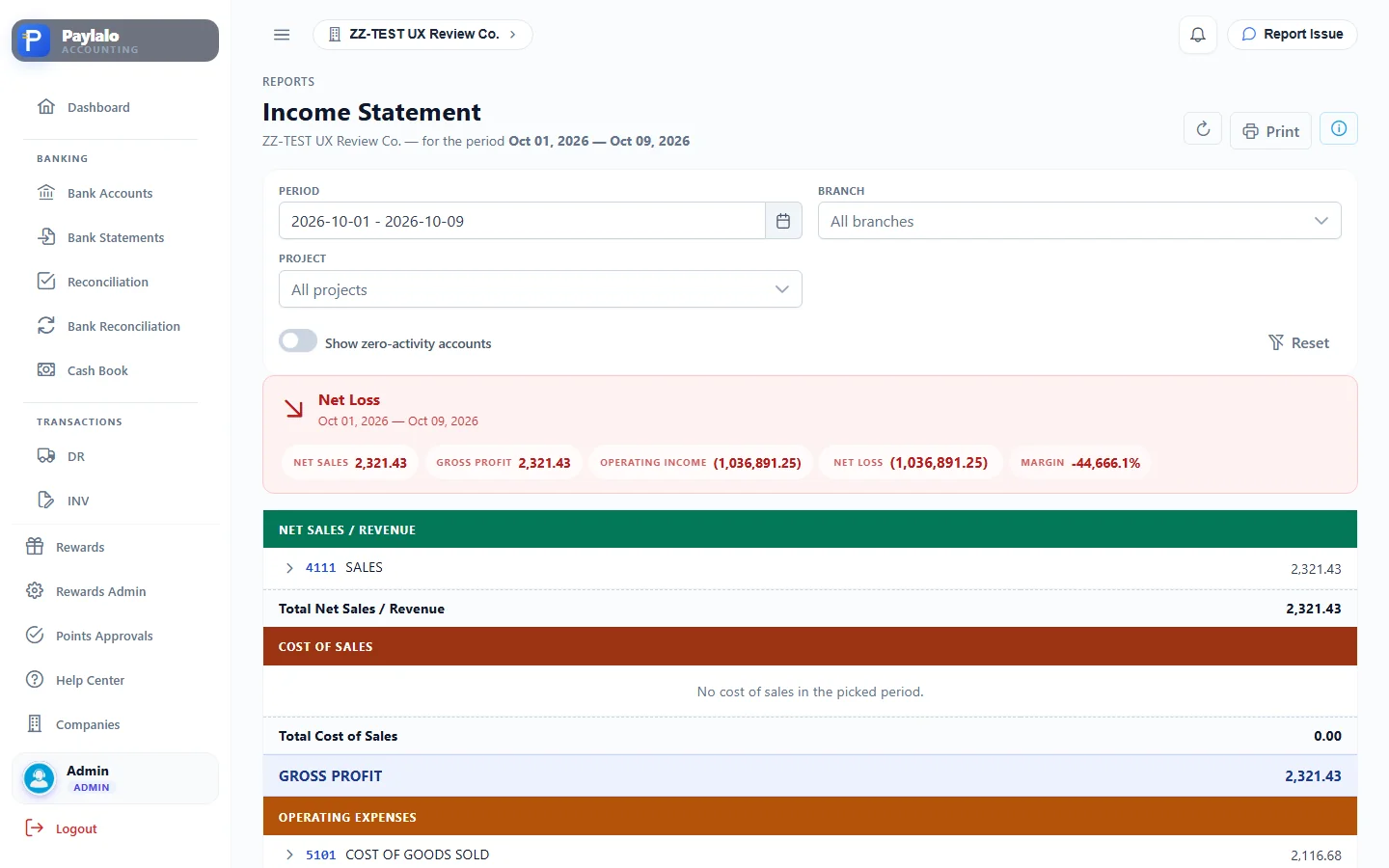
In the General Ledger, reference JV-6 posted Dr 5111 OFFICE SUPPLIES EXPENSE 15,000 / Cr 2117 ACCRUED EXPENSES 15,000. The Trial Balance picked up a new row, 2117 ACCRUED EXPENSES 15,000 Cr, and OFFICE SUPPLIES EXPENSE went up to 16,850 Dr. The October Income Statement shows the 15,000 under Operating Expenses.
Ledgers and the posting-rules reference
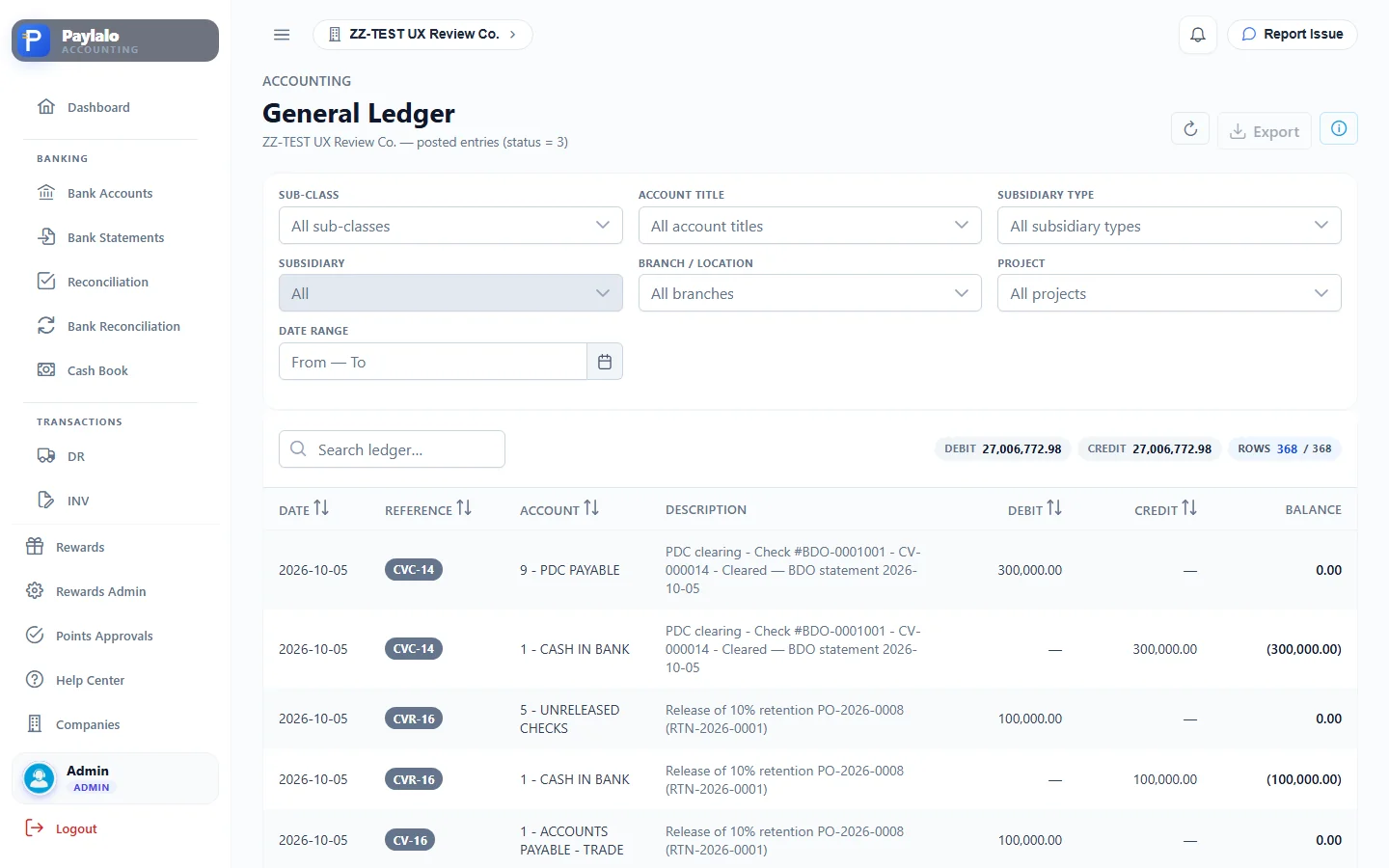
The General Ledger lists posted entries only (“status = 3”). You can filter by sub-class, account title, subsidiary type, subsidiary, branch, project and date range. Each row has a running balance, there’s an Export button, and the totals sit at the top. Debits always equal credits; after my session they were 27.2 M each.
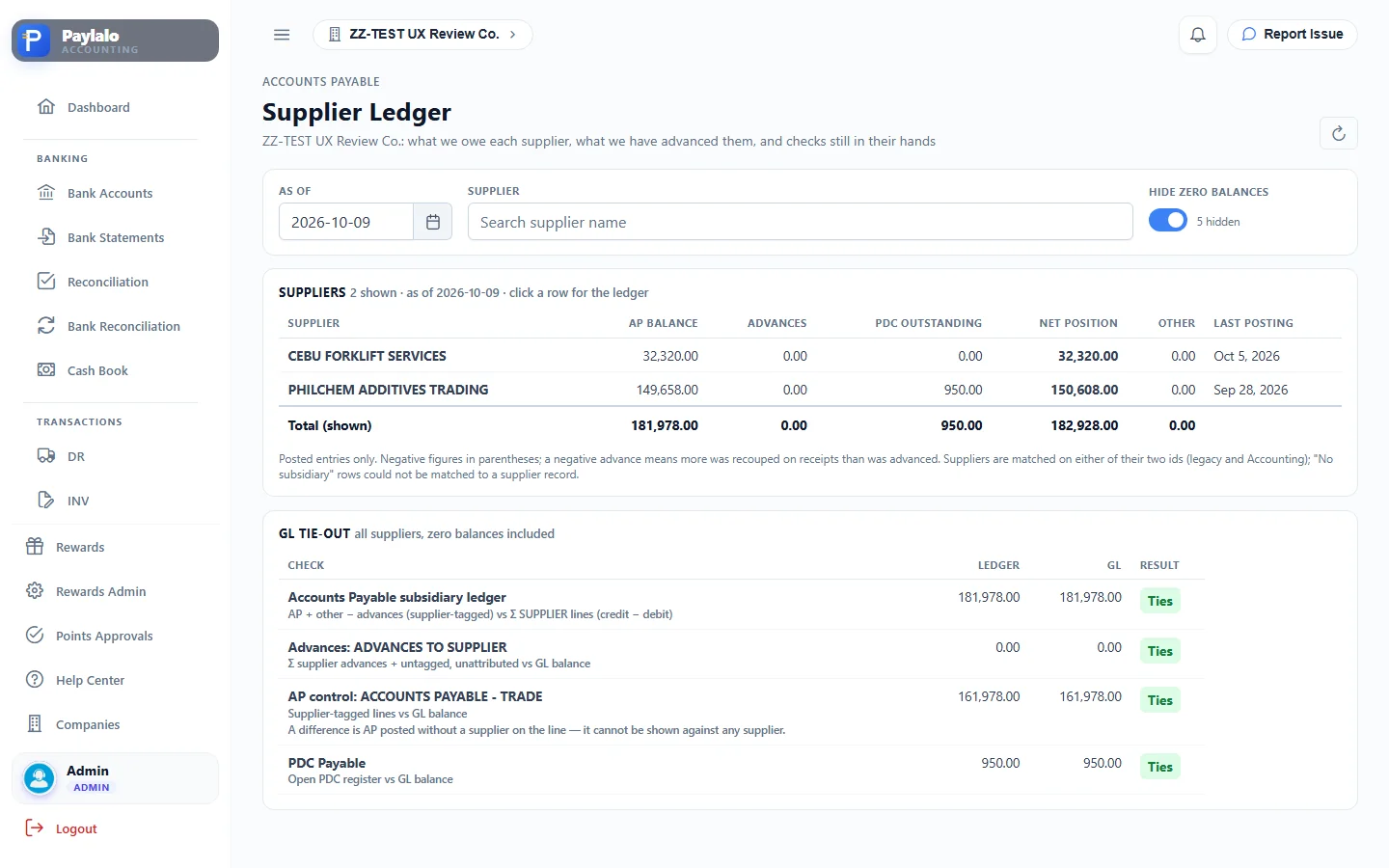
The Accounts Receivable and Accounts Payable ledgers are the same data filtered by subsidiary type. Customer Ledger and Supplier Ledger show one entity with running balances. For suppliers there’s also a GL tie-out block that checks the subsidiary ledger against the AP control, advances and PDC Payable accounts. Inventory Ledger shows item movements per branch, with Inventory Adjustment buttons.
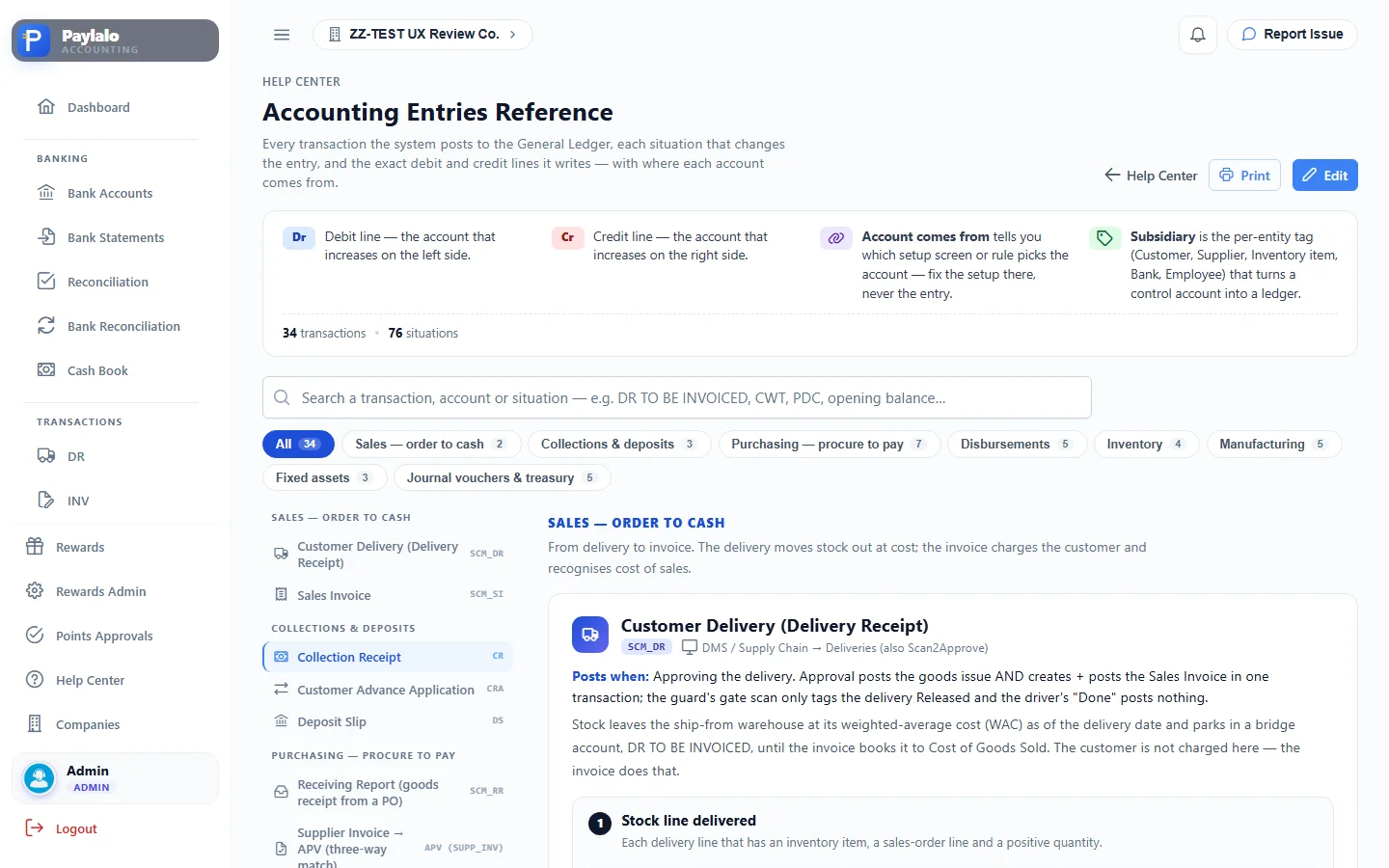
“Accounting Entries” is a printed reference of every posting rule (34 transactions, 76 situations), for example APV (GENERAL), CV, CVC, DS and SCM_SI.
Paying suppliers
General APV (non-PO)
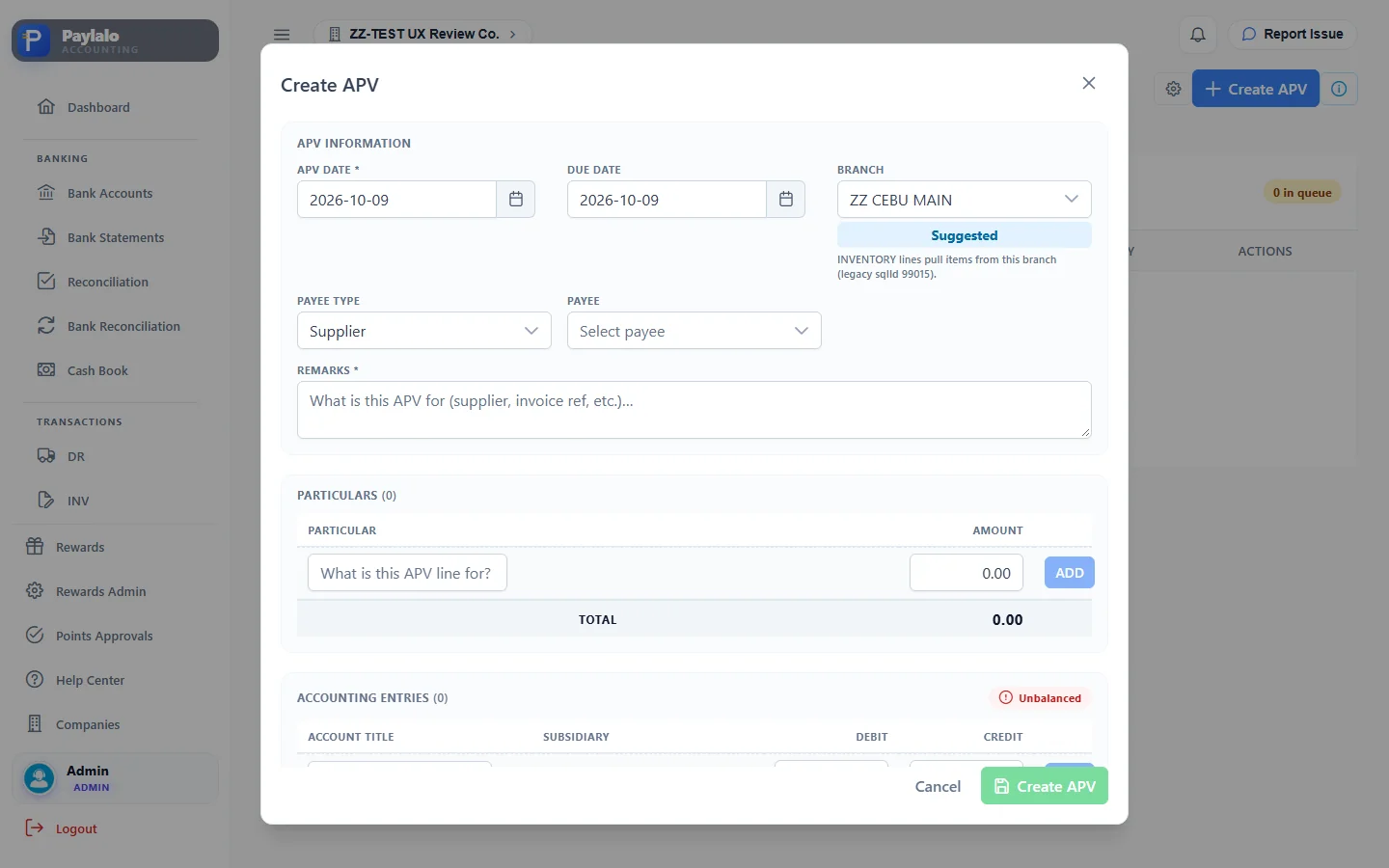
A General APV books a payable that didn’t come through a PO, like utilities, rent or services. You fill in the APV date, due date, branch, payee type (Bank / Customer / Agent / Supplier / Affiliate / Employee / Branch), payee, remarks, particulars and accounting entries. If the account on an entry line has a supplier slot (ACCOUNTS PAYABLE - TRADE here), a Pick a supplier box appears on that line and the debit box locks. That way the AP leg is always a credit tagged to a supplier.
What I did:
- Accounts Payable › General › Create APV.
- Payee: Supplier › VISAYAN ELECTRIC COMPANY INC, an existing approved supplier (the notes at the end explain why I didn’t use ZZ-DOC SUPPLIER). Remarks
ZZ-DOC APV — VECO electricity Sept 2026 billing (documentation test). - Particular “ZZ-DOC Electricity consumption Sept 2026, plant + office, VAT inclusive”, 11,200.00.
- Entries: Dr UTILITIES EXPENSE 10,000.00, Dr INPUT TAX 1,200.00, Cr ACCOUNTS PAYABLE - TRADE 11,200.00 tagged SUPPLIER VISAYAN ELECTRIC COMPANY INC. Balanced.
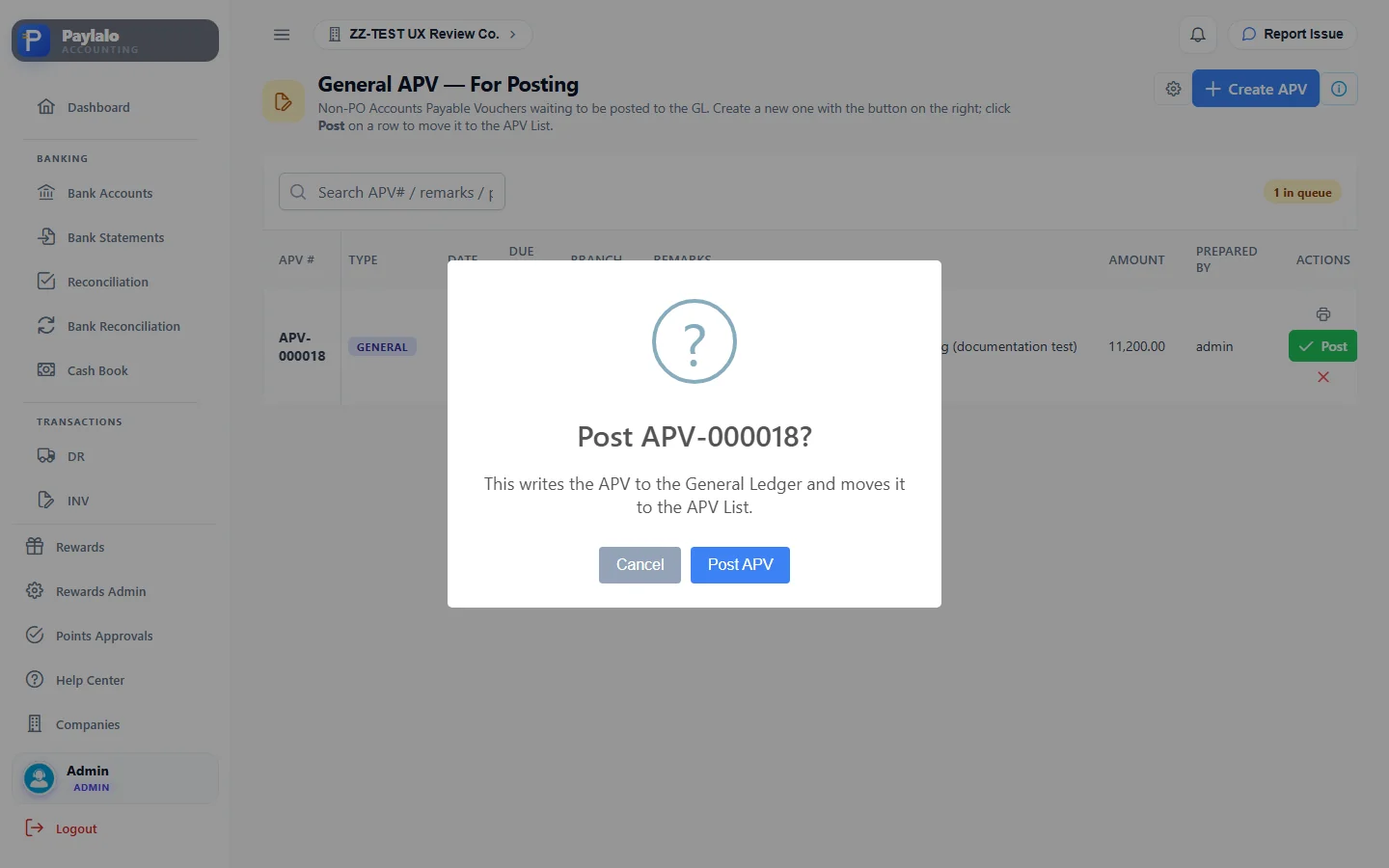
- Create APV. APV-000018 (type General) landed in the “For Posting” queue with a Print-for-approval icon and a Post button.
- Post. The prompt read “Post APV-000018? This writes the APV to the General Ledger and moves it to the APV List.” I clicked Post APV.
- The APV List showed APV-000018 · Posted. Its dialog had GL Entries (3) and a Scan2Approve QR code.
An APV goes For Posting (unposted) → Posted → Paid once a CV covers it. Cancelled is the other way out. The APV List has Posted, Unposted and Cancelled tabs, and the “CV # / PAID” column links to the payment.
In the GL, reference APV-18 posted Dr 5115 UTILITIES EXPENSE 10,000 and Dr 1125 INPUT TAX 1,200 / Cr 2111 ACCOUNTS PAYABLE - TRADE 11,200 (supplier VECO). The October Tax Center listed the 1,200 input VAT line right away.



Where else payables come from
- PO Advances: Supply Chain POs with Payment Type = Advances show up here to post as APV (PO_ADV).
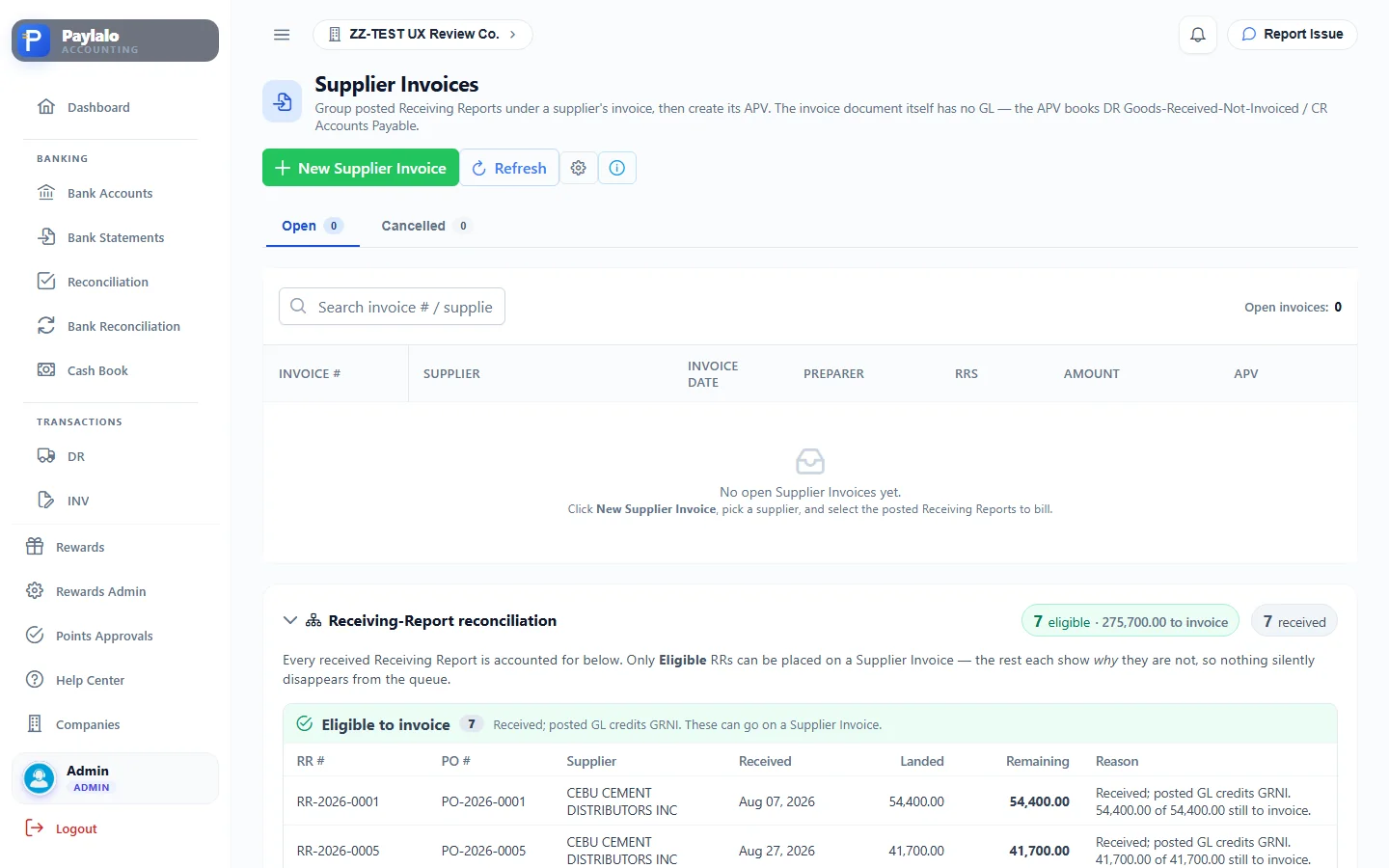
- Supplier Invoices group posted Receiving Reports under the supplier’s invoice. The invoice itself has no GL; the APV it creates books Dr GRNI / Cr AP. The page lists every received RR and says why it is or isn’t eligible. ZZ-TEST had seven RRs with 275,700 left to invoice.
- PRF/SFL are Payment Request Forms and Subject-For-Liquidation advances approved in Cash Center. “Create APV” opens the APV form already filled in.
- Petty Cash replenishment claims become PETTY_CASH APVs payable to the custodian.
Treasury
Cash / Check Voucher (CV) and release
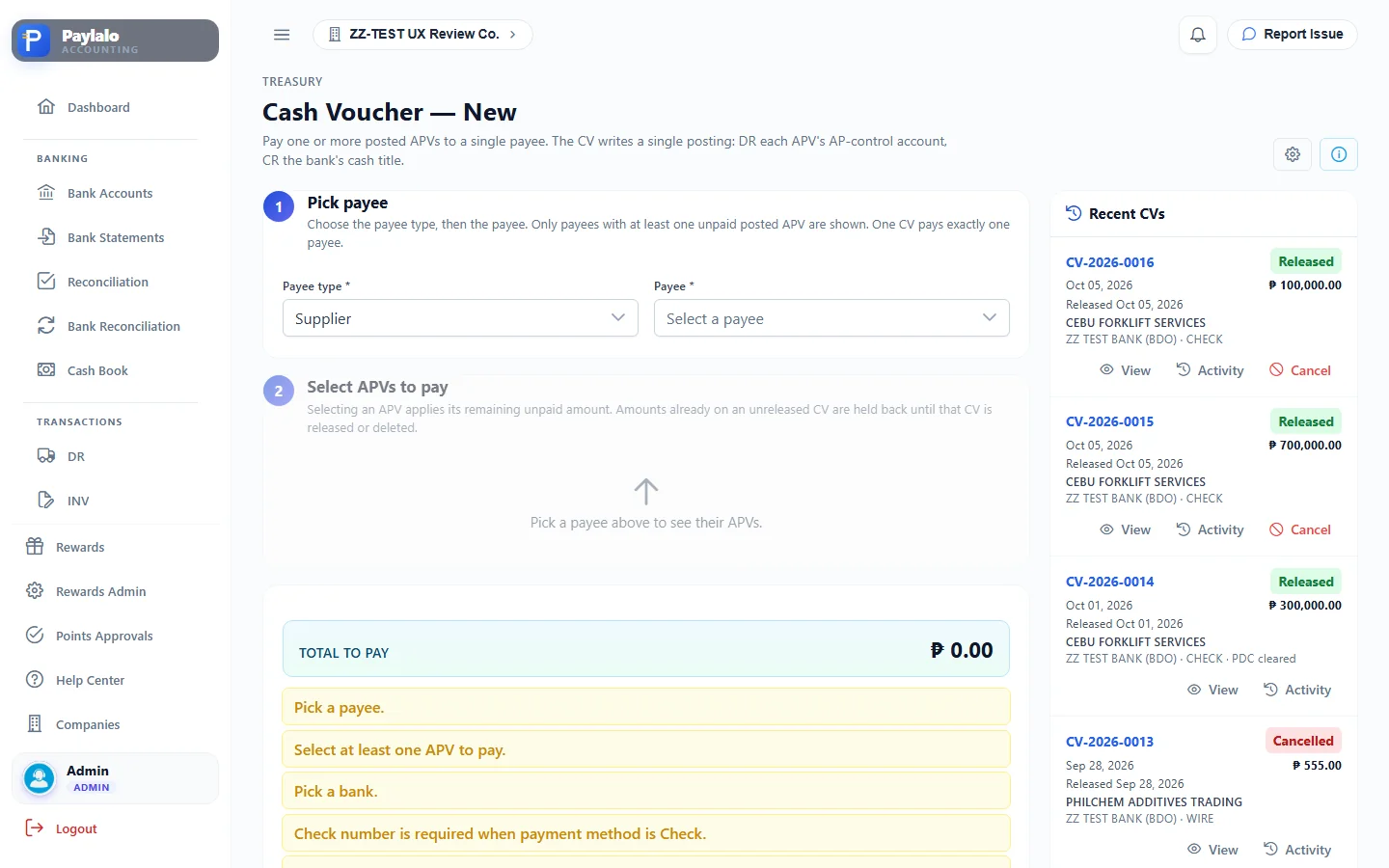
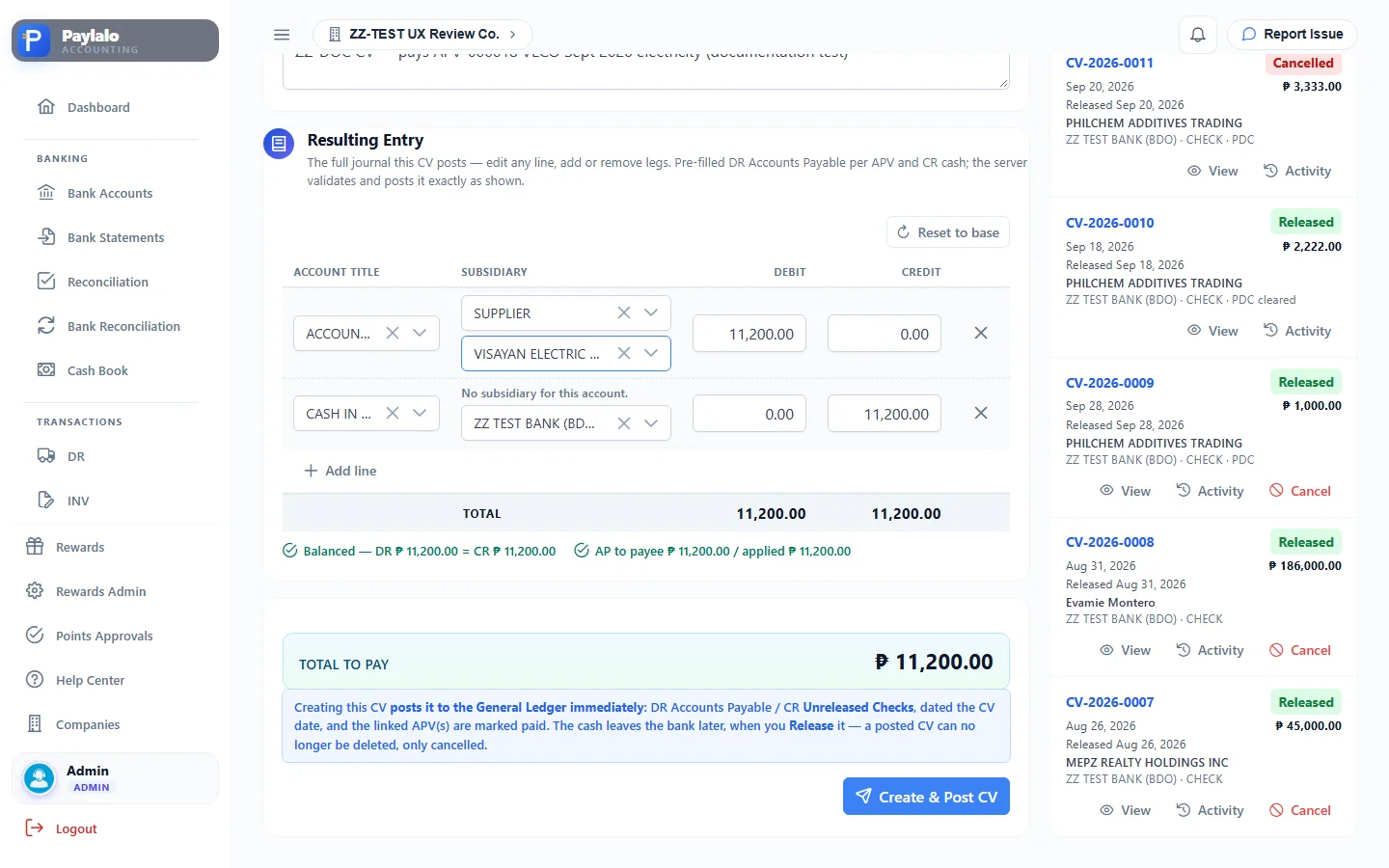
A CV pays one or more posted APVs for a single payee. The page works in three steps. First you pick the payee; only payees with unpaid posted APVs are listed, with their outstanding total. Then you tick the APVs, in full or for a partial amount. Last comes the CV header: CV date, bank, payment method (Check / Wire / Cash), check number, check date and remarks. A Resulting Entry grid is filled in for you, and you can edit it before posting.
What I did:
- Treasury › CV Creation. Payee: Supplier › “VISAYAN ELECTRIC COMPANY INC — 1 APV, 11,200.00 outstanding”.
- Ticked APV-000018 (Pay full). Total to pay ₱11,200.00.
- CV date 2026-10-09, bank ZZ TEST BANK (BDO), method Check, check no.
ZZDOC-0001, check date 2026-10-09, remarksZZ-DOC CV — pays APV-000018 …. I picked the supplier on the AP line of the resulting entry. - Create & Post CV. The prompt read “Creating this CV immediately posts DR Accounts Payable ₱11,200.00 / CR Unreleased Checks … and marks the linked APV(s) paid. The cash leaves the bank later, when you Release it.” I clicked Post CV.
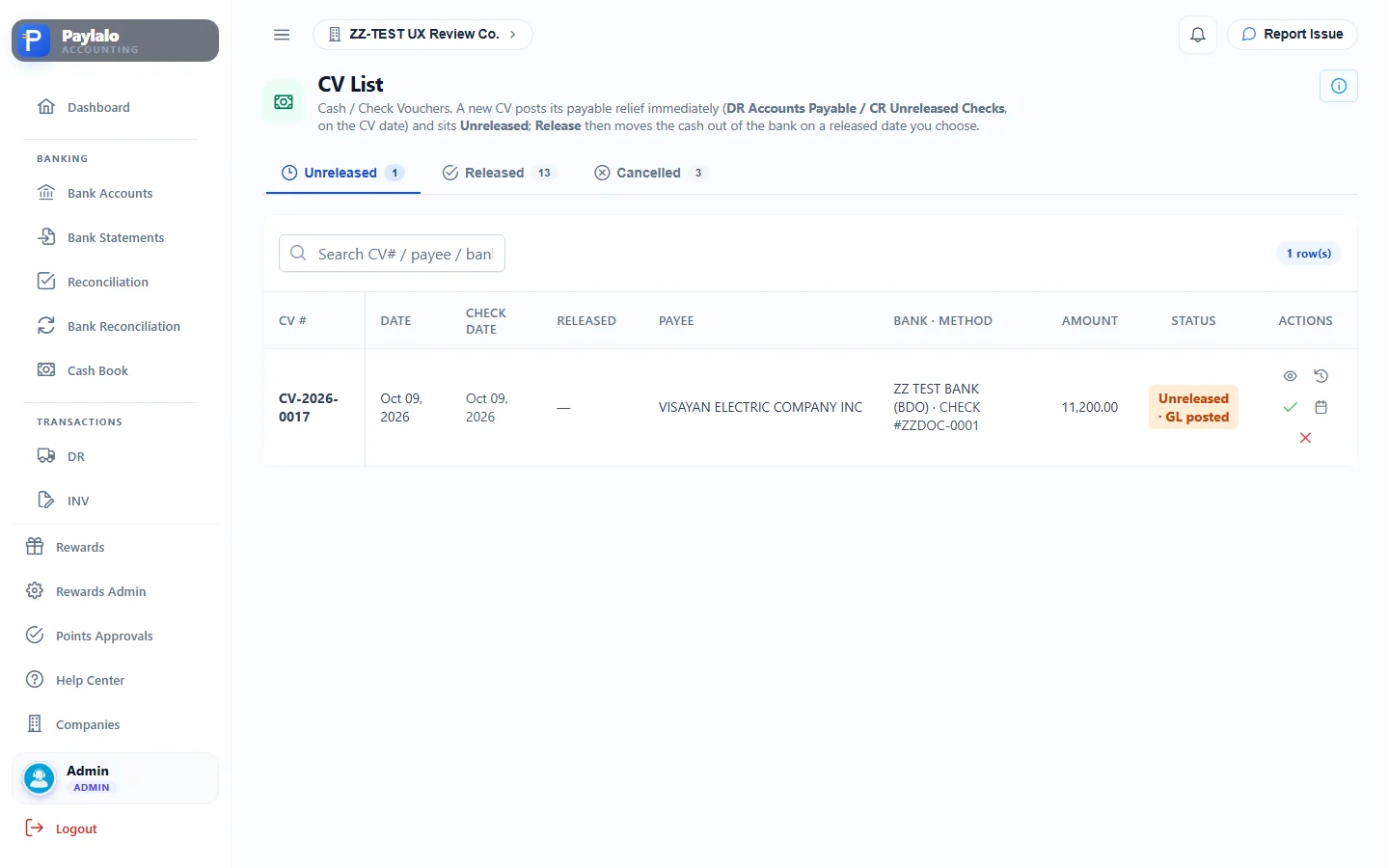
- CV-2026-0017 was created as Unreleased · GL posted. APV-000018 now showed “CV-2026-0017 Paid” on the APV List.
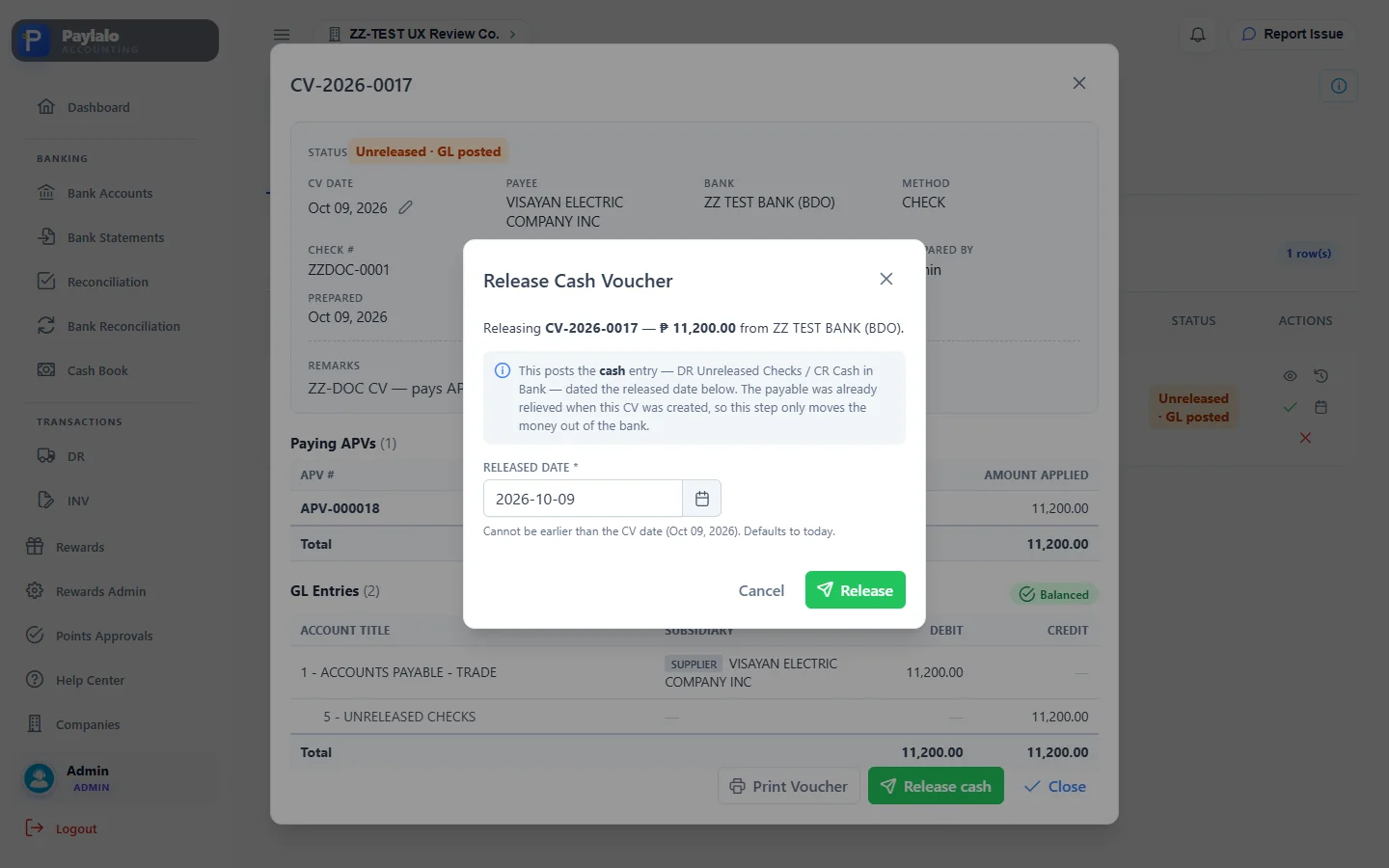
- CV List › view › Release cash. The dialog read “Release Cash Voucher … posts the cash entry — DR Unreleased Checks / CR Cash in Bank — dated the released date”. I clicked Release with released date 2026-10-09.
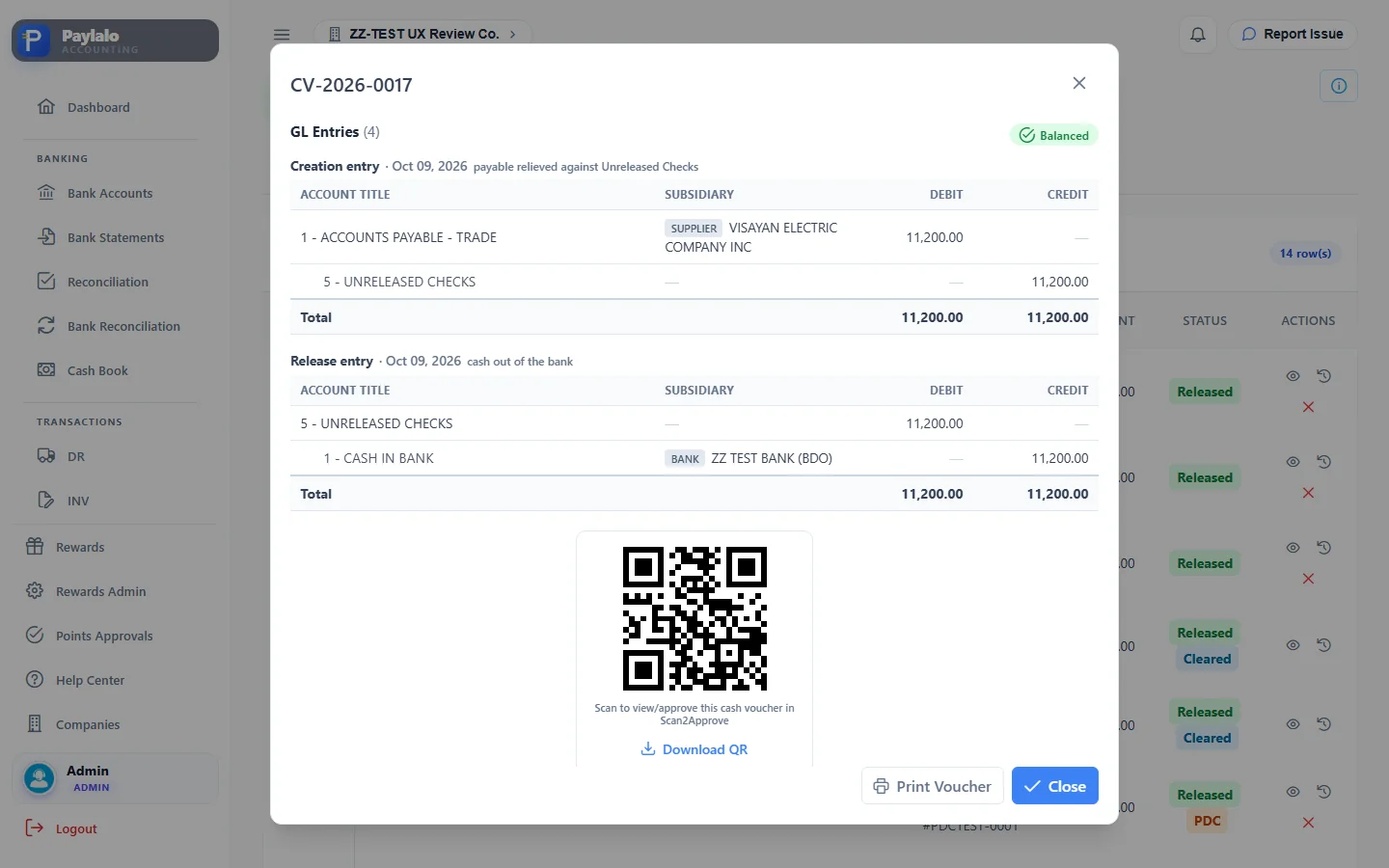
- CV-2026-0017 became Released. Its dialog now had two balanced blocks, “Creation entry” and “Release entry”.
A CV goes Unreleased · GL posted → Released, and post-dated cheques go on to Cleared through the Supplier PDC Register. Cancelling reverses the creation entry and puts the balance back on the APV. You can change a released date afterwards with the pencil icon, but only for reporting; the GL date stays.
The postings:
- CV-17 (creation): Dr 2111 ACCOUNTS PAYABLE - TRADE 11,200 (supplier VECO) / Cr UNRELEASED CHECKS 11,200.
- CVR-17 (release, the disbursement): Dr UNRELEASED CHECKS 11,200 / Cr 1111 CASH IN BANK 11,200 (bank ZZ TEST BANK).
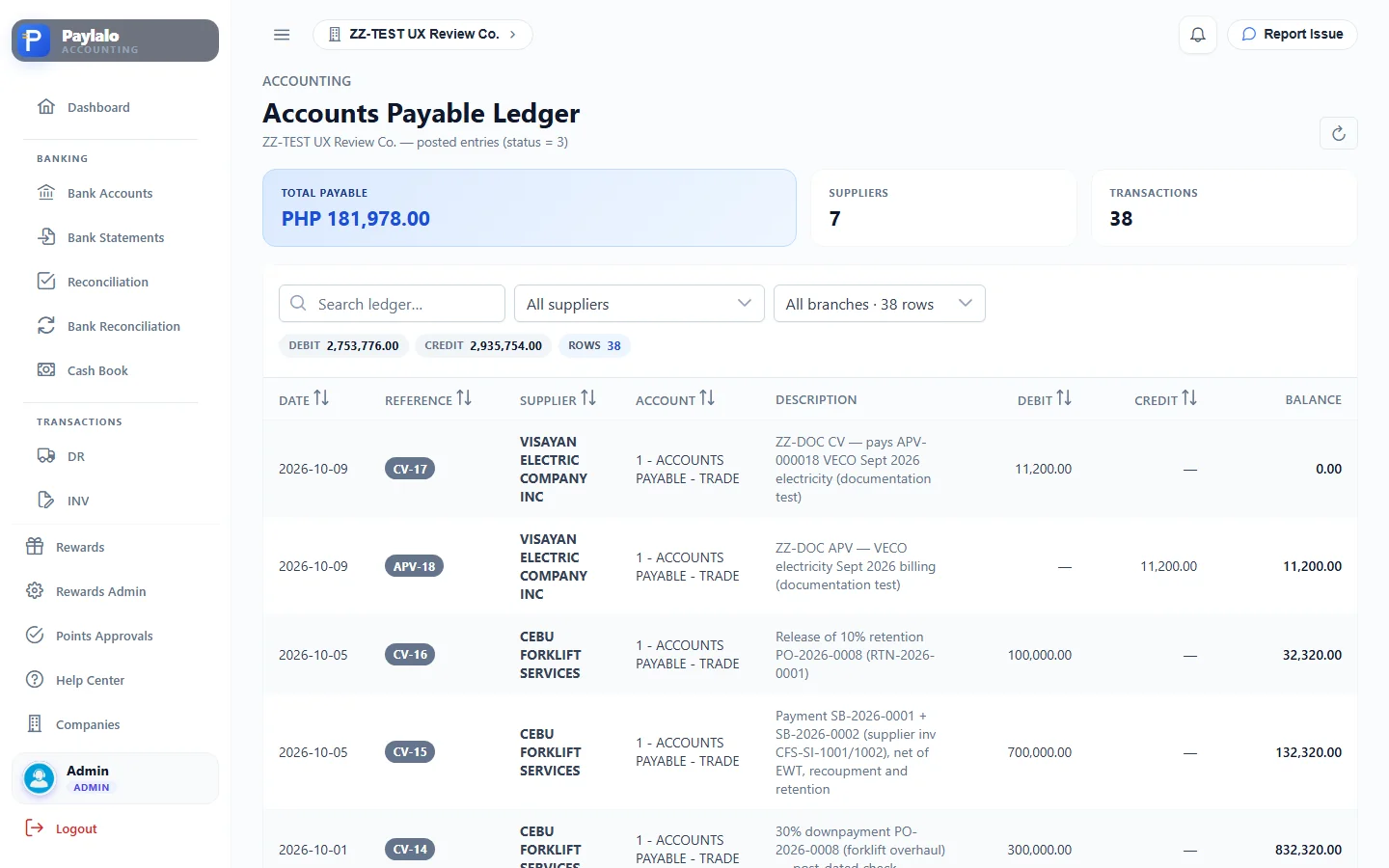
The AP ledger shows the APV-18 credit and the CV-17 debit against VISAYAN ELECTRIC COMPANY INC. The Supplier Ledger for VECO goes to 11,200 and back to 0.00. The Cash Book lists CVR-17 as a payment, and the books side of Bank Reconciliation lists the cheque as an unmatched outflow.



PDC register, deposits, transfers and posting settings
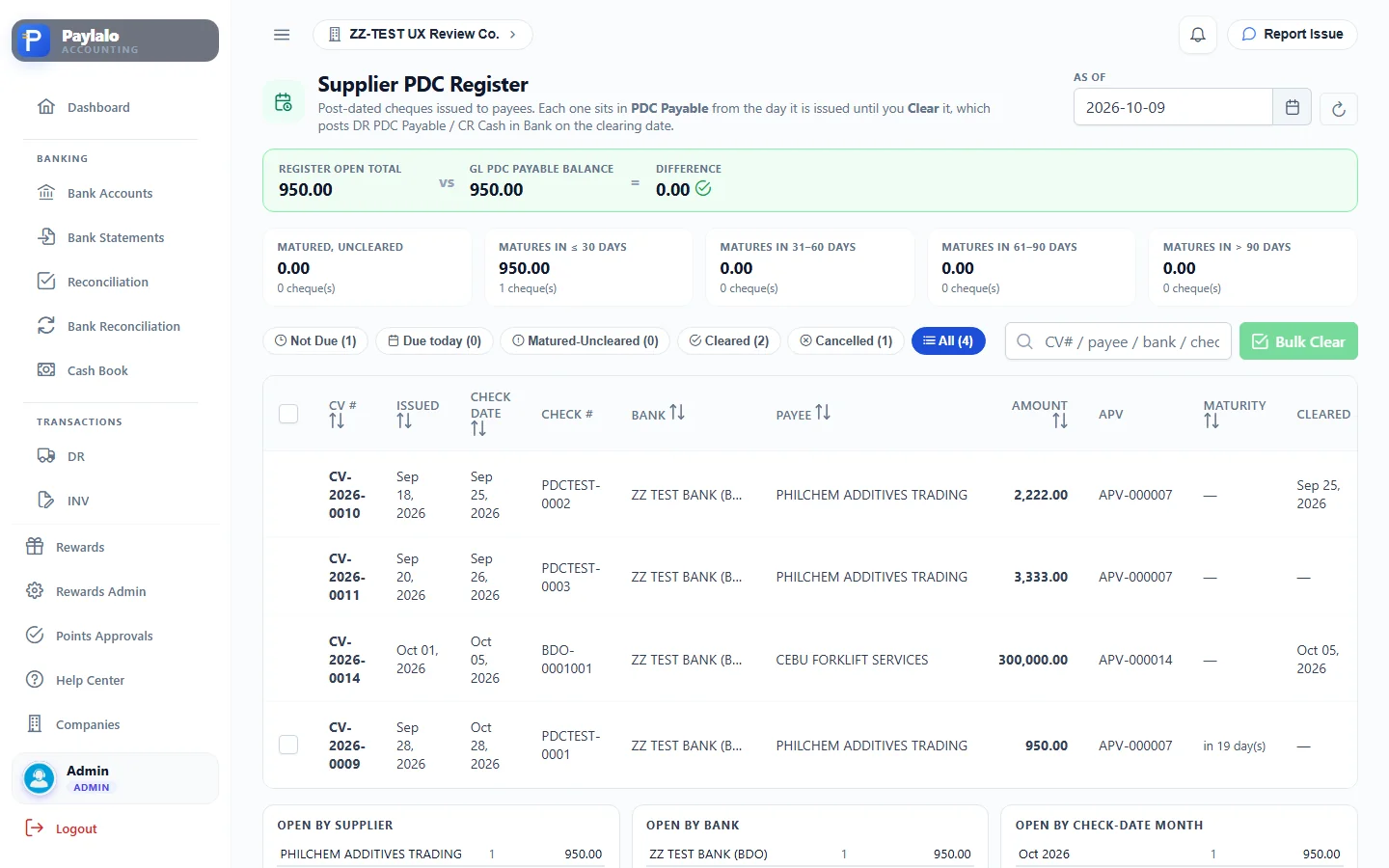
When Posting Settings has PDC Payable on, a cheque dated after the CV date credits PDC PAYABLE instead of cash. The Supplier PDC Register ages those open cheques (not due, due today, matured but uncleared). Clicking Clear posts Dr PDC Payable / Cr Cash in Bank, with reference CVC-nn. The register also ties its open total to the GL PDC Payable balance, which was 950.00 = 950.00 here.
A Deposit Slip takes a bank and the posted Collection Receipts that still have undeposited cash. Posting it writes Dr Cash in Bank / Cr Undeposited Collection for each CR. ZZ-TEST already had four posted DSs, and the screen said “No posted CRs with undeposited cash” at the time, so I didn’t make a new one. You can turn on DS Auto Creation in Posting Settings so every CR deposits itself.
Funds Transfer posts Dr Cash in Bank (to) / Cr Cash in Bank (from). The company only has one bank, so I couldn’t try it.
Posting Settings names the AP control account a CV debits (ACCOUNTS PAYABLE - TRADE) and the PDC Payable account.
Daily Cash Position (DCP)
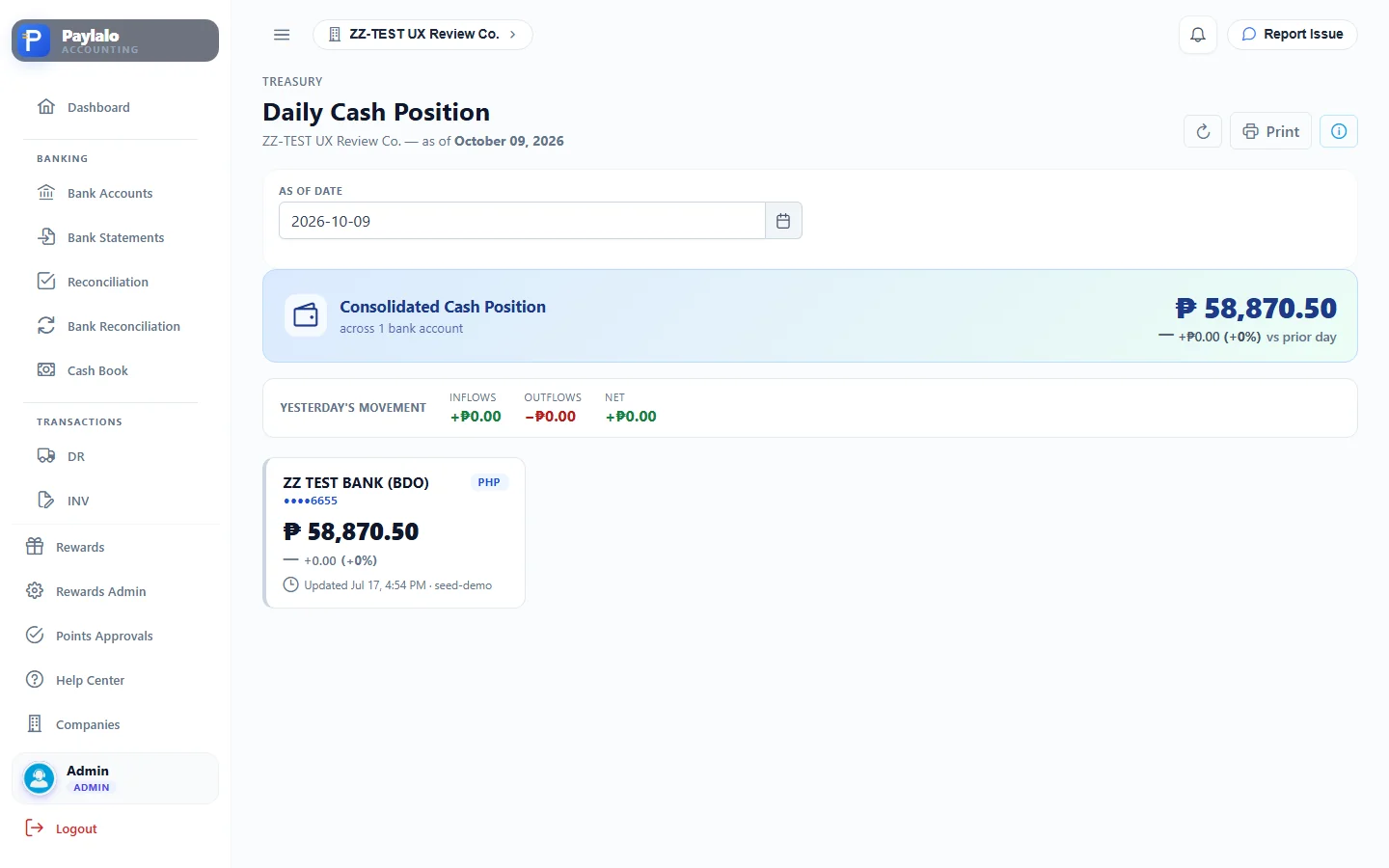
DCP is the treasury forecasting module. It has a dashboard (total cash position, variance this week, unmatched bank entries), Projected Inflows (expected collections with a probability and category), Projected Outflows (scheduled cheques with released and cleared dates), Upload Statement (bank CSV/XLSX or bulk projections), Reports (DCPR Summary, Daily Actual, Daily Projection, Weekly Variance) and DCP Settings for report recipients and schedules.
In ZZ-TEST the total cash position read ₱58,870.50. That’s the closing balance of the uploaded bank statement (three June lines), not the GL cash balance. Projected Outflows listed four post-dated cheques from earlier tests. My ordinary cheque, CV-2026-0017, didn’t show up there.

Bank reconciliation
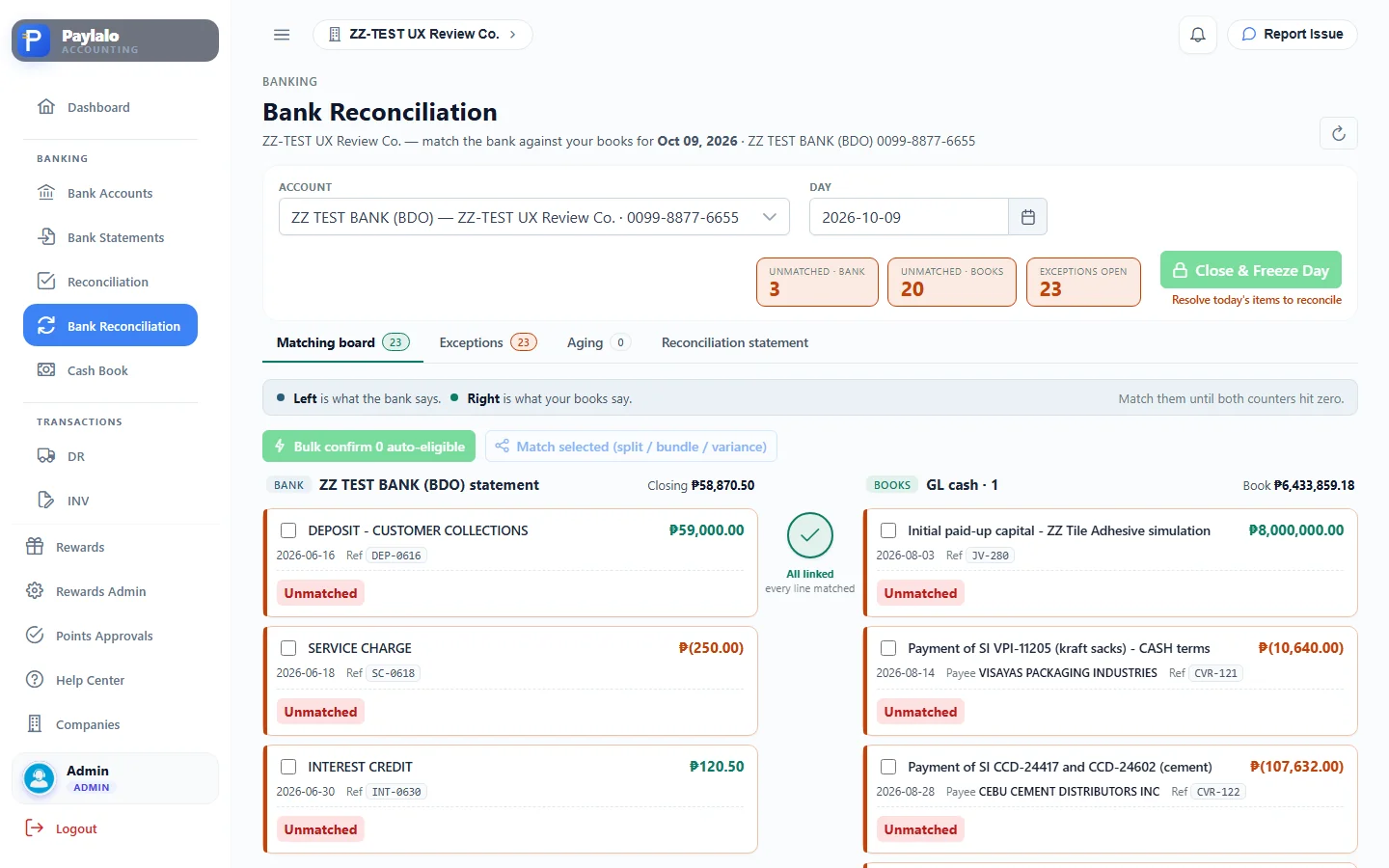
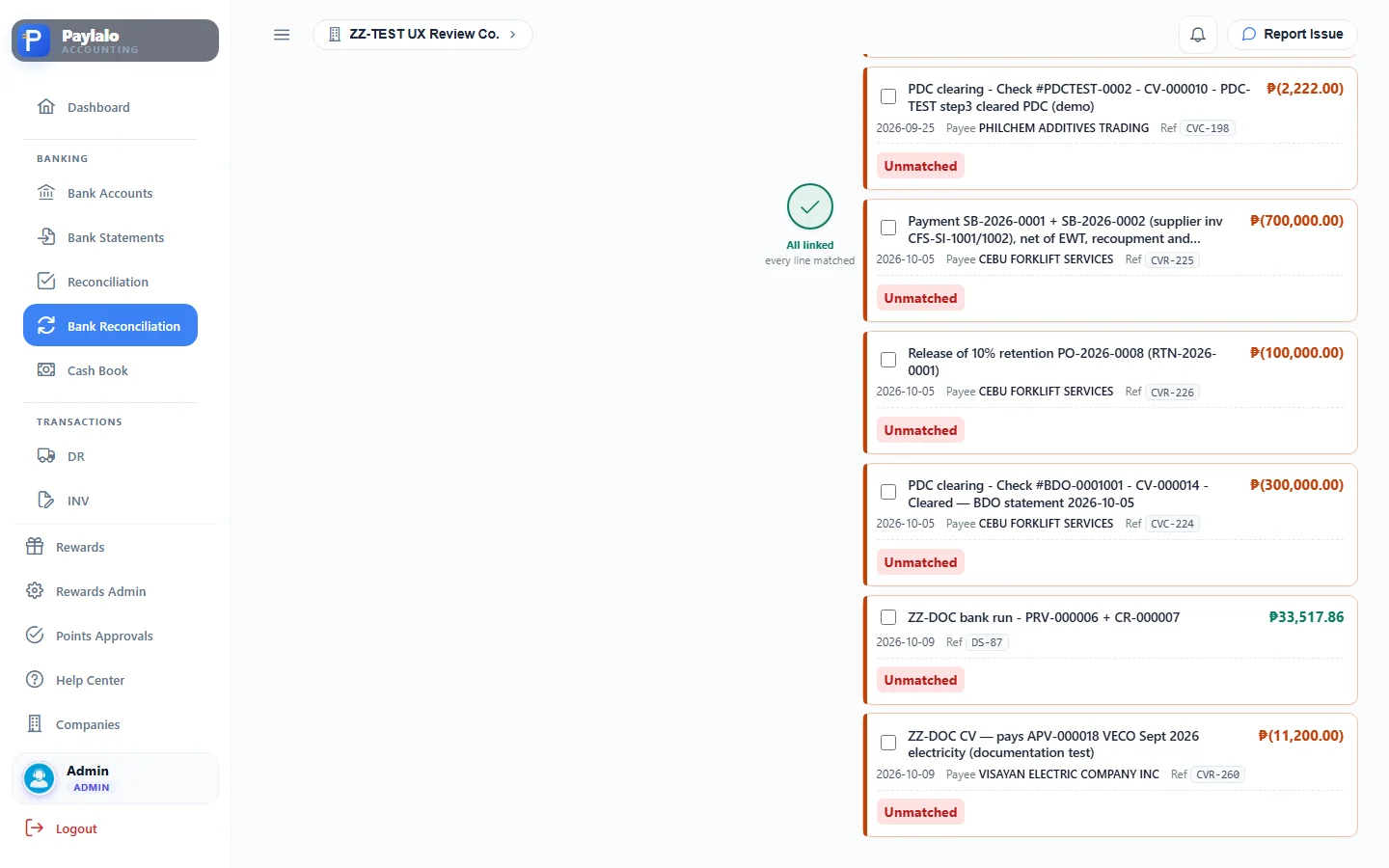
There are two reconciliation screens. Reconciliation (the workbench) is the DCP view: statement entries on the left, candidate projected outflows on the right, and Bulk confirm. Bank Reconciliation is the accounting close. For each bank and day, it puts the bank’s statement lines on the left and GL cash movements on the right. Each stays “Unmatched” until you match it, by split, bundle or variance.
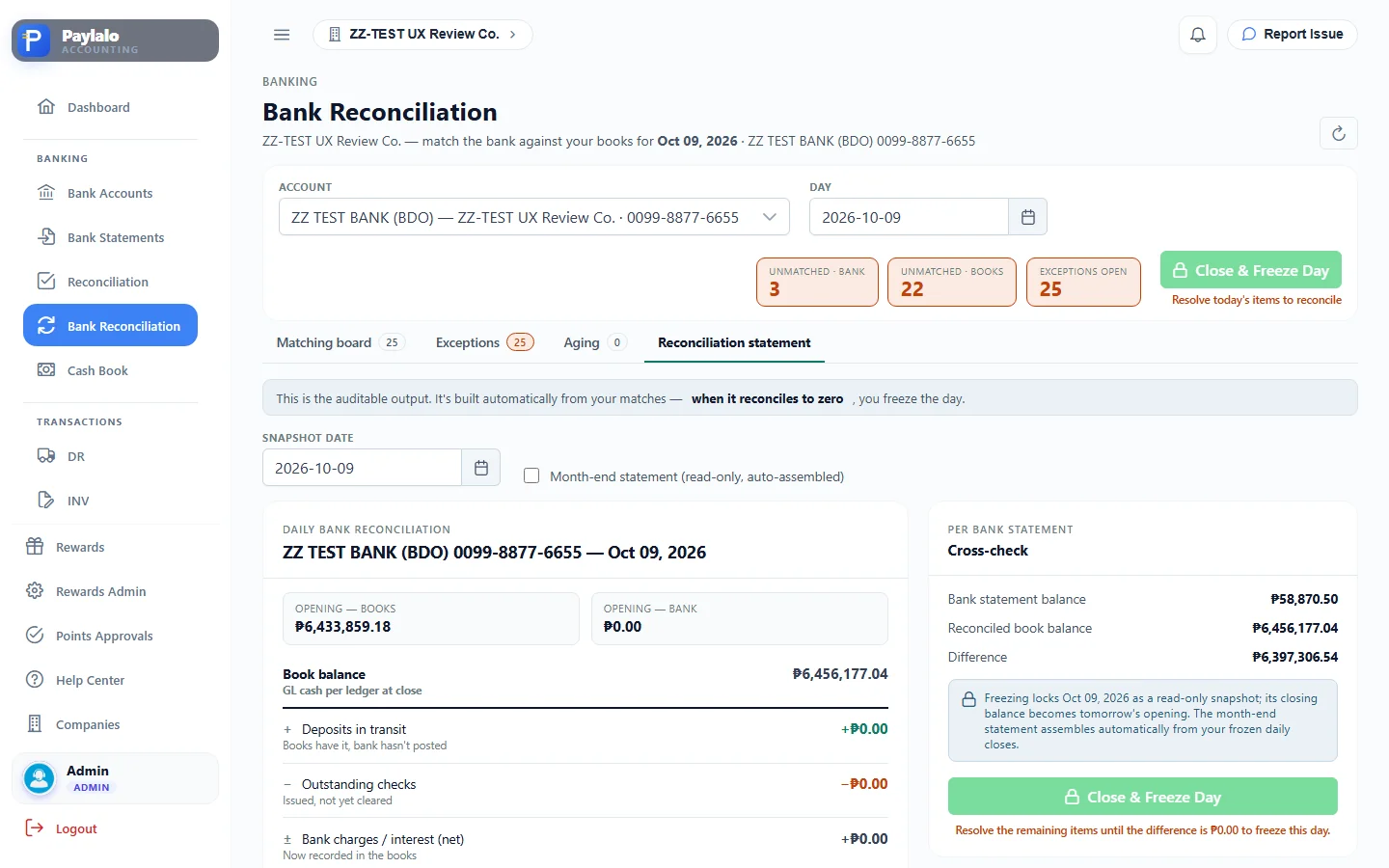
Counters show unmatched bank (3), unmatched books (22) and exceptions. The Reconciliation statement tab builds the statement an auditor would want: book balance plus or minus deposits in transit, outstanding cheques and bank charges. Close & Freeze Day only works once the difference is zero. For 9 Oct 2026 the statement showed a book balance of ₱6,456,177.04 against a statement balance of ₱58,870.50 and said “Does not reconcile yet”, because the test bank only has three uploaded June lines.
Transaction registers
The legacy Transactions proof lists (DR, INV, RR, CR, JO, STK) are read-only registers from the SQL Server ERP, with Post Selected and Print. In ZZ-TEST they show “No transactions match the current filters” from 1 June 2026 on.
The Transactions New registers mirror the Supabase apps. There were seven Supply Chain deliveries, posted on creation as Dr DR TO BE INVOICED / Cr Inventory at WAC. There were seven RRs crediting GRNI, nine sales invoices (Sales / Output VAT / AR plus COGS, clearing DR TO BE INVOICED) and five Collection Receipts from Credit & Collection. Posting, unposting and cancelling happen in each document’s own app. “RR Presets” and “INV Presets” open the booking rules for each company.

Reports
Every report reads posted GL rows.
The Trial Balance takes an as-of date and filters for group, class, reference, branch and project. After my session it said “Balanced — Total Debit = Total Credit”, 12,596,884.26 each across 37 accounts.
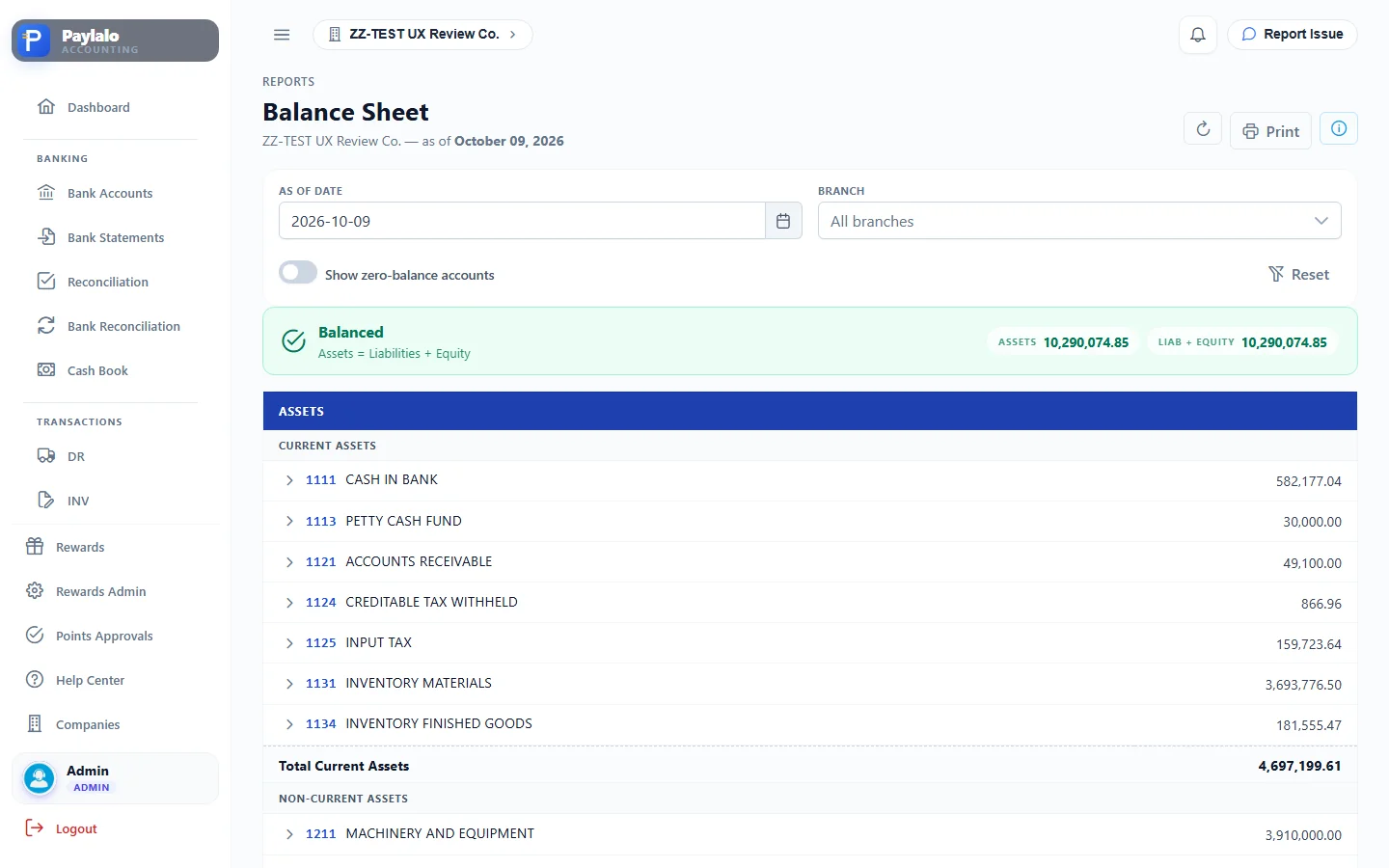
The Balance Sheet as of 9 Oct 2026 showed Assets of 10,290,074.85 = Liabilities + Equity, with the new ACCRUED EXPENSES 15,000 under current liabilities.
The Income Statement for 1 to 9 Oct 2026 showed net sales of 2,321.43 and operating expenses of 1,039,212.68. That includes OFFICE SUPPLIES EXPENSE 15,000 and UTILITIES EXPENSE 10,000 from my two test documents. Net loss was (1,036,891.25).
Cash Flow uses the indirect method, month over month, with notes about documents that carry no branch. AR Aging and AP Aging group balances by bucket; AP outstanding was 181,978 across two suppliers before my test APV, and VECO is settled to zero. The Gross Profit reports (by item, per invoice, per product) said “No sales in this period” for October. Tax Center totals output and input VAT per month and shows the lines behind them.
Settings
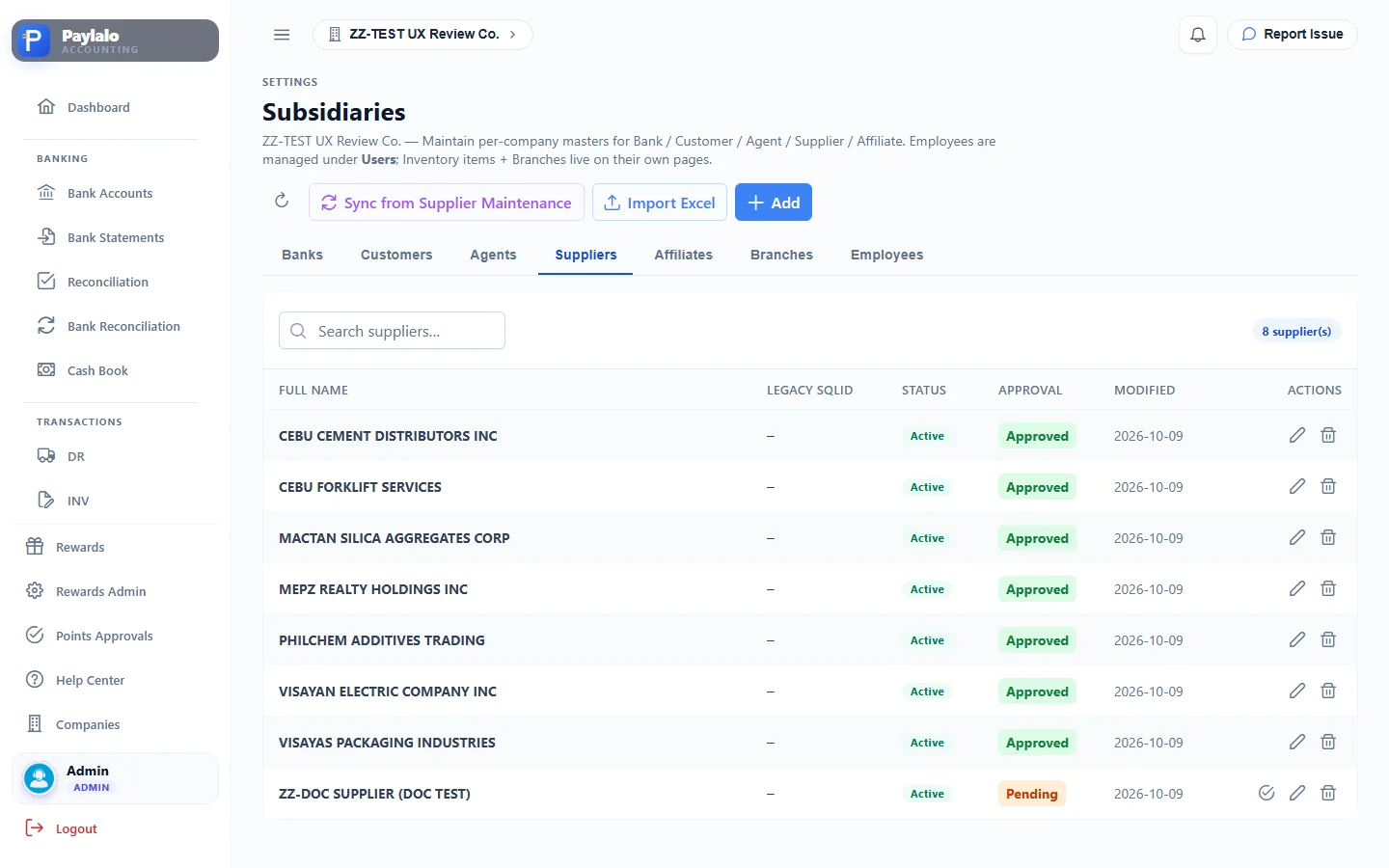
Users & Privileges sets the accounting roles for each company. Branch Maintenance keeps the legacy sqlId bridge. Subsidiaries covers Banks, Customers, Agents, Suppliers, Affiliates, Branches and Employees, with Sync from Supplier Maintenance and an approval status. Measurement holds 35 UoMs and per-item conversions. Inventory Accounts says which GL account each item category posts to; 3 of 8 categories are unmapped. Recompute Cost posts a variance JV to bring historical issues to WAC. Transaction Lock has the books locked through 30 Jun 2026. I didn’t change any of these.
How documents flow into the books
- Operations happen in the other apps. Supply Chain posts DR (Dr DR to be invoiced / Cr Inventory), RR (Dr Inventory / Cr GRNI) and SI (Dr AR, COGS / Cr Sales, Output VAT, DR to be invoiced). Credit & Collection posts CR (Dr Undeposited Collection, CWT / Cr AR). Cash Center raises PRF, SFL and petty-cash claims.
- Accounting turns payables into APVs: Supplier Invoice (Dr GRNI / Cr AP), General APV (Dr expense, Input Tax / Cr AP), PO Advance, Service Billing, Retention Release, PRF and Petty Cash.
- A CV pays one payee’s APVs. Creating it posts Dr AP / Cr Unreleased Checks. Release posts Dr Unreleased Checks / Cr Cash in Bank (CVR). A post-dated cheque credits PDC Payable instead and gets Cleared later (CVC).
- Deposit Slips move CR cash into the bank (Dr Cash in Bank / Cr Undeposited Collection). Funds Transfer moves cash between banks.
- Journal Vouchers cover everything else, like accruals, opening balances and adjustments, and post when approved.
- The posted GL feeds the AR, AP and Inventory ledgers, DCP and bank reconciliation. From there it goes into the Trial Balance, then the Balance Sheet, Income Statement, Cash Flow, aging and tax reports.
Notes from testing
- I created three test documents: JV-000006 (Approved and posted, GL ref JV-6), APV-000018 (Posted, Paid) and CV-2026-0017 (Released, GL refs CV-17 and CVR-17). I didn’t delete, void or edit anything.
- There’s a supplier called
ZZ-DOC SUPPLIER (DOC TEST)under Settings › Subsidiaries, but its approval is Pending, so the APV payee list doesn’t offer it. I used the approved supplier VISAYAN ELECTRIC COMPANY INC instead. - Print Voucher (JV, APV, CV) and the Print buttons on the Trial Balance and other reports open a separate print window. The headless browser I used can’t capture it, so there are no print previews here.
- The CV’s Resulting Entry grid pre-fills the credit as CASH IN BANK, but the confirmation text and the posted entry use UNRELEASED CHECKS. The server posts UNRELEASED CHECKS. The preview should match.
- Amount boxes keep the default
0.00text when focused. Typing “1500” without selecting first gave me 15,000 on the first try. Selecting all before typing works. I kept 15,000 as the test amount. - By the end of the session the Supplier Ledger’s GL tie-out for the AP control account read “Off by (42,000.00)” (AP posted without a supplier on the line). Both of my documents were tagged to a supplier. The gap came from other documents being posted to ZZ-TEST at the same time; new SI, CR and DS entries appeared in the GL while I was working.
- Bank reconciliation can’t reach zero in ZZ-TEST. The bank has only three uploaded June statement lines (closing ₱58,870.50) against a book balance of ₱6,456,177.04 on the recon page. The Trial Balance shows CASH IN BANK at 582,177.04, so the two screens work out book cash differently. DCP’s “Total cash position” equals the statement closing, not the GL.
- DCP Projected Outflows only lists post-dated cheques. My current-dated cheque CV (CV-2026-0017) wasn’t added.
- On the Bank Reconciliation page the books side shows internal ids (e.g. CVR-260) instead of the GL reference (CVR-17), which makes cross-checking slower.
- The legacy Transactions proof lists, Importation Variance, PO Advances, PRF/SFL and Petty Cash queues were empty in ZZ-TEST, so I described those from their screens only.
- Transaction Lock is set through 30 Jun 2026. All my test documents were dated 9 Oct 2026 and posted without a lock error.