Paylalo Cash Center

Paylalo Cash Center handles a company’s cash outside the main disbursement run: the petty cash fund, Payment Request Forms (PRF) for paying a known bill, and Subject For Liquidation (SFL) cash advances that an employee accounts for later with receipts. Treasury staff, fund custodians and approvers use it every day.
It keeps no books of its own. Every step that touches the ledger either writes a journal voucher (JV) straight into the shared Paylalo ledger, or raises an Accounts Payable Voucher (APV) that Paylalo Accounting pays with a Check Voucher (CV). It runs at cashcenter.paylalo.com with the same sign-in and company picker as the rest of the suite. I recorded everything below in the test company ZZ-TEST UX Review Co. on 9 October 2026.

The screens
- The Dashboard counts open PRFs, unreleased SFLs and unrouted replenishments, shows the total fund balance, has a card per fund (balance, limit, % of limit, branch, funding bank) and a “Needs attention” panel.
- PRF / SFL is one list with PRF and SFL tabs. One New Request form handles both, and the detail dialog has Approve, Reject, Route to APV, Release and Print.
- SFL Liquidation records what an employee actually spent against a released SFL, posts the expense JV, then settles the balance.
- Petty Cash → Funds is where you create, establish, adjust and close imprest funds. Each fund has a running ledger.
- Petty Cash → Vouchers holds petty cash vouchers (PCVs). Disbursing one lowers the fund balance and posts nothing to the GL.
- Petty Cash → Advances is a memo of cash handed out from a fund. No GL entry, no change to the balance.
- Petty Cash → Replenishments bundles disbursed voucher lines, routes them to an APV, and confirms once Accounting has paid.
- Help is an in-app guide with a flow diagram for each process and a “What Cash Center sends to Accounting” reference.
All eight sidebar entries open working screens. None is a placeholder.

Petty Cash
The fund
A petty cash fund is a fixed float a custodian holds for small daily spending. It runs on the imprest system, so cash on hand plus unreplenished receipts should always add up to the fund limit.
The New Petty Cash Fund form asks for Fund Account Name (default “PETTY CASH FUND”), Custodian (an employee), Funding Bank (the cash-in-bank source), Branch, Initial Fund and Fund Limit.
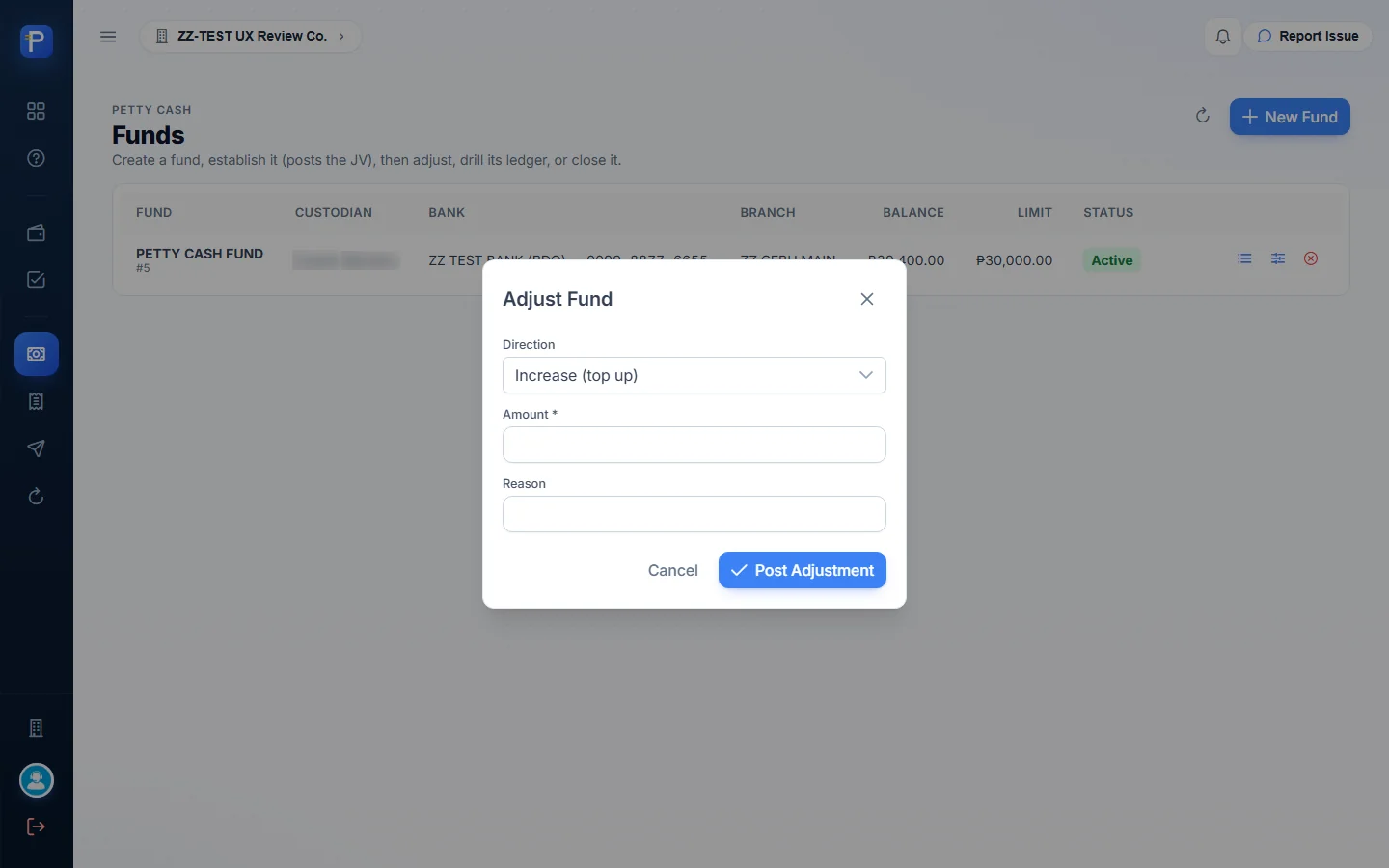
A fund goes through four steps. Create only records the details, with status Not established. Establish posts the JV that moves cash from the bank into the fund. Adjust raises or lowers the float, with a reason, through Post Adjustment. Close returns the remaining cash. Every posting step asks for a posting date first. Nobody types the balance in; it’s always computed from the fund’s movements.
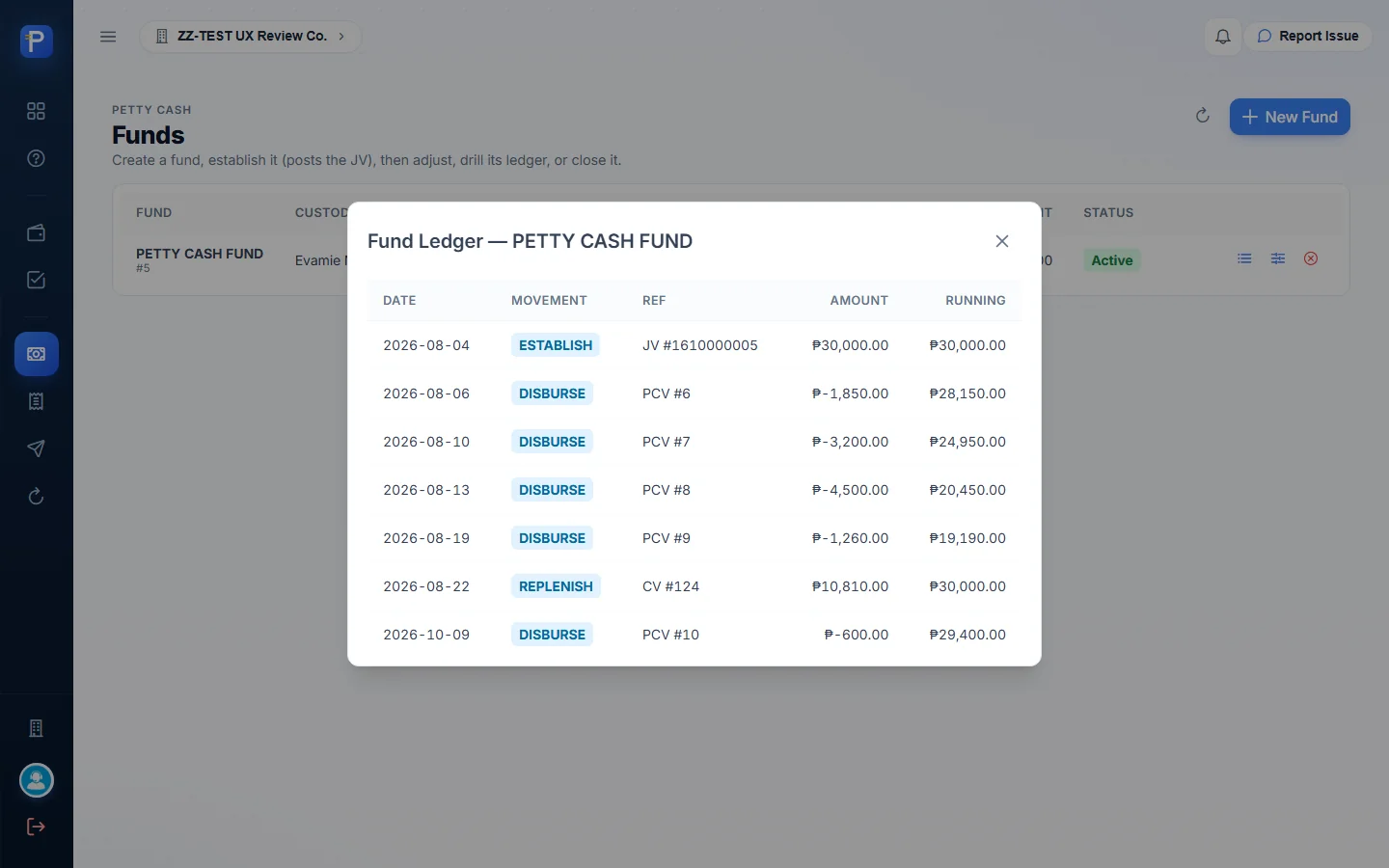
The test company has one active fund, PETTY CASH FUND #5. The custodian is a staff member (name blurred), the funding bank is ZZ TEST BANK (BDO), the branch is ZZ CEBU MAIN, and the balance and limit were both ₱30,000.00 when I started. The View fund ledger icon opens a running ledger. It showed the establishing JV #1610000005 (₱30,000.00), four PCV disbursements, and a REPLENISH line tied to CV #124 that brought the balance back to ₱30,000.00.


Petty cash vouchers (PCV)
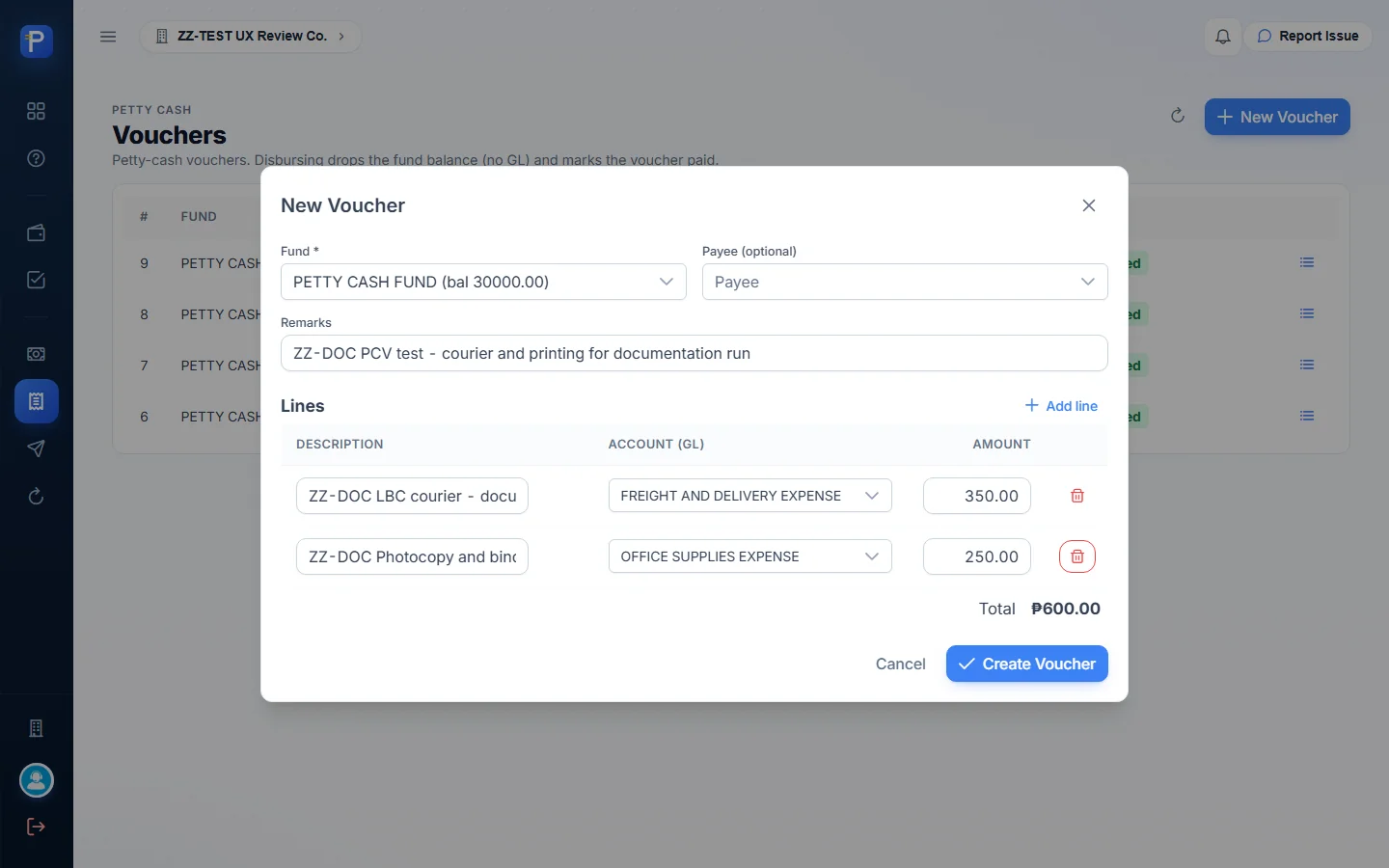
A PCV records one small expense paid from the fund. You pick the Fund (the picker shows the live balance, e.g. “PETTY CASH FUND (bal 30000.00)”), an optional Payee, Remarks, and one or more lines, each with a Description, an Account (GL) and an Amount.
What I did:
- Vouchers → New Voucher. I picked the fund and entered remarks “ZZ-DOC PCV test - courier and printing for documentation run”.
- Line 1 was “ZZ-DOC LBC courier - documents to Mandaue”, FREIGHT AND DELIVERY EXPENSE, ₱350.00. Line 2 was “ZZ-DOC Photocopy and binding”, OFFICE SUPPLIES EXPENSE, ₱250.00. Total ₱600.00.
- Create Voucher. PCV #10 saved as Draft with a Disburse button.
- Disburse, then I confirmed the “Disbursement date”. The status changed to Disbursed.
Nothing reached the GL, which is how imprest accounting works. The fund ledger got the line DISBURSE PCV #10 ₱-600.00 and the balance fell from ₱30,000.00 to ₱29,400.00. The dashboard then showed 98% of limit.

Replenishment
Replenishment tops the fund back up to its limit. It’s also the point where the petty cash expenses finally hit the books.
- Replenishments → New Replenishment. I picked the fund. The form listed every eligible disbursed voucher line with its account, all ticked by default. Here that was PCV #10’s two lines, 2 selected, ₱600.00.
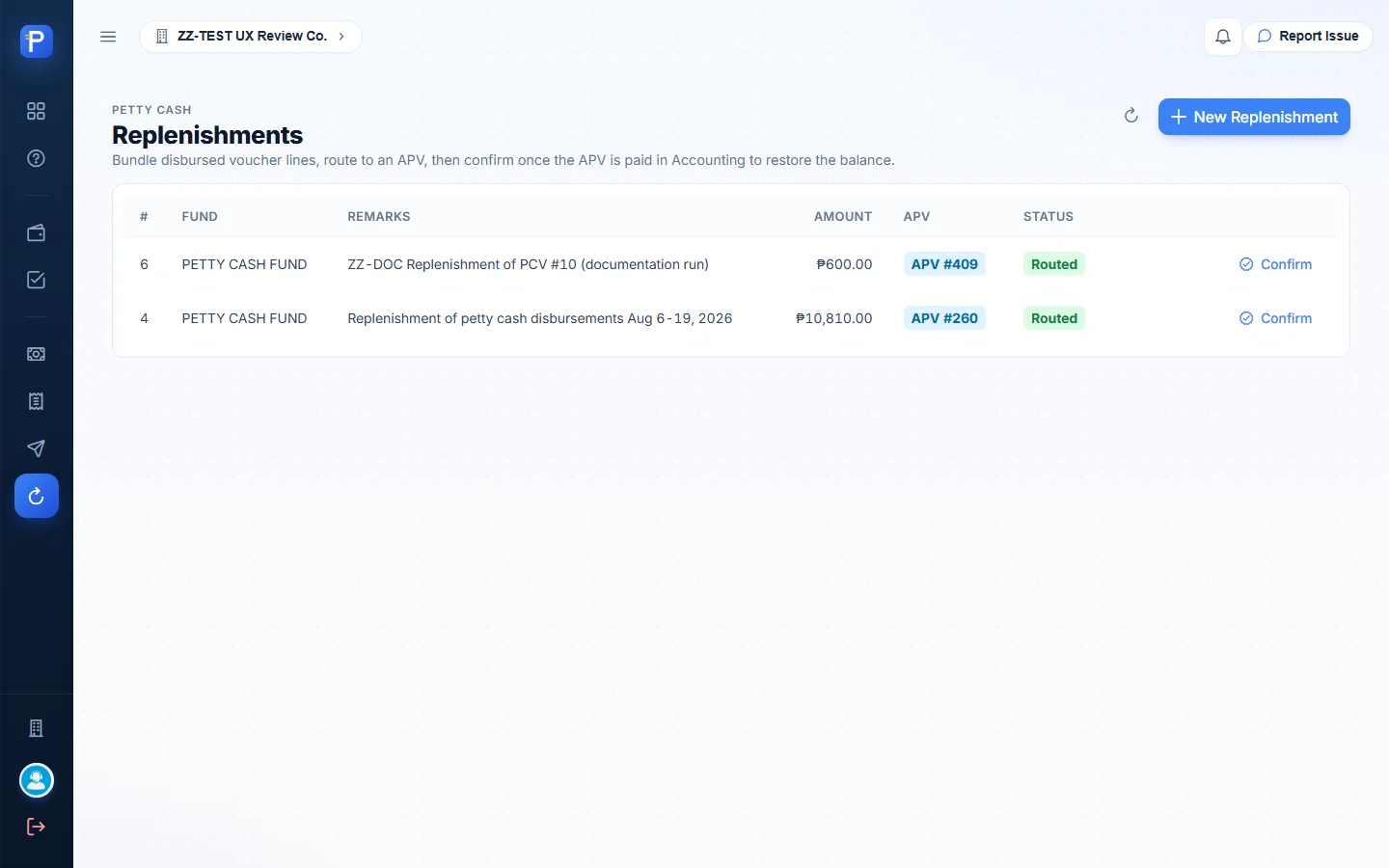
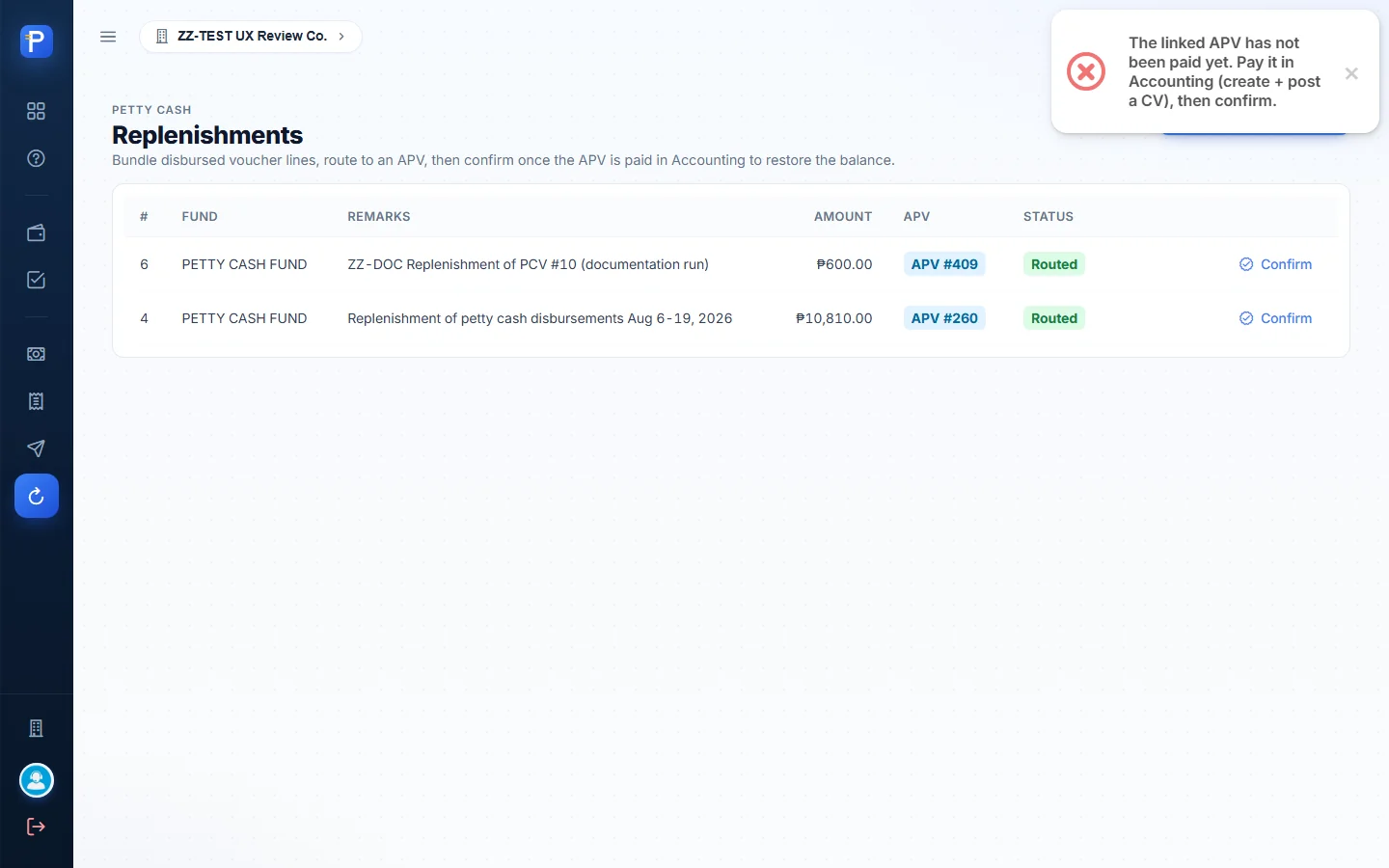
- I entered remarks “ZZ-DOC Replenishment of PCV #10 (documentation run)” and pressed Create. Replenishment #6 saved as Draft.
- Route to APV, then I confirmed the “APV date for this replenishment”. The row changed to Routed and showed APV #409.
- Confirm (dated “Confirmation date (restores fund balance)”) only goes through after Accounting has paid the APV. I tried it at this point and got:
The linked APV has not been paid yet. Pay it in Accounting (create + post a CV), then confirm.
Route to APV raises an APV in Paylalo Accounting with one line per voucher line, each on the account chosen on the PCV. Accounting pays it with a CV, and Confirm then records the cash coming back into the fund. The seed data shows the finished loop: replenishment #4 (₱10,810.00, APV #260) appears in the fund ledger as REPLENISH CV #124.

Cash advances (memo only)
An advance notes cash handed out of a fund before it’s spent. The fields are Fund, Amount and Description.
I recorded Advance #2 for ₱500.00, “ZZ-DOC Advance note - messenger errand cash (documentation run)”. The fund balance stayed at ₱29,400.00 and no JV was posted, which matches the help text (“a note kept alongside the fund”). The list has no liquidate or close action. Formal employee advances go through an SFL.

PRF / SFL
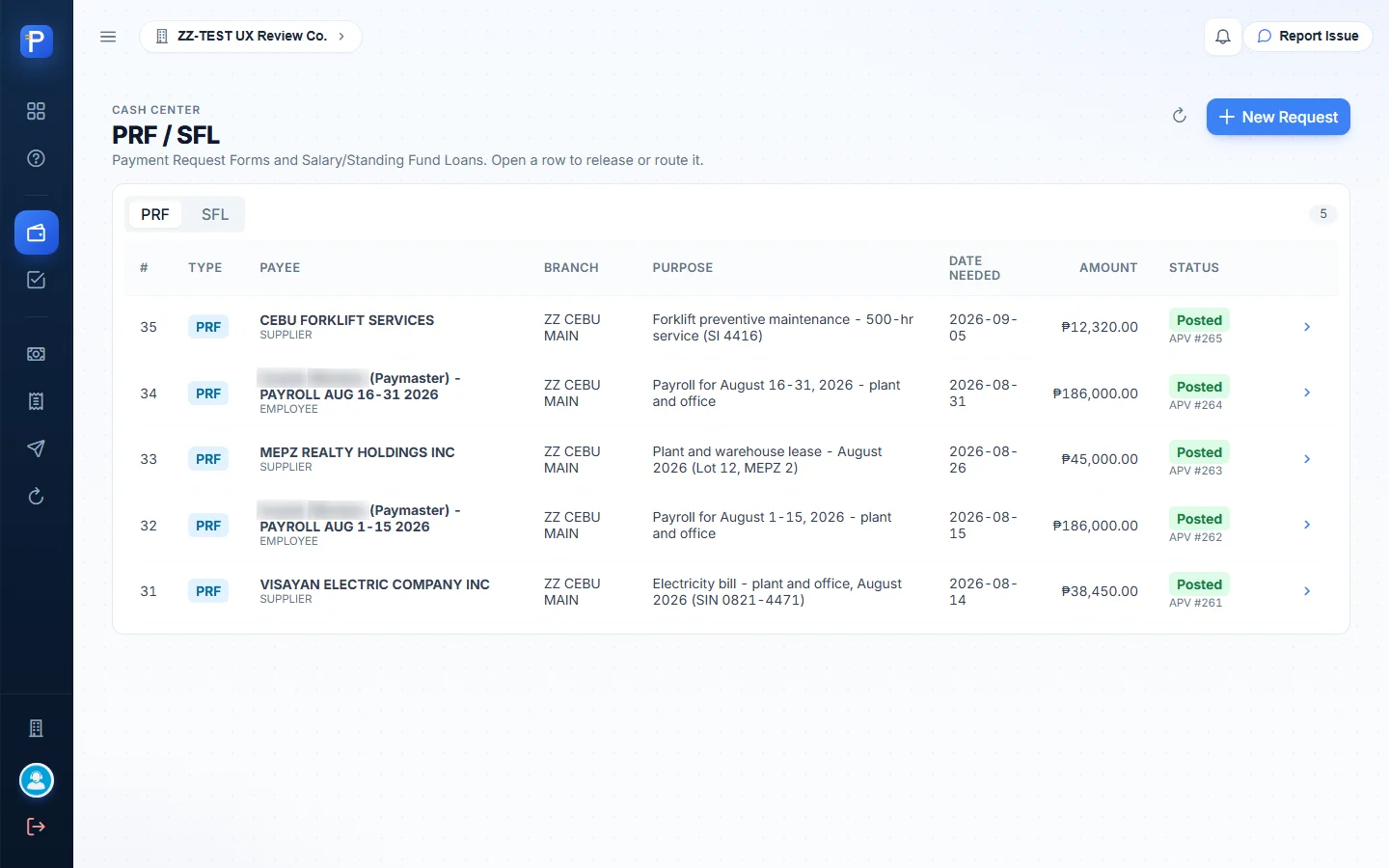
This screen is one list with PRF and SFL tabs. Columns are #, Type, Payee (with payee type), Branch, Purpose, Date Needed, Amount and Status. The status chip also names the document it led to, like “Posted · APV #265”. Click a row and a detail dialog opens with the header, the lines, an Activity trail (who did what and when, with JV and APV numbers), Comments, and whatever actions the current status allows.
Payment Request Form (PRF)
A PRF is a request to pay a specific, known bill. The requester says what’s being paid and how much. The approver picks the GL accounts and routes it to Accounting.
The fields are Request Type (PRF — Payment Request), Payee Type (Employee, Supplier, Customer, Agent, Bank or Branch), Payee, Date Needed, Branch, Purpose / Request For, and Lines with only a Description and Amount. The form says, “The accounting team tags the ledger account when the request is processed.”
The steps:
- New Request opens as a dialog over the list. I chose PRF, Supplier, ZZ CEBU MAIN, and two lines making up the total.
- Create Request. A “Request created.” toast appears and the request is listed as For approval.
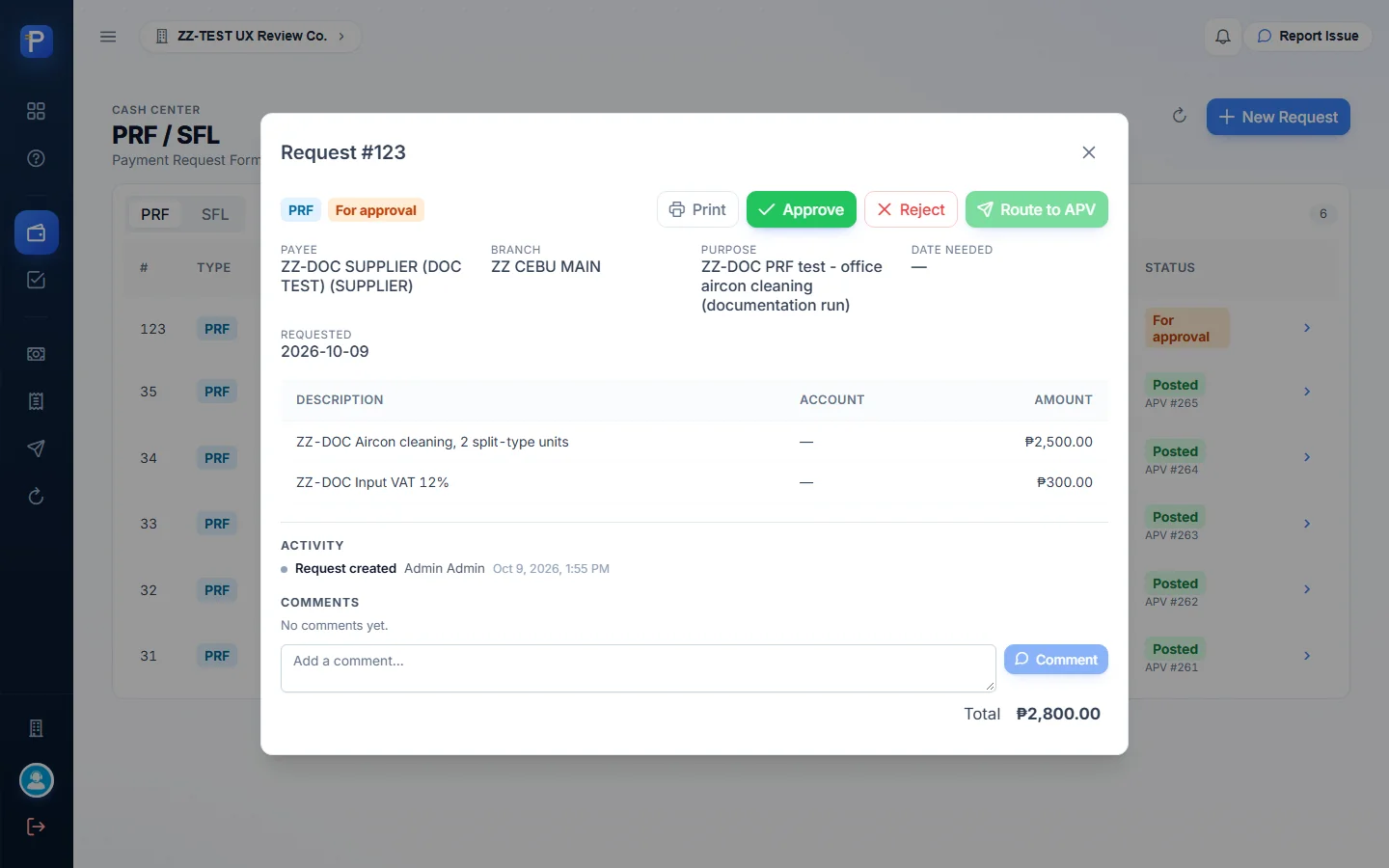
- Open it. You get Approve, Reject, and Route to APV (greyed out until it’s approved).
- Approve. The status becomes Approved and Activity logs “Approved”.
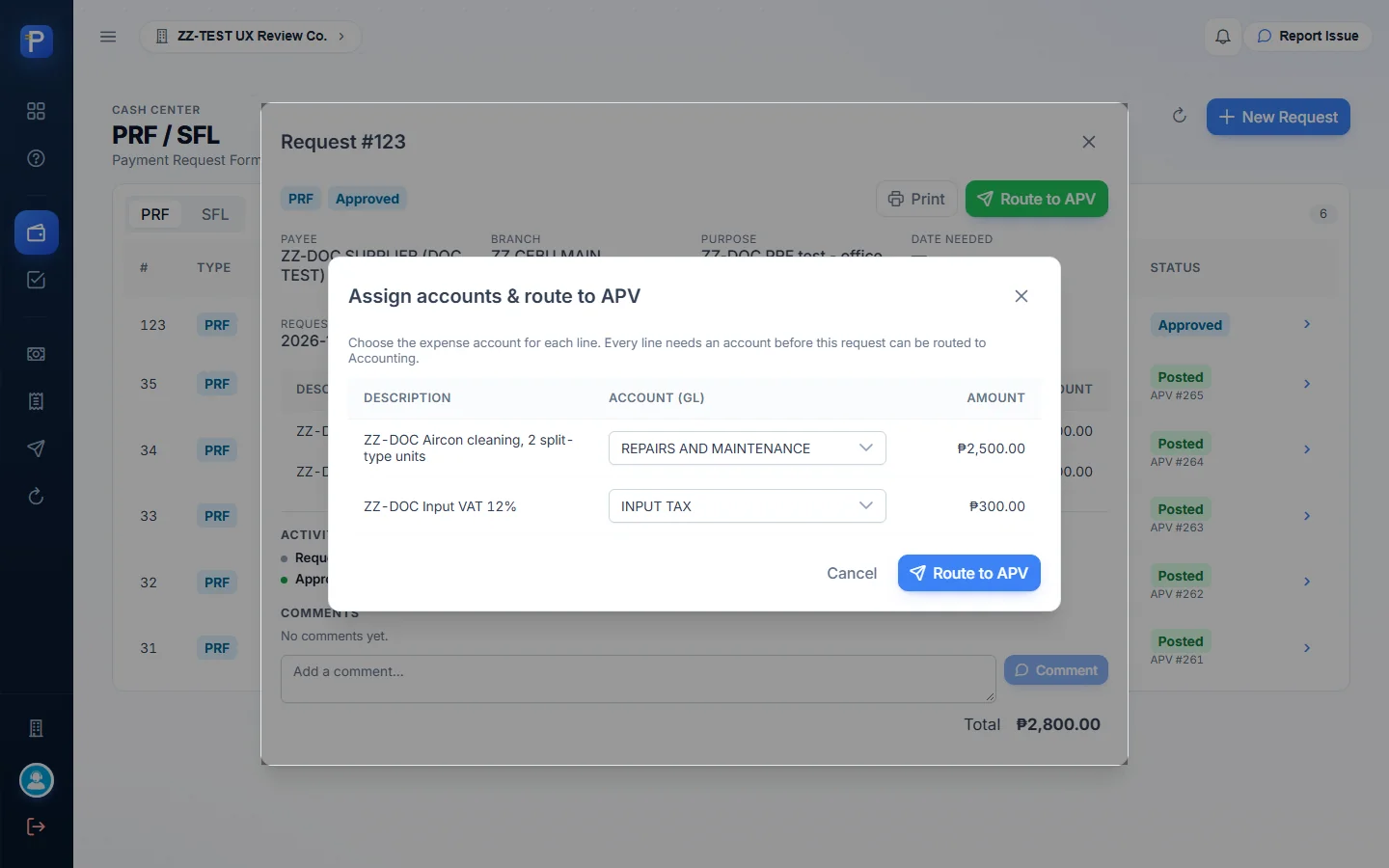
- Route to APV opens “Assign accounts & route to APV”. Every line needs an Account (GL), and the Route button stays disabled until each has one.
- Confirm the “APV date”. The request becomes Posted · APV #nnn, the accounts show on the lines, and Activity logs “Pushed to Accounting · APV #nnn”.
I made two test requests. PRF #123 was for payee ZZ-DOC SUPPLIER (DOC TEST), ₱2,800.00 (₱2,500.00 aircon cleaning plus ₱300.00 input VAT). It was approved, but routing was refused with Supplier payee not yet approved (maker/checker): approvalStatus=PENDING. The supplier master has its own maker/checker approval and that supplier is still pending, so the PRF stays at Approved.
PRF #124 was for CEBU FORKLIFT SERVICES, an approved supplier, ₱5,600.00. The lines were ₱5,000.00 forklift tyre on REPAIRS AND MAINTENANCE and ₱600.00 input VAT on INPUT TAX. I approved it, routed it, and it ended as Posted · APV #406.




Print opens the browser’s print dialog on its own layout. The printed Payment Request Form has the company header, PRF-124 and the date, then payee, payee type, branch, date needed, status (Posted · APV #406), requested by, purpose, and a line table with GL accounts and the total. There are signature blocks for Requested By and Approved By (filled from saved signatures, with dates), a blank Received By, and a QR code captioned “PRF-124 · scan with Scan2Approve”.

Subject For Liquidation (SFL)
An SFL is a cash advance to an employee that has to be accounted for later with receipts. It uses the same New Request form, with Request Type “SFL” and payee type Employee.
- New Request → SFL. The payee was an employee (name blurred in the screenshots), branch ZZ CEBU MAIN, purpose “ZZ-DOC SFL test - cash advance for supplier site visit (fare, meals)”, and one line of ₱3,000.00.
- Create Request gave SFL #125, For approval. Release was greyed out; Approve and Reject were available.
- Approve → Approved, and Release became available.
- Release, then I confirmed the “Release date (posts the receivable JV)” → Released. Activity logged “Released to Accounting · JV #3904”. That puts the advance on the books as a receivable from the employee. A Create liquidation button showed up.


SFL Liquidation
Liquidating and settling
Liquidation records what the employee actually spent against a released SFL, books the expenses, and clears whatever is left.
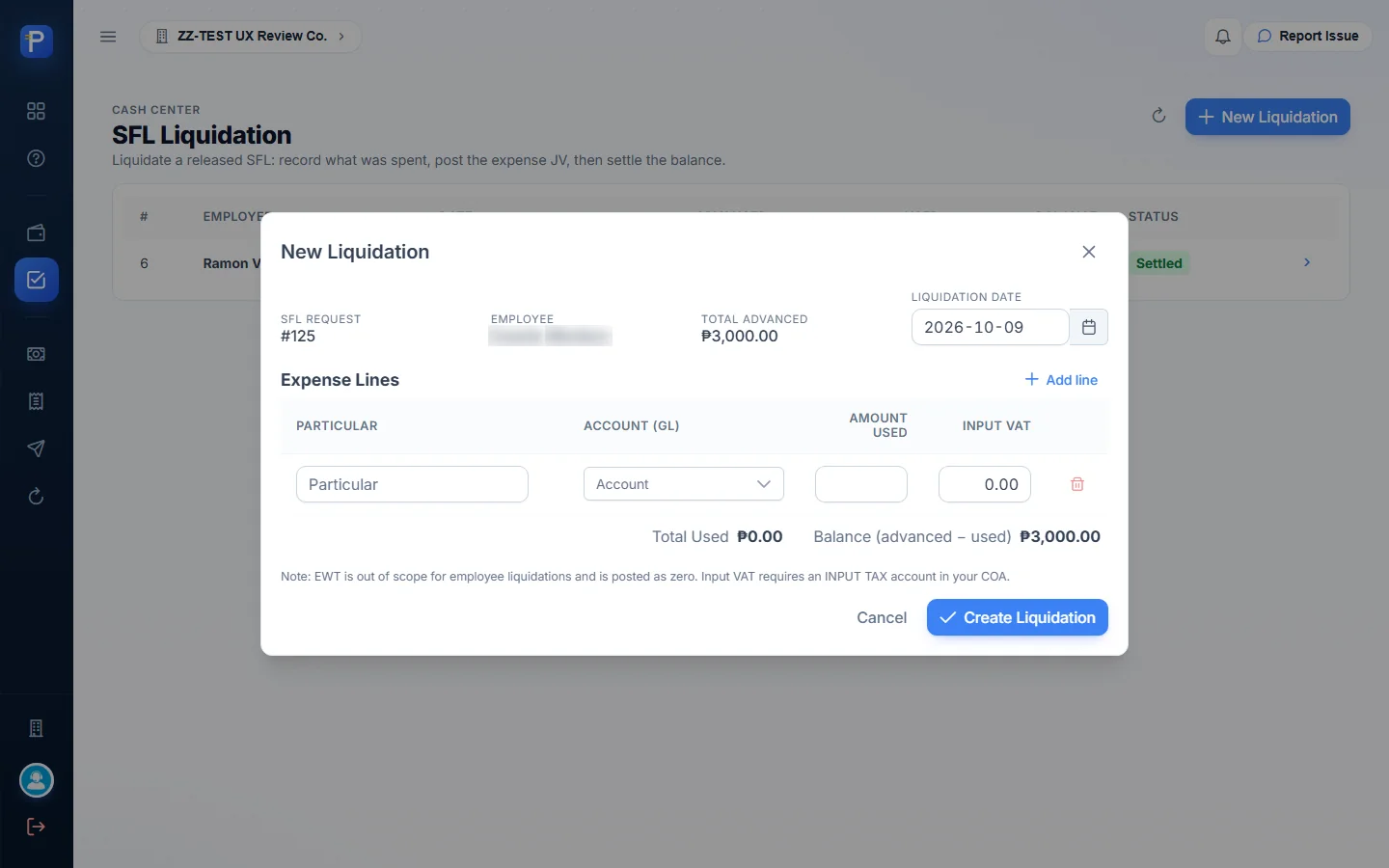
The form has SFL Request (carried over from the request), Employee, Total Advanced, Liquidation Date, and expense lines with Particular, Account (GL), Amount Used and Input VAT. Running totals show Total Used and Balance (advanced − used). A note says: “EWT is out of scope for employee liquidations and is posted as zero. Input VAT requires an INPUT TAX account in your COA.”
- On SFL #125, Create liquidation opened SFL Liquidation (
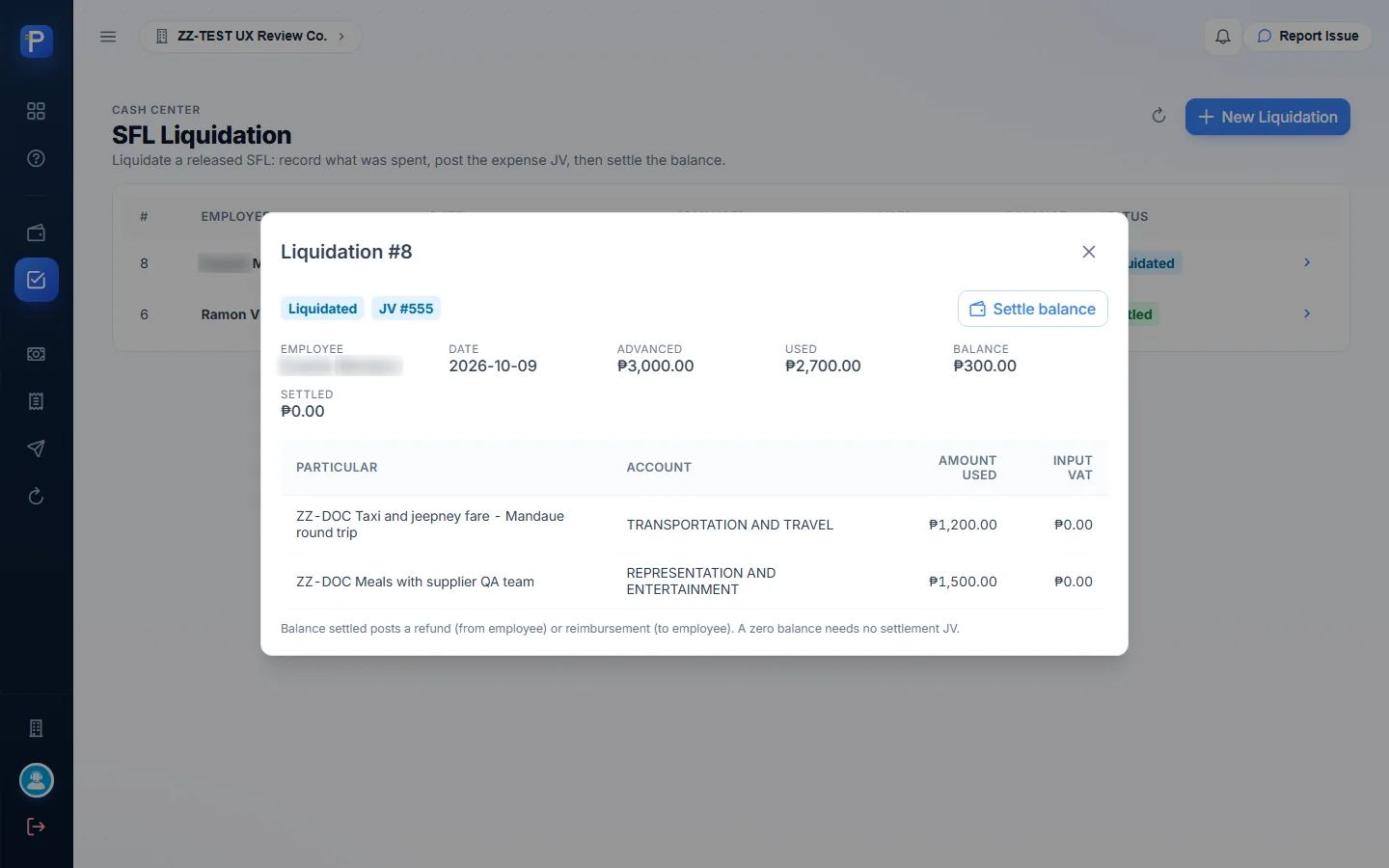
/app/sfl/liquidation?requestId=125) with the New Liquidation form already filled: Request #125, the employee, ₱3,000.00 advanced. - I added two lines: “ZZ-DOC Taxi and jeepney fare - Mandaue round trip”, TRANSPORTATION AND TRAVEL, ₱1,200.00, and “ZZ-DOC Meals with supplier QA team”, REPRESENTATION AND ENTERTAINMENT, ₱1,500.00. Total Used ₱2,700.00, Balance ₱300.00.
- Create Liquidation gave Liquidation #8, For review.
- Liquidate, then I confirmed the “Liquidation posting date” → Liquidated. Activity on the SFL logged “Liquidation posted · Liquidation #8 · JV #3917 · balance 300.00 to settle”.
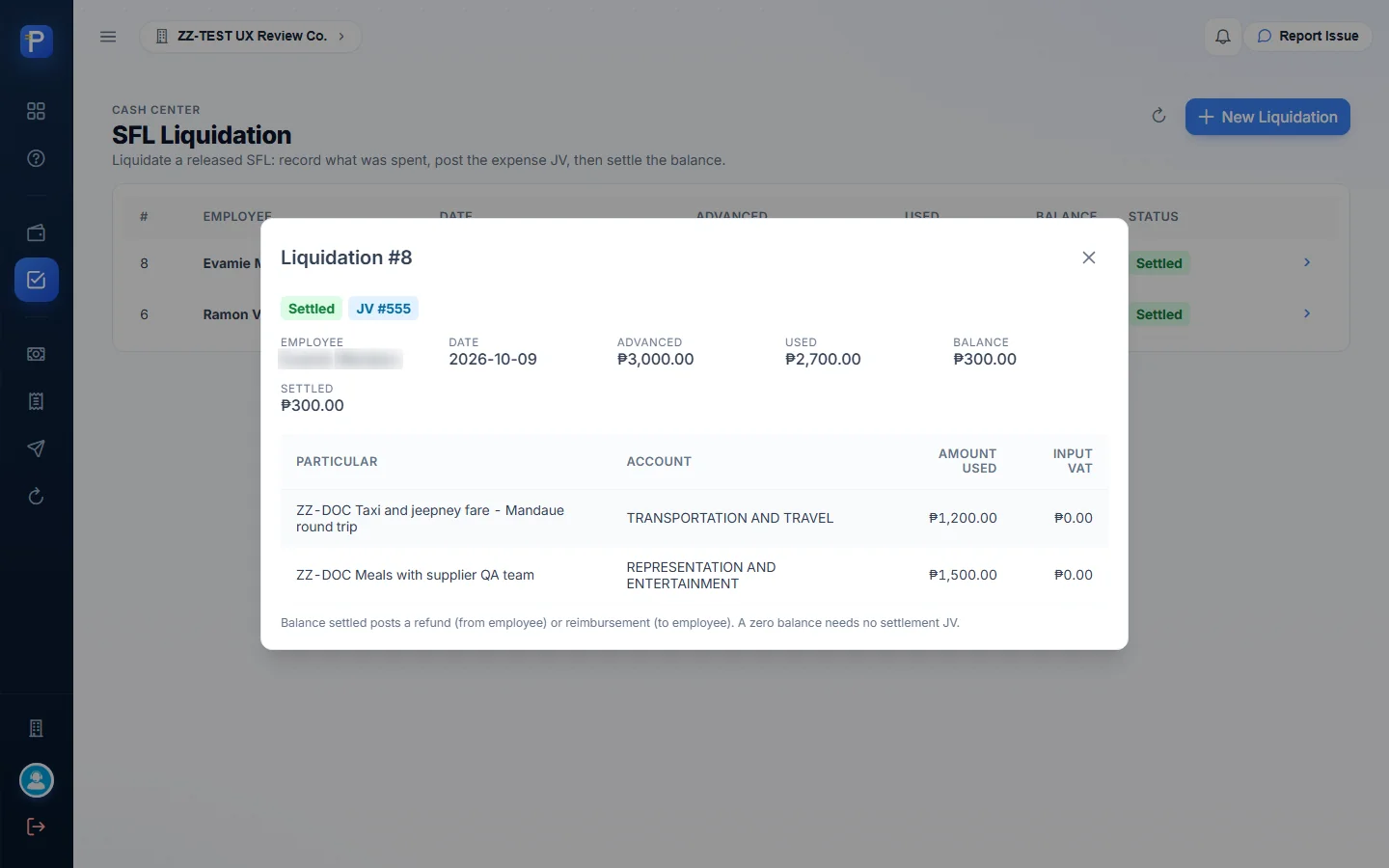
- Settle balance, then I confirmed the “Settlement posting date” → Settled, with Settled ₱300.00. The SFL logged “Balance refunded by employee · Liquidation #8 · JV #3918”. The employee spent less than the advance, so the settlement was a refund. If they’d spent more, it would have been a reimbursement. An exactly even liquidation needs no settlement JV at all.
At the end, Liquidation #8 was Settled (Advanced ₱3,000.00, Used ₱2,700.00, Balance ₱300.00, Settled ₱300.00), and SFL #125 showed Liquidated with a five-step activity trail.



How the documents connect
- Fund: Establish (JV, bank → petty cash fund) → PCV Disburse (fund balance only, no GL) → Replenishment groups disbursed PCV lines → APV in Accounting (expense lines debited) → CV pays it in Accounting → Confirm in Cash Center restores the fund (ledger line “REPLENISH CV #”).
- PRF: Create → Approve → assign GL accounts and Route to APV → APV in Accounting → paid by CV in Accounting. The supplier payee must already have passed maker/checker approval in the master file.
- SFL: Create → Approve → Release (receivable JV) → Liquidation → Liquidate (expense JV against the receivable) → Settle (refund or reimbursement JV) → closed.
- Advance (memo): recorded against a fund only. No JV, no balance change, nothing downstream.
The backbone this app shares with the rest of the suite is APV → CV → GL. Cash Center creates the JVs and APVs. Paying always happens in Paylalo Accounting.
Notes from testing
- PRF #123 couldn’t be routed. The supplier “ZZ-DOC SUPPLIER (DOC TEST)” hasn’t passed maker/checker approval in the supplier master (
approvalStatus=PENDING), and Cash Center checks that before it creates an APV. The control is right, but you only find out at the last step. The supplier picker lists pending suppliers without marking them. PRF #124, against an approved supplier, went through to APV #406. - Replenishment Confirm depends on Accounting. Replenishment #6 (APV #409) stays Routed until the APV is paid by a CV in Paylalo Accounting, which is a separate app and outside this run.
- The liquidation reference numbers don’t line up. The Liquidation #8 dialog shows “JV #555” in its status chips, while the SFL activity trail cites JV #3917 for the liquidation and JV #3918 for the settlement, and the liquidation dialog shows no separate settlement JV number. They may be different numbering series (an internal ID versus the voucher number). I couldn’t reconcile them from Cash Center alone.
- “SFL” goes by two names. The Help Center and the SFL Liquidation screen call it Subject For Liquidation. The PRF / SFL page subtitle says “Salary/Standing Fund Loans”, and the Request Type option reads “SFL — Standing Fund Loan”.
- A button hangs around too long. After SFL #125 was fully liquidated and settled, its detail dialog still showed Create liquidation.
- The Advances page wording is off. The subtitle says advances are “to be liquidated later”, but there’s no liquidate action. Help calls them memo notes only, and my test confirmed no balance change and no JV.
- Things I didn’t try: I didn’t create, establish, adjust or close a fund. I only screenshotted the New Fund and Adjust Fund forms, so I wouldn’t add fund GL postings. I didn’t try Reject on a PRF or SFL, and I didn’t enter input VAT on a liquidation line (it stayed at ₱0.00).
- The admin role had every action. No button was missing for lack of permission.