Paylalo Cashiering
Paylalo Cashiering is the collections desk of the Paylalo suite. A cashier uses it to record money coming in from customers, bank it, and report what came in each day, and the accountant and the collector use it to see what each customer still owes. It sits between Supply Chain, which issues the Sales Invoices that become receivables, and Accounting, which owns the General Ledger the receipts post to.
Every document is scoped to one company. I did everything below as the admin of the test company ZZ-TEST UX Review Co.
The screens
- Receipts (
/app/collection-receipts): the register of Collection Receipts (CR) and Provisional Receipts (PRV). The New Receipt form has two modes, “Apply to invoices” and “Receive on account (advance)”. - Deposit Slips (
/app/deposit-slips): bank the cash and cheques sitting in Undeposited Collection. One slip can carry many receipts. - PDC Register (
/app/pdc-register): follow post-dated cheques from “on hand” through deposit, clearing or bounce. It only monitors and never posts. - Collection Report (
/app/collection-report): the Daily Collection Report, or cashier remittance summary, with CSV and Print. - Customer Ledger (
/app/customer-ledger): one customer’s AR balance, unapplied advances and net due, with aging and the GL rows. - Statement of Account (
/app/statement): a printable SOA with activity, open items, advances held, aging buckets and the company’s deposit accounts. - Apply Advance (
/app/advance-applications): the register of Advance Applications (CRA), which offset money held on account against open invoices.
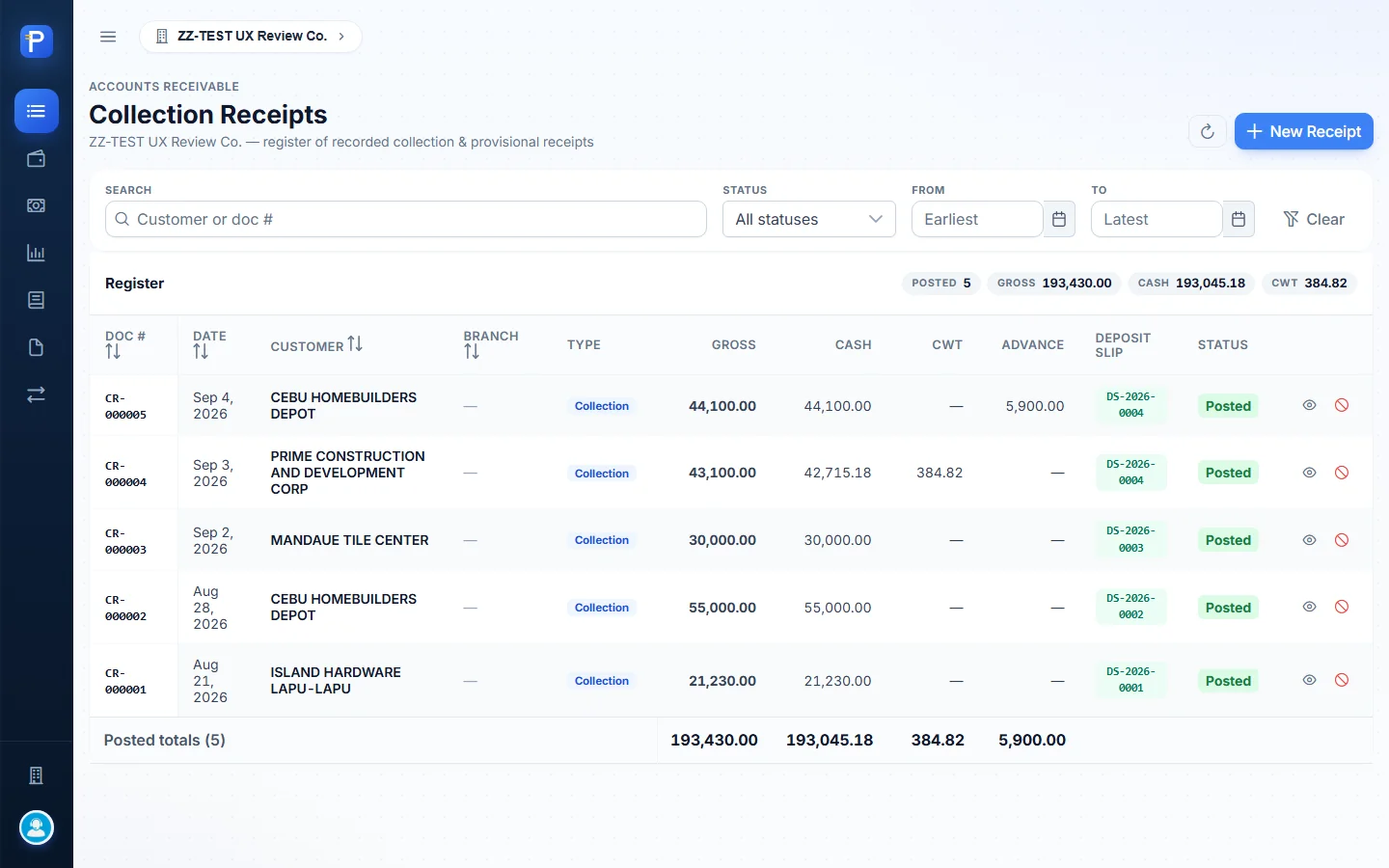
Receipts
The register lists every receipt with Doc #, date, customer, branch, type (Collection or Provisional), Gross, Cash, CWT, Advance, the Deposit Slip that banked it, and a status chip. Posted totals sit in the footer, and the header shows the POSTED count, GROSS, CASH and CWT. Each row has View, which opens the printable receipt, and Cancel.

Taking an advance (“Receive on account”)
This mode records money that has no invoice behind it, like a deposit or an advance payment. It books to Advances from Customer and prints as a Provisional Receipt, not a VAT collection receipt.
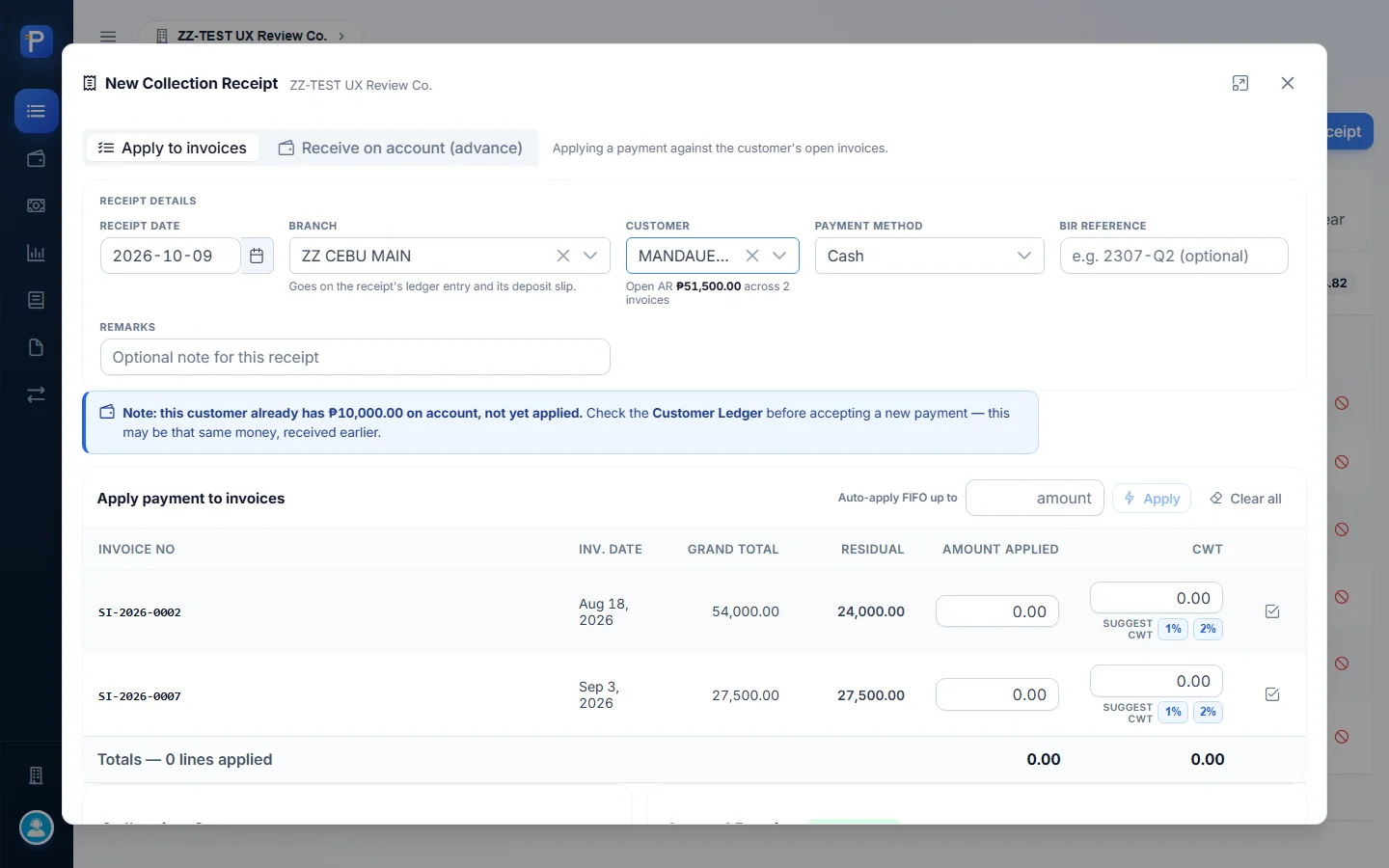
The form asks for the receipt date, the branch (it goes on the ledger entry and the deposit slip), the customer, and the payment method: Cash, Check or Bank Transfer. Check adds bank name and check number. Then come the BIR reference, remarks and Amount received. Next to the customer picker the form shows the customer’s open AR (“Open AR ₱51,500.00 across 2 invoices”). I put it there so the cashier can tell whether this really is an advance.
- Open Receipts, click New Receipt, and switch Entry mode to Receive on account (advance).
- Pick the customer. I used MANDAUE TILE CENTER, an existing ZZ-TEST customer with open invoices, so I could apply the advance later.
- Type the amount. The Journal Preview updates as you type: Undeposited Collection (cash) 10,000.00 debit, Advances from Customer 10,000.00 credit, marked “Balanced”.
- Add remarks (
ZZ-DOC advance on account - documentation test) and click Post Advance. A dialog asks “Receive ₱10,000.00 on account from MANDAUE TILE CENTER?” Confirm with Post Receipt. - The Provisional Receipt Preview opens right away, with a Print button.

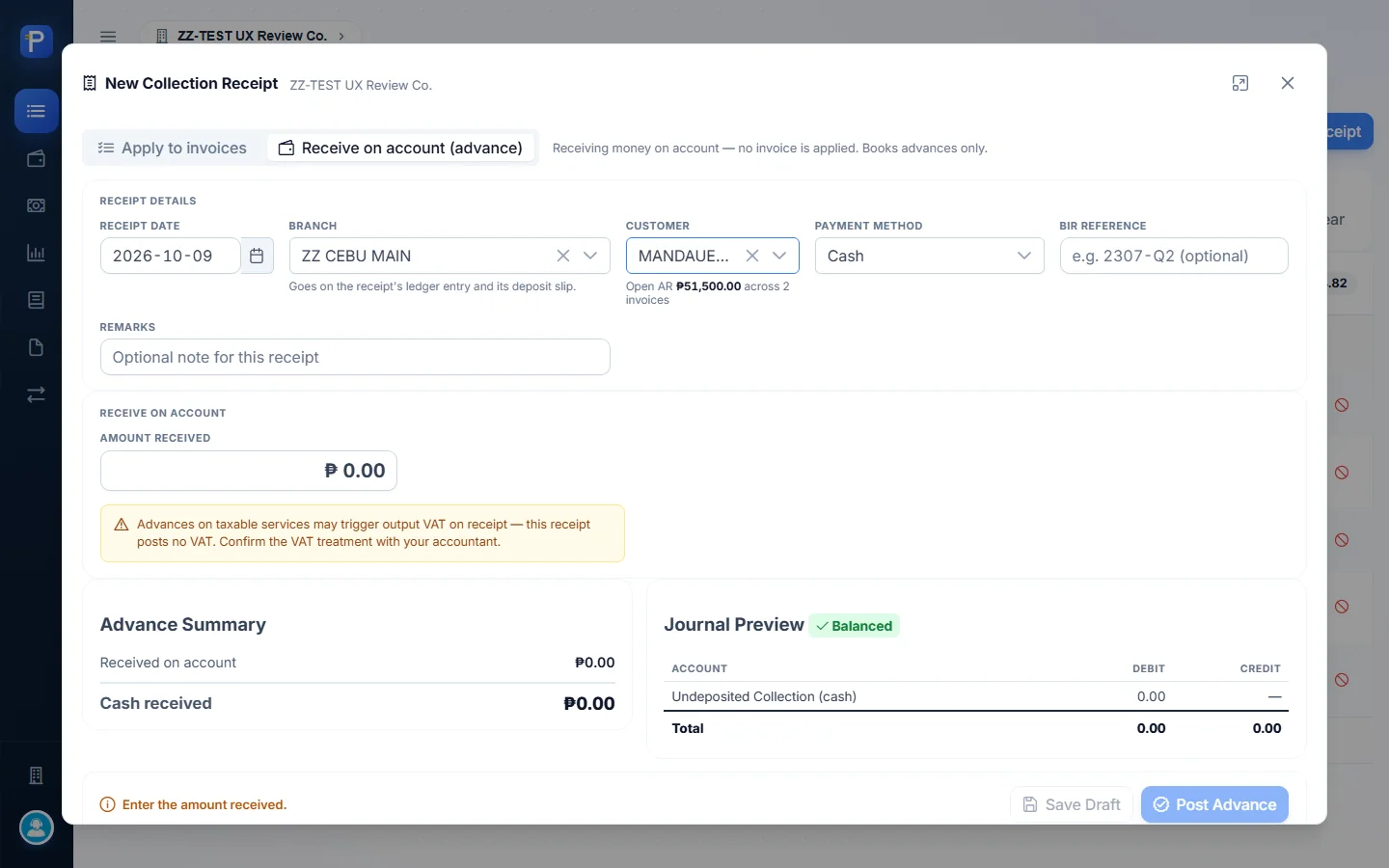

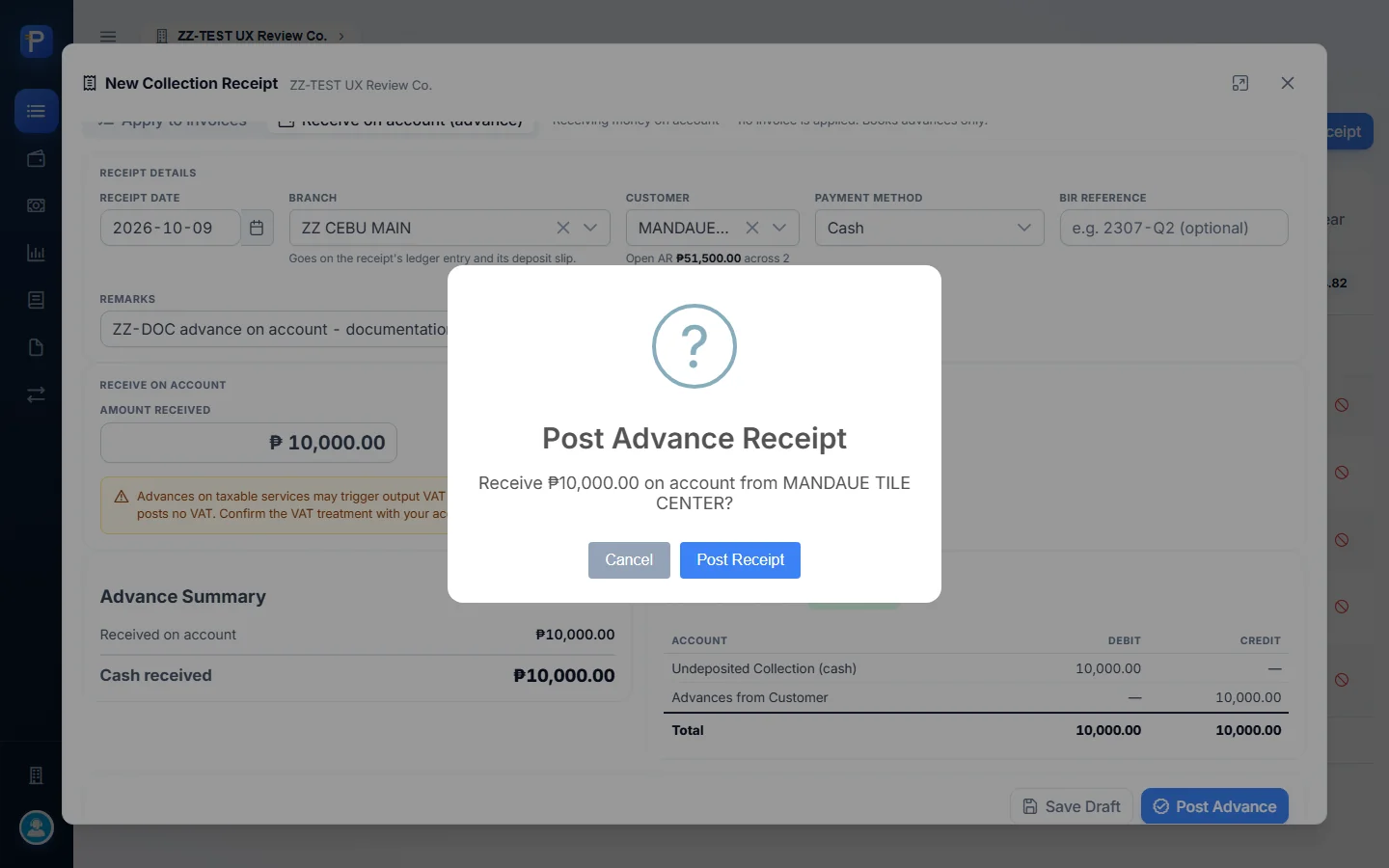
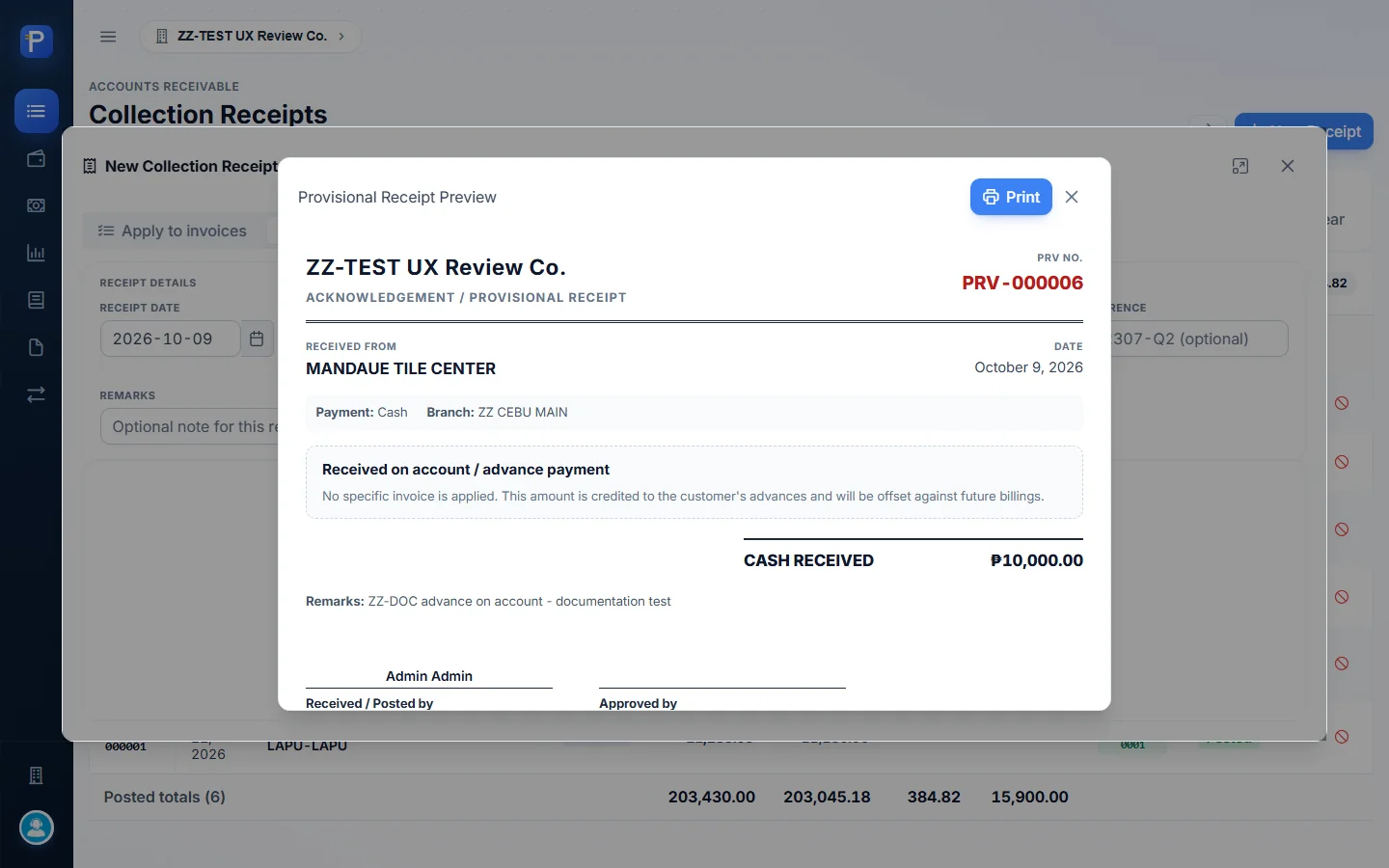
The result was PRV-000006: type Provisional, status Posted, Advance 10,000.00, no deposit slip yet. The form warns that advances on taxable services may trigger output VAT on receipt, and that this receipt posts no VAT.
One thing I noticed. The register shows this document as PRV-000006, its GL reference is CR-6, and the deposit-slip picker and the advance-application screens call it CR-000006. It’s the same document with three labels.
Paying invoices (“Apply to invoices”)
This mode receives a payment against the customer’s open Sales Invoices, net of Creditable Withholding Tax (BIR Form 2307).
The header is the same as above. Below it is a line for each open invoice with Grand Total, Residual, Amount Applied and CWT. I added a few helpers:
- Auto-apply FIFO up to an amount.
- Settle in full on each line.
- Suggest CWT 1% / 2%, which works out the withholding on the VAT-exclusive base. 1% of 24,000 gross gave 482.14.
- Clear line and Clear all.
- An Advance / over-collection box in the Collection Summary, for money received beyond the invoices.
- Click New Receipt (the mode defaults to Apply to invoices) and pick MANDAUE TILE CENTER. The form loads SI-2026-0002 (residual 24,000.00) and SI-2026-0007 (27,500.00). It also shows a blue note: “this customer already has ₱10,000.00 on account, not yet applied. Check the Customer Ledger before accepting a new payment — this may be that same money, received earlier.”
- Set payment method Check, bank BPI, check number ZZDOC-1001, BIR reference 2307-Q4, and remarks
ZZ-DOC check collection - settles SI-2026-0002 with 1% CWT. - Click Settle in full on SI-2026-0002, then 1% under Suggest CWT. The Collection Summary reads AR settled (gross) 24,000.00, less CWT (482.14), cash to receive 23,517.86. The Journal Preview shows Undeposited Collection 23,517.86 Dr, Creditable Tax Withheld 482.14 Dr, Accounts Receivable 24,000.00 Cr, balanced.
- Click Post Receipt and confirm “Post this Collection Receipt for MANDAUE TILE CENTER?”.

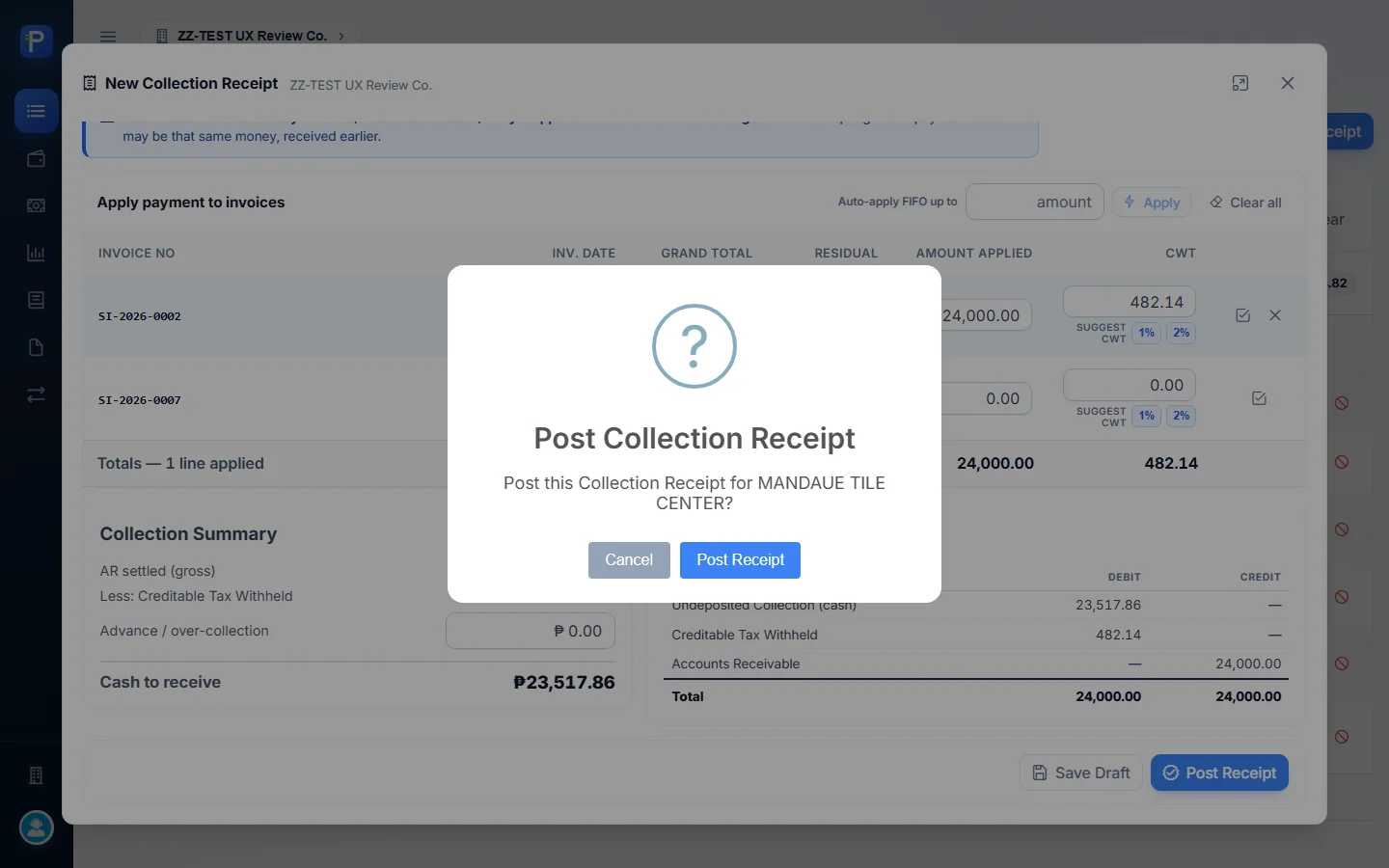

The result was CR-000007: Collection, Posted, Gross 24,000.00, Cash 23,517.86, CWT 482.14. The register’s posted count went from 6 to 7 documents, and the CWT total became 866.96. Both kinds of receipt share one number sequence. The advance took number 6 as PRV-000006, so the next collection became CR-000007. Both modes also offer Save Draft, which I didn’t use.
The ledger after both receipts
The Customer Ledger for MANDAUE TILE CENTER then showed AR balance ₱27,500.00 (1 open invoice), Unapplied advances ₱10,000.00 and Net due ₱17,500.00. The transaction list went: SI-2026-0002 54,000 Dr, CR-3 30,000 Cr (an older partial payment), SI-2026-0007 27,500 Dr, CR-6 Advances from Customer 10,000 Cr, CR-7 Accounts Receivable 24,000 Cr, closing net 17,500.00. A banner said “1 invoice is open. Apply advance?” with an Apply Advance button.

Deposit slips
A deposit slip moves the day’s collections out of Undeposited Collection and into a bank account, one slip per trip to the bank. The register shows slip #, date, bank, branch, bank ref #, receipt count, amount, status and who posted it. The expand arrow lists the receipts inside a slip.
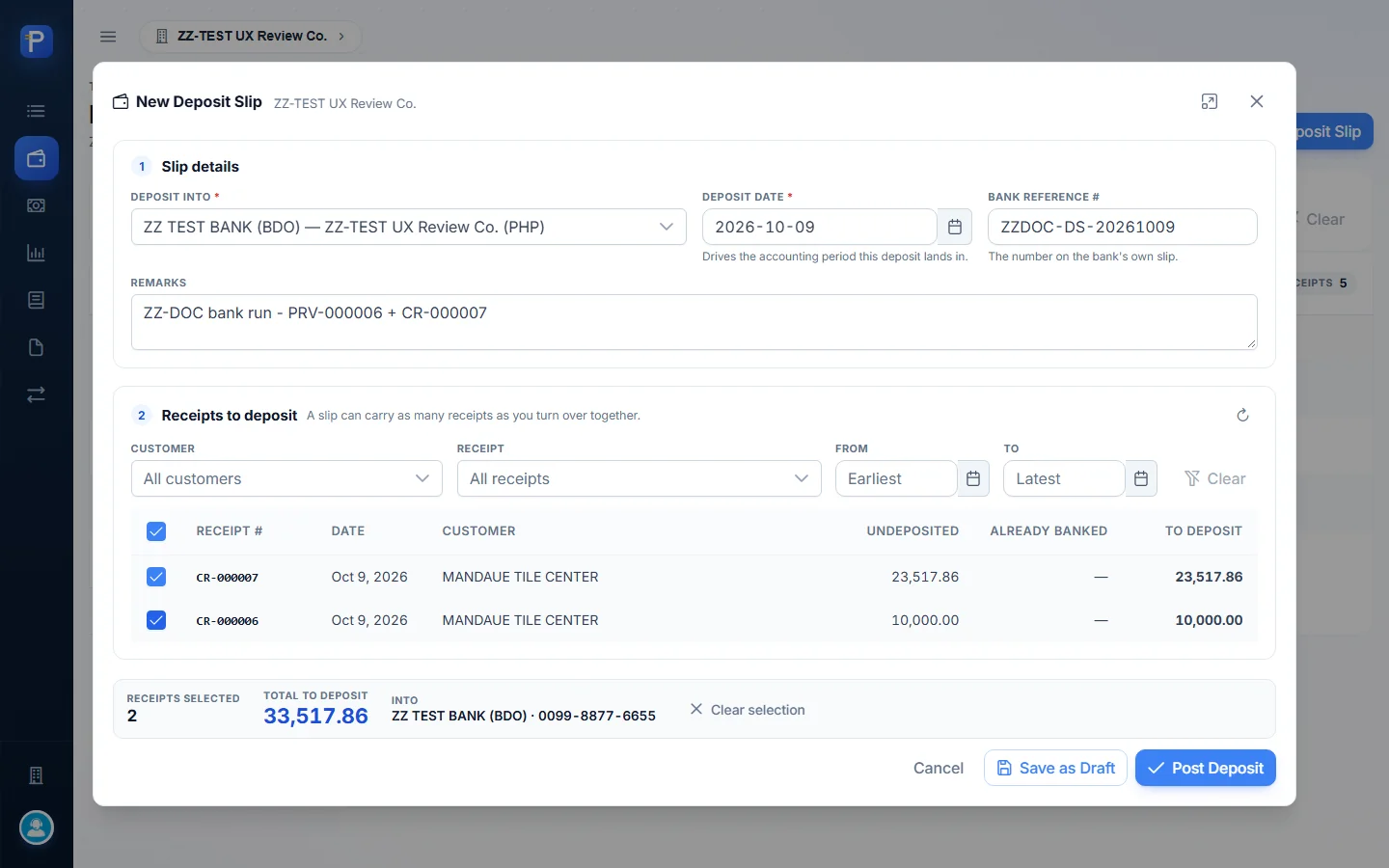
The form asks for Deposit into (the bank account, and ZZ-TEST only has ZZ TEST BANK (BDO)), Deposit date (“drives the accounting period this deposit lands in”), Bank reference # (the number on the bank’s own slip) and remarks. Below that is the receipts table with Undeposited, Already Banked and To Deposit columns, plus filters for customer, receipt and date.
- Click New Deposit Slip, choose the bank, and type the bank ref
ZZDOC-DS-20261009and remarks. - Tick the receipts to bank: CR-000007 (23,517.86) and CR-000006/PRV-000006 (10,000.00). The footer counts “Receipts selected 2, Total to deposit 33,517.86, Into ZZ TEST BANK (BDO) · 0099-8877-6655”.
- Click Post Deposit. The confirmation spells out the posting: “This writes the deposit to the General Ledger, moving ₱33,517.86 out of Undeposited Collection and into ZZ TEST BANK (BDO) across 2 receipts. Those receipts can no longer be cancelled until the slip is reversed in Accounting.”
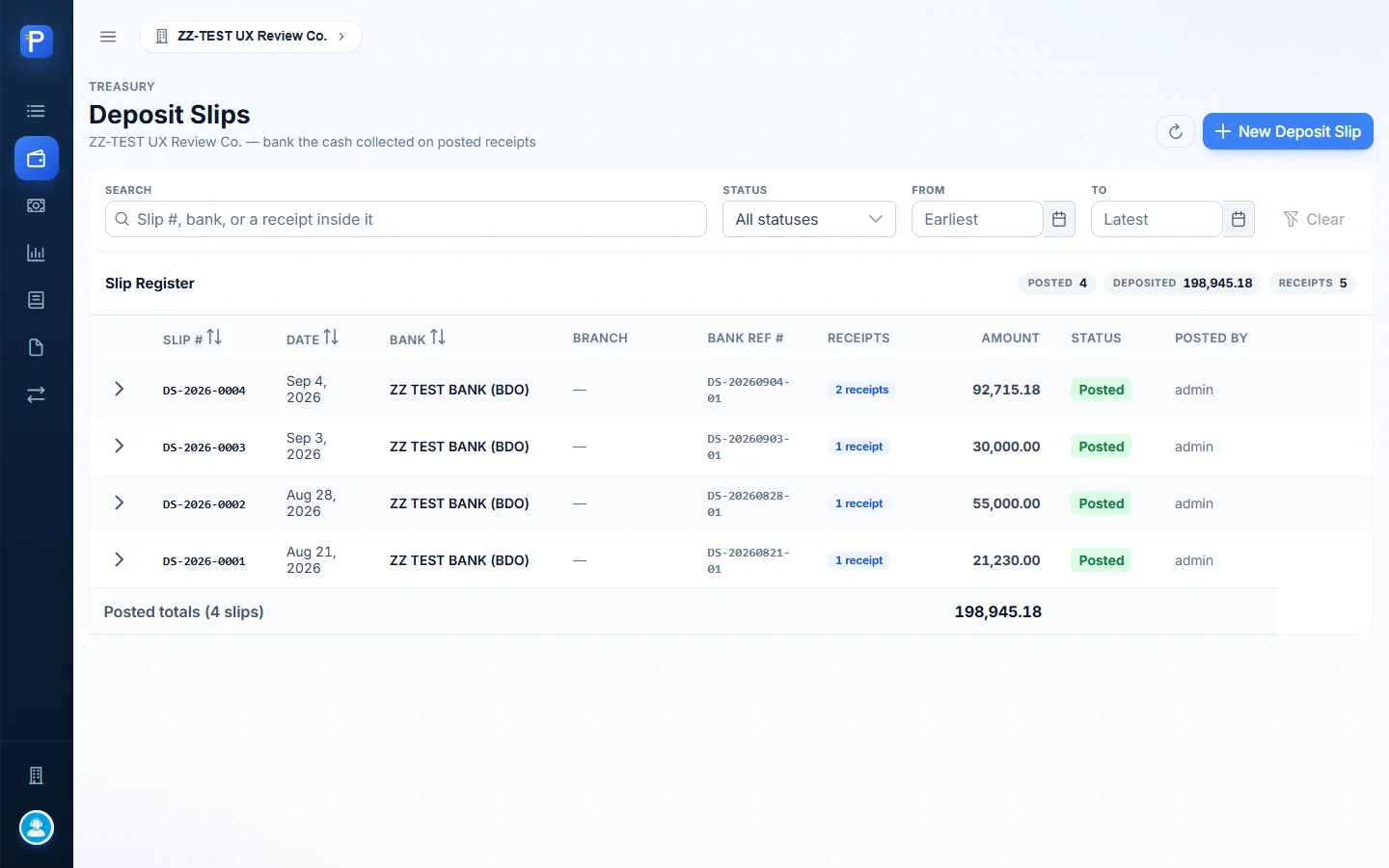



The result was DS-2026-0005: Posted, 2 receipts, 33,517.86, branch ZZ CEBU MAIN, posted by admin. The register totals went to 5 slips, 232,463.04 and 7 receipts. Save as Draft is there too, but I didn’t test a draft.
Daily Collection Report
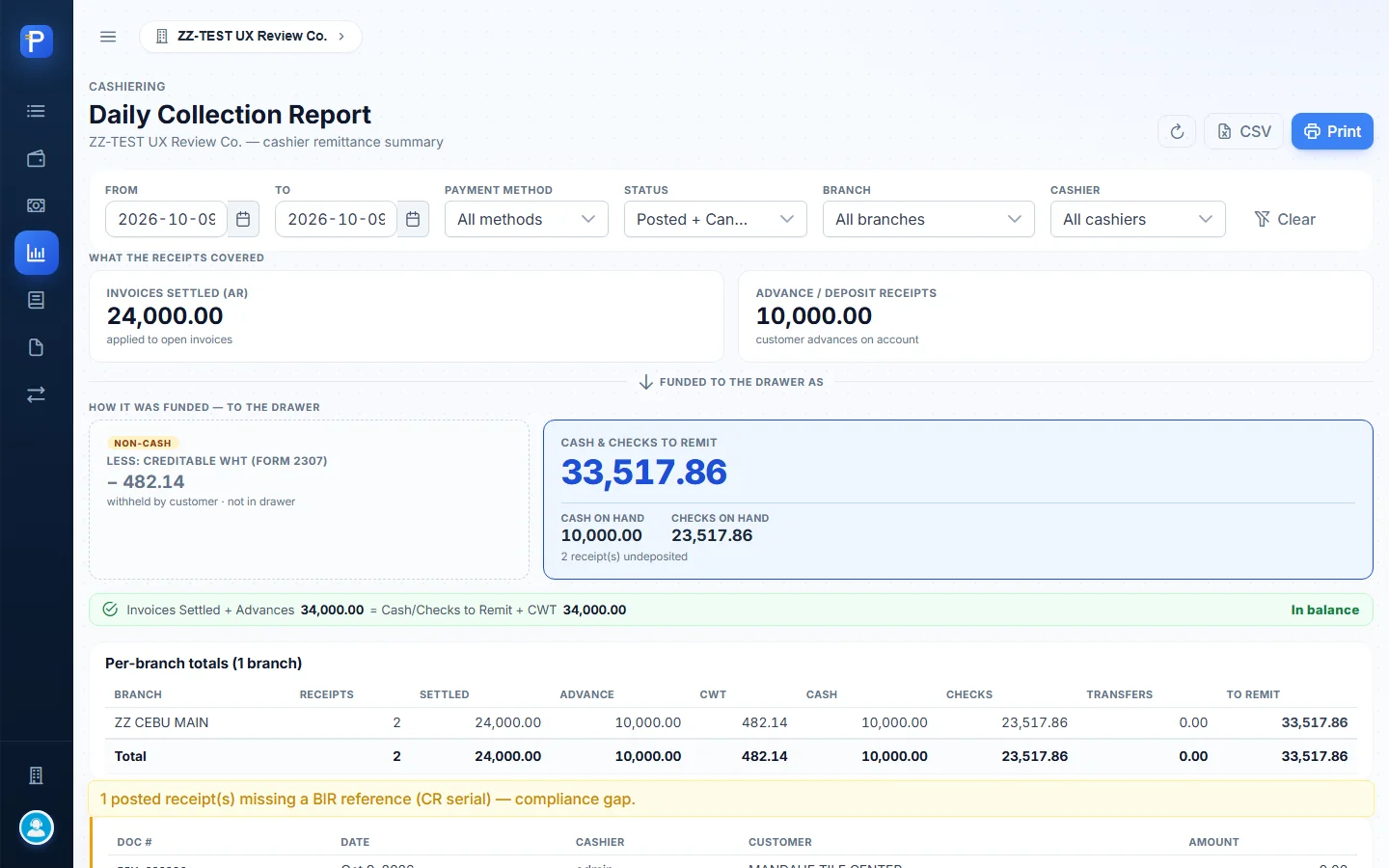
This is the cashier’s remittance summary for a date range. You can filter by payment method, status (Posted + Cancelled), branch and cashier, and export to CSV or print.
The report comes in two halves. “What the receipts covered” shows Invoices settled (AR) 24,000.00 and Advance / deposit receipts 10,000.00. “How it was funded — to the drawer” shows non-cash CWT −482.14 and Cash & checks to remit 33,517.86, split into Cash on hand 10,000.00 and Checks on hand 23,517.86. A green line proves the two halves agree: “Invoices Settled + Advances 34,000.00 = Cash/Checks to Remit + CWT 34,000.00 — In balance.”
Under that are totals per branch and a compliance box (“1 posted receipt(s) missing a BIR reference (CR serial) — compliance gap”), which points at PRV-000006. There’s a Checks on hand list with check # and bank, and a breakdown per cashier listing each receipt with its BIR ref. A missing one shows MISSING in the column.

Customer Ledger
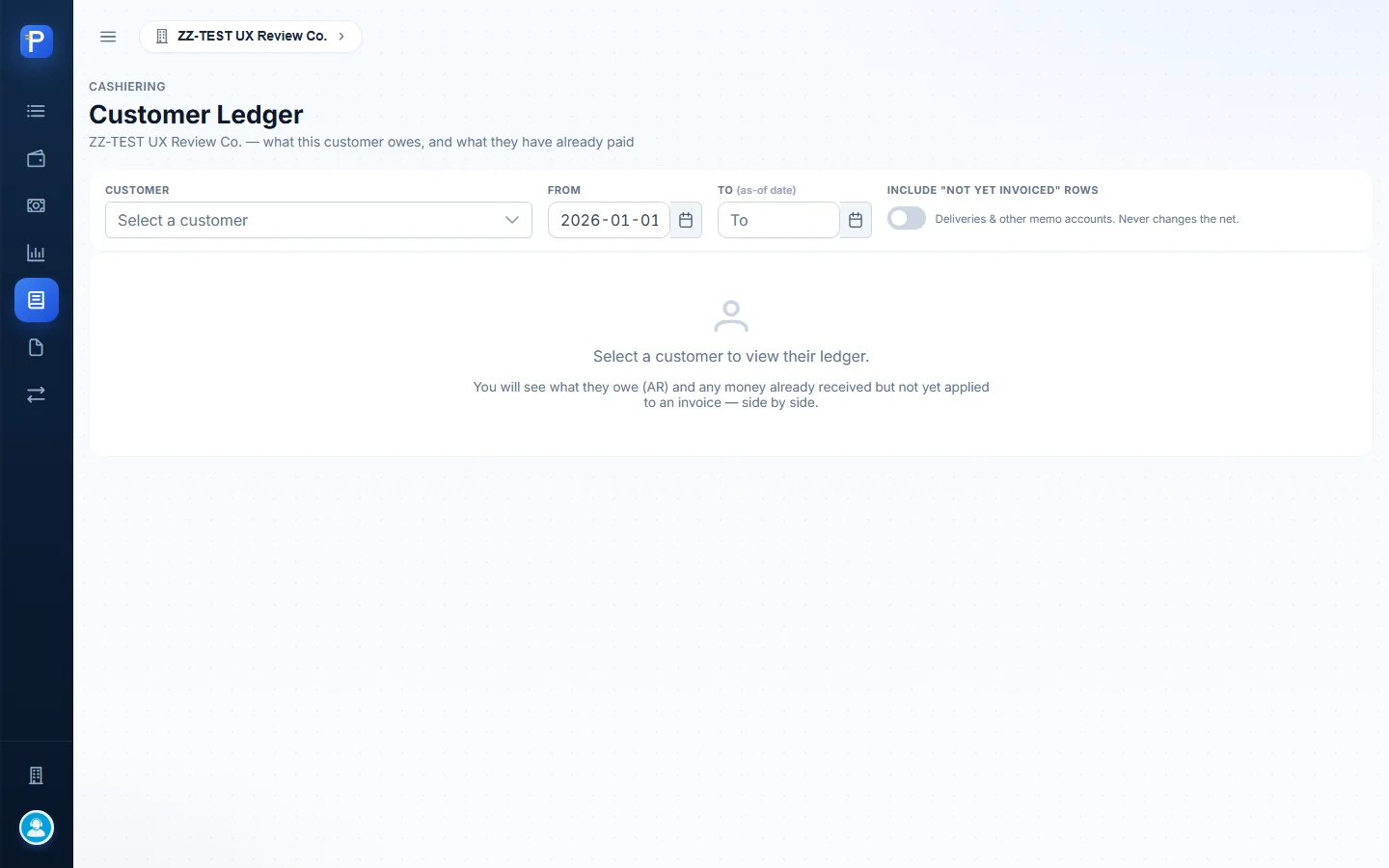
The ledger shows one customer’s position, what they owe and what they’ve already paid, with the GL rows behind it.
You pick the customer, a From date (it only limits the transaction list), and a To date (the as-of date). A switch adds “not yet invoiced” memo rows such as deliveries. The cards show AR balance (owes us), Unapplied advances (money on account), Net due, Deliveries not yet invoiced (memo), and AR aging in Current / 1-30 / 31-60 / 61-90 / 91+ buckets. Aging goes by document date and doesn’t net off advances. The table can be filtered to All, AR or Advances, and shows GL ref, account, bucket, particulars, debit, credit and the running net from the server.

Statement of Account
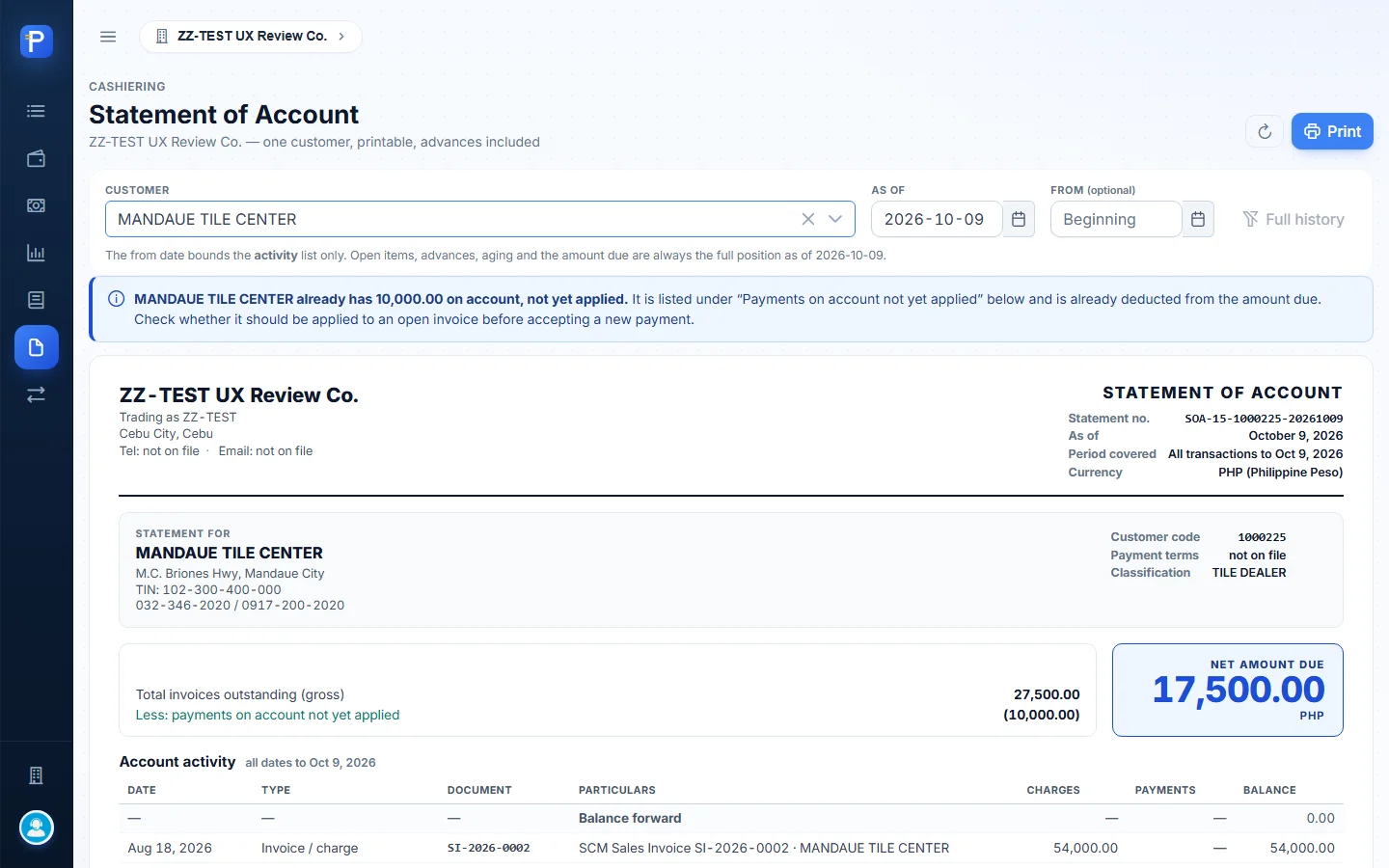
I wanted a printable SOA that never asks a customer for money they’ve already paid. You pick a customer and an as-of date. From is optional and only limits the activity list.
The printed statement has:
- the company header and the statement number (SOA-15-1000225-20261009);
- the customer block with TIN and classification;
- “Total invoices outstanding (gross) 27,500.00, Less payments on account not yet applied (10,000.00), NET AMOUNT DUE 17,500.00”;
- an Account activity table with a running balance;
- Outstanding invoices with days and age bucket (SI-2026-0007, 36 days, 31-60);
- Payments on account not yet applied (PRV-000006, 10,000.00 available);
- an aging table and the company’s deposit accounts for paying;
- a footer saying it is “not an invoice, not an Official Receipt, and is not valid for VAT substantiation”.
Print sends this view to the browser’s print dialog. There’s no separate preview page, so what’s on screen is the printable layout.

Applying an advance
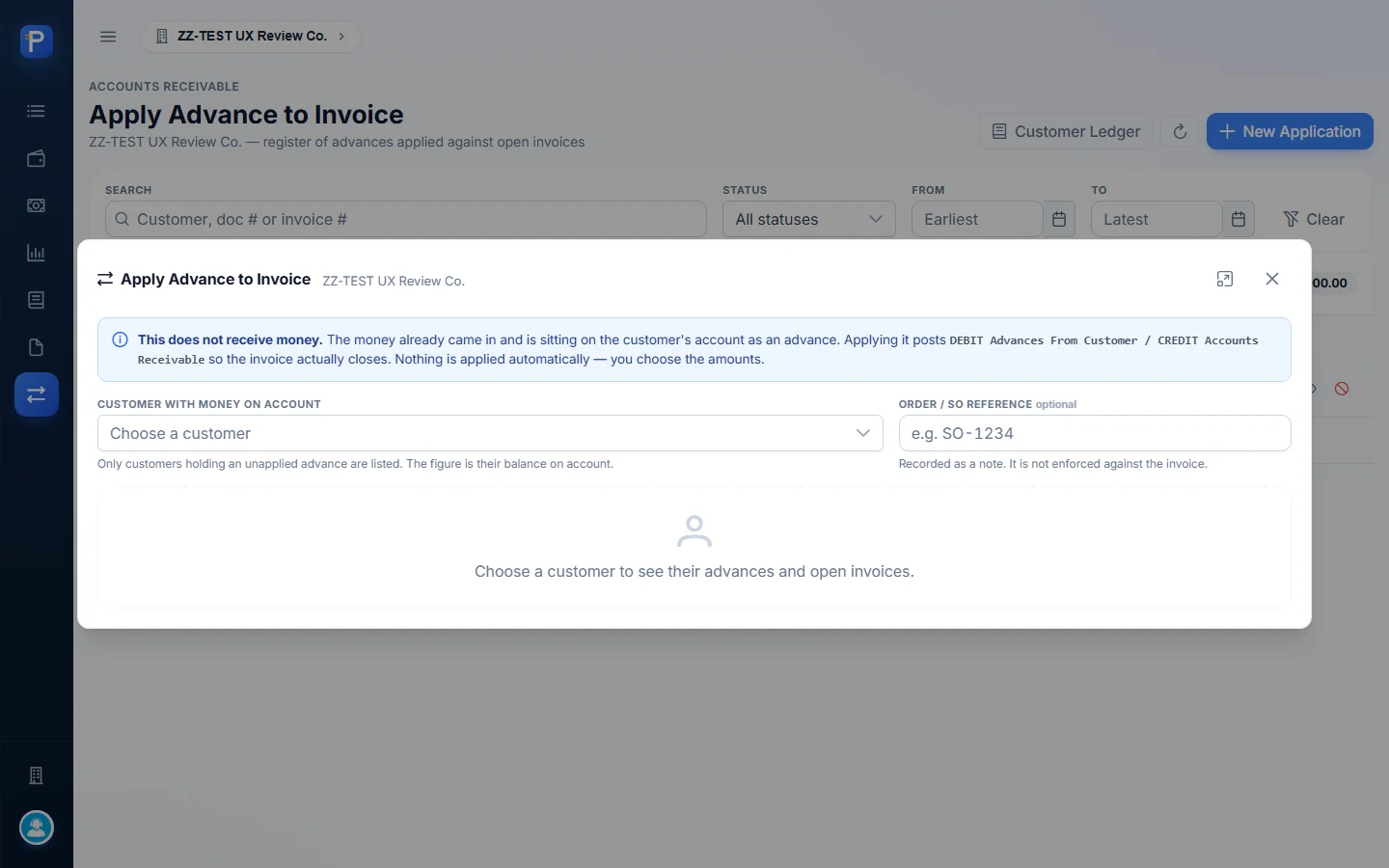
An Advance Application offsets money held on account against an open invoice. The form puts it plainly: “This does not receive money… Applying it posts DEBIT Advances From Customer / CREDIT Accounts Receivable so the invoice actually closes. Nothing is applied automatically — you choose the amounts.”
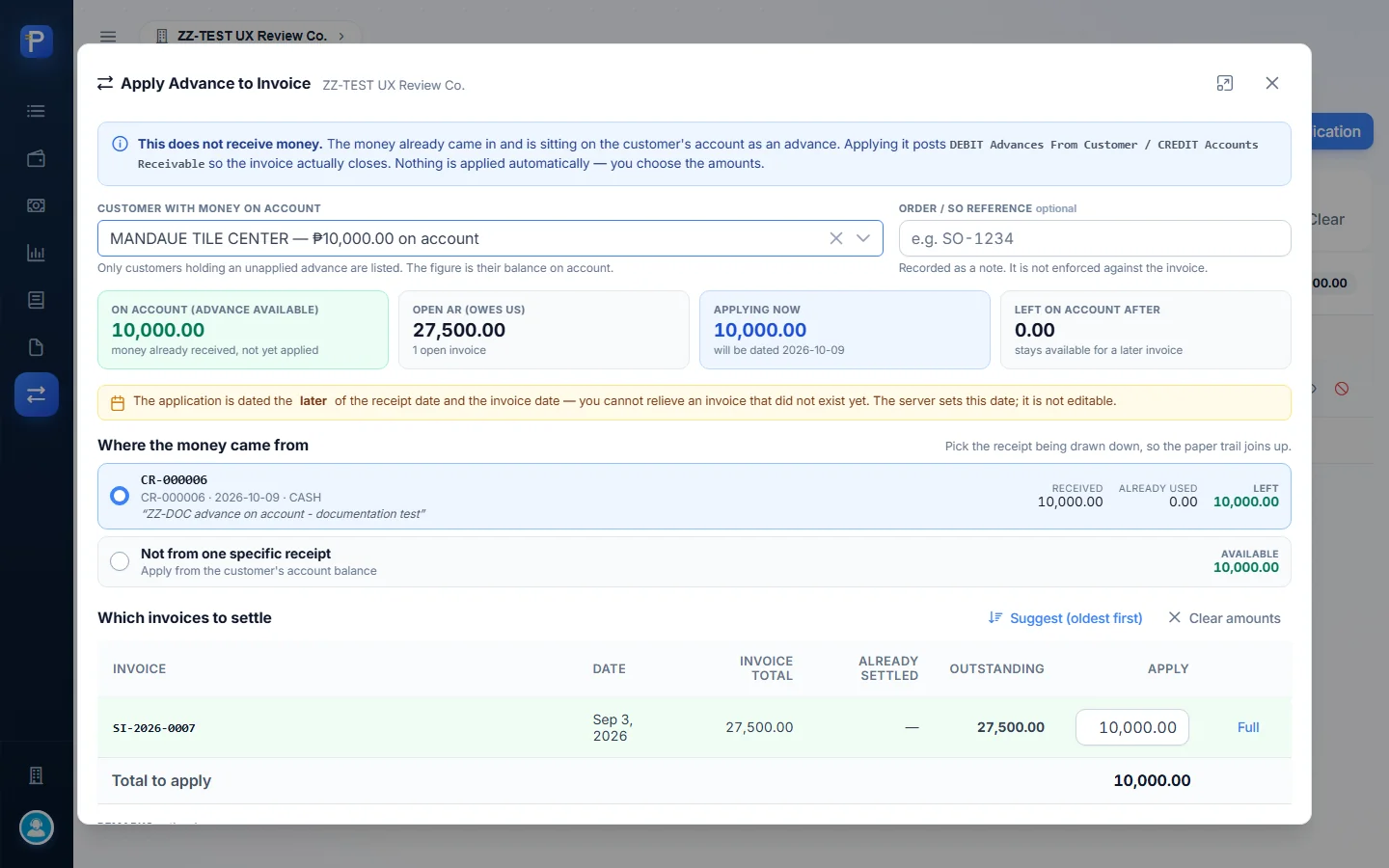
You pick the customer (only customers holding an unapplied advance are listed, with their balance) and an optional Order / SO reference, which is just a note. Then you say Where the money came from: a specific receipt, or “Not from one specific receipt” to draw on the account balance. The invoice table has an Apply amount and a Full button per line, plus Suggest (oldest first) and remarks. The server sets the application date to the later of the receipt date and the invoice date, and you can’t edit it.
- Click New Application and choose “MANDAUE TILE CENTER — ₱10,000.00 on account”. The cards show On account 10,000.00, Open AR 27,500.00, Applying now 10,000.00, and Left on account after 0.00. Source receipt CR-000006 is already selected, and SI-2026-0007 is already filled in with 10,000.00.
- Add remarks and click Apply Advance. Confirm “Apply ₱10,000.00 from CR-000006? This posts a journal entry dated 2026-10-09: DEBIT Advances From Customer ₱10,000.00, CREDIT Accounts Receivable ₱10,000.00… No cash moves. It can be reversed by cancelling the application.”
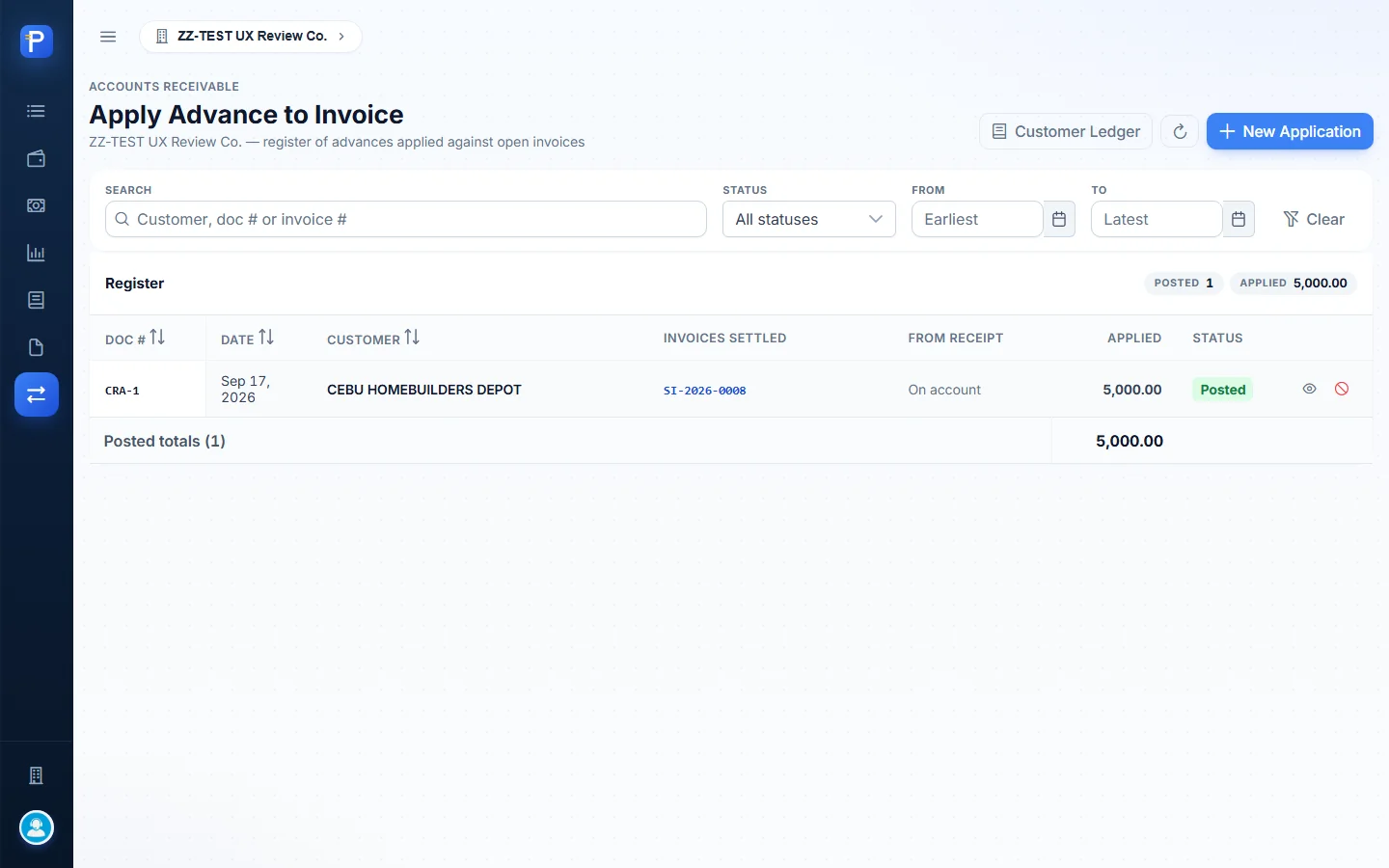

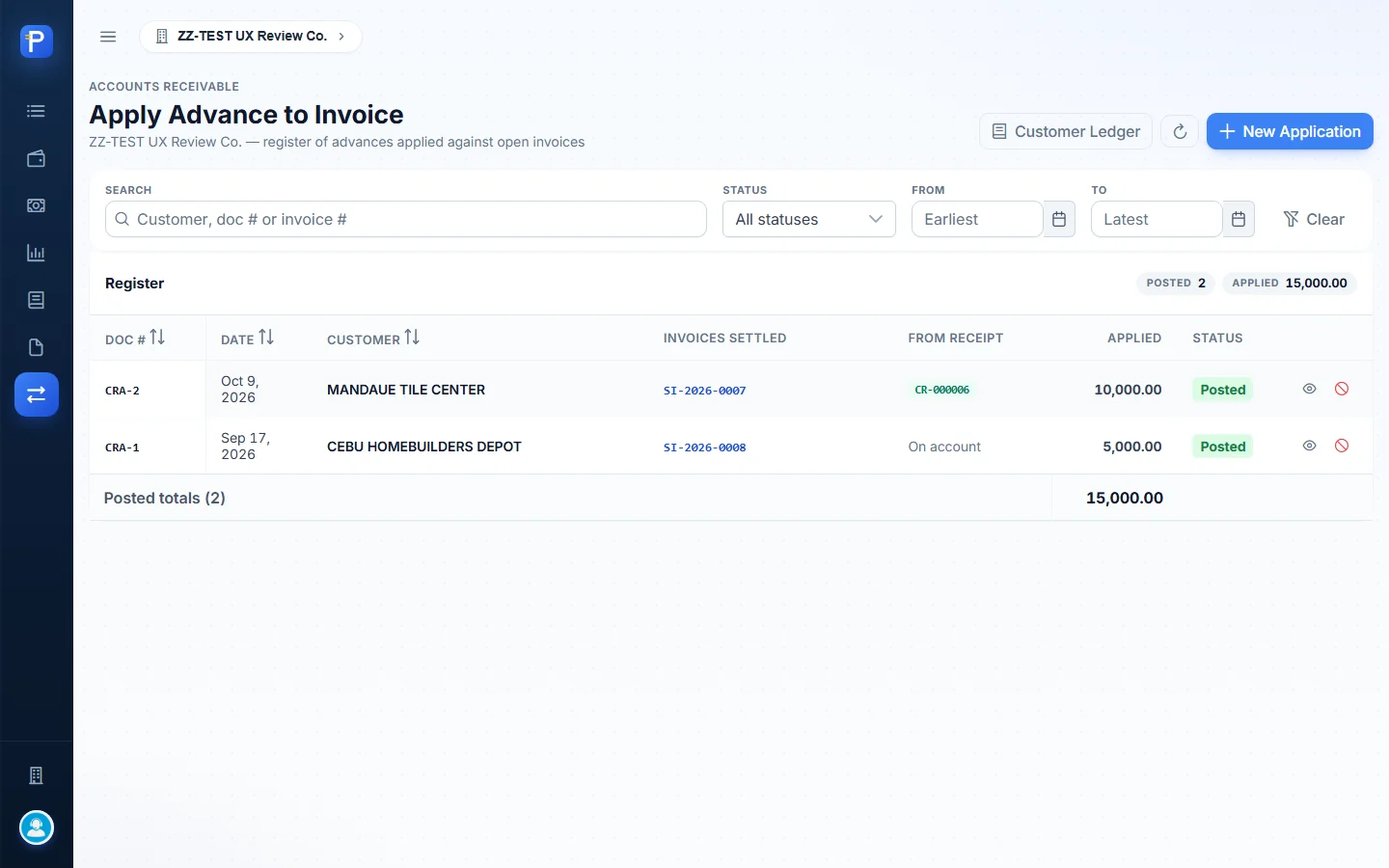
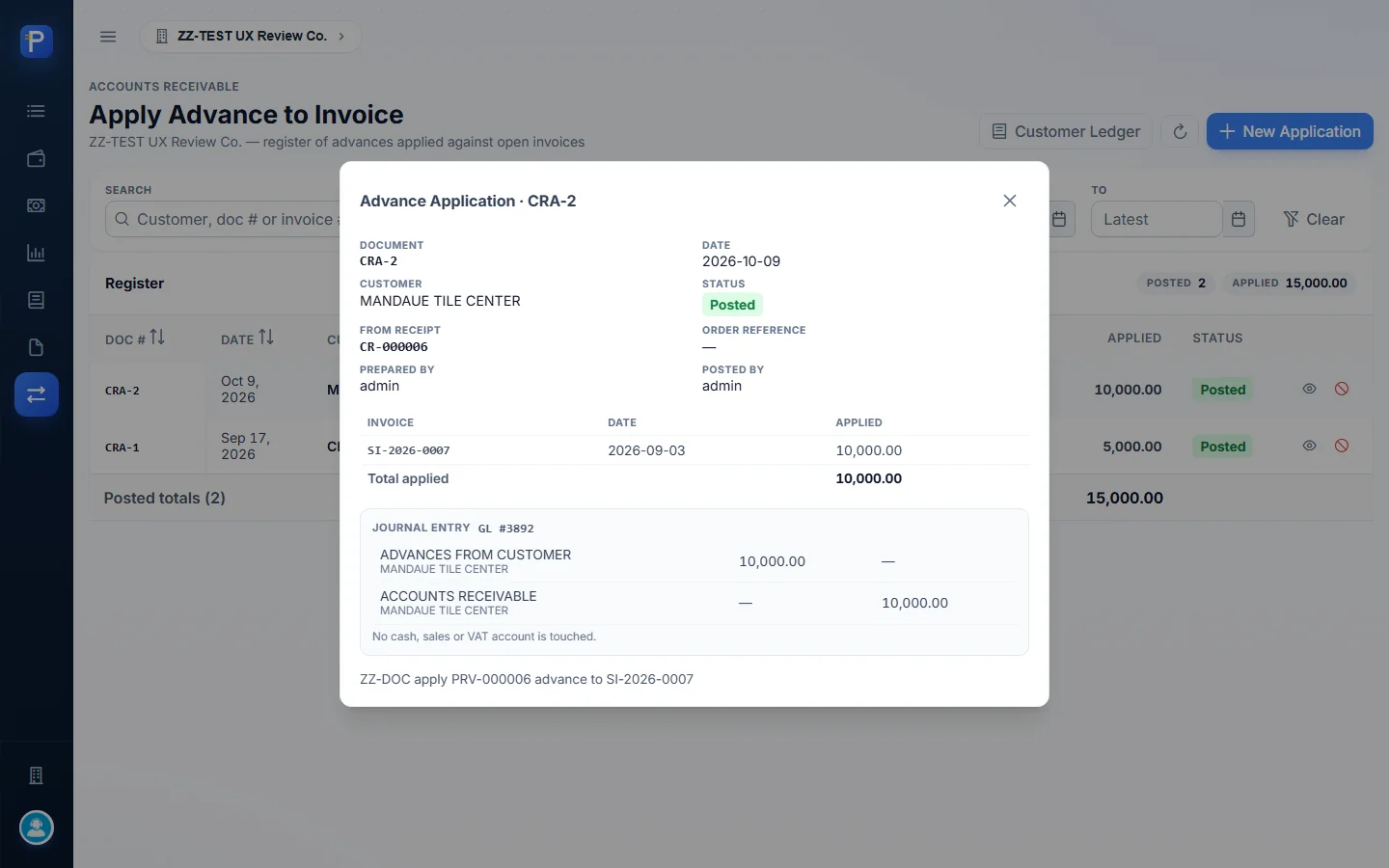
The result was CRA-2: Posted, 10,000.00 applied to SI-2026-0007 from CR-000006, journal entry GL #3892 (Advances from Customer 10,000 Dr / Accounts Receivable 10,000 Cr). Afterwards the ledger showed AR balance 17,500.00, unapplied advances 0.00, net due 17,500.00, and two CRA-2 rows in the list. The on-account warning was gone from the ledger, the statement and the receipt form.
Post-dated cheques
The PDC Register tracks cheques handed over before their date. The empty-state text draws the line: “The money itself still posts through a Collection Receipt on the Receipts page.”
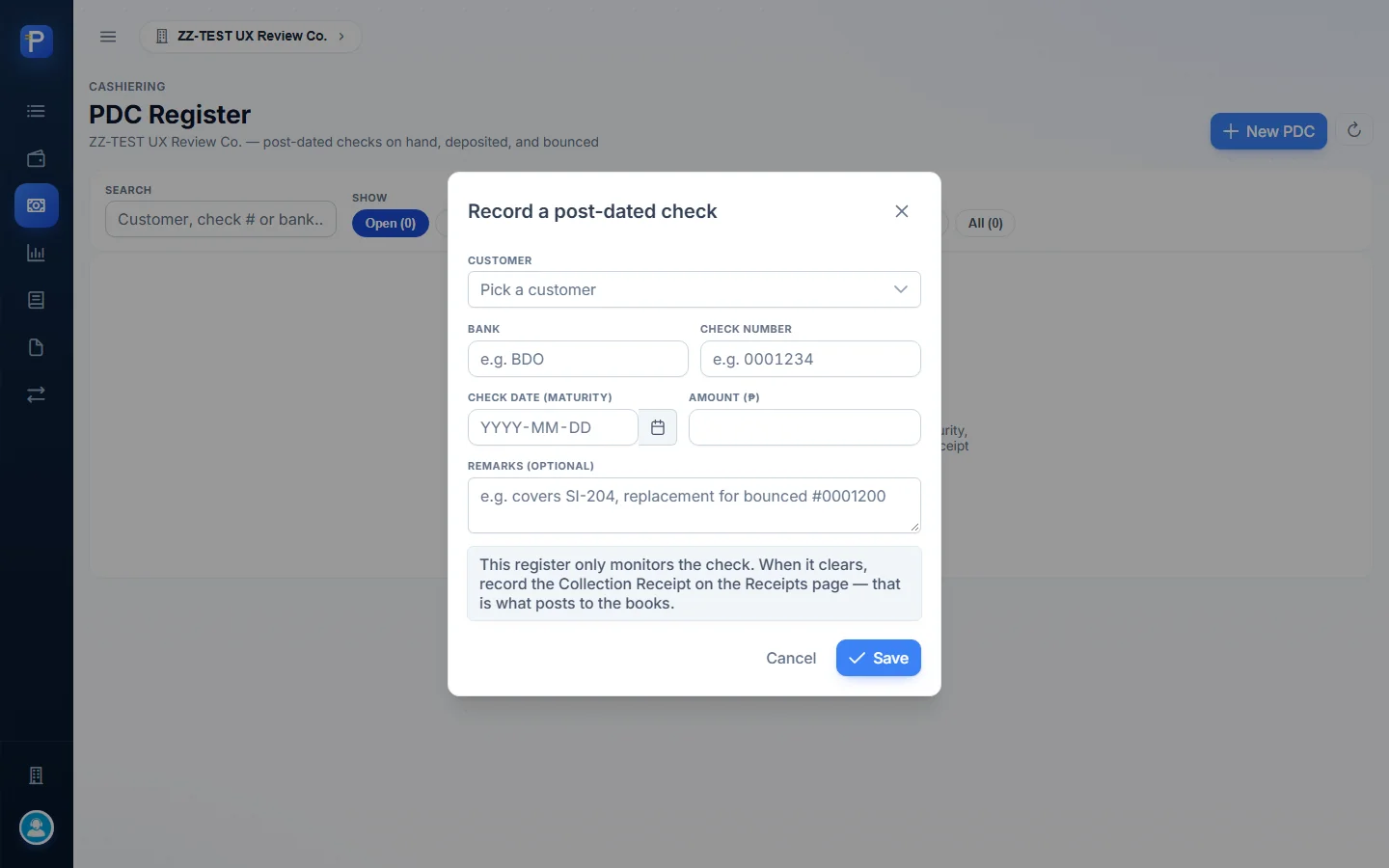
The form asks for customer, bank, check number, check date (maturity), amount and remarks. Cards count On hand, Due for deposit (matured but still on hand), Deposited pending clearing, and Bounced, and the filters match them.
- Click New PDC and enter MANDAUE TILE CENTER, BPI,
ZZDOC-PDC-2002, maturity 2026-11-15, amount 27,500.00, and remarksZZ-DOC post-dated check covering SI-2026-0007. Click Save. - The row appears as On Hand, “In 37 days”, with Deposit, Edit and Cancel check actions.
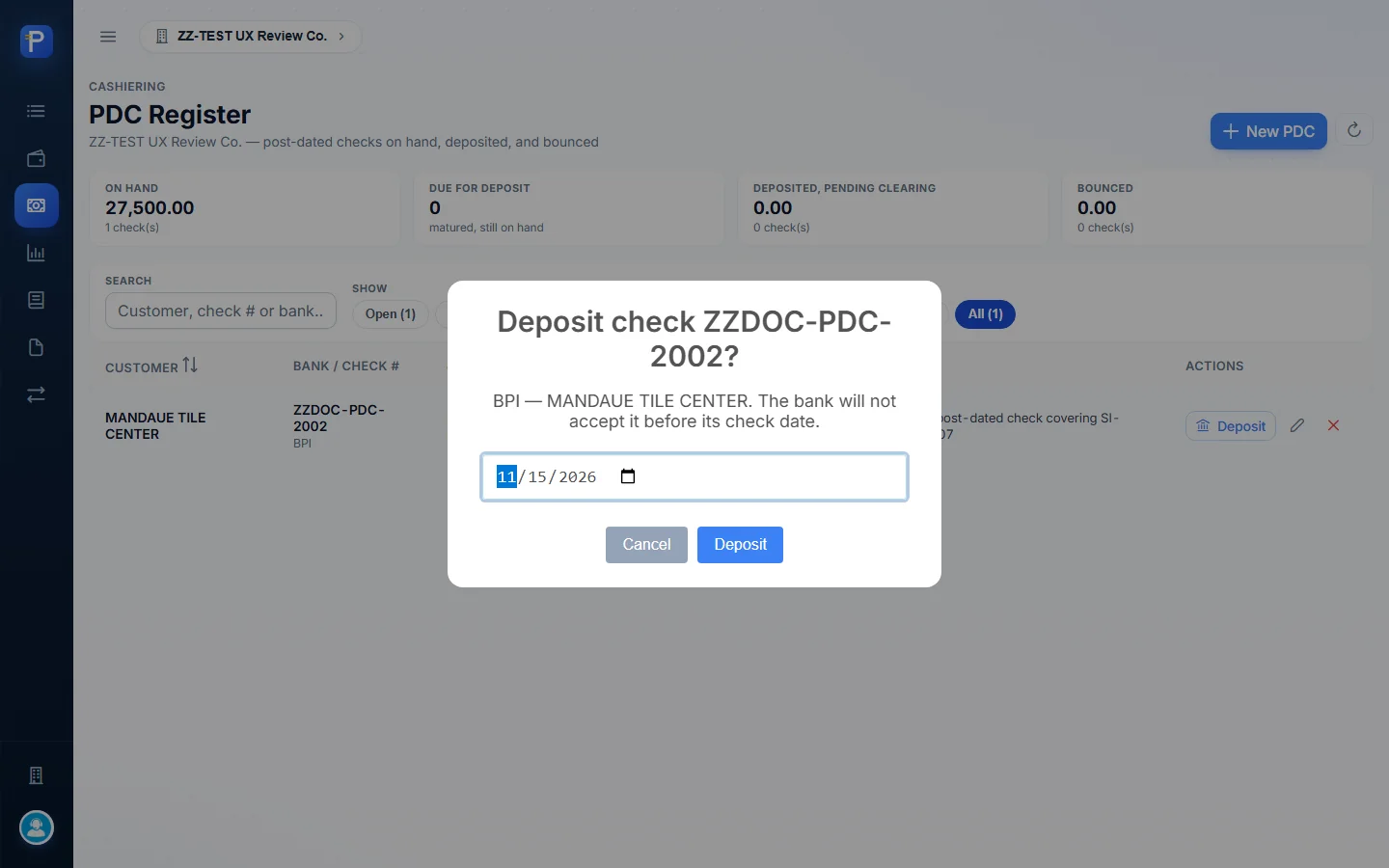
- Deposit asks “Deposit check ZZDOC-PDC-2002? … The bank will not accept it before its check date.” The date box defaults to the maturity date. After I confirmed, the status became Deposited, dep. Nov 15 and the actions changed to Cleared and Bounced.
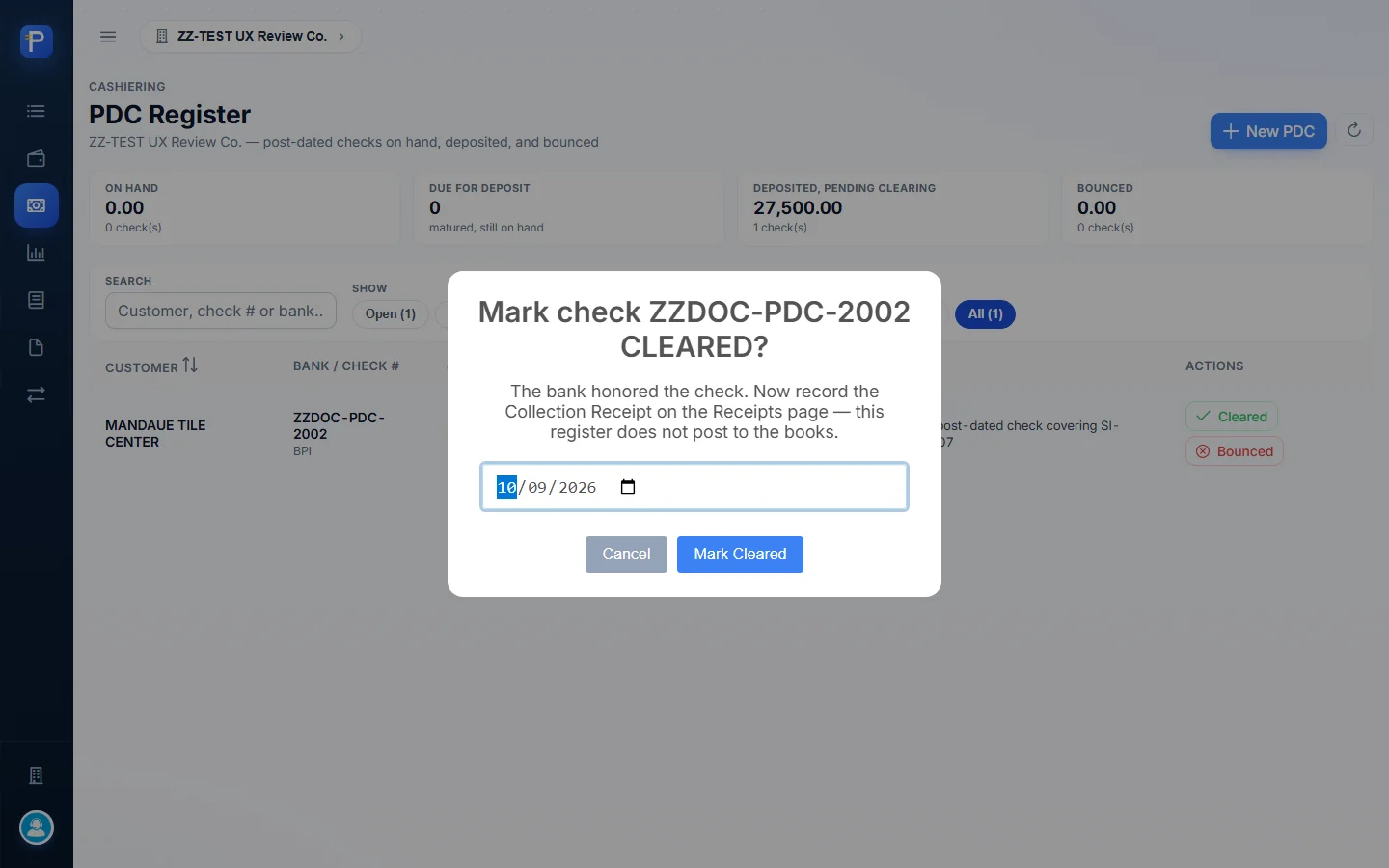
- Cleared asks “Mark check ZZDOC-PDC-2002 CLEARED? The bank honored the check. Now record the Collection Receipt on the Receipts page — this register does not post to the books.” With today’s date it was refused: “Clearing date cannot be earlier than the deposit date (2026-11-15).” So the cheque stays Deposited.





How the documents connect
- Supply Chain posts a Sales Invoice (SI). It shows up here as open AR (GL ref SCM_SI-nn) in the ledger, the statement and the receipt form.
- A Collection Receipt (CR) applies cash or a cheque to invoices, net of CWT, and debits Undeposited Collection. A Provisional Receipt (PRV, from the same number series) books an advance to Advances from Customer instead.
- A post-dated cheque can sit in the PDC Register while it waits. The register only monitors, and the CR still gets recorded when the cheque clears.
- A Deposit Slip (DS) banks one or more posted receipts, crediting Undeposited Collection and debiting the bank. Banked receipts can’t be cancelled until the slip is reversed in Accounting.
- An Advance Application (CRA) offsets a PRV balance against an open invoice with a journal entry that moves no cash.
- The Daily Collection Report ties receipts to the drawer and CWT, per cashier and branch. The Customer Ledger and Statement of Account show where each customer ends up. Journal entries (for example GL #3892) live in Accounting.
What still needs fixing
- After both receipts were banked on DS-2026-0005, the Daily Collection Report still said “2 receipt(s) undeposited” under Checks on hand, even after a reload. It may mean “as received that day”, but the label reads like current status.
- In Account activity, the Statement of Account labels the payment rows CR-000003 and CR-000007 as type “Invoice / charge”, even though they sit in the Payments column. Only PRV-000006 is typed “Payment on account”.
- The advance receipt is PRV-000006 on the register and statement but CR-000006 in the deposit-slip picker and the Apply Advance screen (GL ref CR-6). Same document, inconsistent label.
- The Print buttons on the statement, the receipt previews and the report open the browser’s print dialog. There’s no separate print-preview route, so the screen itself is the printable view.
- You can’t mark a PDC cleared with a clearing date before its deposit date, so a cheque deposited on its maturity date can’t be cleared “today”. I didn’t try Bounced. I also didn’t exercise Edit and Cancel check on the PDC, Cancel receipt, Cancel application, or the two Save Draft buttons.
- The company has one bank account (ZZ TEST BANK (BDO)), one branch (ZZ CEBU MAIN), and no customer-maintenance screen in this app. I used MANDAUE TILE CENTER because it had open invoices. A ZZ-DOC CUSTOMER TRADING record exists from a sibling app, but it has no invoices.
- I didn’t delete, void or cancel anything. The test documents I created were PRV-000006, CR-000007, DS-2026-0005, CRA-2, and PDC ZZDOC-PDC-2002 (status Deposited).