Paylalo Fixed Assets
Paylalo Fixed Assets (assets.paylalo.com) keeps the register of what a company owns: machinery, vehicles, office and IT equipment. It charges depreciation once a month, posts it to the same general ledger the rest of Paylalo uses, and takes assets off the books when they’re sold, scrapped or written off. The month-end accountant uses it, so do the people who raise and approve capital requests, and the group accountant holds the tighter reversal rights.
It sits next to two other Paylalo apps. Purchasing still happens in Supply Chain, and the categories and chart of accounts come from the ERP back office. I ran this walkthrough as the admin of the test company ZZ-TEST UX Review Co. Every figure and message below is what the screen showed.
The screens
- Dashboard (
/app/dashboard): cost, accumulated depreciation and net book value summed over the register, the last posted depreciation run, and a table by category. - Asset Requests (
/app/requests): ask for a capital item and get the spend authorised. Draft → For Approval → Approved → Fulfilled, with an approval limit of 50,000.00. - Asset Register (
/app/assets): every capitalised item with its schedule and book value. New asset, Edit, Place in service, Cancel draft, Depreciation schedule, QR label, Print all QR. - Depreciation (
/app/depreciation): preview a month asset by asset, post it to the GL as one journal entry per branch, view run lines, reverse the latest run. - Disposals (
/app/disposals): sale, trade-in, scrap or write-off in one journal entry. It can be reversed. - Reports (
/app/reports): Asset register, PPE rollforward and Depreciation history, with Export and Print. - Asset Categories (
/app/categories): the ERP’s item categories, each with five GL accounts and a default life, salvage and method. - The shell around it all has a Rewards store, a Help Center with a full guided tour of the module, a profile (photo and signature), the company switcher, notifications and Report Issue.
Dashboard
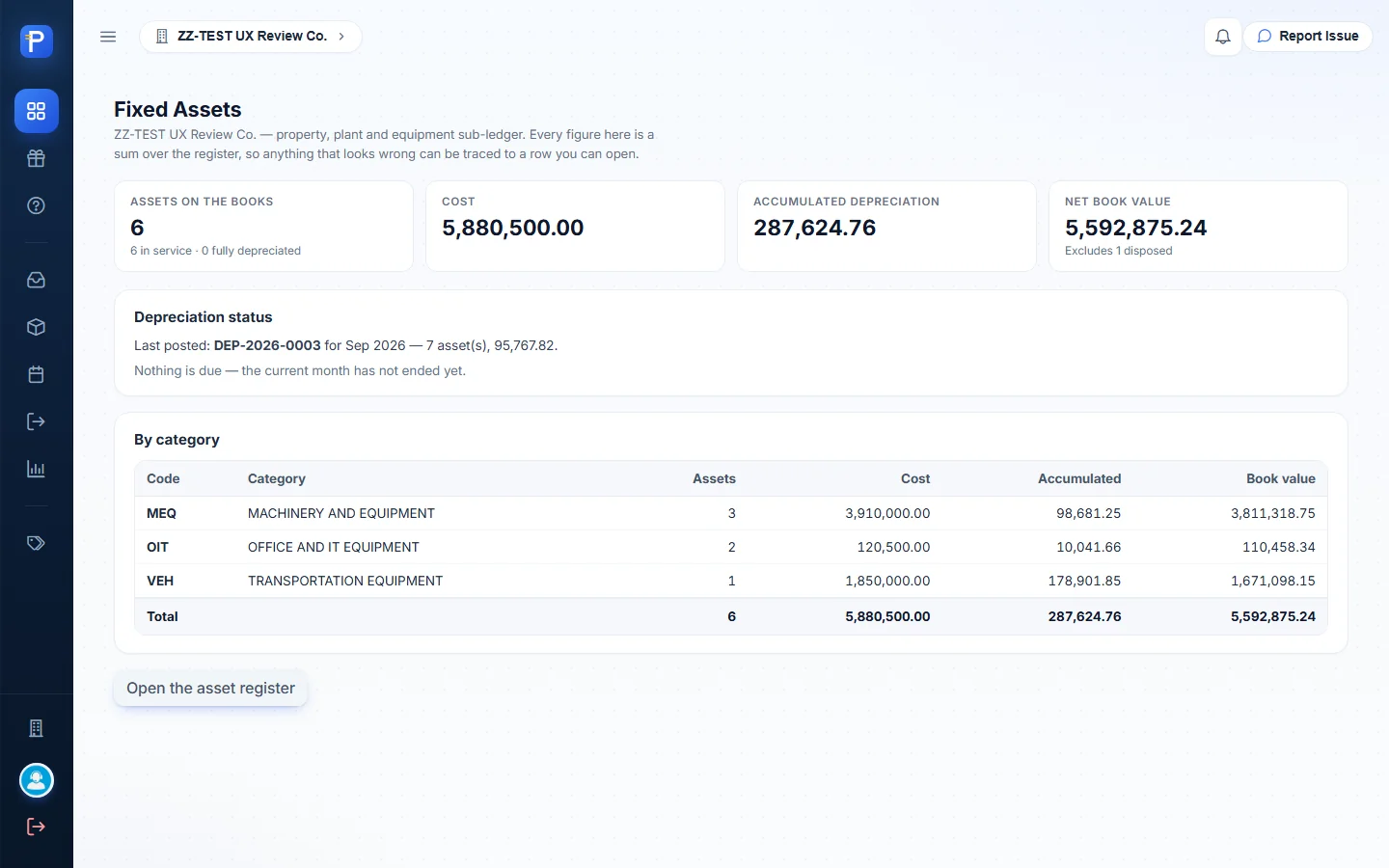
The dashboard sums the register. Before I started it read: Assets on the books 6 (6 in service, 0 fully depreciated), Cost 5,880,500.00, Accumulated depreciation 287,624.76, Net book value 5,592,875.24, and “Excludes 1 disposed”.
The Depreciation status panel names the last posted run (“DEP-2026-0003 for Sep 2026 — 7 asset(s), 95,767.82”) and says whether anything is due (“Nothing is due — the current month has not ended yet”). The By category table shows MEQ, OIT and VEH with assets, cost, accumulated and book value, and its Total row matches the cards.
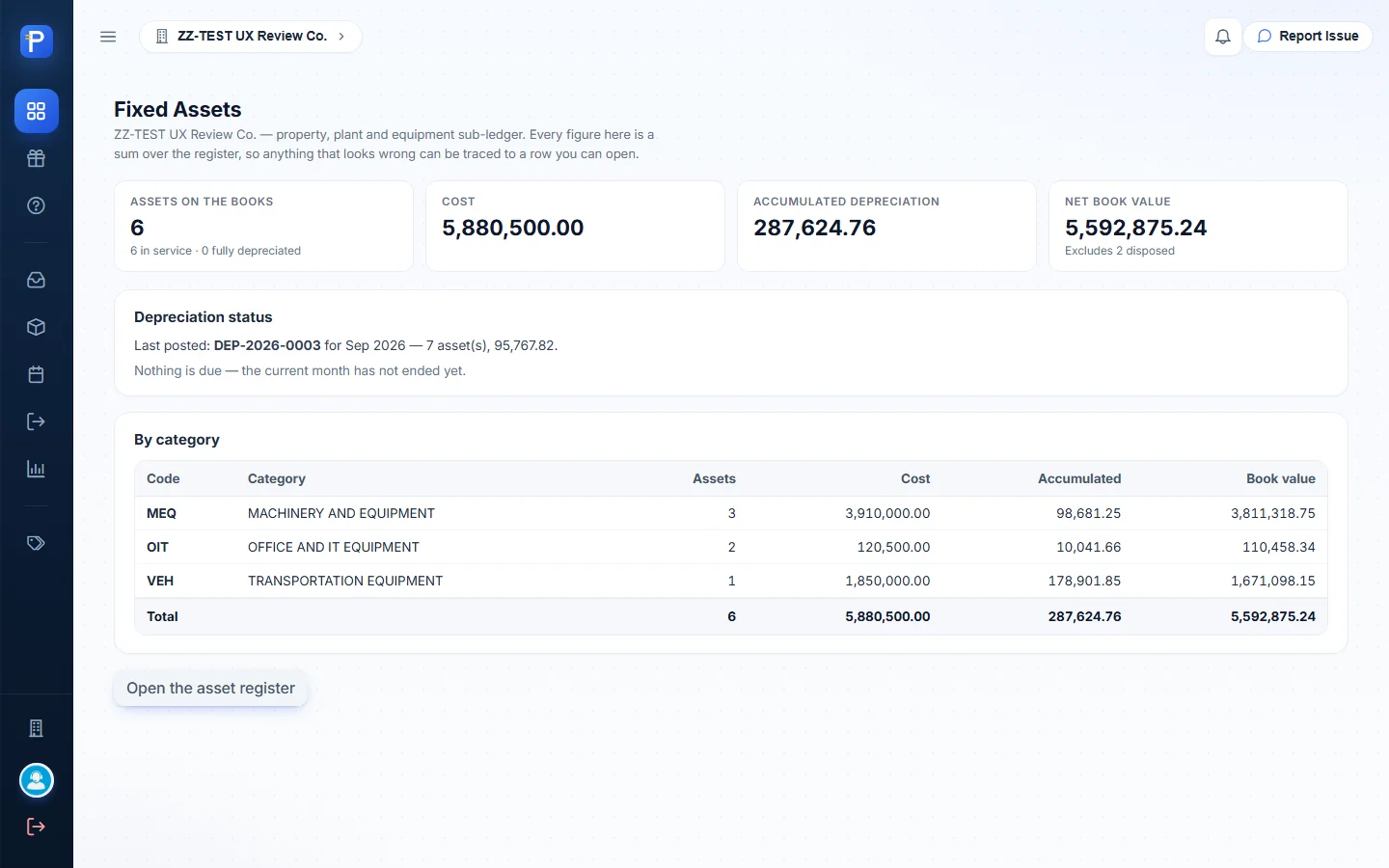
After the walkthrough the page read “Excludes 2 disposed” and the totals hadn’t moved. That’s expected, because I both added and disposed of the ZZ-DOC asset.
Asset categories
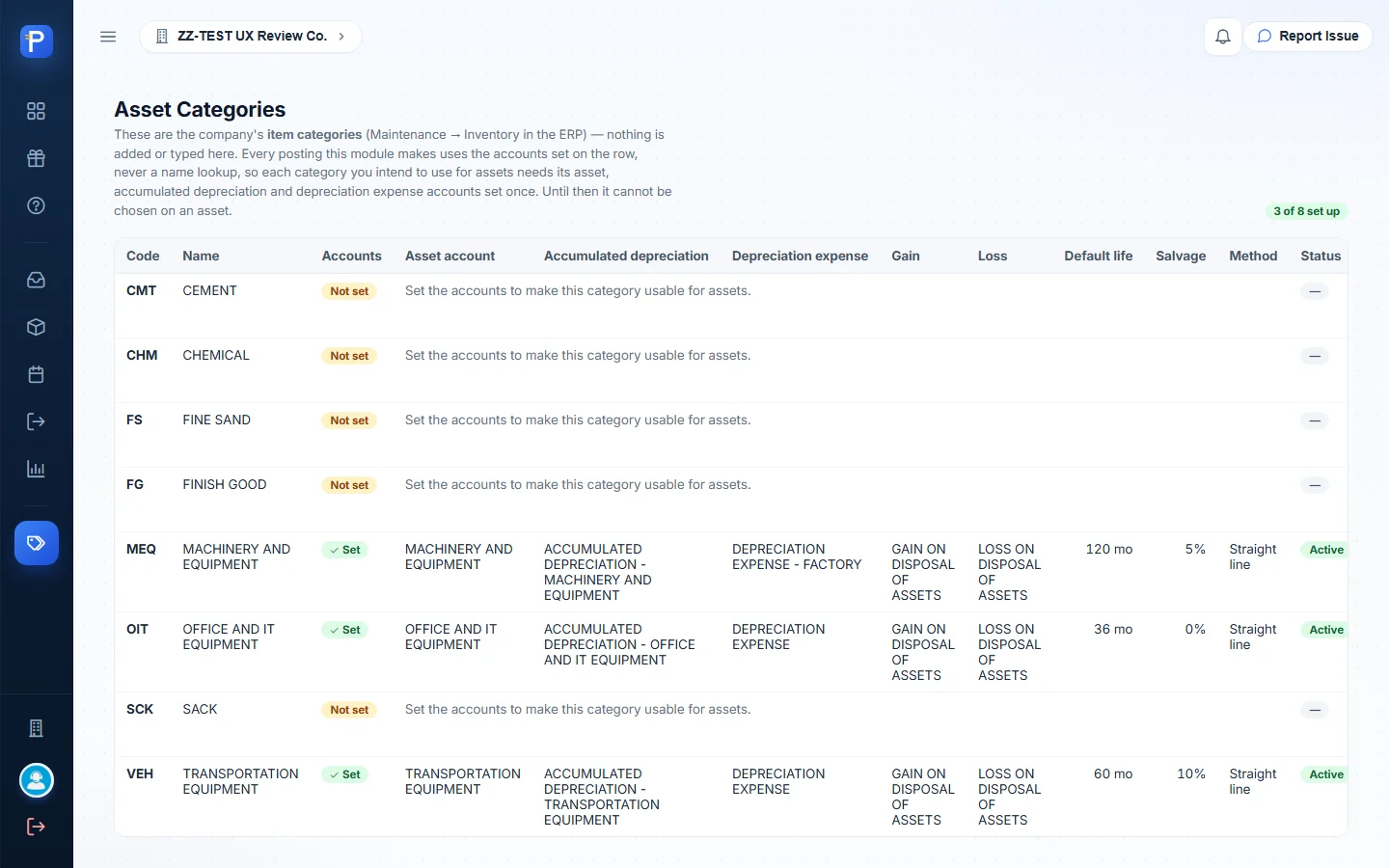
You don’t create categories here, and the page says so: “These are the company’s item categories (Maintenance → Inventory in the ERP) — nothing is added or typed here.” What you do here is attach GL accounts to each one. That’s an Asset account, Accumulated depreciation and Depreciation expense, plus optional Gain and Loss accounts, along with defaults for life, salvage and method. You can only pick a category on an asset once its three required accounts are set. The others show “Not set — Set the accounts to make this category usable for assets.” with a Set up button.
In ZZ-TEST, 3 of 8 categories are set up:
- MEQ, MACHINERY AND EQUIPMENT. Asset account MACHINERY AND EQUIPMENT, ACCUMULATED DEPRECIATION - MACHINERY AND EQUIPMENT, DEPRECIATION EXPENSE - FACTORY, GAIN ON DISPOSAL OF ASSETS and LOSS ON DISPOSAL OF ASSETS. 120 months, 5% salvage, straight line.
- OIT, OFFICE AND IT EQUIPMENT. Asset account OFFICE AND IT EQUIPMENT, ACCUMULATED DEPRECIATION - OFFICE AND IT EQUIPMENT, DEPRECIATION EXPENSE, and the same gain and loss accounts. 36 months, 0%, straight line.
- VEH, TRANSPORTATION EQUIPMENT. Asset account TRANSPORTATION EQUIPMENT, ACCUMULATED DEPRECIATION - TRANSPORTATION EQUIPMENT, DEPRECIATION EXPENSE, same gain and loss. 60 months, 10%, straight line.
Since categories come from the ERP, I couldn’t make a ZZ-DOC category in this app. Setting accounts on an unrelated ERP category like CEMENT or SACK would have changed master data that wasn’t mine to change. OIT fit the test asset, so I used it as it was.
Asset requests (FAR)
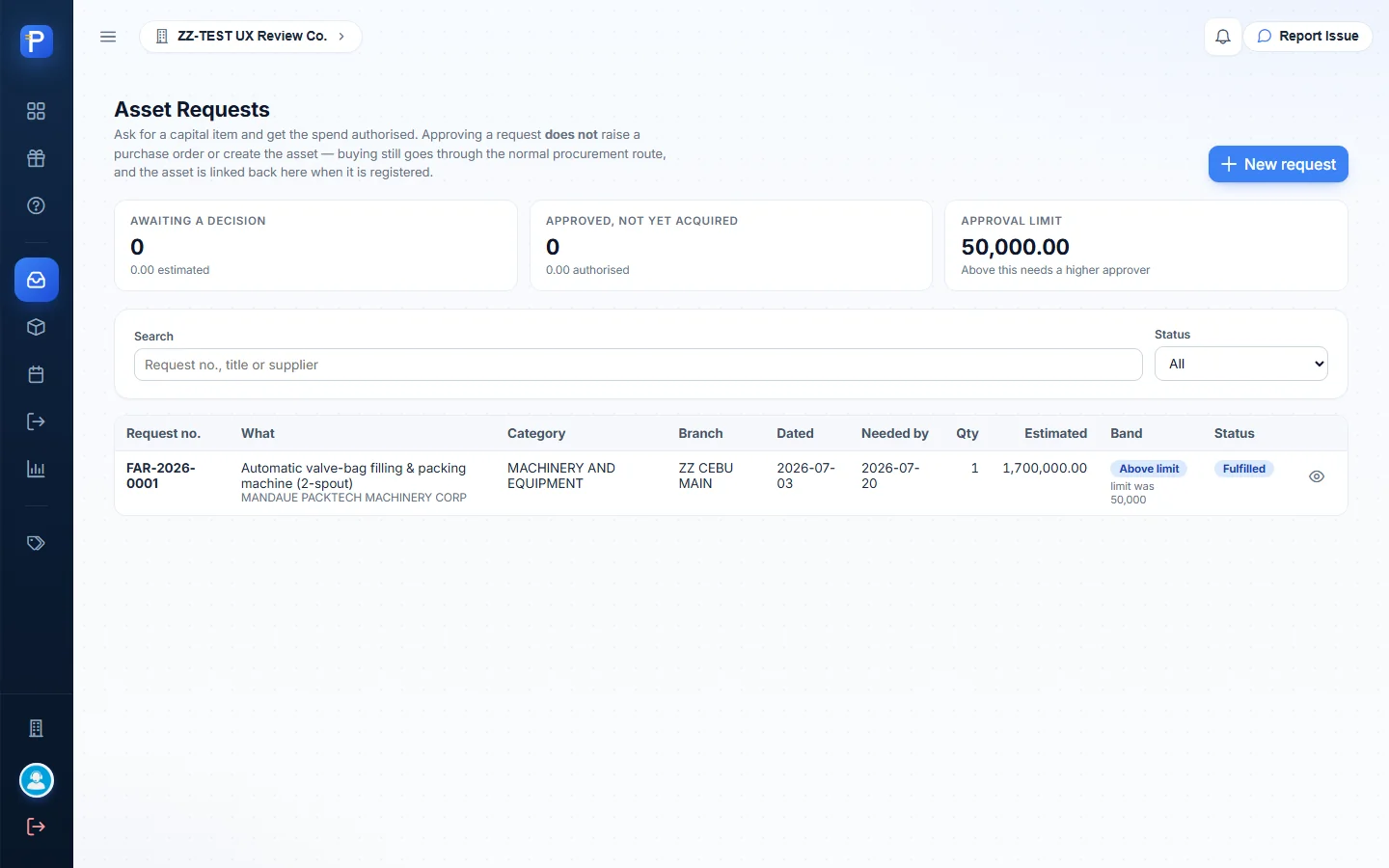
An asset request asks for a capital item and gets the spend authorised. The page header is clear that approving “does not raise a purchase order or create the asset — buying still goes through the normal procurement route, and the asset is linked back here when it is registered.” Up top are three tiles: Awaiting a decision, Approved not yet acquired, and the Approval limit (50,000.00, “Above this needs a higher approver”). Below them are a search box and a Status filter (Draft, For Approval, Approved, Fulfilled, Rejected, Cancelled).
The form asks: What are you asking for, Justification (“An approver decides on this. A line item alone is not enough.”), Quantity, and Estimated cost (total). The cost field has a live band indicator (“Within the 50,000 approval limit. Frozen once submitted.”). Then come Request date, Needed by, Likely asset category (only a hint), Branch, Preferred supplier (a suggestion that commits nobody) and Remarks.
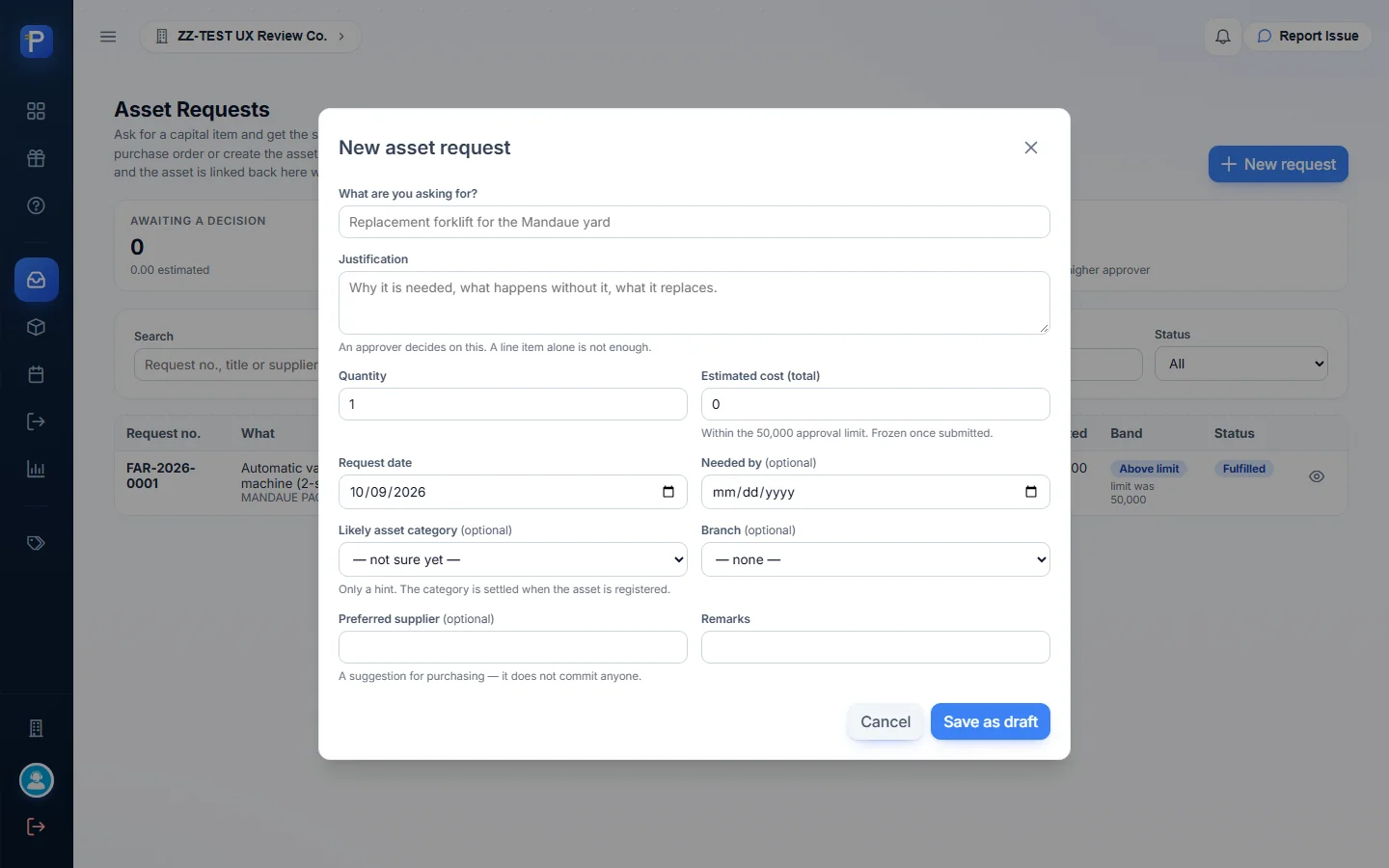
What I did:
- Clicked New request and filled it in: “ZZ-DOC Industrial label printer for dispatch office”, a justification, quantity 1, estimated cost 42,000, request date 2026-06-01, needed by 2026-06-15, category OIT, branch ZZ CEBU MAIN, preferred supplier “ZZ-DOC Supplier (any)”.
- Save as draft. The row shows up as FAR-2026-0002, tagged “yours”, band “Within limit”, status Draft, with Open, Edit, Submit for approval and Cancel request.
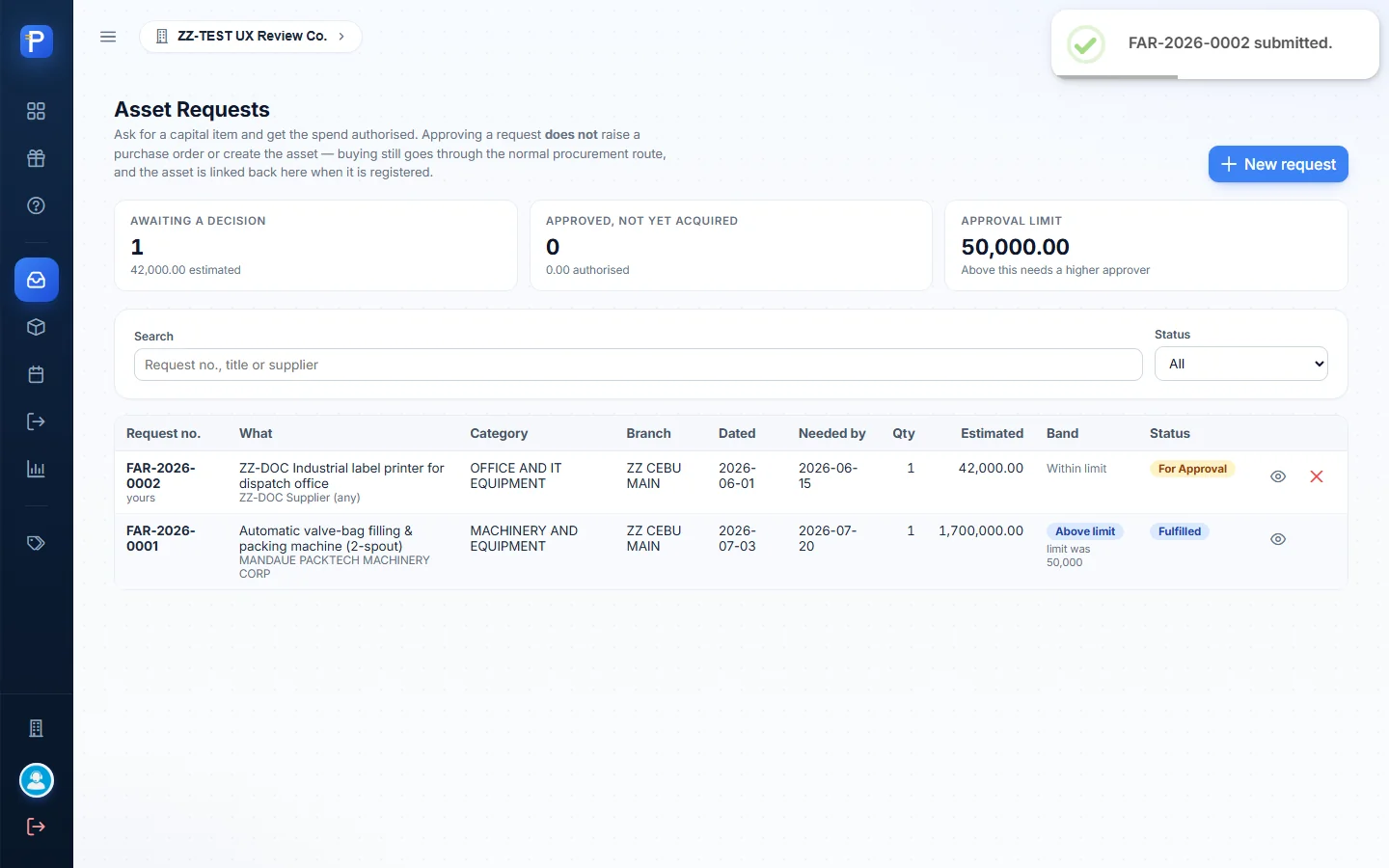
- Submit for approval. The confirmation reads “FAR-2026-0002 — 42,000.00. This is within the approval limit. Once submitted the estimated cost is frozen.” After I submitted, the status went to For Approval and Edit disappeared. Only Open and Cancel were left.
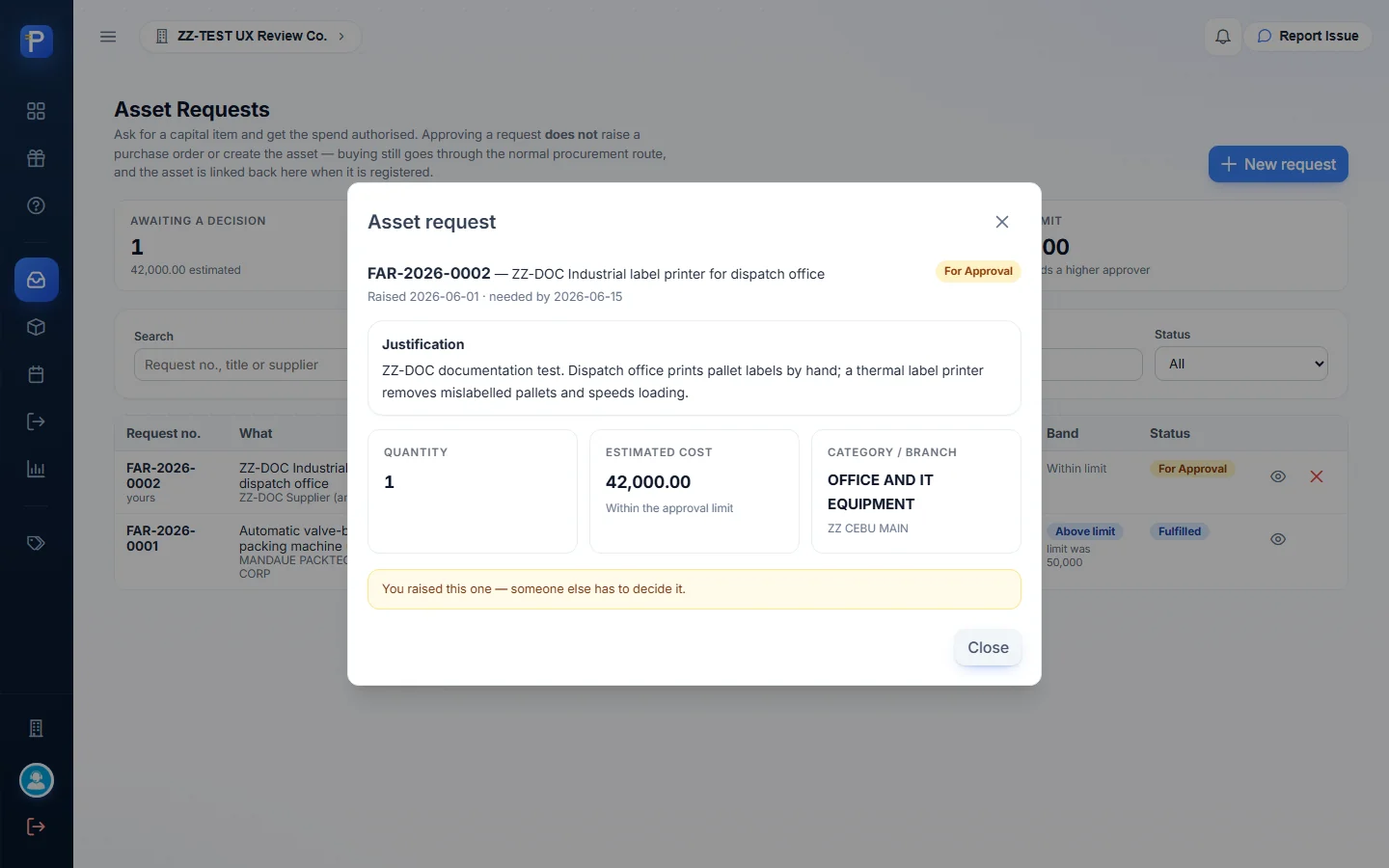
- Opening the request shows the detail dialog with the line “You raised this one — someone else has to decide it.” As the admin who raised it, I wasn’t offered Approve or Reject, so it stayed at For Approval.

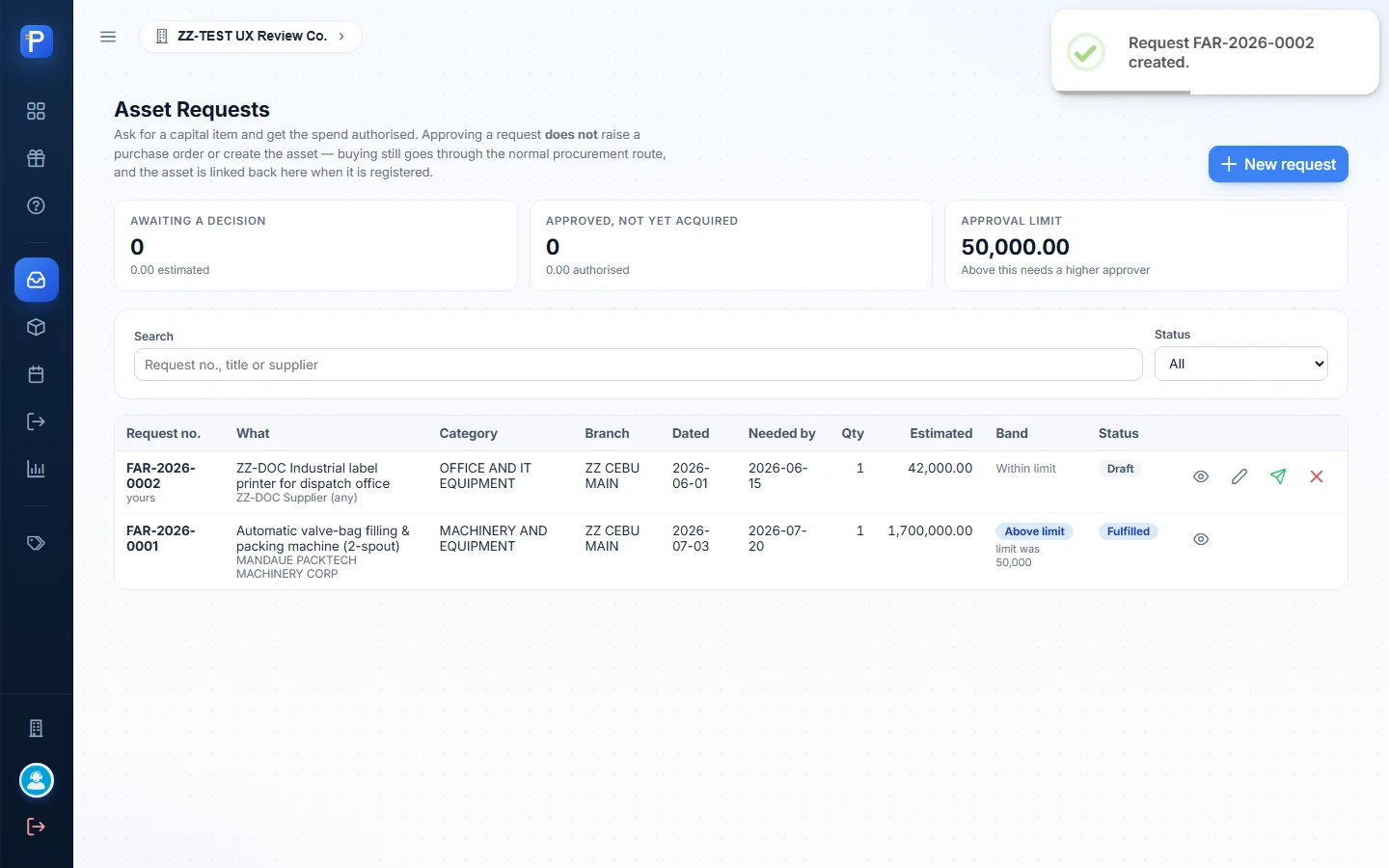

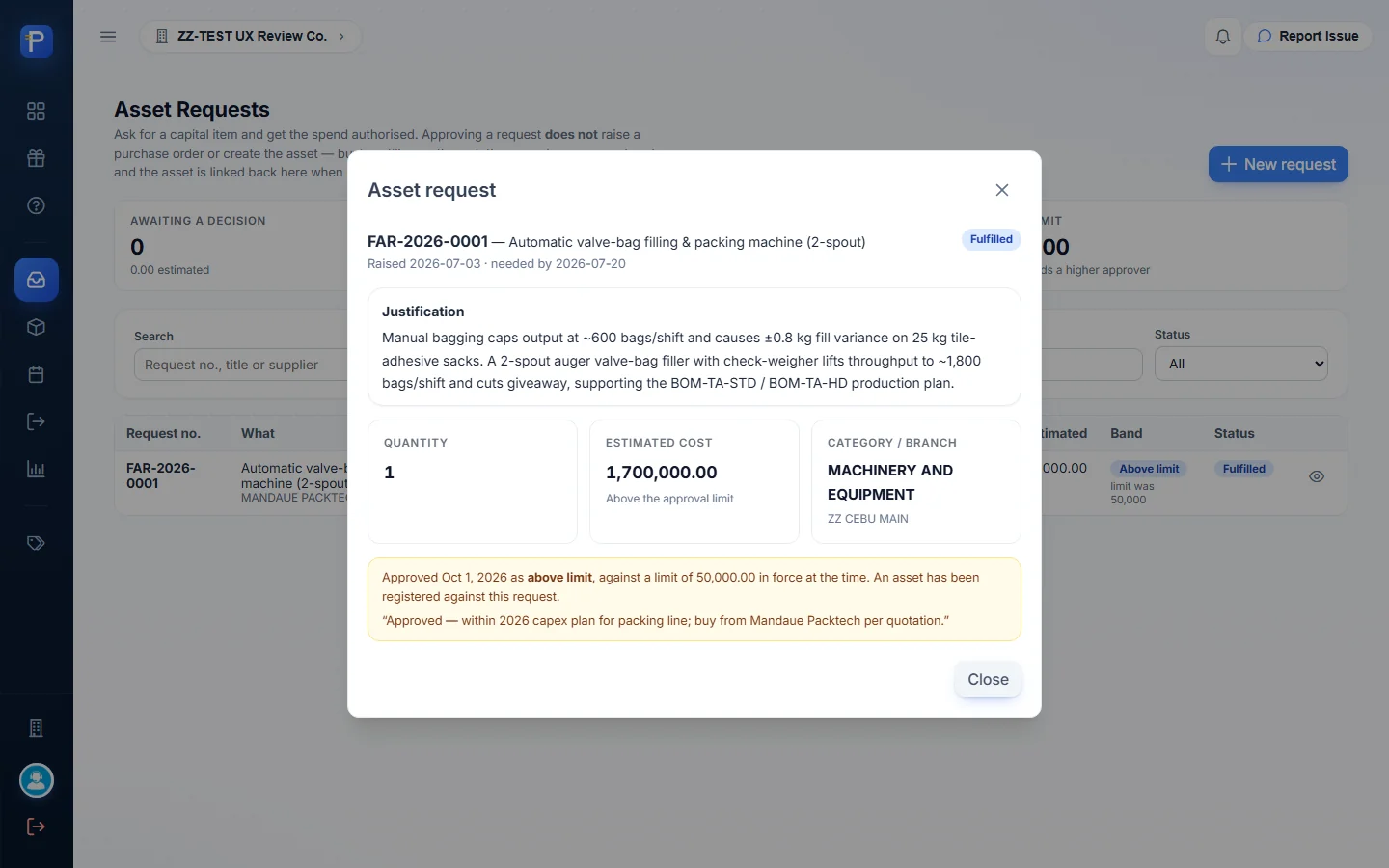
For the rest of the lifecycle, the older request FAR-2026-0001 shows what a decided one looks like. It was for 1,700,000.00, “Above limit — limit was 50,000”. It reads “Approved Oct 1, 2026 as above limit, against a limit of 50,000.00 in force at the time. An asset has been registered against this request.” with the approver’s note. Its status is Fulfilled because FA-2026-0002 was linked to it on the asset form.
Asset register (FA)
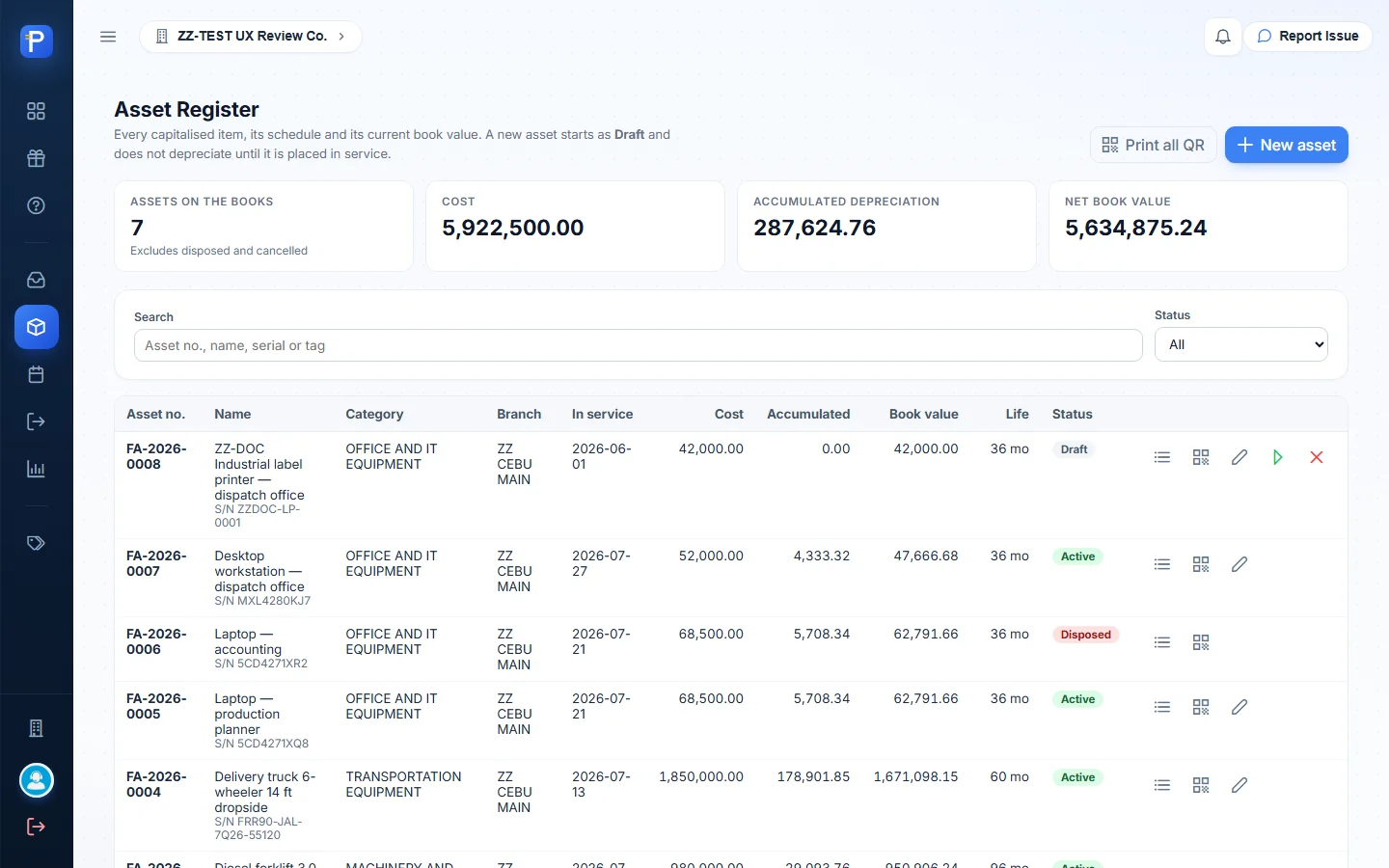
The register lists every asset with category, branch, in-service date, cost, accumulated depreciation, book value, life and status (Draft, Active, Fully depreciated, Disposed, Cancelled). Three cards on top repeat the dashboard totals. A Status filter and a search on “Asset no., name, serial or tag” narrow the list. Each row has Depreciation schedule, QR label and, while it can still be edited, Edit asset.
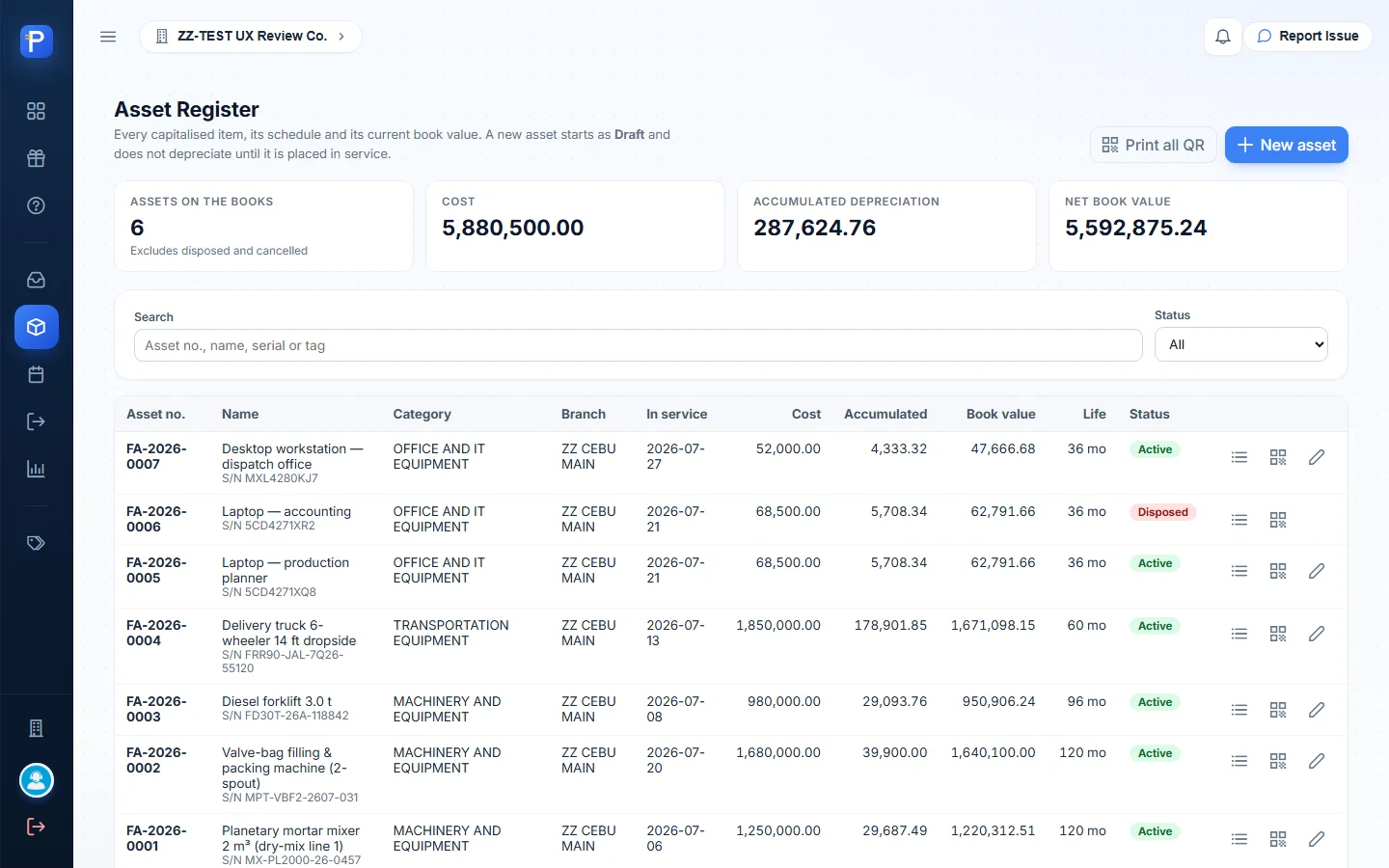
The New asset form has these fields:
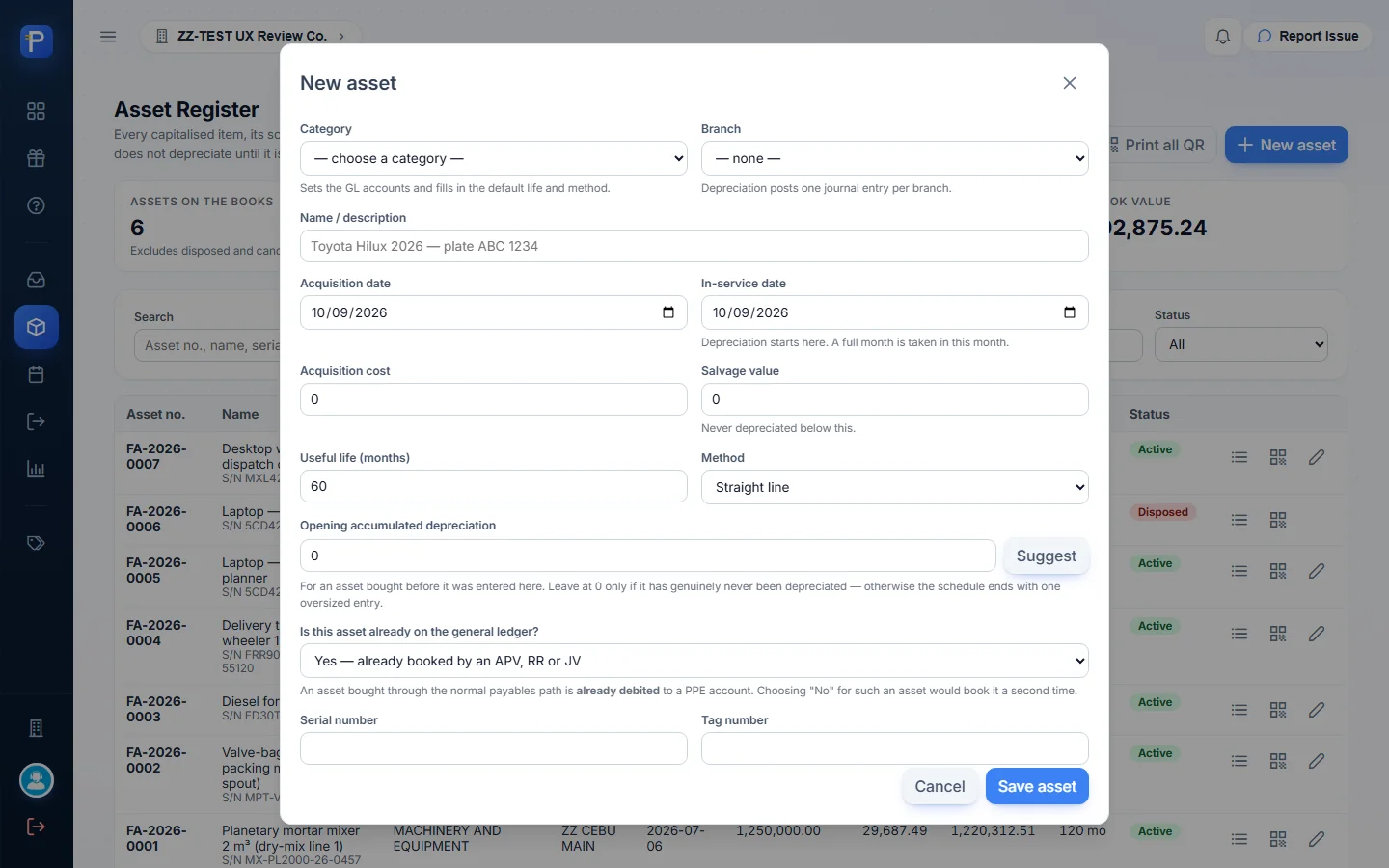
- Category (“Sets the GL accounts and fills in the default life and method”) and Branch (“Depreciation posts one journal entry per branch”).
- Name, Acquisition date, and In-service date (“Depreciation starts here. A full month is taken in this month”).
- Acquisition cost, Salvage value, Useful life (months), and Method (Straight line or Declining balance).
- Opening accumulated depreciation, with a Suggest button.
- The question “Is this asset already on the general ledger?” The answers are “Yes — already booked by an APV, RR or JV” and “No — Fixed Assets should post the acquisition entry”.
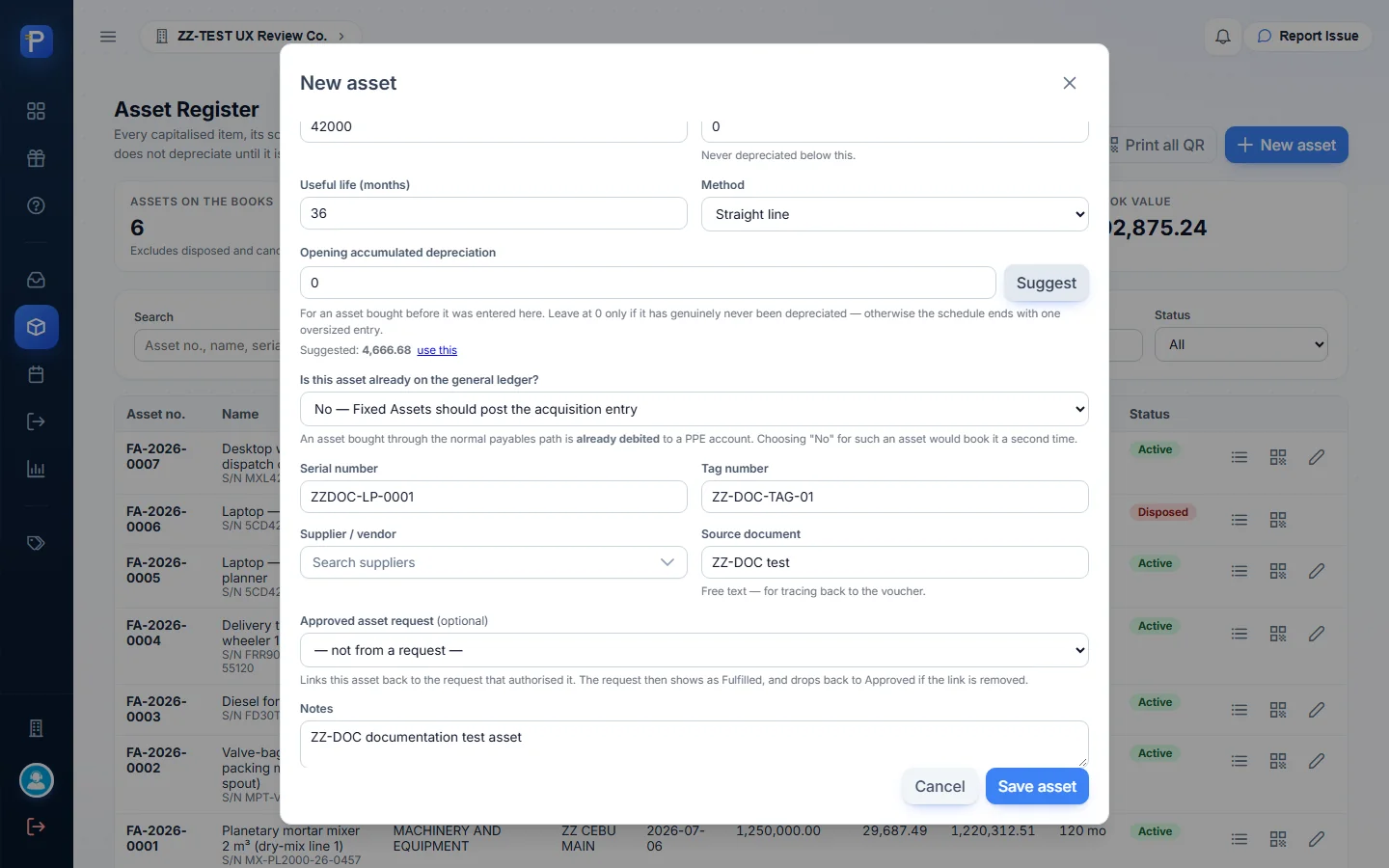
- Serial number, Tag number, Supplier, Source document (free text, “APV / RR / JV”), Approved asset request (an optional link, and only approved requests are listed) and Notes.
What I did:
- Filled in category OIT, branch ZZ CEBU MAIN, name “ZZ-DOC Industrial label printer — dispatch office”, acquisition and in-service 2026-06-01, cost 42,000.00, salvage 0, life 36 months (filled from the category), straight line, serial ZZDOC-LP-0001, tag ZZ-DOC-TAG-01, and “No — Fixed Assets should post the acquisition entry”. Suggest proposed an opening accumulated depreciation of 4,666.68, which is four months (June to September) at 1,166.67. I left it at 0 for the test.
- Save asset. FA-2026-0008 appears as Draft with cost 42,000.00, accumulated 0.00 and book value 42,000.00, plus two more actions: Place in service and Cancel draft. The cards now count 7 assets and cost 5,922,500.00.
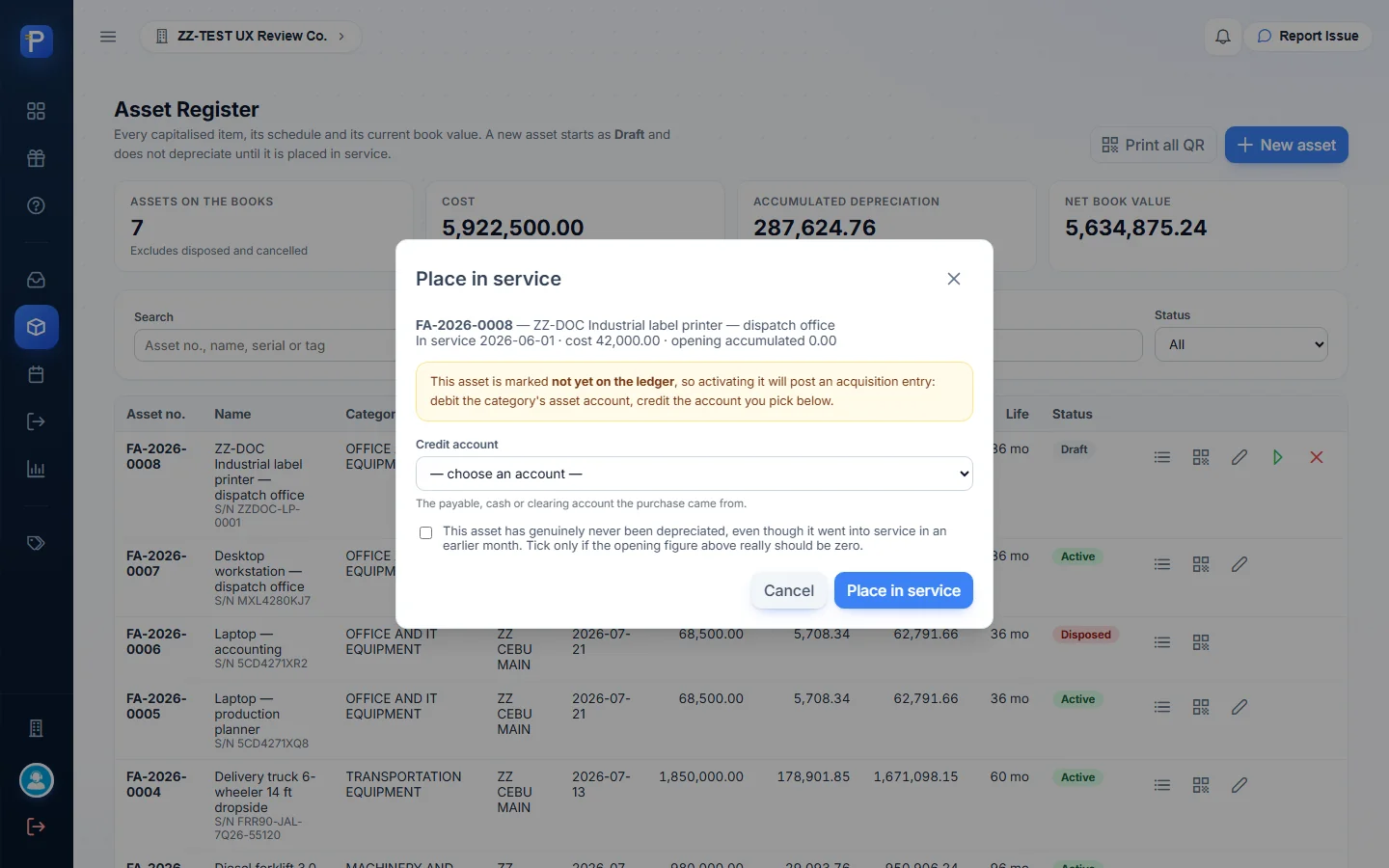
- Place in service opens a dialog. Because the asset is “not yet on the ledger”, it asks for a Credit account (“The payable, cash or clearing account the purchase came from”) and explains the posting: “debit the category’s asset account, credit the account you pick below”. It also has a checkbox to confirm the asset “has genuinely never been depreciated, even though it went into service in an earlier month”.
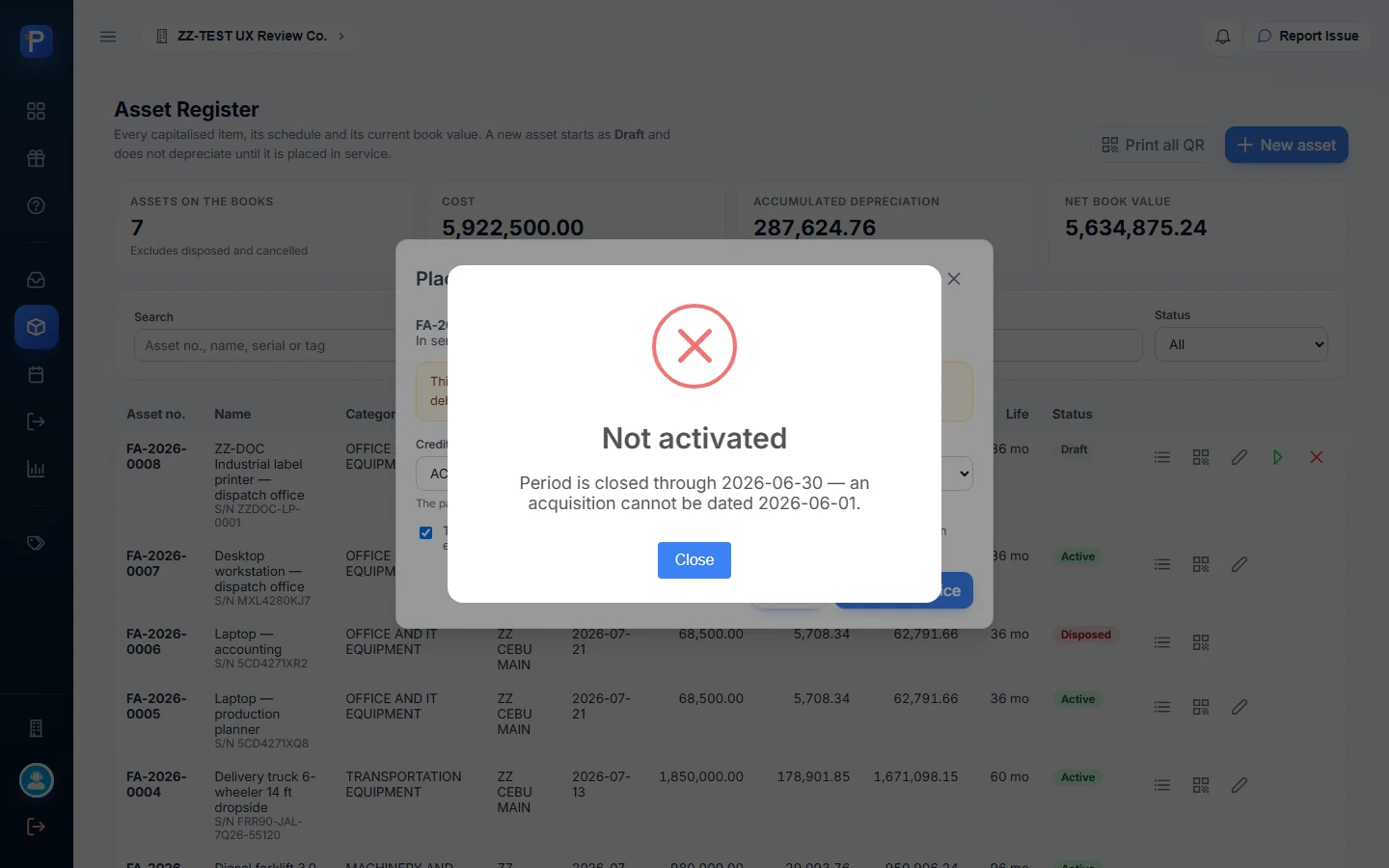
- I picked ACCOUNTS PAYABLE - TRADE as the credit account, and the first try was refused: “Not activated — Period is closed through 2026-06-30 — an acquisition cannot be dated 2026-06-01.” The company’s closed period is enforced here.
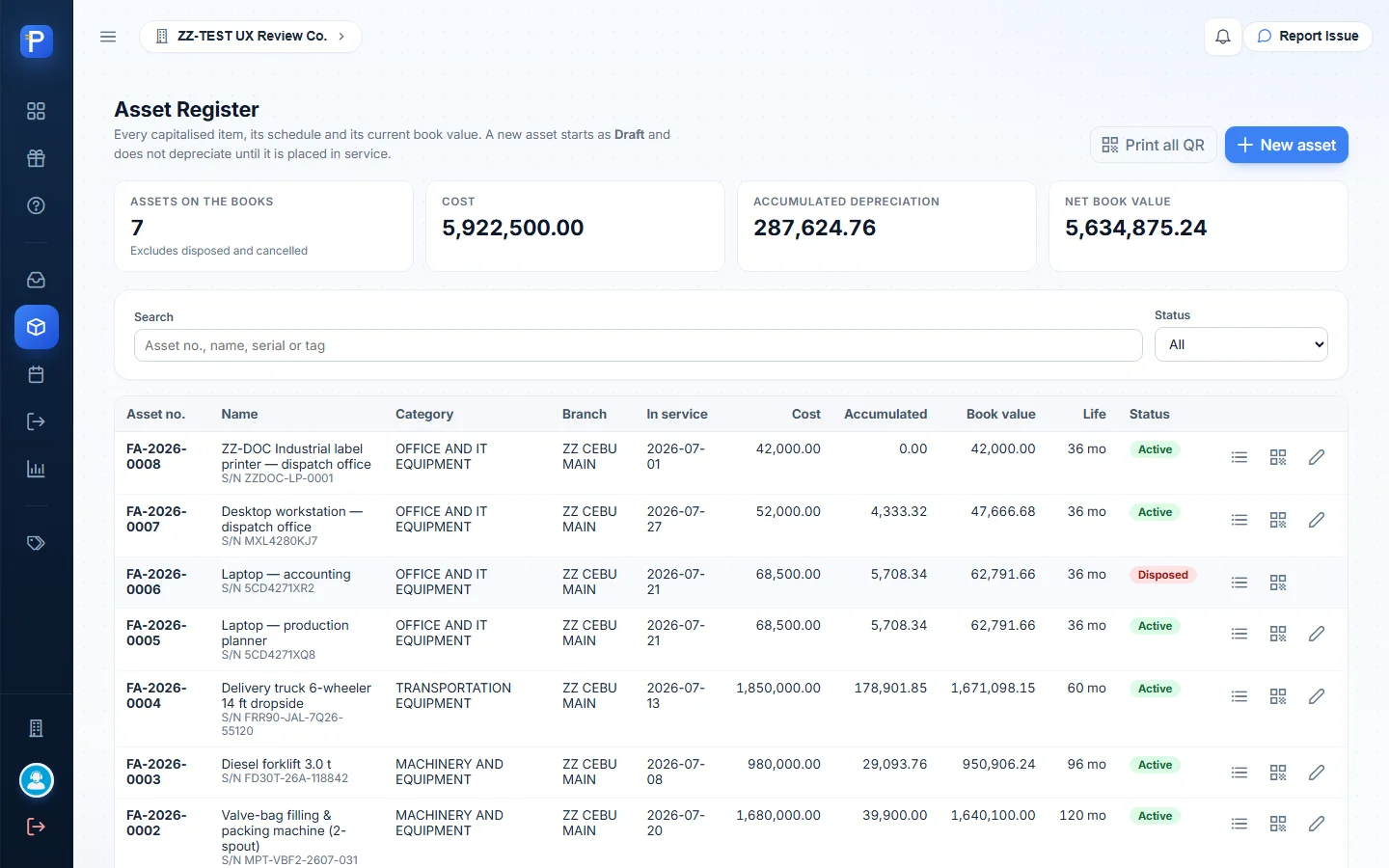
- A draft can still be edited, so I changed acquisition and in-service to 2026-07-01 and placed it in service again. This time the toast said “FA-2026-0008 is now in service.” The status went to Active. Edit stayed, and Place in service and Cancel draft went away. Going by the posting rule in the dialog, this booked Dr OFFICE AND IT EQUIPMENT 42,000.00 / Cr ACCOUNTS PAYABLE - TRADE 42,000.00, dated 2026-07-01. The app doesn’t show the journal itself, only the accounts and the result.
- The new asset’s Depreciation schedule reads “Cost 42,000.00 · salvage 0.00 · 36 months — Nothing posted yet. Periods appear here once a depreciation run covers this asset.”
- QR label shows a QR code for FA-2026-0008 with the tag number and “Scan with Scan2Approve to open this asset”, plus Download PNG and Print label.

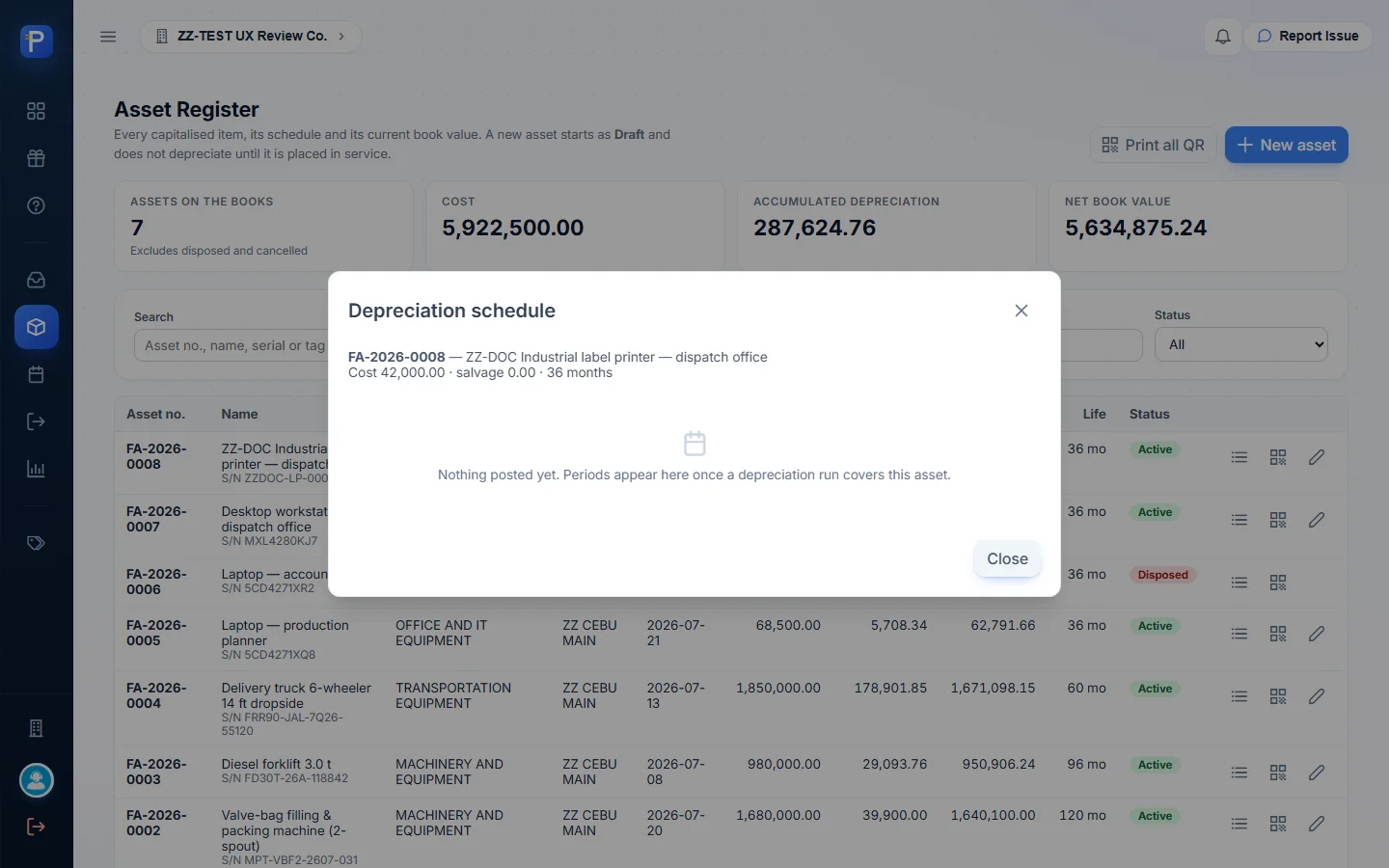

Saving posts nothing. A Draft is “not counted in your totals”. Place in service posts the acquisition entry, but only when the asset is marked as not yet on the ledger. The Help Center adds two rules. Once an asset has been depreciated even once, its cost, life, salvage and dates are frozen. A cancelled draft stays in the register as Cancelled.
Depreciation runs (DEP)
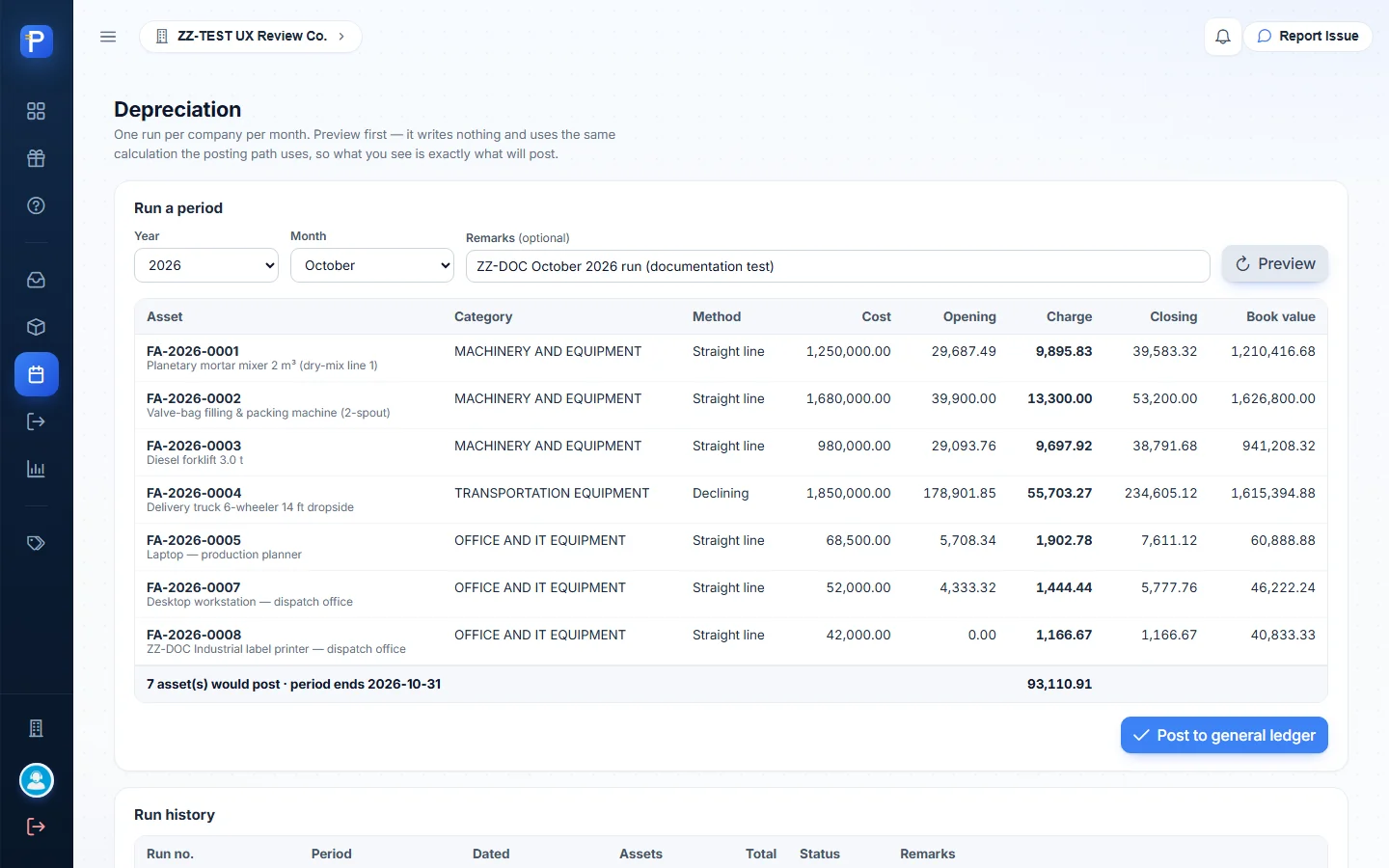
The page opens with the rule: “One run per company per month. Preview first — it writes nothing and uses the same calculation the posting path uses, so what you see is exactly what will post.” The Run a period panel takes Year, Month and Remarks. Preview lists every in-service asset with method, cost, opening accumulated, this month’s Charge, closing and the resulting book value. Assets that already have a charge for that period are greyed out with a note that “the database refuses a second charge for the same asset and period”.
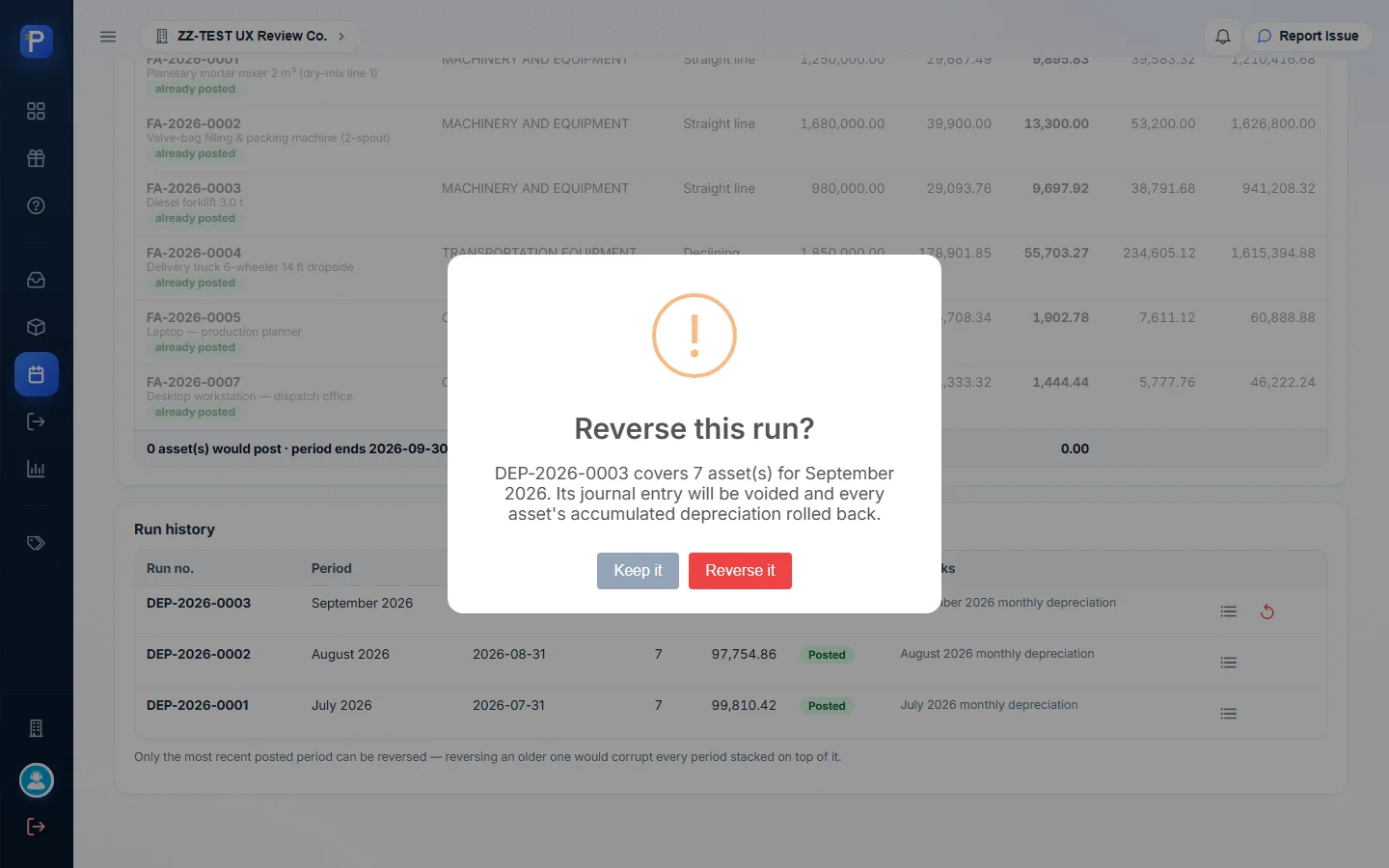
Below that is Run history, with View lines and, on the latest run only, Reverse run. The reason is spelled out: “Only the most recent posted period can be reversed — reversing an older one would corrupt every period stacked on top of it.”
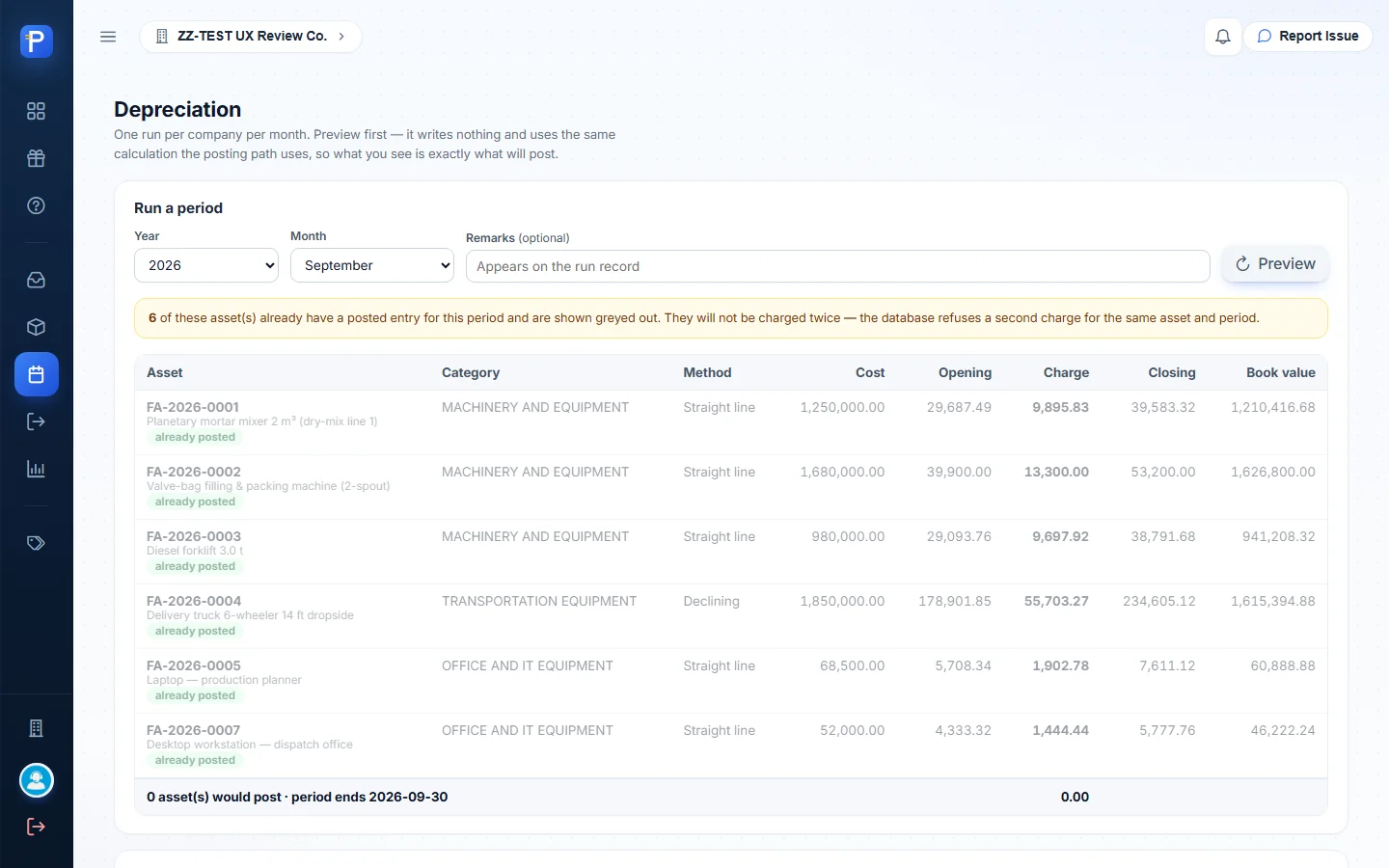
What I tried and what happened:
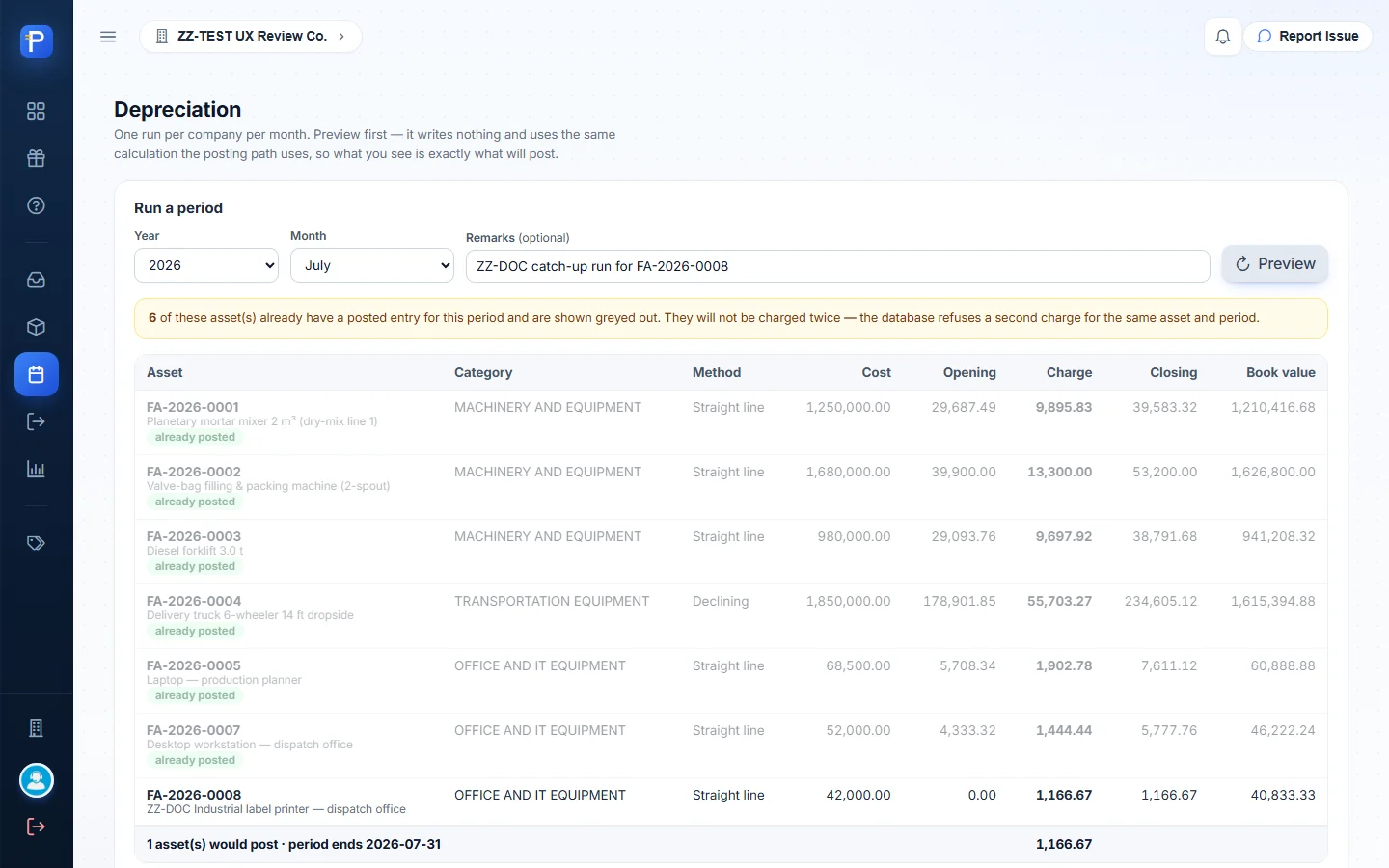
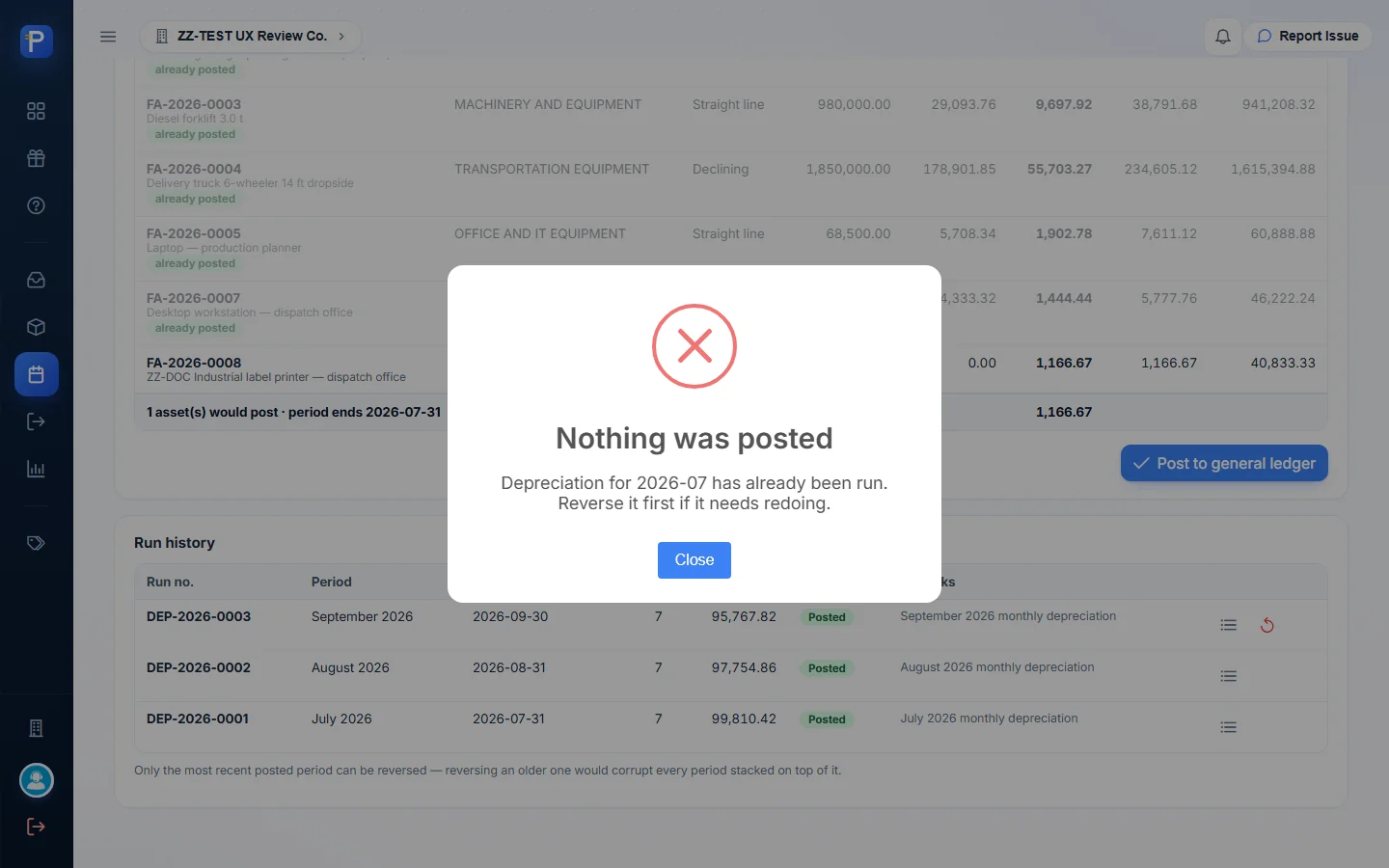
- Previewed July 2026 with the remark “ZZ-DOC catch-up run for FA-2026-0008”. Six assets showed “already posted”. FA-2026-0008 was the one chargeable line: straight line, cost 42,000.00, opening 0.00, charge 1,166.67 (42,000 / 36), closing 1,166.67, book value 40,833.33. The footer read “1 asset(s) would post · period ends 2026-07-31 — 1,166.67”.
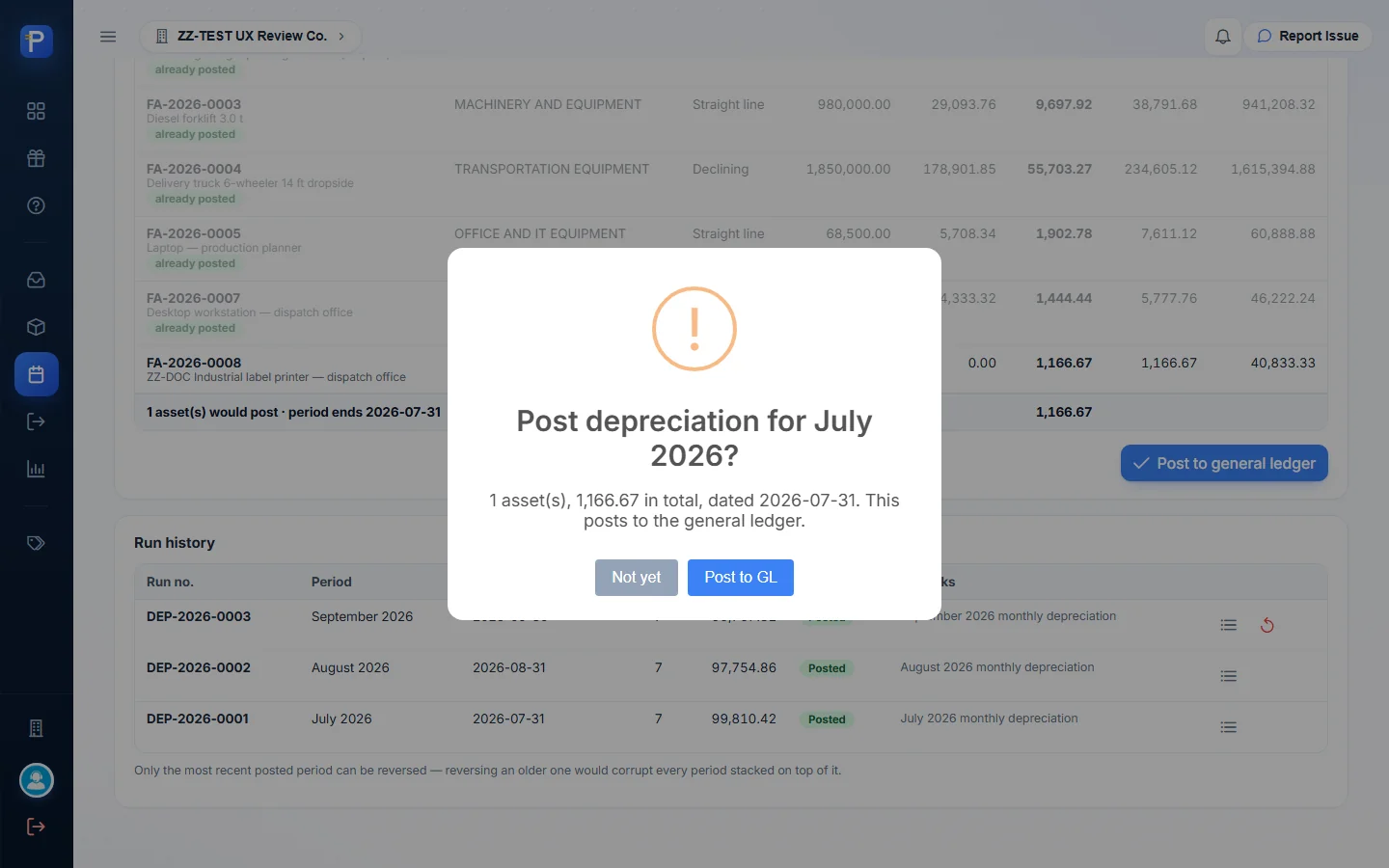
- Clicked Post to general ledger. The confirmation said “Post depreciation for July 2026? 1 asset(s), 1,166.67 in total, dated 2026-07-31. This posts to the general ledger.” I clicked Post to GL.
- It was refused: “Nothing was posted — Depreciation for 2026-07 has already been run. Reverse it first if it needs redoing.” DEP-2026-0001 already covers July, and one run per month means one run per month, even when a new asset would be the only line.
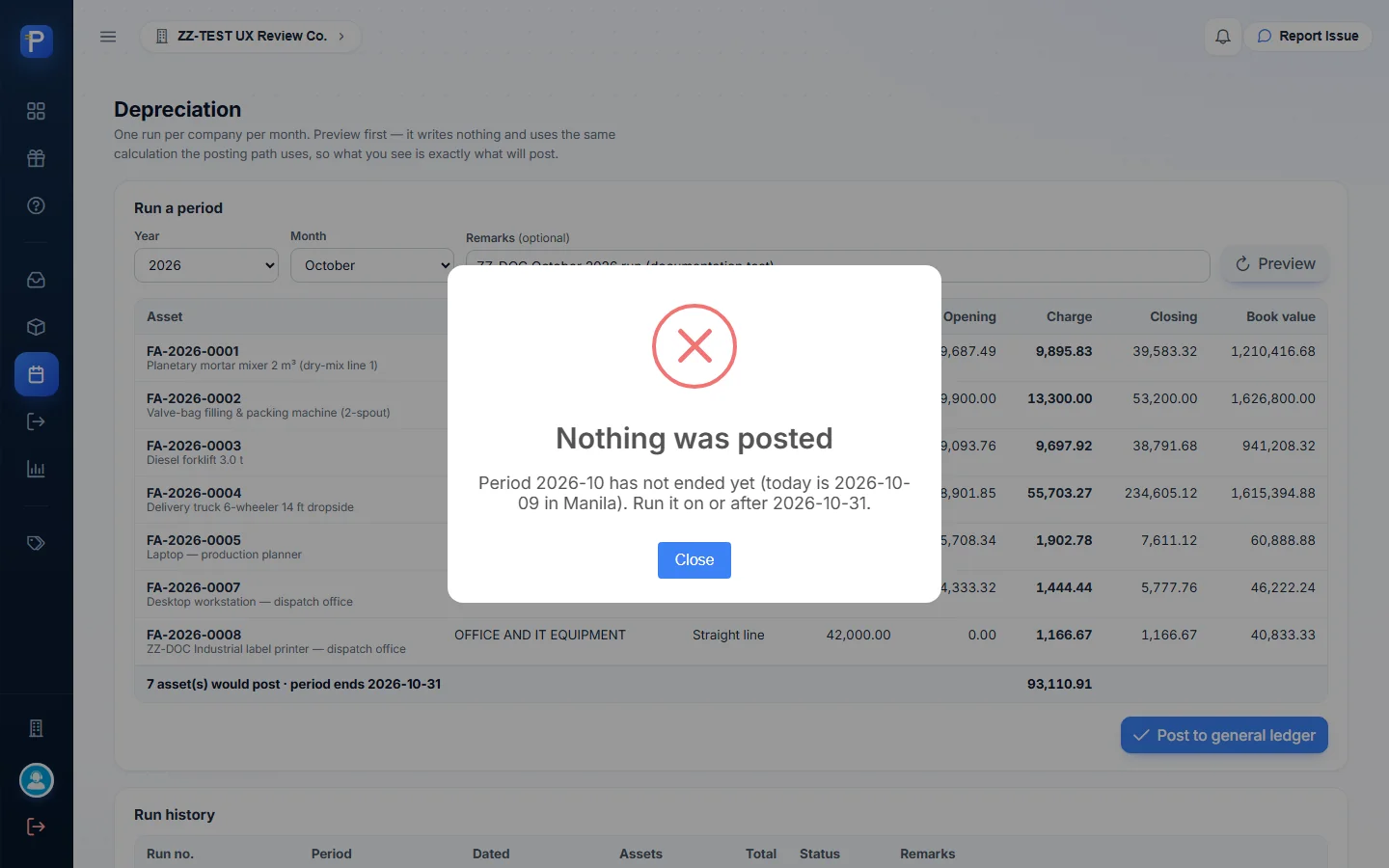
- Previewed October 2026, the earliest month with no run. All 7 in-service assets would post, total 93,110.91, period ending 2026-10-31. Posting was refused again: “Nothing was posted — Period 2026-10 has not ended yet (today is 2026-10-09 in Manila). Run it on or after 2026-10-31.”
So I couldn’t post any run in this session without reversing DEP-2026-0003, and that wasn’t a record I’d created. The existing runs show what a posted run looks like:
- DEP-2026-0001, July 2026, dated 2026-07-31, 7 assets, 99,810.42, Posted.
- DEP-2026-0002, August 2026, 2026-08-31, 7 assets, 97,754.86, Posted.
- DEP-2026-0003, September 2026, 2026-09-30, 7 assets, 95,767.82, Posted.
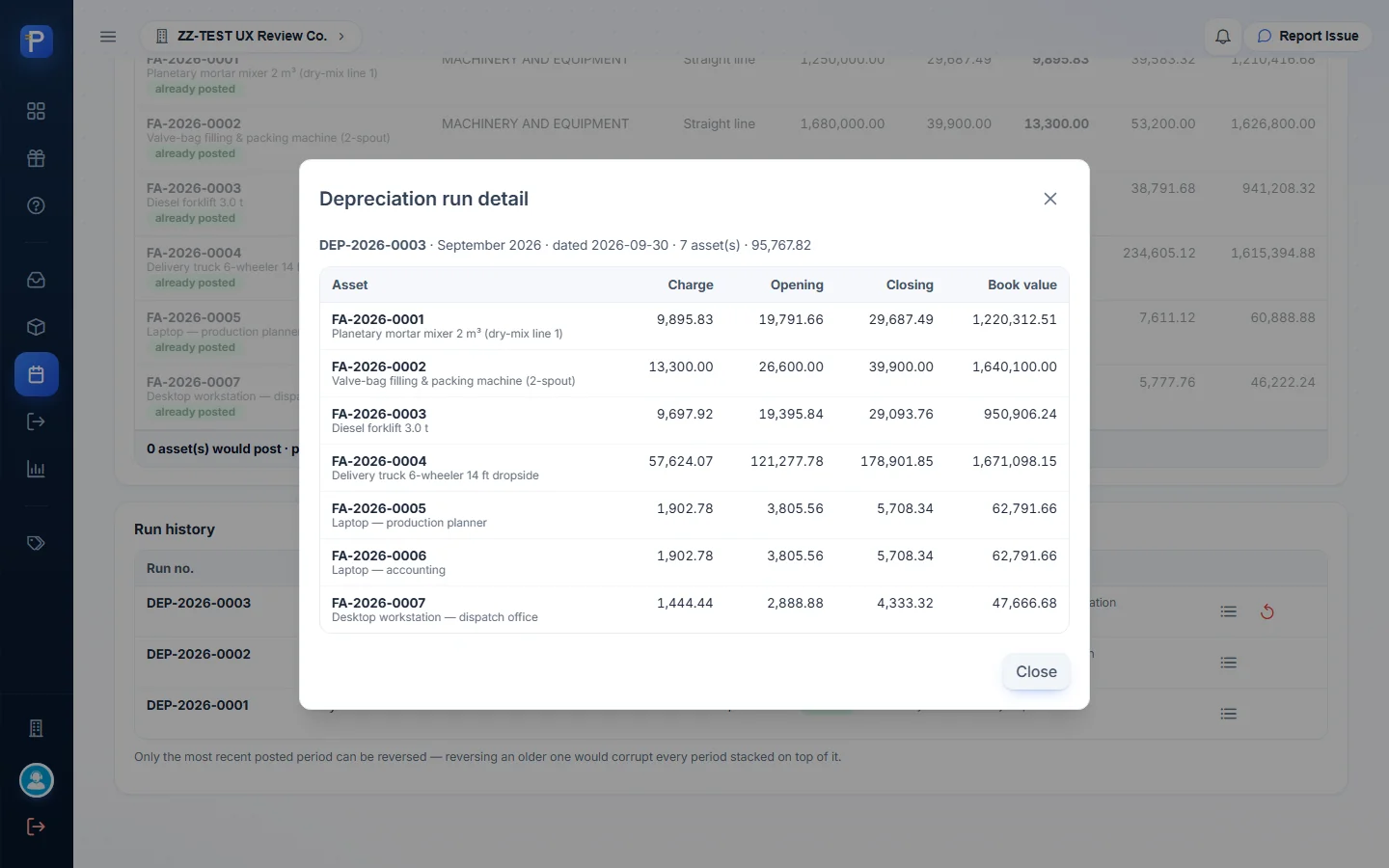
View lines on DEP-2026-0003 lists each asset’s charge, opening, closing and book value. For example: FA-2026-0002 13,300.00 (26,600.00 → 39,900.00), FA-2026-0004 on declining balance 57,624.07 (121,277.78 → 178,901.85), FA-2026-0005 1,902.78, and FA-2026-0007 1,444.44. The closing figures match the Accumulated column of the register exactly.
On the accounts side, a run debits each category’s Depreciation expense account and credits its Accumulated depreciation account. For MEQ that’s DEPRECIATION EXPENSE - FACTORY / ACCUMULATED DEPRECIATION - MACHINERY AND EQUIPMENT. For OIT it’s DEPRECIATION EXPENSE / ACCUMULATED DEPRECIATION - OFFICE AND IT EQUIPMENT. For VEH it’s DEPRECIATION EXPENSE / ACCUMULATED DEPRECIATION - TRANSPORTATION EQUIPMENT. It makes one journal entry per branch, dated the last day of the month. The in-service month gets a full month’s charge with no proration, and the last month takes up the leftover rounding centavos.
I opened Reverse run and backed out with Keep it. The warning reads: “DEP-2026-0003 covers 7 asset(s) for September 2026. Its journal entry will be voided and every asset’s accumulated depreciation rolled back.”
Disposals (DSP)
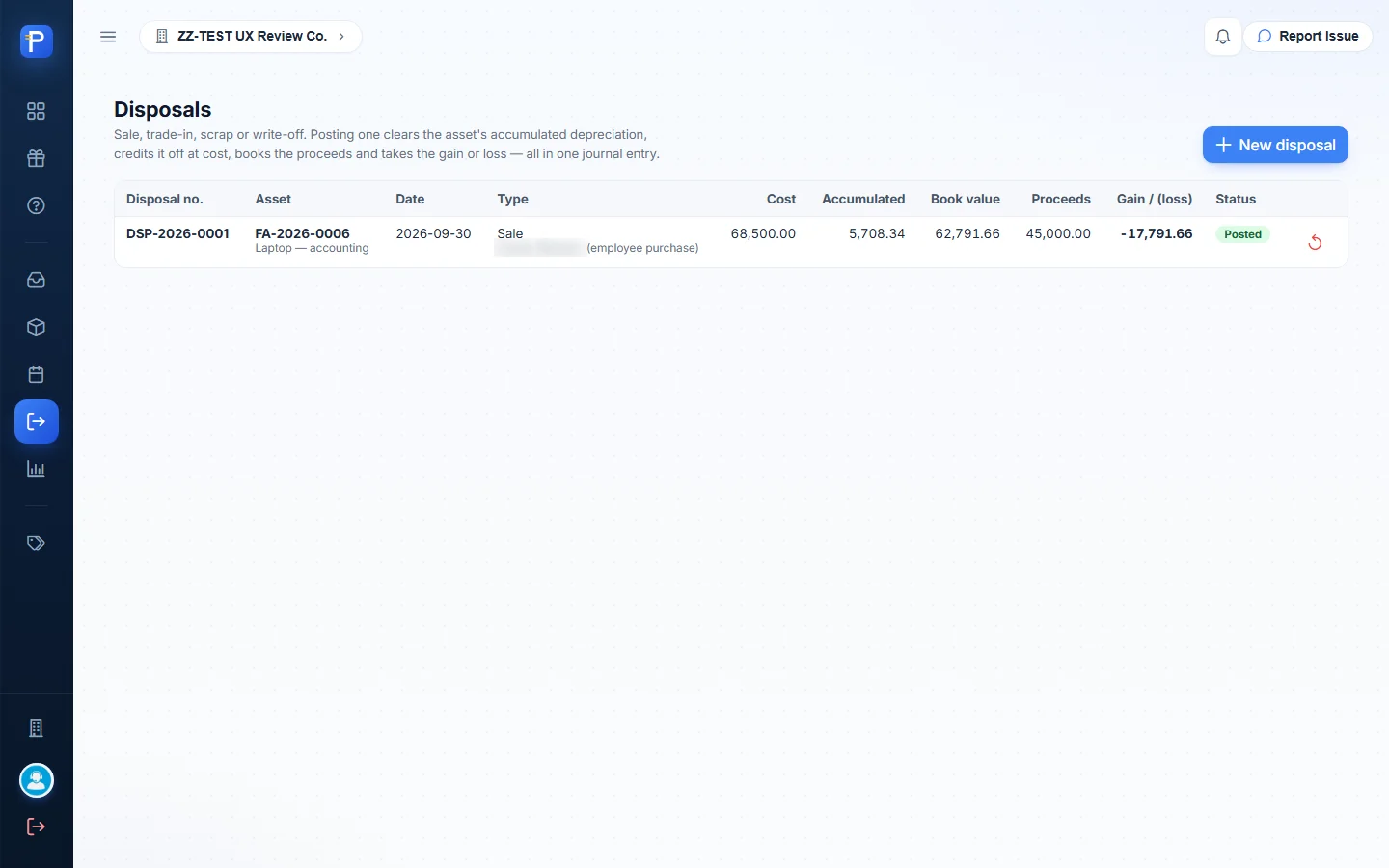
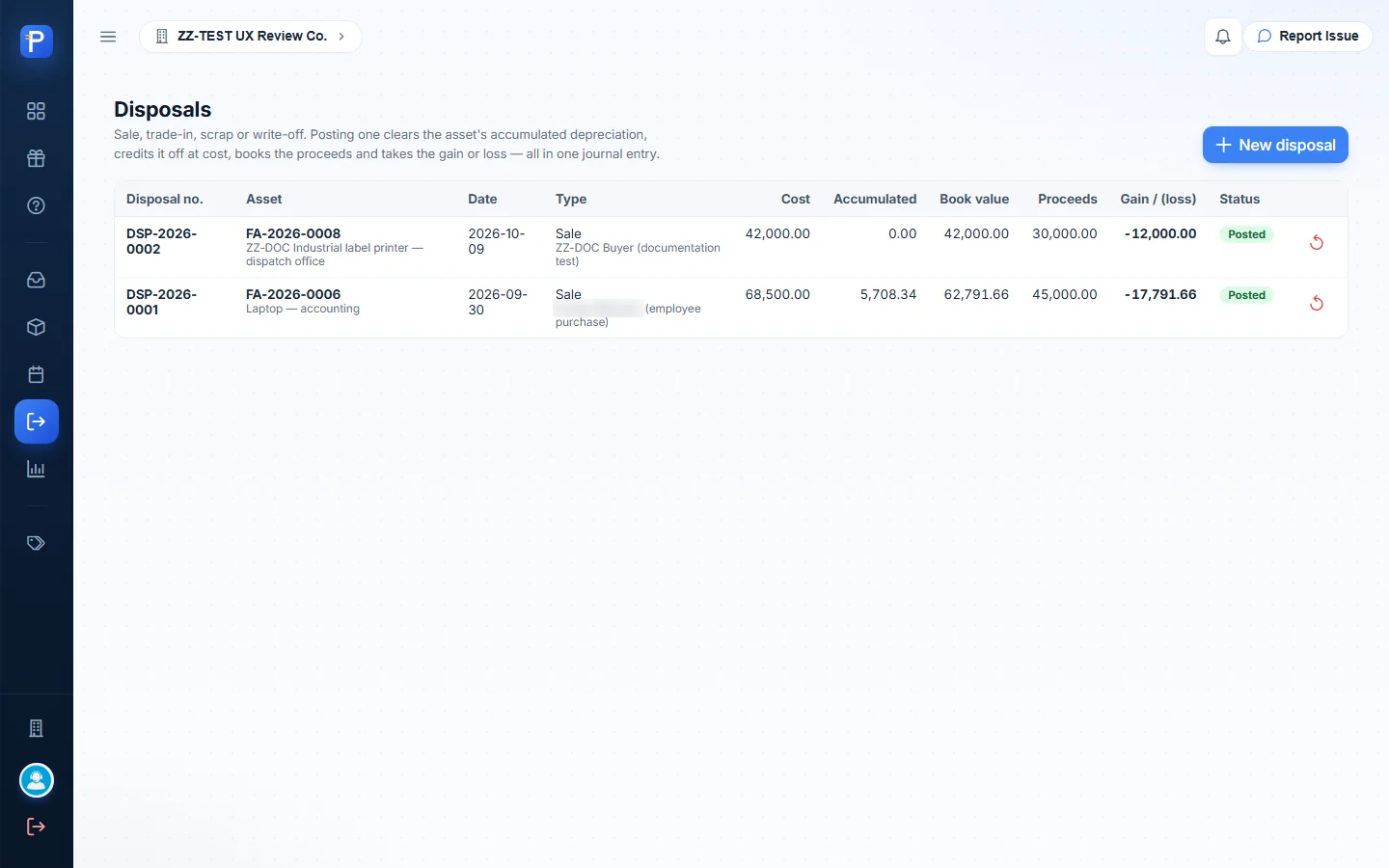
The page description: “Sale, trade-in, scrap or write-off. Posting one clears the asset’s accumulated depreciation, credits it off at cost, books the proceeds and takes the gain or loss — all in one journal entry.” The fields are Asset (only in-service or fully depreciated assets are listed, each with its book value), Disposal date, Type (Sale, Trade-in, Scrap, Write-off), Proceeds, Proceeds land in, Buyer / counterparty and Remarks. Proceeds land in is an account picker that’s enabled and required whenever proceeds are above zero. Once you enter an asset and proceeds, the form shows the result before you post.

What I did:
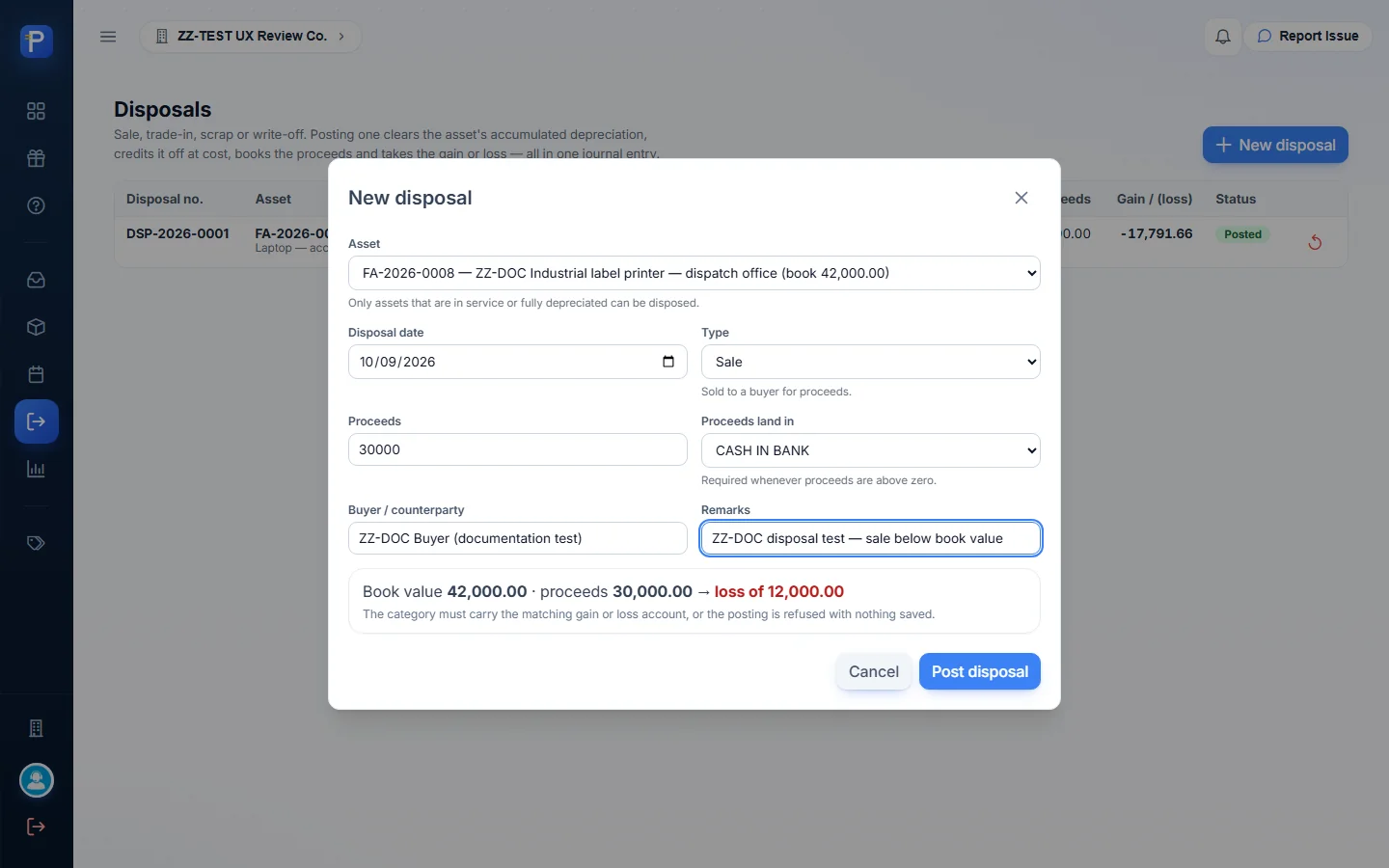
- New disposal. Asset “FA-2026-0008 — ZZ-DOC Industrial label printer — dispatch office (book 42,000.00)”, date 2026-10-09, type Sale, proceeds 30,000, proceeds into CASH IN BANK, buyer “ZZ-DOC Buyer (documentation test)”. The form worked out “Book value 42,000.00 · proceeds 30,000.00 → loss of 12,000.00” and warned “The category must carry the matching gain or loss account, or the posting is refused with nothing saved.”
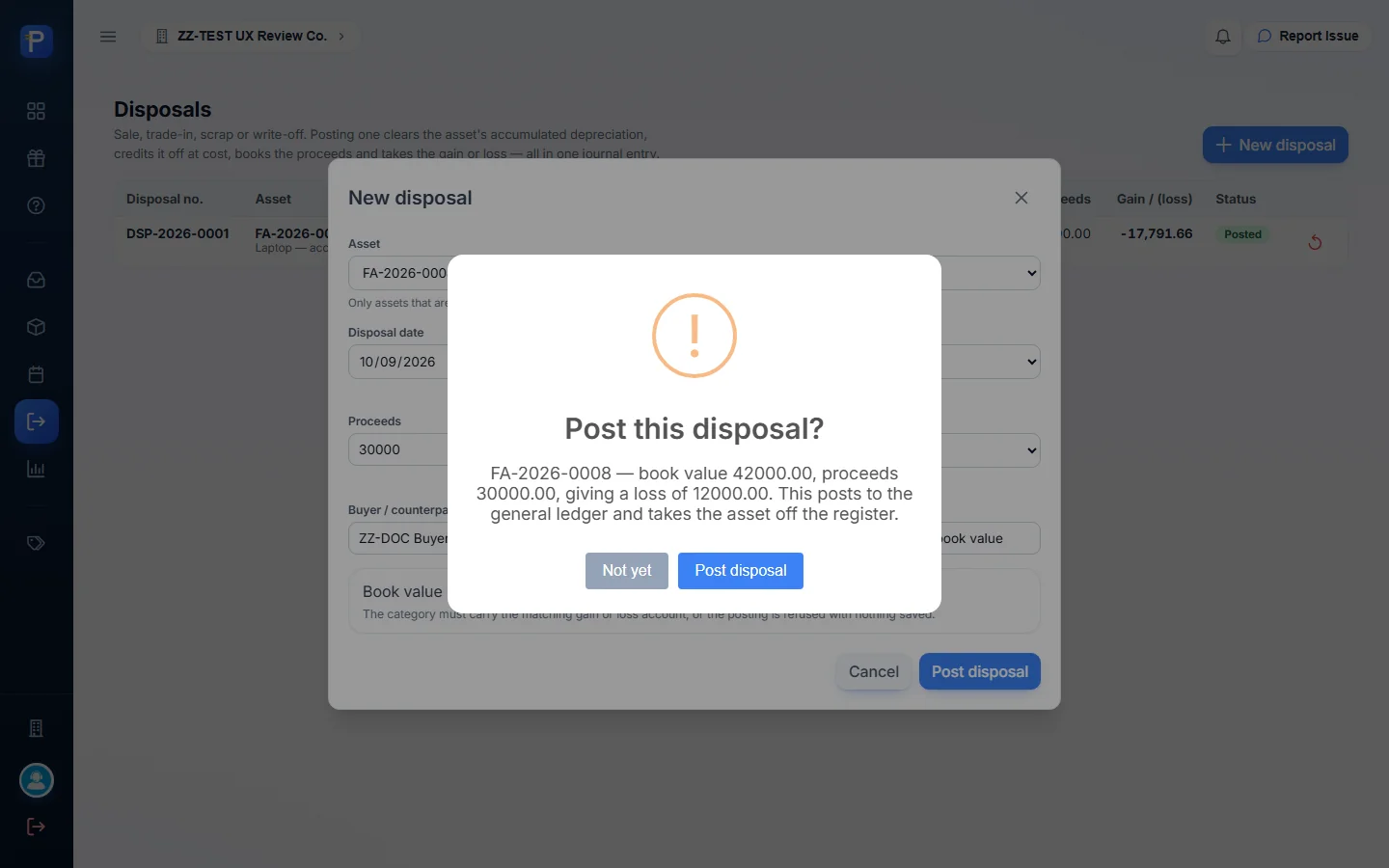
- Post disposal. The confirmation: “Post this disposal? FA-2026-0008 — book value 42000.00, proceeds 30000.00, giving a loss of 12000.00. This posts to the general ledger and takes the asset off the register.” I clicked Post disposal.
- The result was DSP-2026-0002, Posted: cost 42,000.00, accumulated 0.00, book value 42,000.00, proceeds 30,000.00, gain/(loss) -12,000.00, with a Reverse disposal action.
From the accounts named by the category and the form, it posts Dr CASH IN BANK 30,000.00, Dr LOSS ON DISPOSAL OF ASSETS 12,000.00, Cr OFFICE AND IT EQUIPMENT 42,000.00. Accumulated depreciation on this asset was 0.00, so there’s no debit to ACCUMULATED DEPRECIATION - OFFICE AND IT EQUIPMENT. The earlier DSP-2026-0001 has the same shape with an accumulated-depreciation leg. That one was a laptop: cost 68,500.00, accumulated 5,708.34, proceeds 45,000.00, loss 17,791.66.
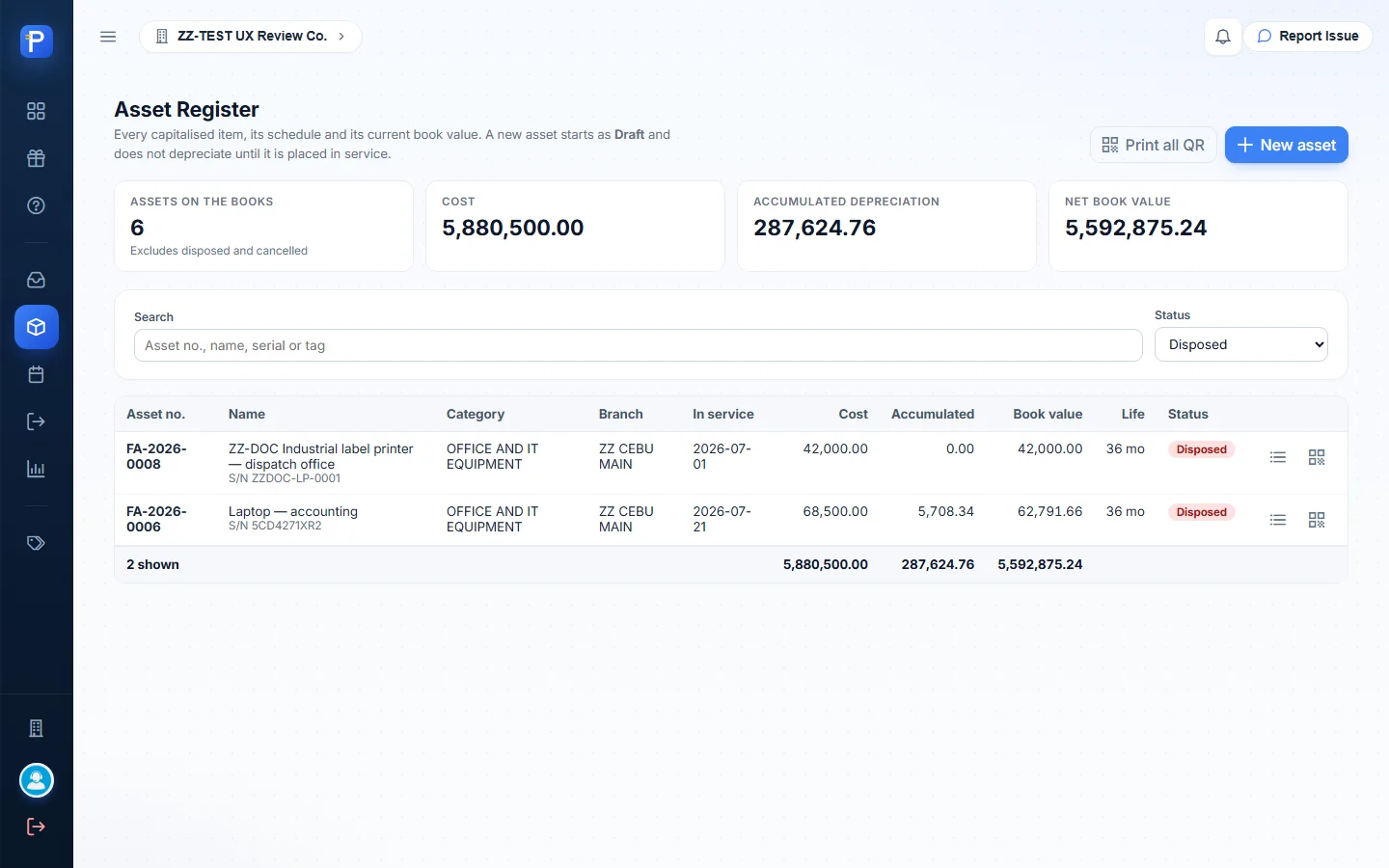
After posting, FA-2026-0008 shows as Disposed in the register. Edit is gone, but the schedule and QR label still open. It drops out of the dashboard and register totals (“Excludes 2 disposed”). It only shows on the Asset register report when “Include disposed and cancelled” is ticked.

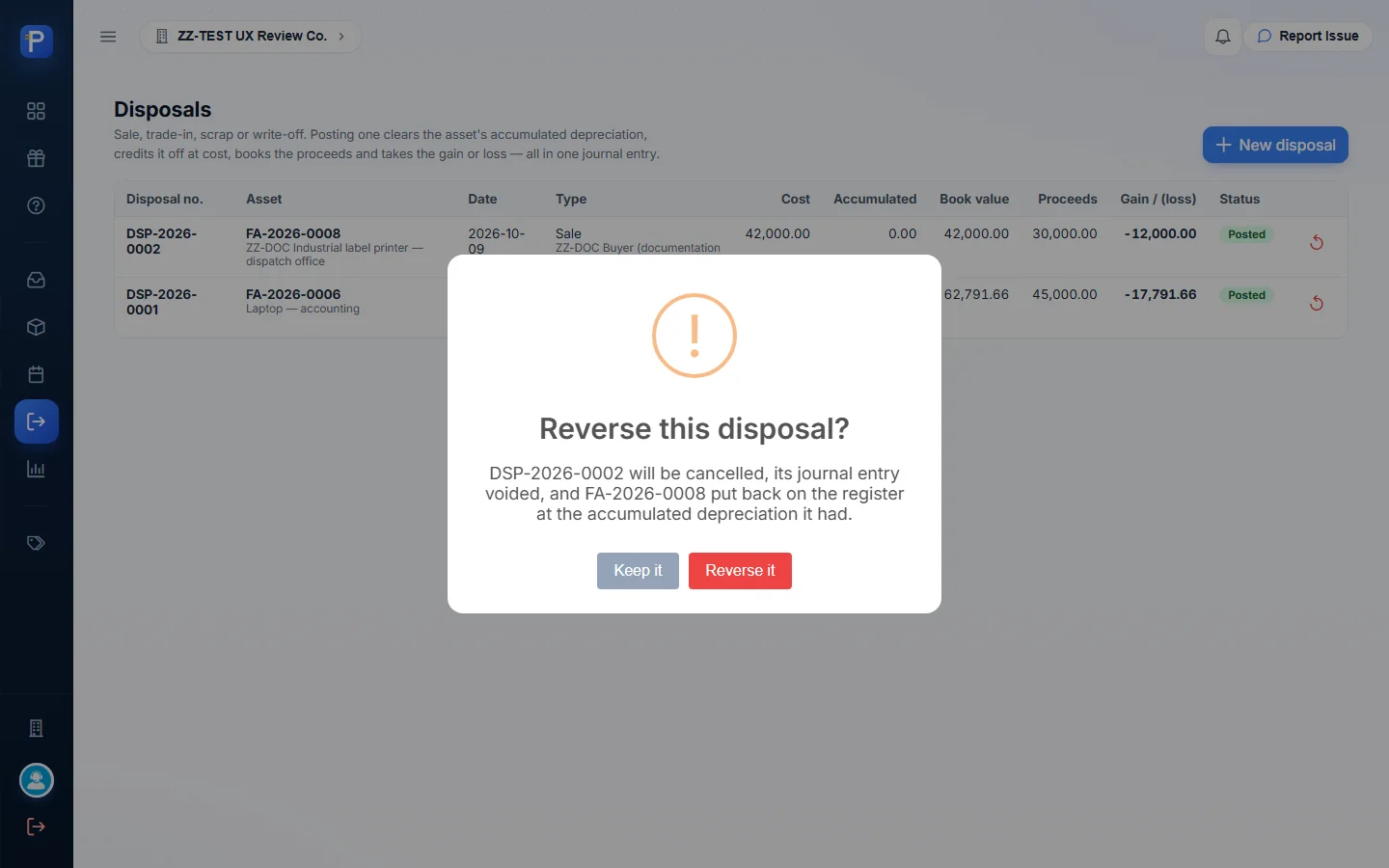
I opened Reverse disposal and backed out with Keep it. It reads: “DSP-2026-0002 will be cancelled, its journal entry voided, and FA-2026-0008 put back on the register at the accumulated depreciation it had.”
Reports
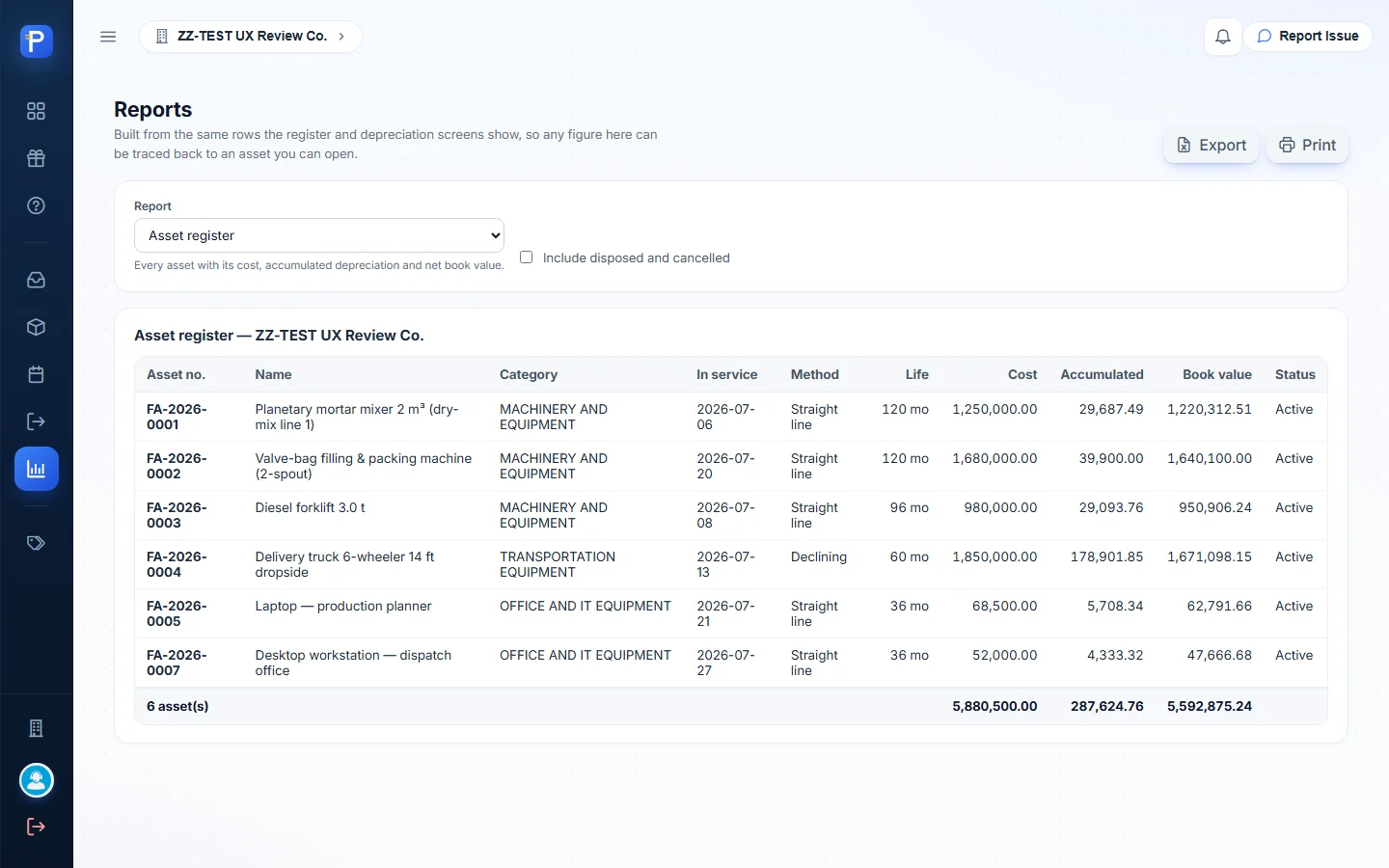
Reports is one page with a Report selector and Export and Print buttons. The page says the reports are “Built from the same rows the register and depreciation screens show, so any figure here can be traced back to an asset you can open.”
- Asset register: every asset with in-service date, method, life, cost, accumulated and book value. By default that’s 6 assets, 5,880,500.00 / 287,624.76 / 5,592,875.24. With Include disposed and cancelled ticked it’s 8 assets, 5,991,000.00 / 293,333.10 / 5,697,666.90, and FA-2026-0006 and FA-2026-0008 show as Disposed.
- PPE rollforward: the same figures grouped by category, “the shape a balance-sheet note takes”. MEQ 3 assets 3,910,000.00 / 98,681.25 / 3,811,318.75. OIT 2 / 120,500.00 / 10,041.66 / 110,458.34. VEH 1 / 1,850,000.00 / 178,901.85 / 1,671,098.15. Total 6 / 5,880,500.00 / 287,624.76 / 5,592,875.24. The page notes “Disposed and cancelled assets are excluded — including them would stop this tying to the PPE control account.”
- Depreciation history: every posted run. DEP-2026-0001 99,810.42, DEP-2026-0002 97,754.86, DEP-2026-0003 95,767.82, “3 posted run(s) 293,333.10”. It adds “Reversed runs are excluded — their journal entries are voided in the ledger.”
The history total of 293,333.10 equals the register’s accumulated depreciation when disposed assets are included. That’s the tie-out I made this page for.


The shell
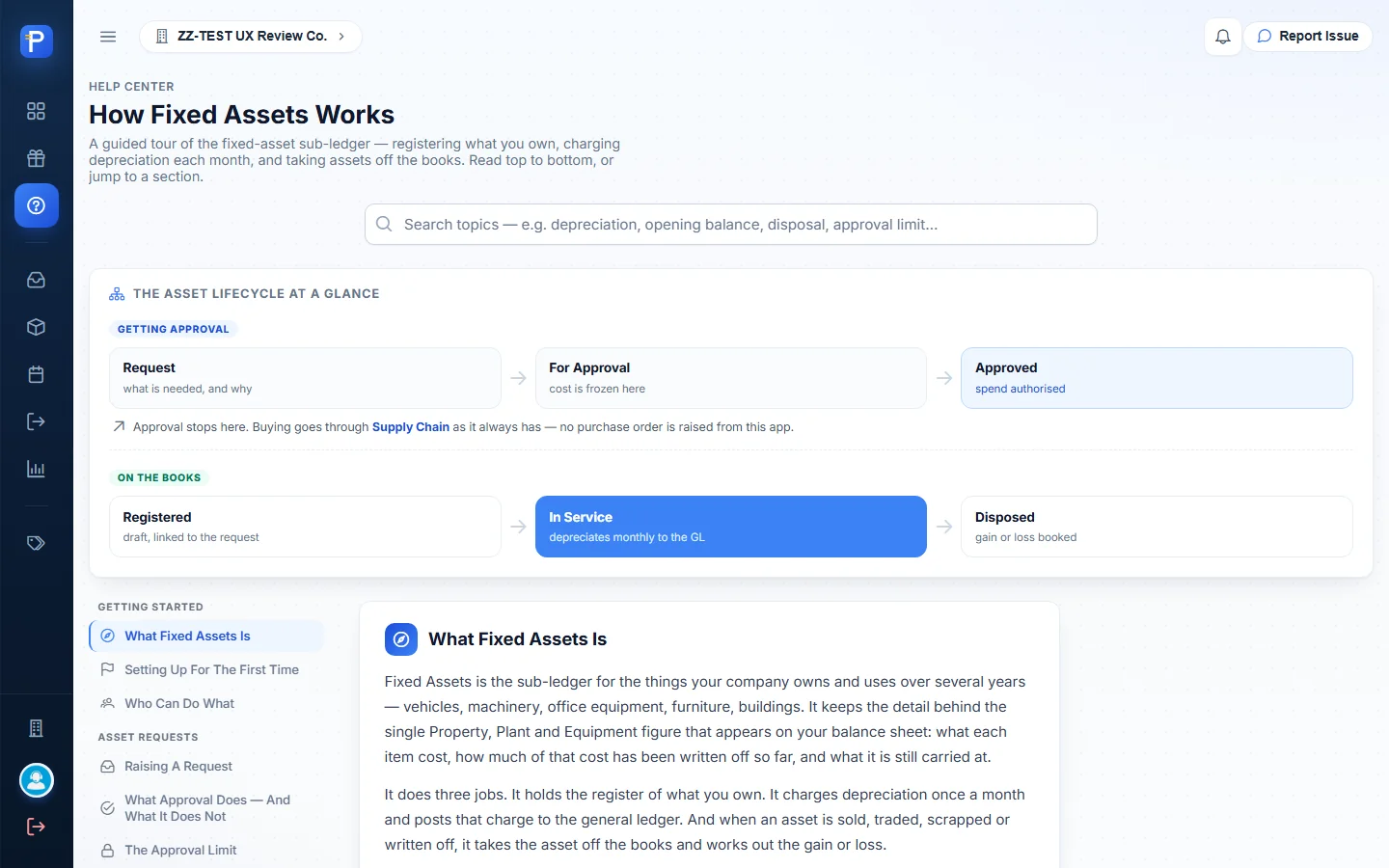
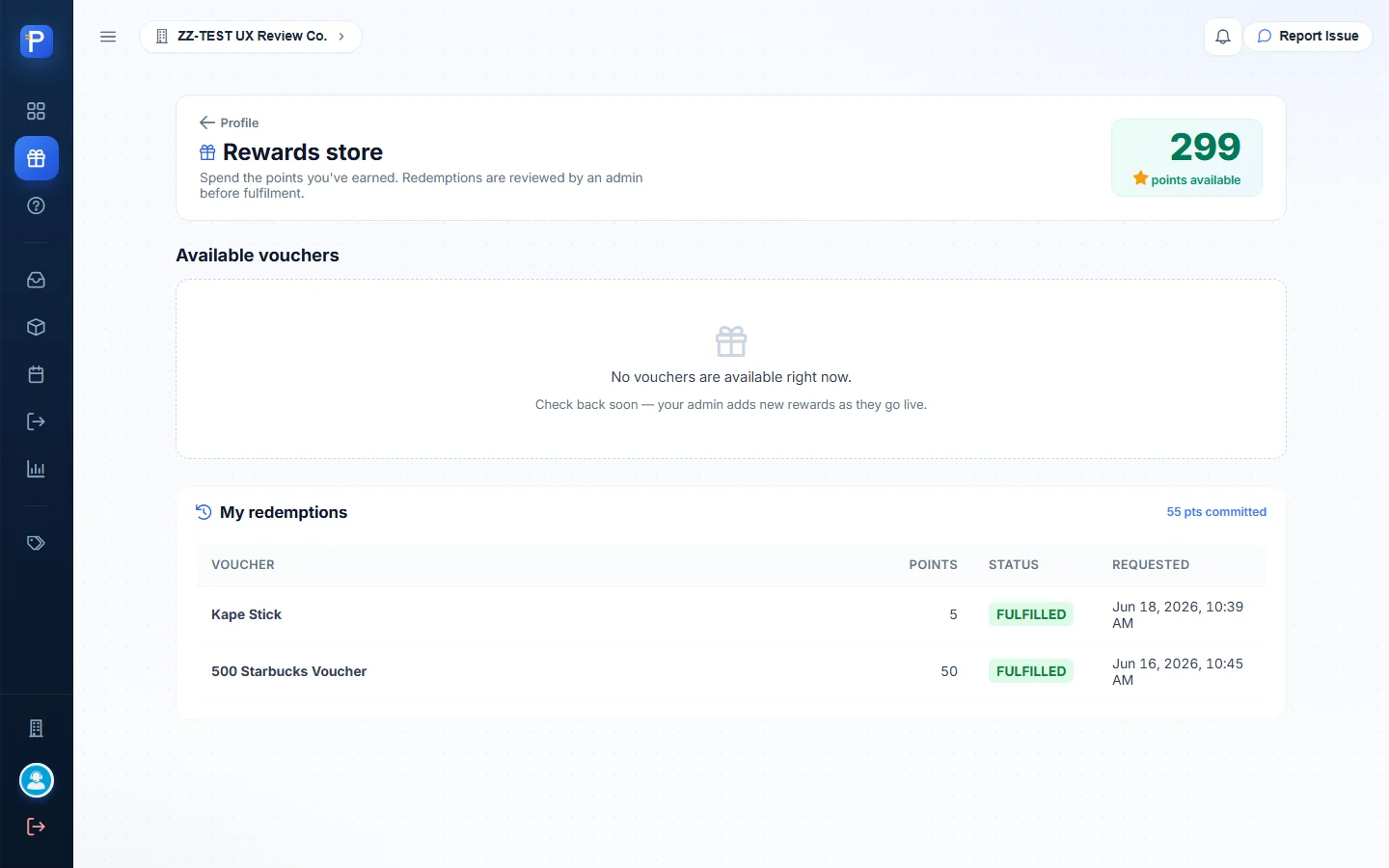
The shell, shared with the rest of the suite, has a Rewards store (points balance and past redemptions), a Help Center that walks through the whole module (lifecycle diagram, every screen, statuses, cut-off rules and FAQs), and a profile page for your photo and signature.

How the documents connect
- Asset categories get set up once from the ERP’s item categories, with asset, accumulated depreciation, depreciation expense, gain and loss accounts.
- An asset request (FAR) goes Draft → For Approval (estimate frozen) → Approved by someone other than the requester → Fulfilled once an asset links to it. It raises no PO. Buying runs through Supply Chain.
- An asset (FA) is registered as a Draft with its cost, dates, life and method, optionally linked to the approved request. Then it’s placed in service (Active). If an APV, RR or JV hasn’t already booked it, activation posts the acquisition entry to the credit account you choose.
- A depreciation run (DEP) is previewed, then posted as one entry per branch for each month that has ended, oldest first. View lines shows each asset’s charge, and only the latest run can be reversed.
- A disposal (DSP) clears accumulated depreciation, credits cost, and books the proceeds and gain or loss in one entry. The asset becomes Disposed. It can be reversed.
- The reports tie the register to the ledger: the rollforward to the PPE control account, and the history to the depreciation posted.
Notes from testing
- You can’t create a category in this app. Categories are the ERP item categories, and only the three already set up (MEQ, OIT, VEH) can be picked. I used OIT for the ZZ-DOC asset.
- Placing the asset in service dated 2026-06-01 was refused with “Period is closed through 2026-06-30 — an acquisition cannot be dated 2026-06-01.” I re-dated it to 2026-07-01 and activated it.
- I couldn’t post any depreciation run. July 2026 was refused because “Depreciation for 2026-07 has already been run”, and October 2026 because the “Period 2026-10 has not ended yet (today is 2026-10-09 in Manila)”. Posting for the new asset would have needed the existing September run reversed, and I didn’t do that. So FA-2026-0008 was disposed with 0.00 accumulated depreciation. For an asset entered after its in-service month, the intended route is the Suggest button (4,666.68 opening).
- The requester can’t approve their own request (“You raised this one — someone else has to decide it”), so FAR-2026-0002 stayed at For Approval.
- Export on Reports didn’t change anything on screen, because it’s a file download. Print and Print all QR open the browser’s print dialog, which a headless screenshot can’t capture.
- I only opened Reverse run and Reverse disposal as far as their confirmation dialogs, then cancelled.
- The app doesn’t display the journal entries themselves. The accounts above come from the category setup, the Place in service dialog and the disposal form. The amounts come from the run and disposal rows.