Paylalo Manufacturing (Make-to-Order)
Paylalo Manufacturing (Make-to-Order) is the factory app for building against real customer orders. Every build starts from an approved sales order in the Distribution (DMS) app, with a named customer, a quantity and a promised date. Production planners use it to see which order lines still need a build, raise a production order against a line, and follow that batch through the floor, material issue, work in process (WIP), overhead and completion.
It runs at order.paylalo.com and shares its item master, branches, warehouses, stock figures and general ledger with the rest of the Paylalo suite. After the sales order step, it uses the same pieces as the make-to-stock app: bills of materials, production orders, the floor queue, WIP and overhead pools.
For this walkthrough I raised one make-to-order build in the test company ZZ-TEST UX Review Co. and took it all the way to a posted completion.
What’s in the menu
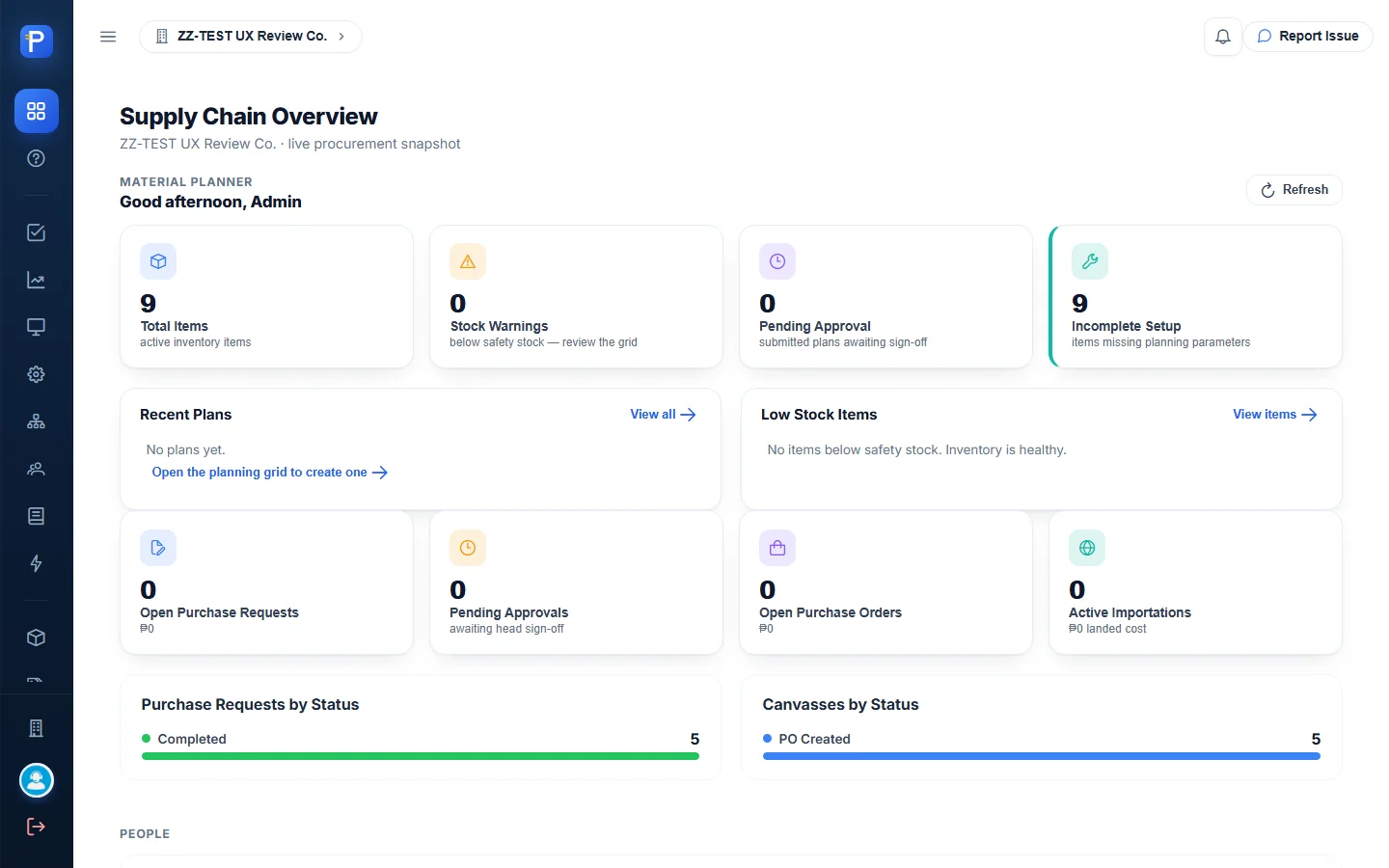
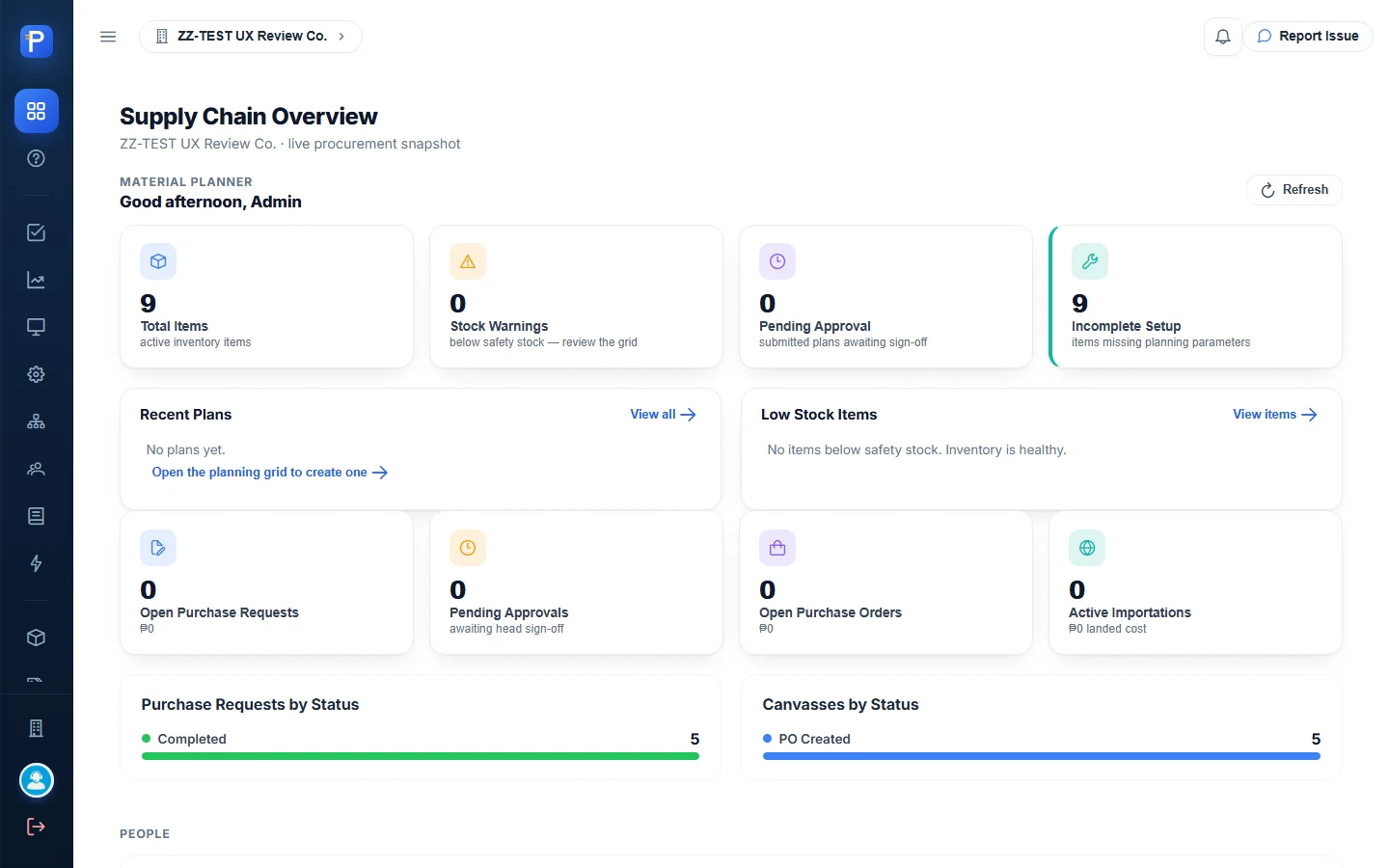
- Dashboard is the landing page. In this build it shows the shared Supply Chain overview (planning and procurement counts), not manufacturing figures.
- Sales Order Demand is the make-to-order inbox. It lists Approved and Partial DMS sales orders and how much of each line still needs building. This is where you press Build.
- Demand Coverage has one row per finished good. It nets customer demand against active production allocations, safety stock and on-hand stock in one warehouse.
- Floor Queue is a three-stage shop-floor board (Queue, Processing, Ready) with crews and stations.
- Production Orders is the build document. It shows the material requirement and a Posting panel with Issue materials and Post completion.
- Bills of Materials are versioned recipes per batch, costed live at weighted-average cost.
- Crews & Stations: who runs a batch and where.
- WIP & Cost Sheet is a read-only list of orders that still carry a WIP balance.
- Overhead & Rates covers cost pools, monthly rates, month-end confirmation, and applied vs actual.
- Inventory (Stock Position, Items, Item Categories, Item Groups) and Planning (Material Planning grid, Forecast, Plans, KPIs, Admin) are shared with Supply Chain.
- Help is a long built-in guide that explains every screen and rule.
Demand
Sales Order Demand
This screen shows which customer orders can be built. The app is clear that it never creates, edits, approves or cancels a sales order: “Nothing on a sales order can be changed from this app.” The only thing Manufacturing writes is an allocation, which links a production order to a sales order line.
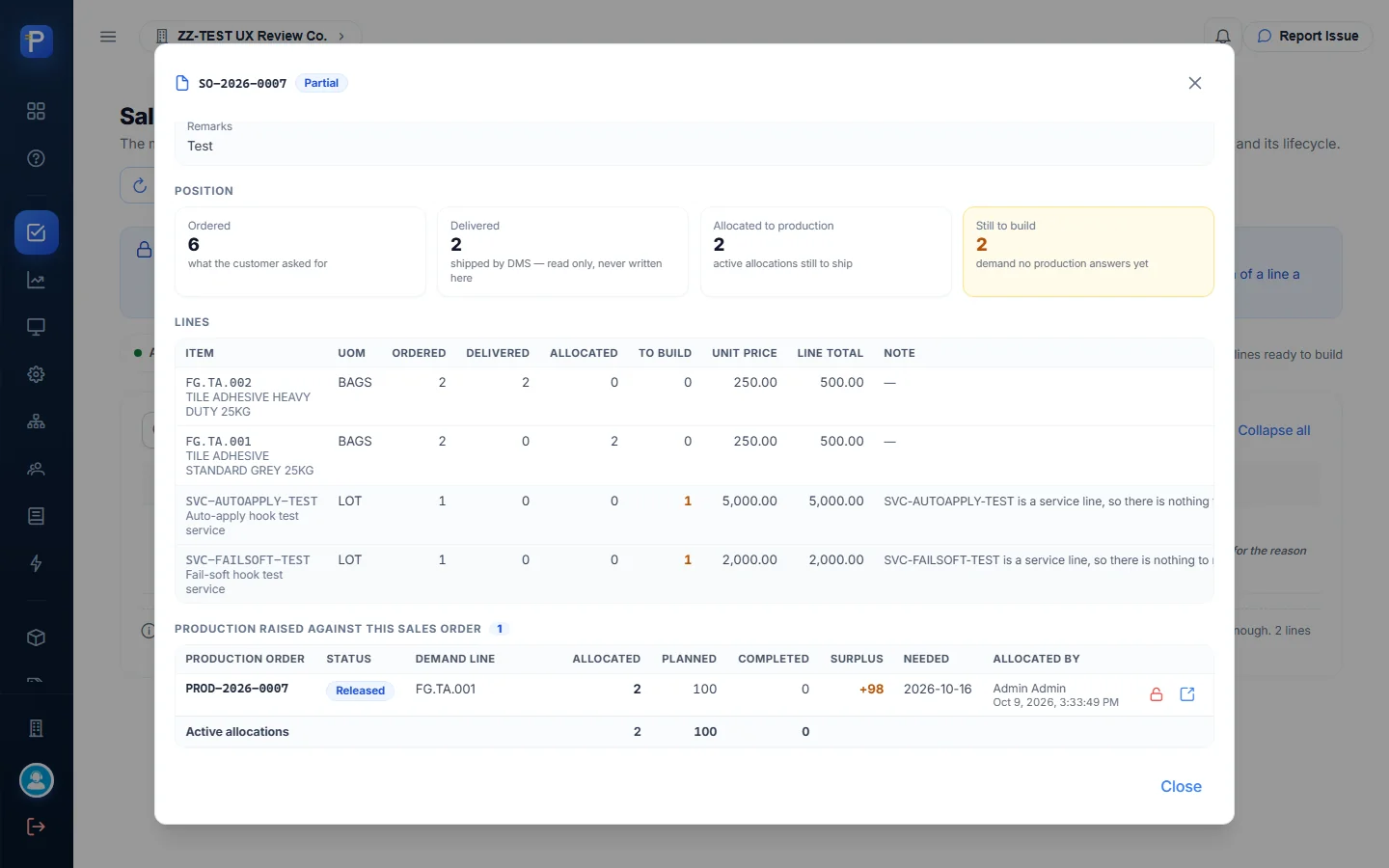
Only orders in Approved or Partial status are listed. The screen explains that “the server refuses production against Draft, Delivered, Closed, Cancelled or Rejected orders”. SO-2026-0008 (ZZ-DOC CUSTOMER TRADING) had already been delivered, so it didn’t appear. The only order that qualified was SO-2026-0007 for CEBU HOMEBUILDERS DEPOT, in Partial status, with 6 units ordered and 2 delivered.
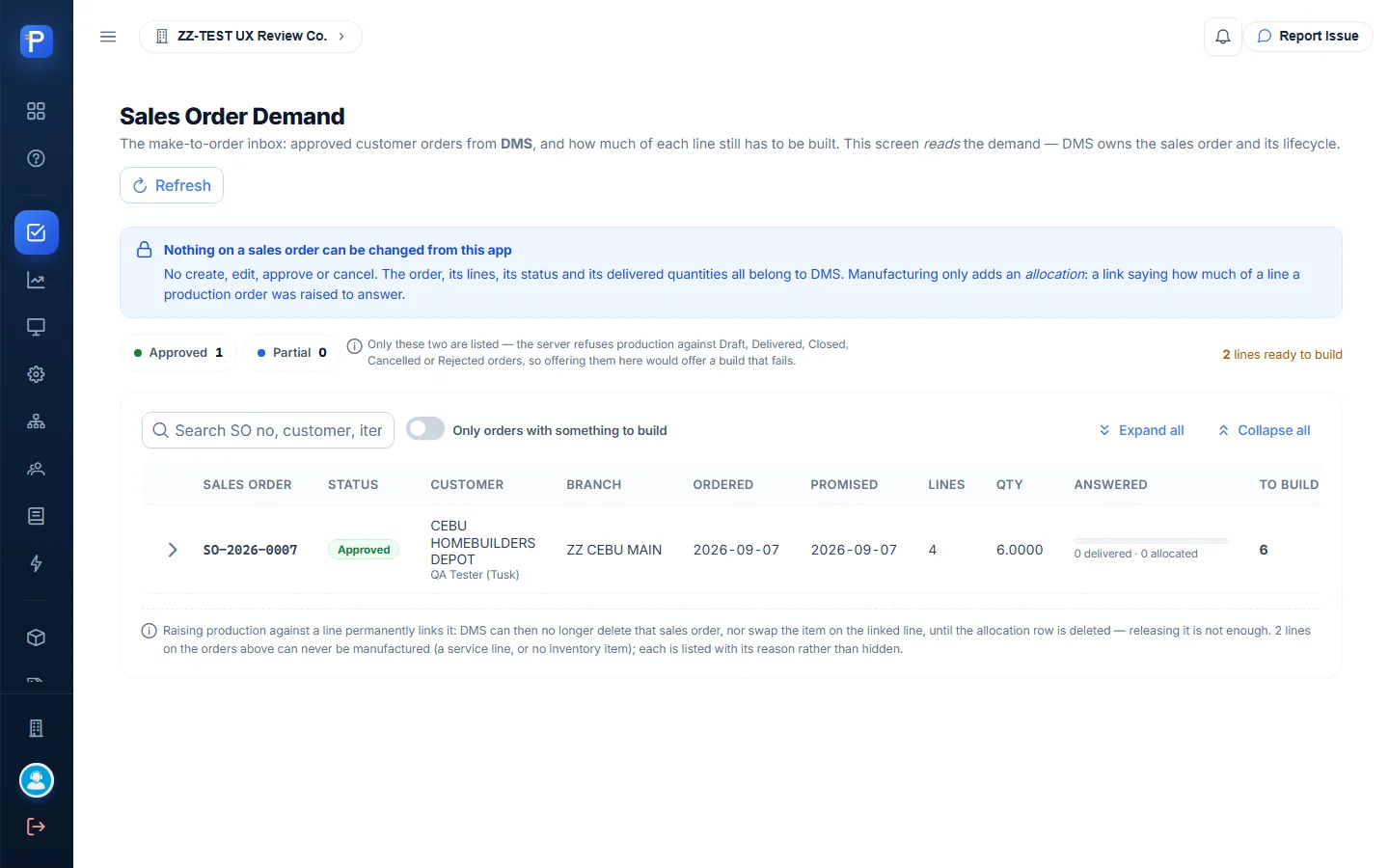
Each order row shows ordered qty, Answered (delivered plus allocated, as a progress bar) and To build. The View dialog breaks the order into lines:
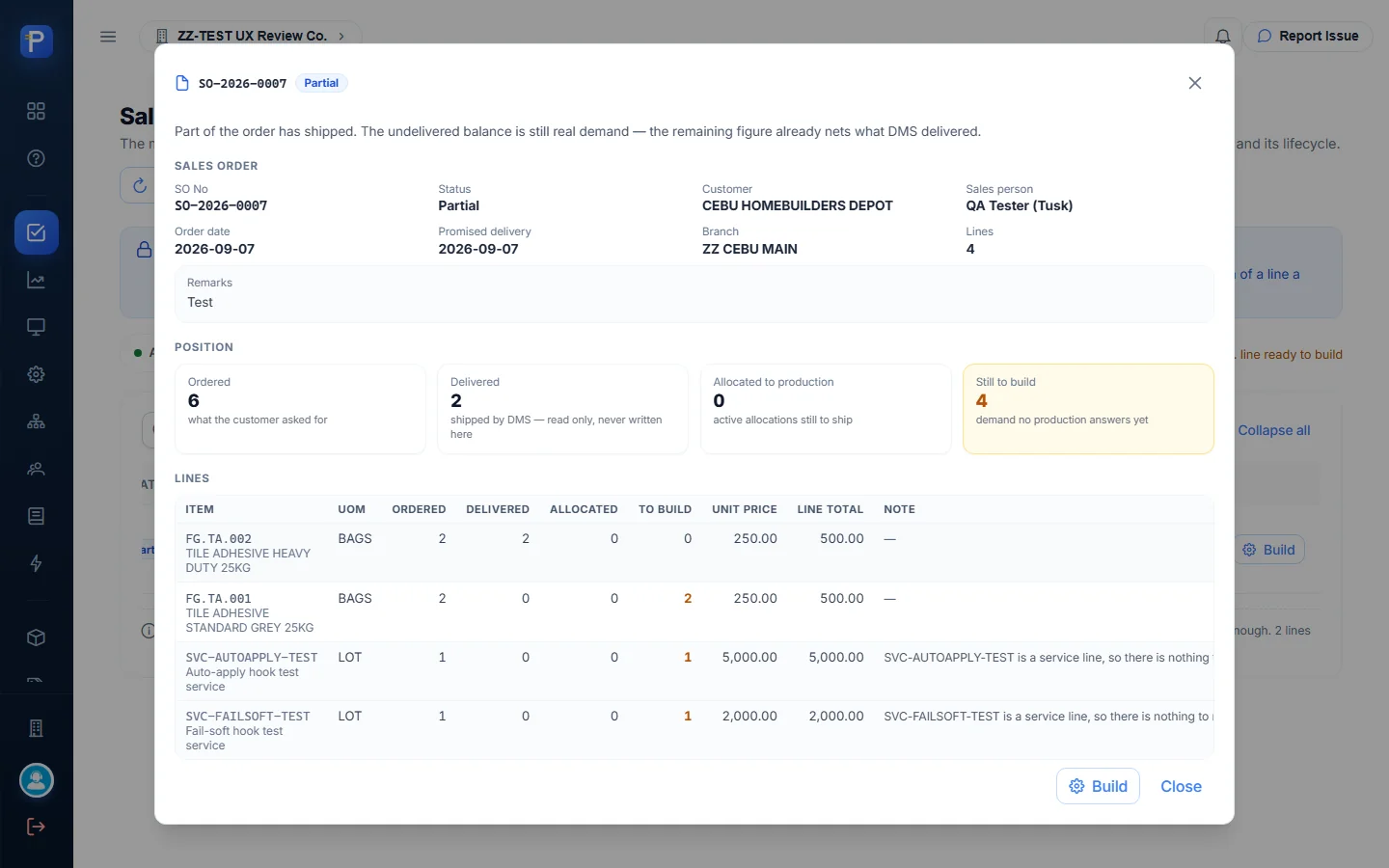
- FG.TA.002 Heavy Duty: 2 ordered, 2 delivered, 0 to build.
- FG.TA.001 Standard Grey: 2 ordered, 0 delivered, 2 to build.
- Two service lines, SVC-AUTOAPPLY-TEST and SVC-FAILSOFT-TEST, are listed with the reason “…is a service line, so there is nothing to manufacture. Production can only be raised against a stock item.” They’re shown, not hidden.
Raising a production order with Build
- On Sales Order Demand, press Build on the order row. The dialog opens on the first buildable line (FG.TA.001).
- The header restates the demand: “CEBU HOMEBUILDERS DEPOT ordered 2 BAGS of FG.TA.001; 0 delivered, 0 already allocated to production — 2 left to build. Promised for 2026-09-07.”
- Pick the Recipe. Only recipes that are Active and in effect on the order date are offered; BOM-TA-STD v1 was the default. Then set Batches (whole batches only), Order date, Date needed, the Materials from and Finished goods into warehouses, and optional Remarks.
- A live summary shows “This order will build 100 / Allocated to this customer’s line 2 / Surplus to plain stock 98”. One batch makes 100 bags, so the extra 98 go to ordinary stock.
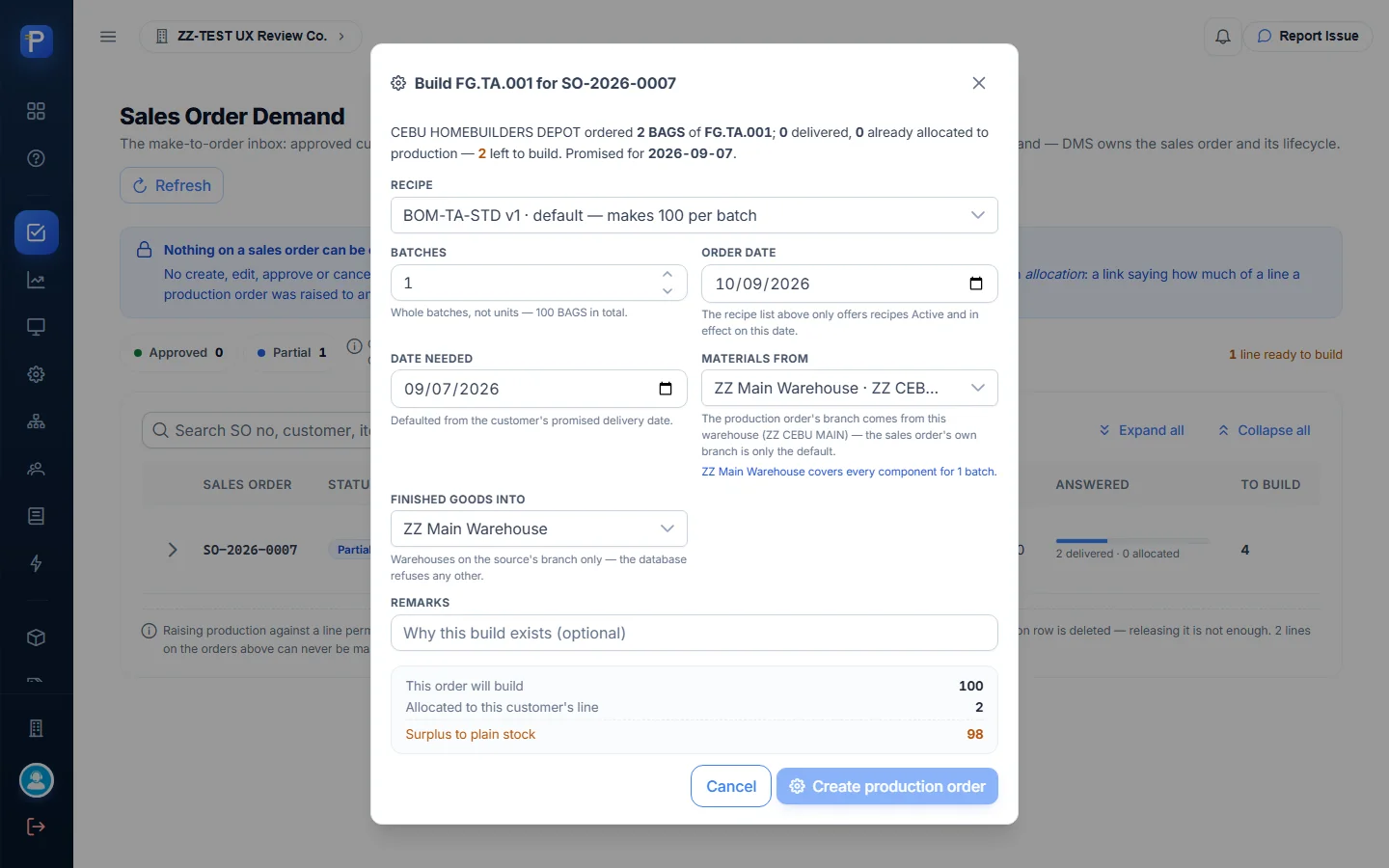
Date needed defaults to the customer’s promised date, 2026-09-07. That was earlier than today’s order date, so Create production order stayed disabled and the dialog showed:
1 thing to fix
Date needed is before the order date.
I changed Date needed to 2026-10-16 and added the remark “ZZ-DOC MTO build for SO-2026-0007 line FG.TA.001 (documentation test)”.

- Press Create production order and confirm the prompt: “Create a production order for 100 BAGS of FG.TA.001 against SO-2026-0007? Only 2 is allocated to CEBU HOMEBUILDERS DEPOT’s line — the extra 98 becomes plain stock.”

The app created PROD-2026-0007 with status Released. Creating the order posts nothing. On the demand screen the order moved to “2 delivered · 2 allocated” (67 % answered) and “0 lines ready to build”. The SO detail gained a “Production raised against this sales order” table: PROD-2026-0007, Released, allocated 2, planned 100, surplus +98, allocated by Admin Admin, with Release the allocation and Open in Production Orders buttons. The app warns that once an allocation exists, DMS can no longer delete that sales order or swap the item on that line.
Demand Coverage
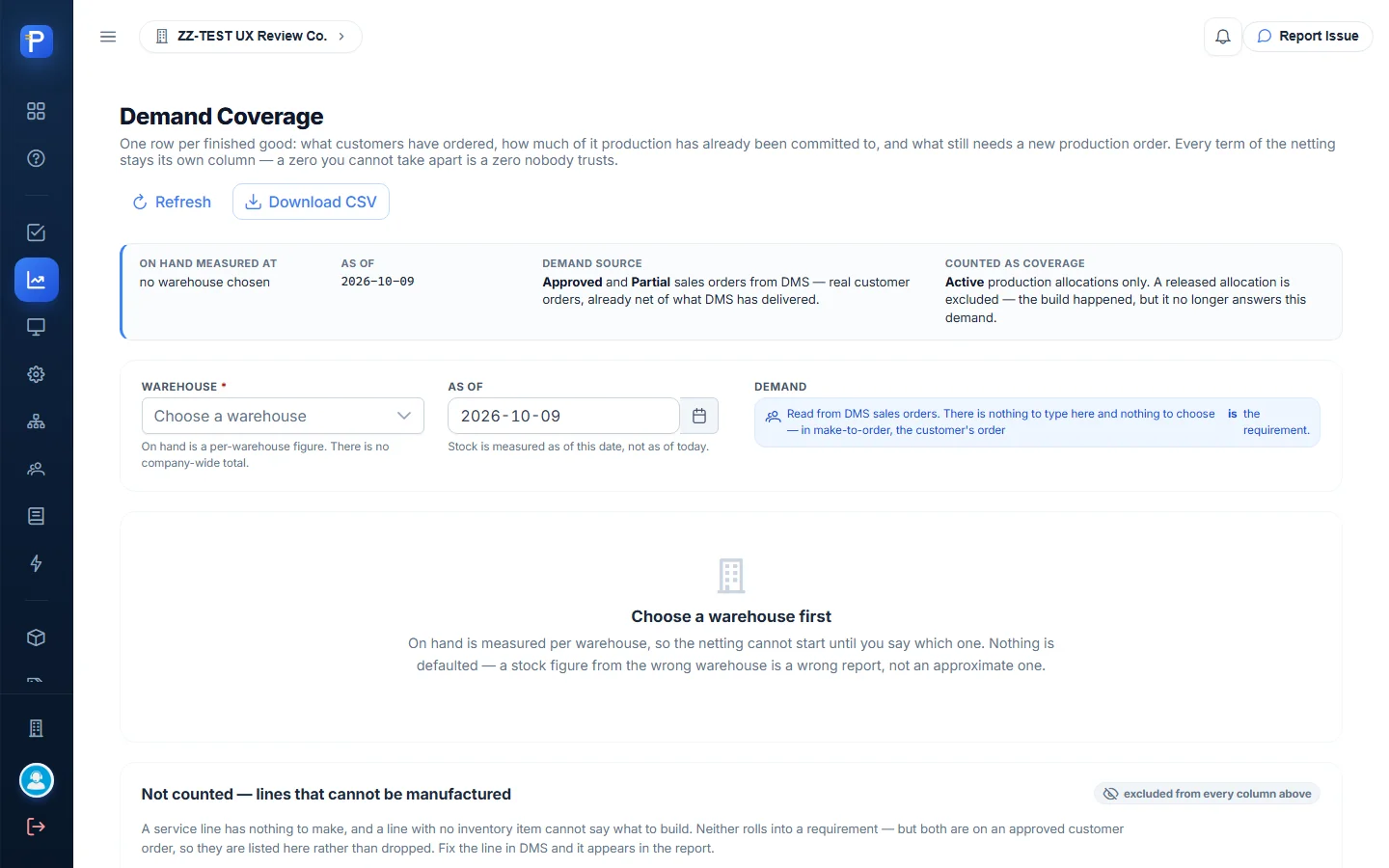
This report won’t show anything until you pick a warehouse: “Nothing is defaulted — a stock figure from the wrong warehouse is a wrong report”. Each row spells out the netting in its own columns: Ordered − Allocated = Uncovered, + Safety − On hand = To build, then the whole batches needed. After the build, FG.TA.001 showed Ordered 2, Allocated 2, Uncovered 0, and On hand 100 in ZZ Main Warehouse. Service lines go in a separate “Not counted” table. You can download the report as CSV.

Production
Bills of Materials
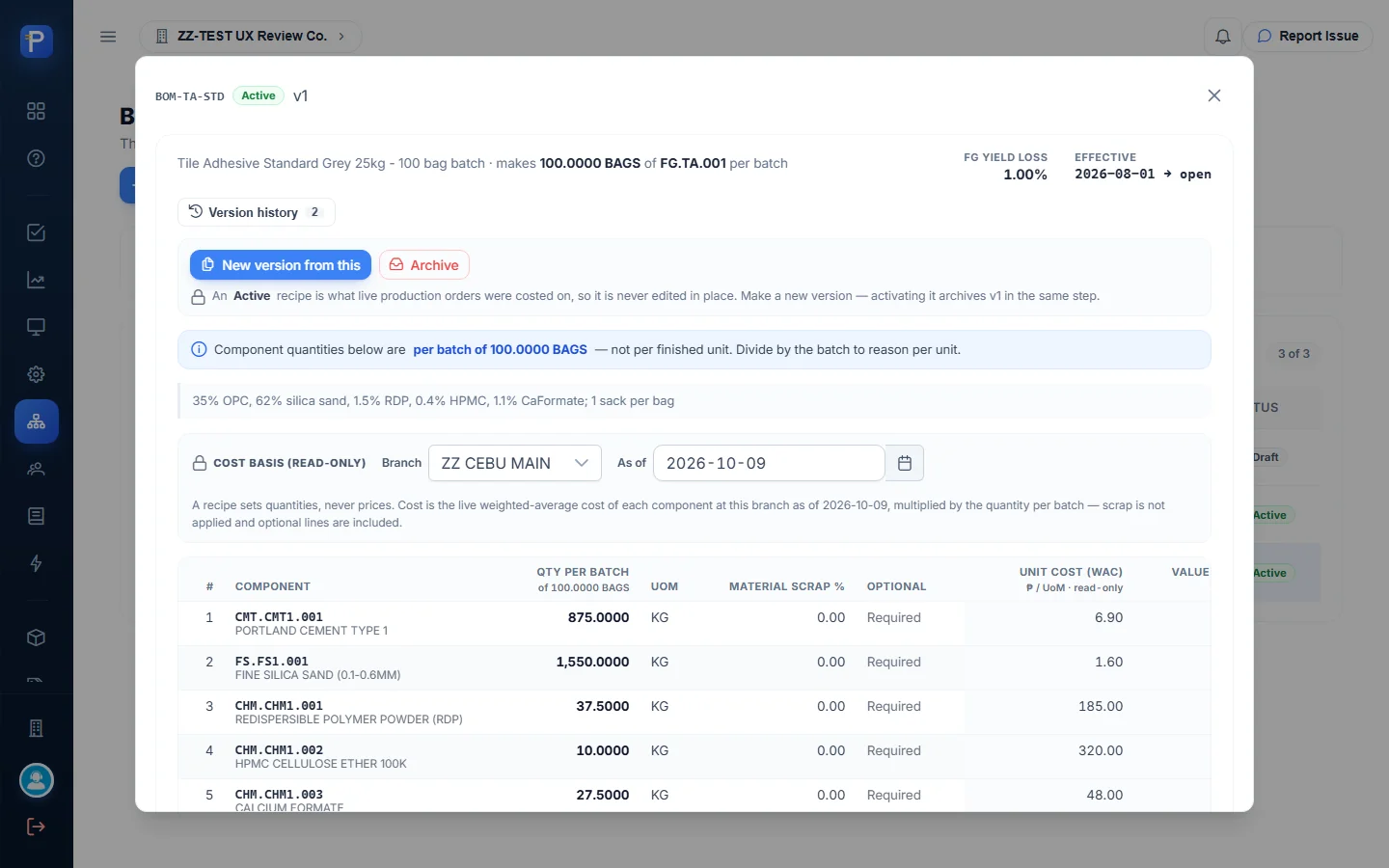
A recipe gives component quantities per batch. BOM-TA-STD v1 makes 100 bags of FG.TA.001 from 875 kg Portland cement, 1,550 kg silica sand, 37.5 kg RDP, 10 kg HPMC, 27.5 kg calcium formate and 100 kraft sacks. The recipe never stores a cost. Cost is read live at weighted-average cost: ₱20,921.50 per batch, or ₱209.22 per bag. You can’t edit an Active recipe in place. You use New version from this, and activating the new version archives v1. Draft recipes offer Edit draft, Activate and Delete draft.
Production Orders
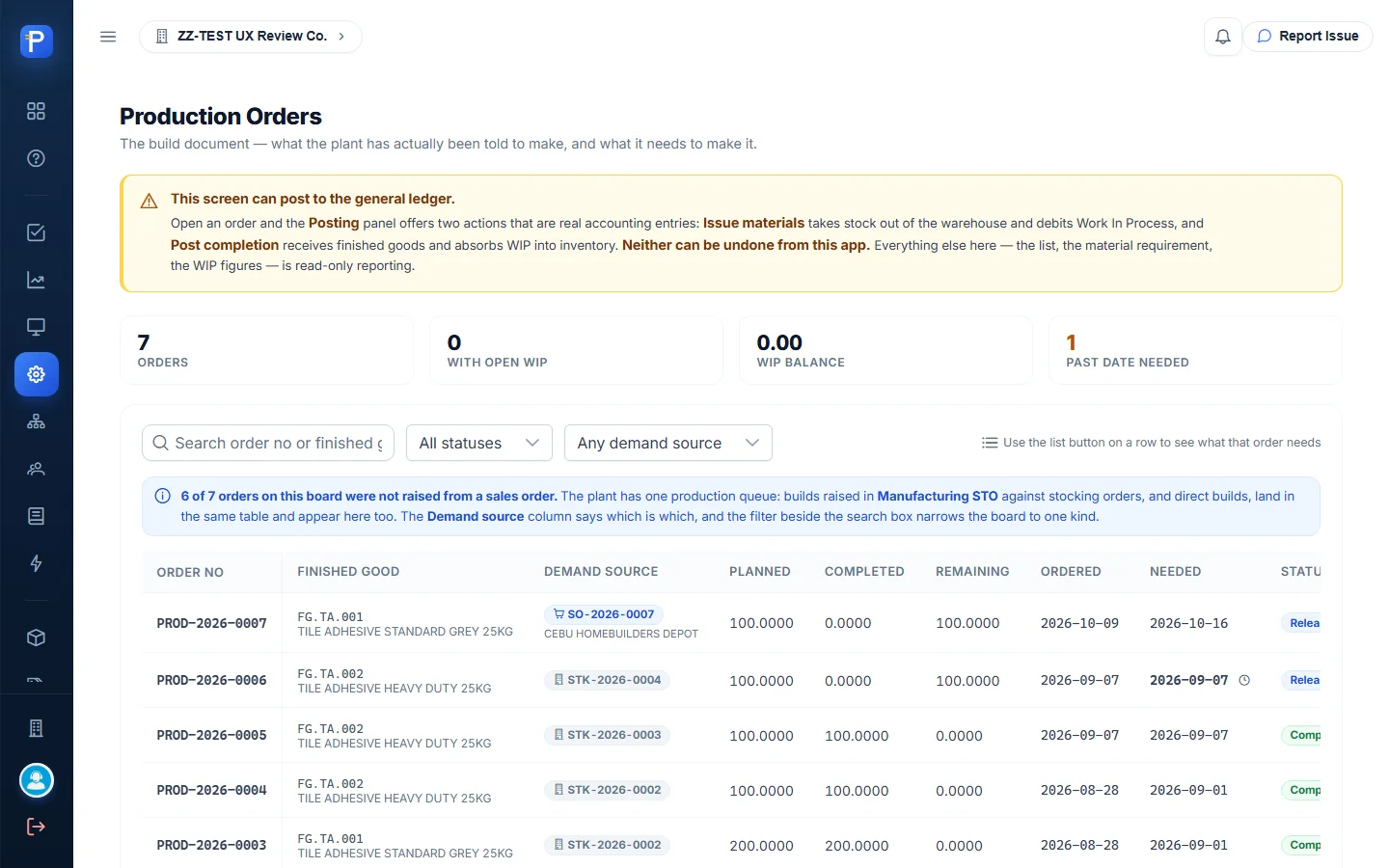
This list has every build in the plant. Make-to-stock builds (demand source STK-…) and make-to-order builds (SO-… plus the customer name) share one queue, and the board says so: “6 of 7 orders on this board were not raised from a sales order.” A banner warns that two actions on this screen post to the general ledger and can’t be undone from the app.
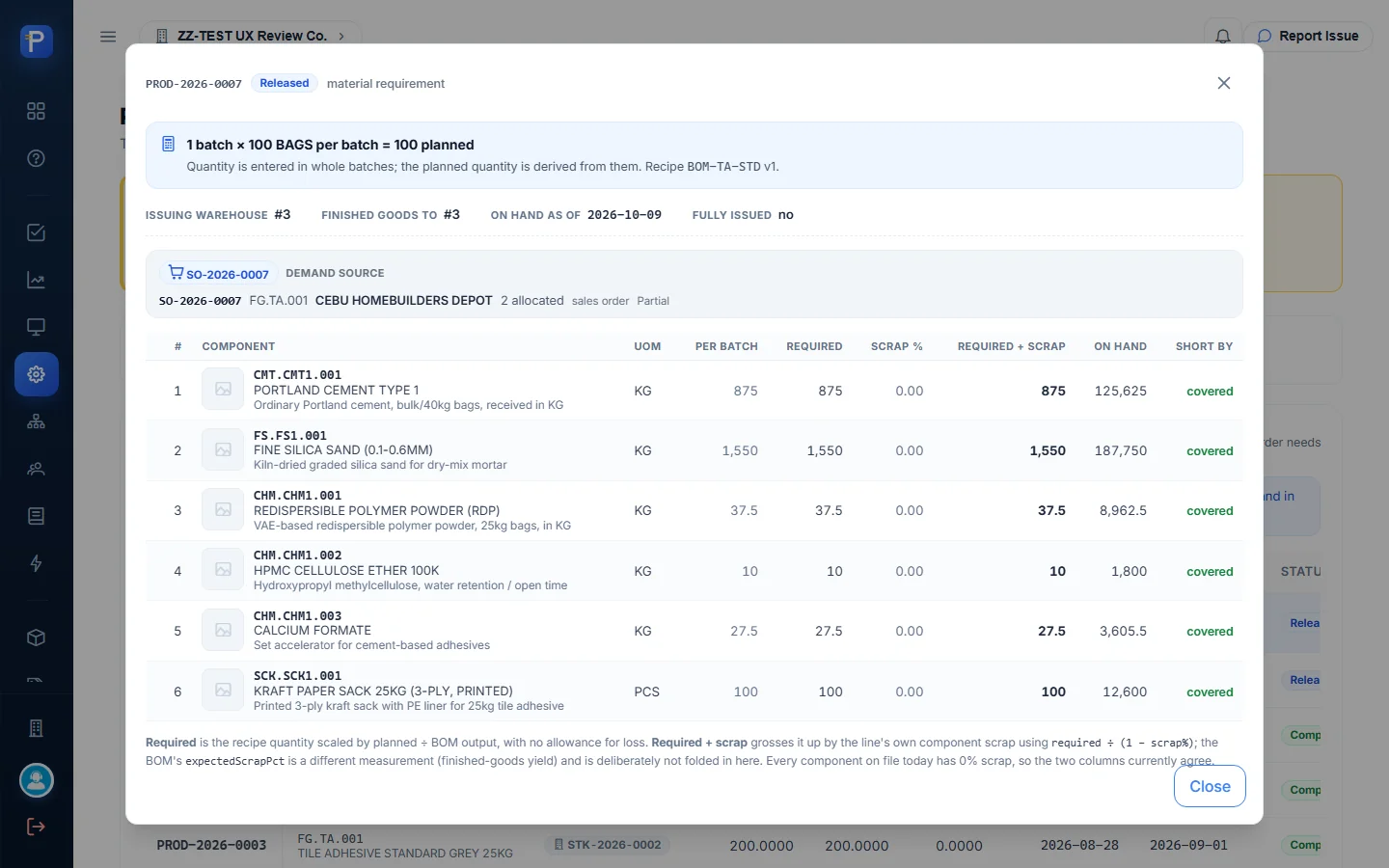
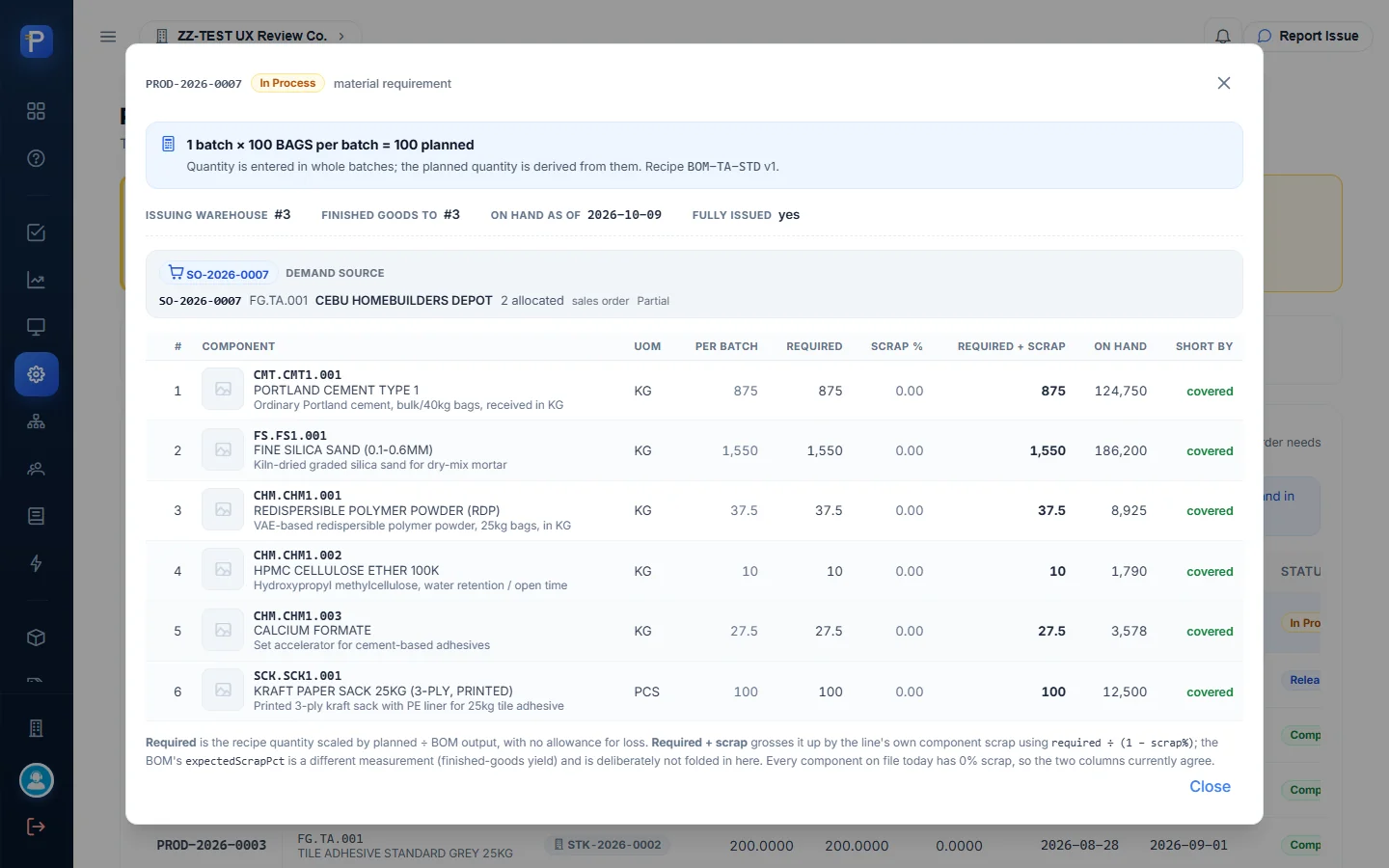
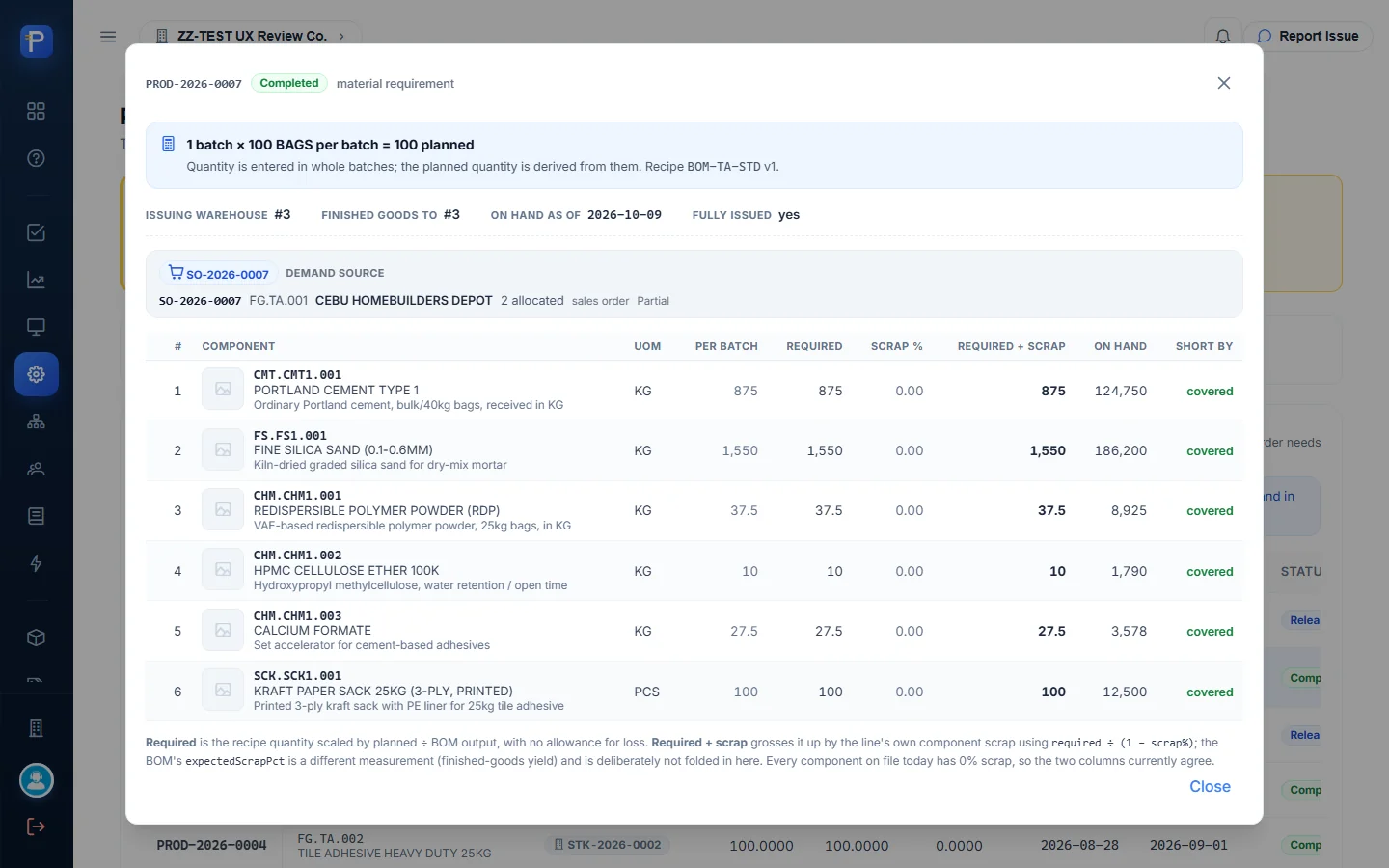
The row’s list button opens the material requirement panel. It shows the batch maths (“1 batch × 100 BAGS per batch = 100 planned”), the demand-source chip (SO-2026-0007, 2 allocated, sales order Partial), and each component’s required qty, scrap %, on hand and covered/short. The Posting panel sits below it.
Issuing materials
- In the Posting panel, press Issue materials.
- The form opens with the outstanding balance filled in, not the full requirement. The app explains this avoids charging a run twice. Each line shows required, already issued, balance, source-warehouse on hand and Issue now. The issue date matters: “Stock and cost are measured AS OF this date”.
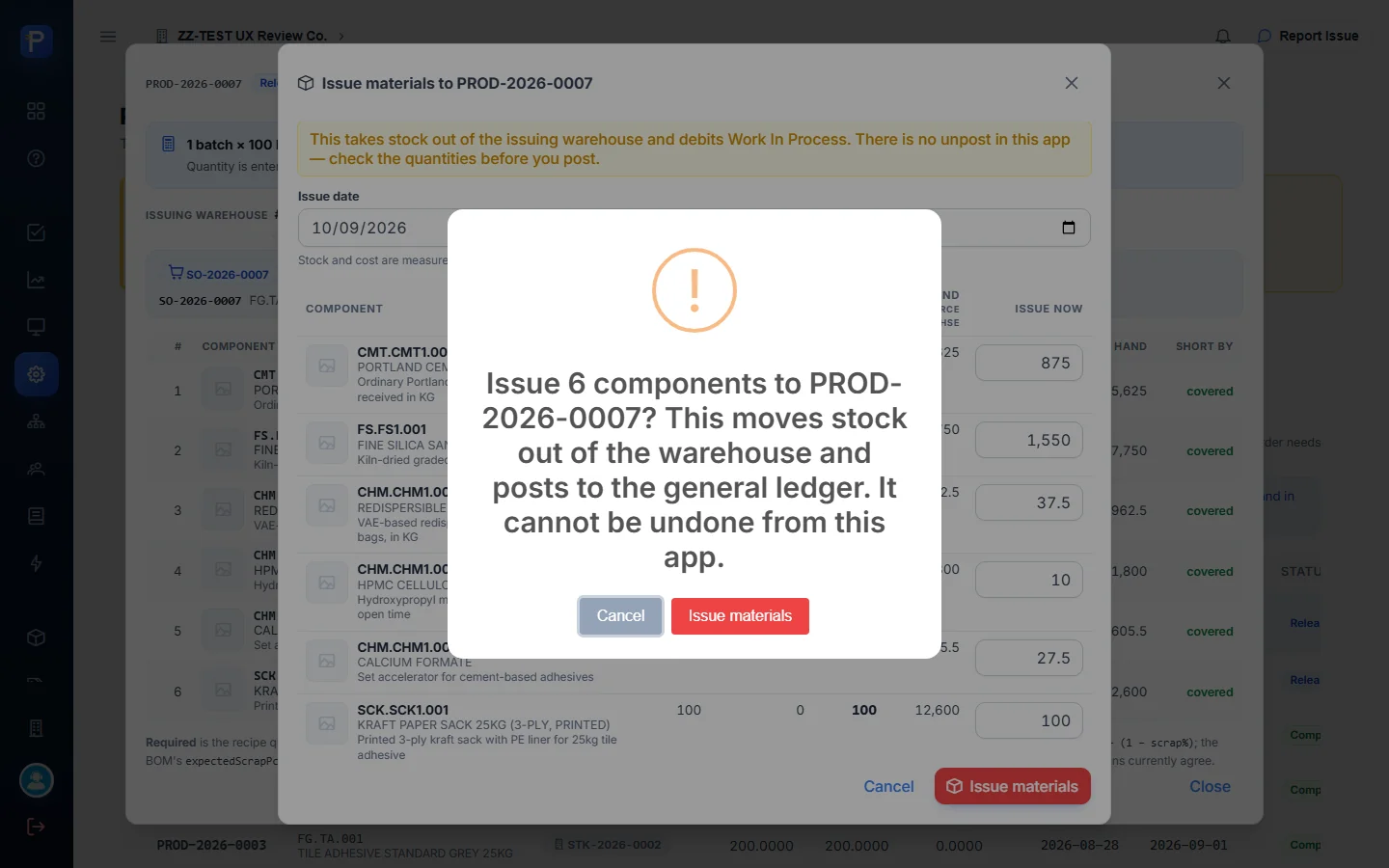
- Press Issue materials and confirm: “Issue 6 components to PROD-2026-0007? This moves stock out of the warehouse and posts to the general ledger. It cannot be undone from this app.”
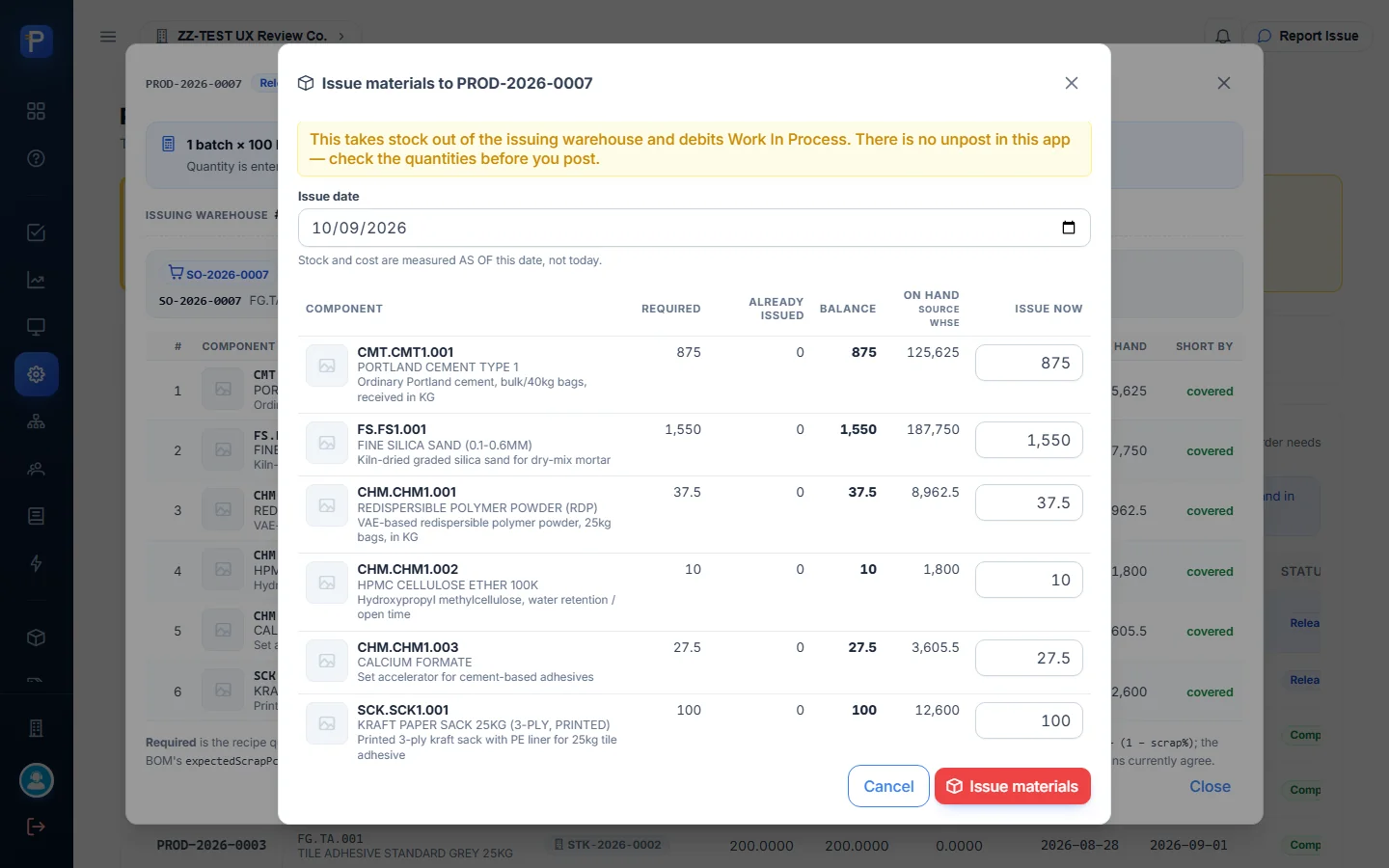
The order moved to In Process, Fully issued = yes, with WIP ₱20,921.50. That’s exactly the BOM’s WAC batch cost: cement 875 × 6.896 = 6,034.00, sand 2,480.00, RDP 6,937.50, HPMC 3,200.00, calcium formate 1,320.00 and sacks 950.00. Component on-hand dropped by the issued quantities. Portland cement, for example, went from 125,625 to 124,750 kg in the requirement panel.
WIP & Cost Sheet
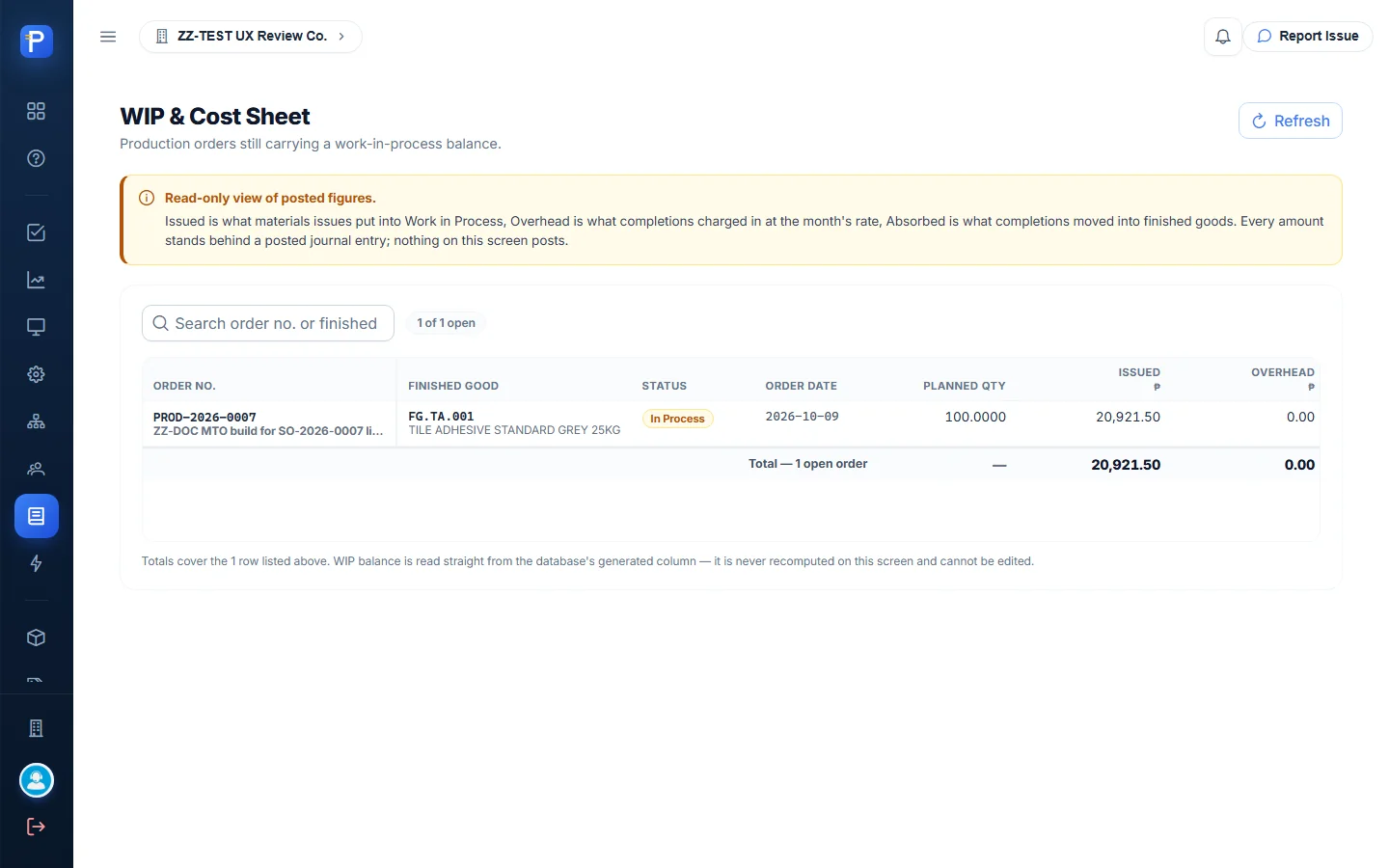
This sheet is read-only. It lists only orders with a non-zero WIP balance, in columns Issued, Overhead, Absorbed, Written off and WIP balance. The WIP balance is “generated by the database as issued plus overhead minus absorbed minus written off”. After the issue it showed PROD-2026-0007 (with my ZZ-DOC remark), Issued 20,921.50 and WIP 20,921.50. After completion it went back to “No open work in process”.
Shop floor
Floor Queue
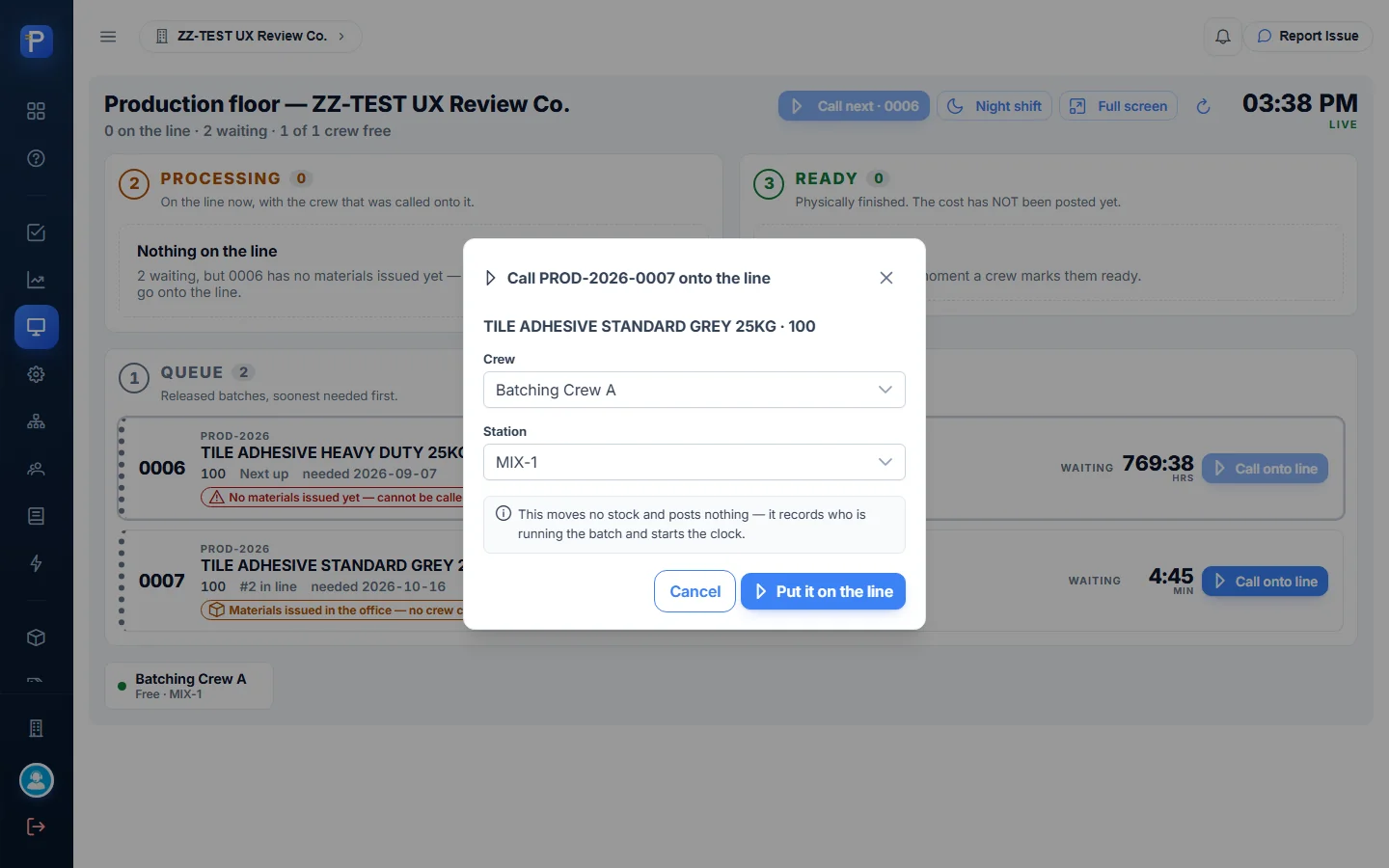
The Floor Queue is a live board with three stages. Queue holds released batches, soonest needed first. Processing is what’s on the line with a crew. Ready is physically finished but not yet costed. There are Night shift and Full screen modes for a wall display. A batch can’t be called until its materials are issued. PROD-2026-0006, an older stocking build, sat at the head of the queue with “No materials issued yet — cannot be called”.
- After the issue, PROD-2026-0007 showed “Materials issued in the office — no crew called”. Press Call onto line, pick the crew (Batching Crew A) and station (MIX-1), then press Put it on the line. The dialog says: “This moves no stock and posts nothing — it records who is running the batch and starts the clock.”
- On the line, the card offers Mark ready, Send back and Adjust ingredients.
- Press Mark ready and confirm (“This is a floor signal only — it posts no cost and moves no stock”). The batch moves to Ready, labelled “Waiting for cost posting”, and the production order status becomes Ready.

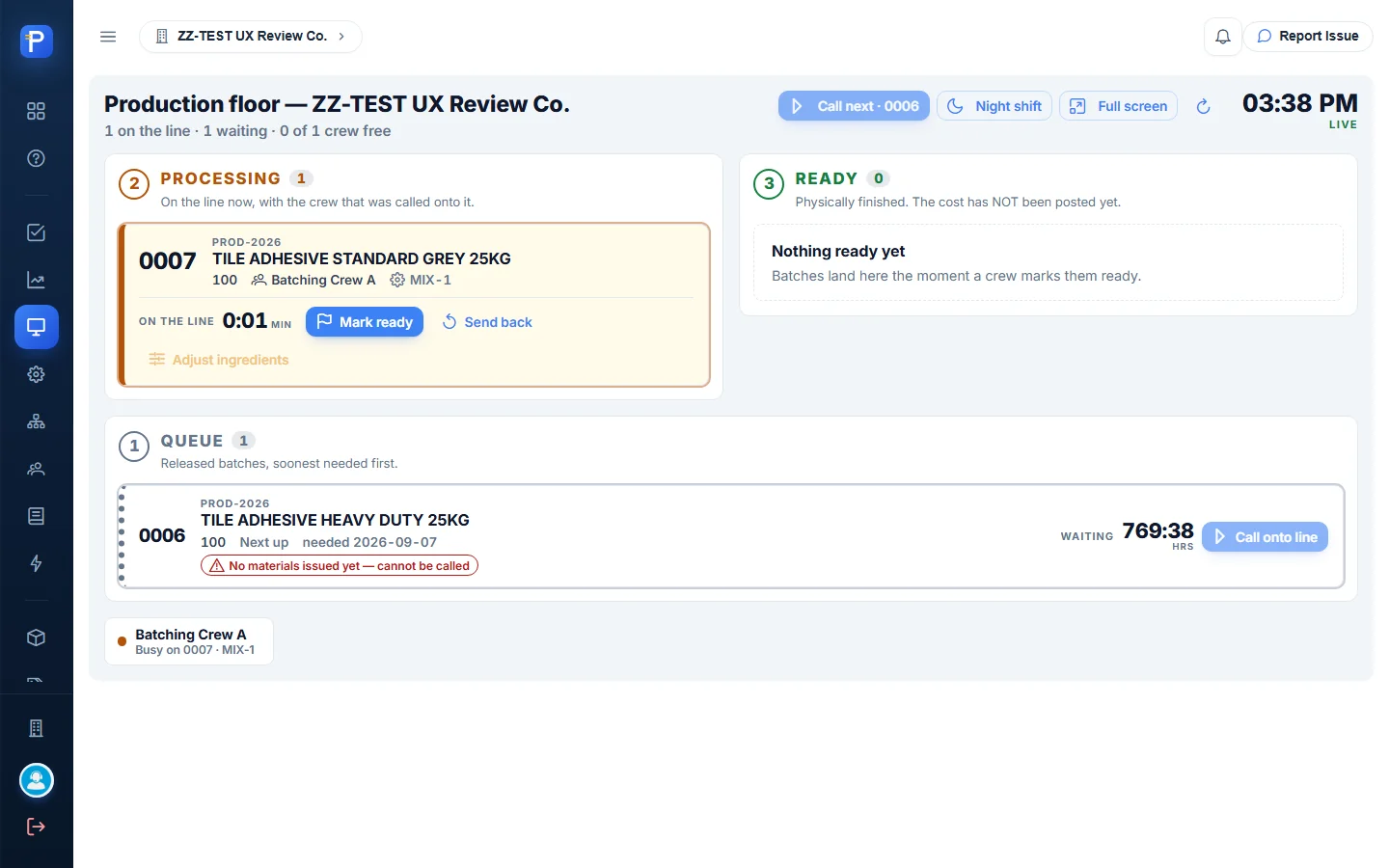

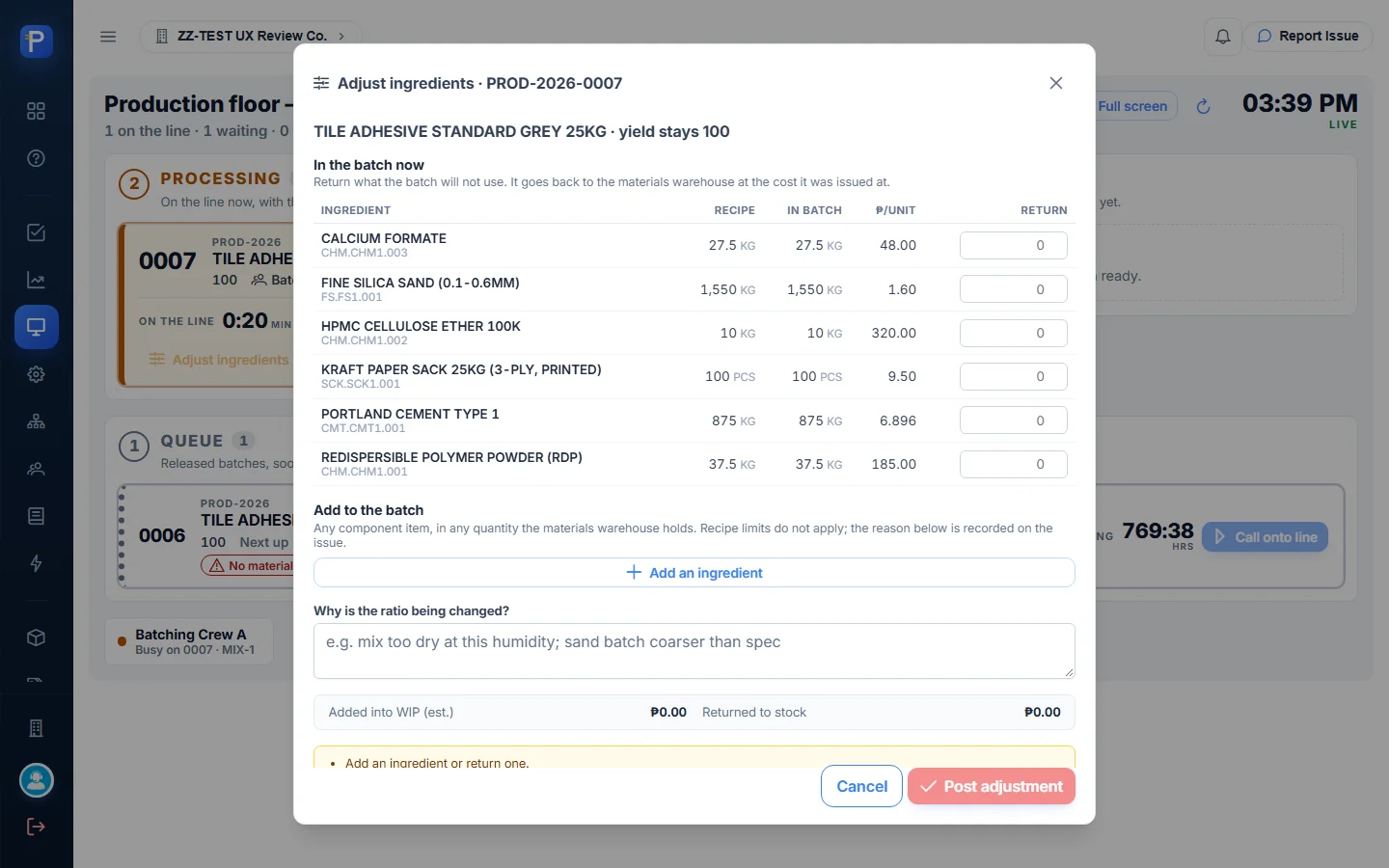
I opened Adjust ingredients but didn’t post it. It lets the floor return unused components at their issued cost, or add any component with a reason (the reason is required). Planned yield stays the same, and the unit cost reflects the new ratio. It shows the issue cost per unit, for example cement ₱6.896/kg and HPMC ₱320.00/kg.
Costing
Overhead & Rates
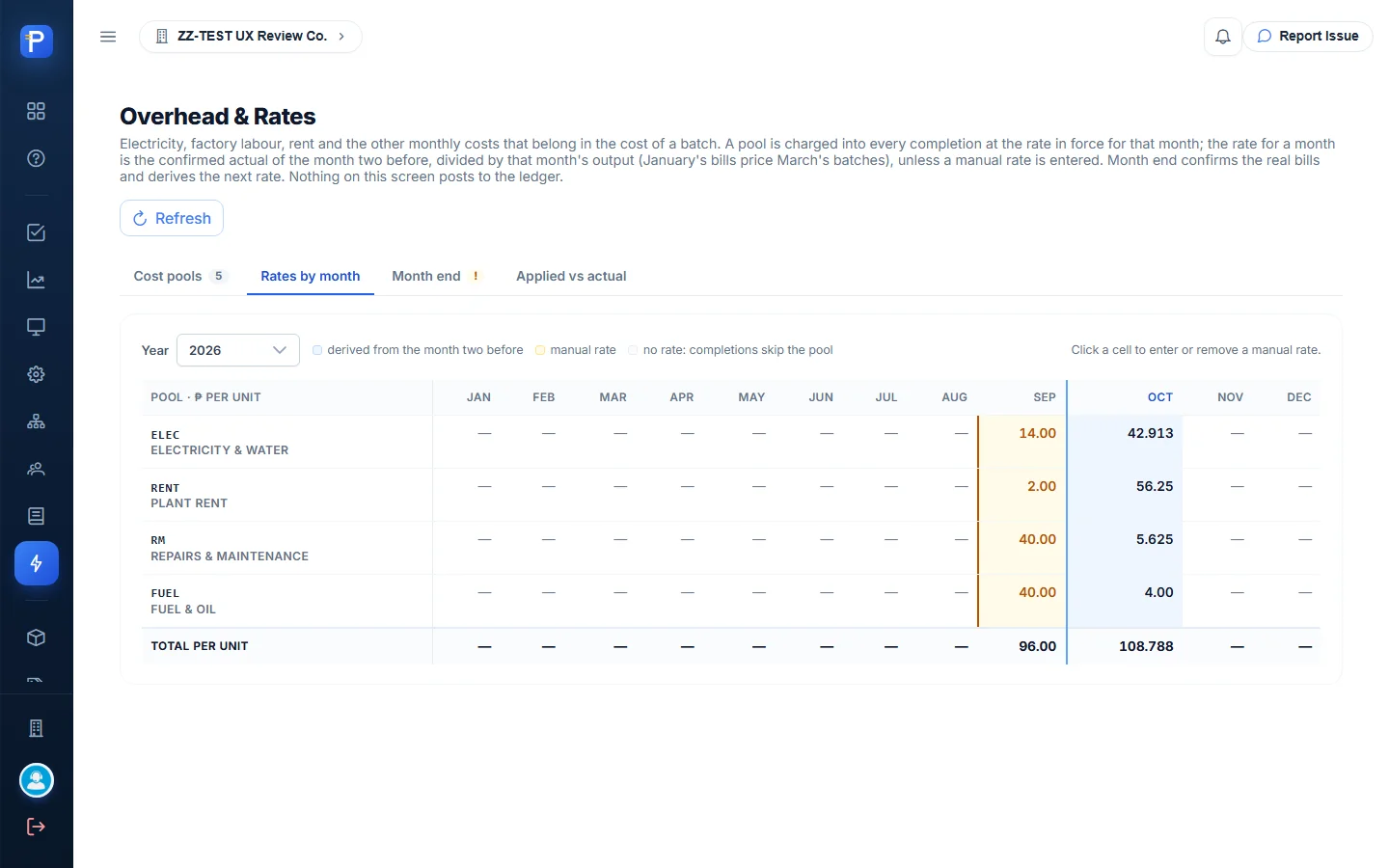
Overhead is split into pools: Electricity & water, Factory labour (inactive), Plant rent, Repairs & maintenance, and Fuel & oil. Each pool reads from mapped expense accounts and credits Factory Overhead Applied. A month’s rate is the confirmed actual from two months earlier divided by that month’s output, unless someone enters a manual rate. The October 2026 rates were 42.913 + 56.25 + 5.625 + 4.00 = ₱108.788 per unit.
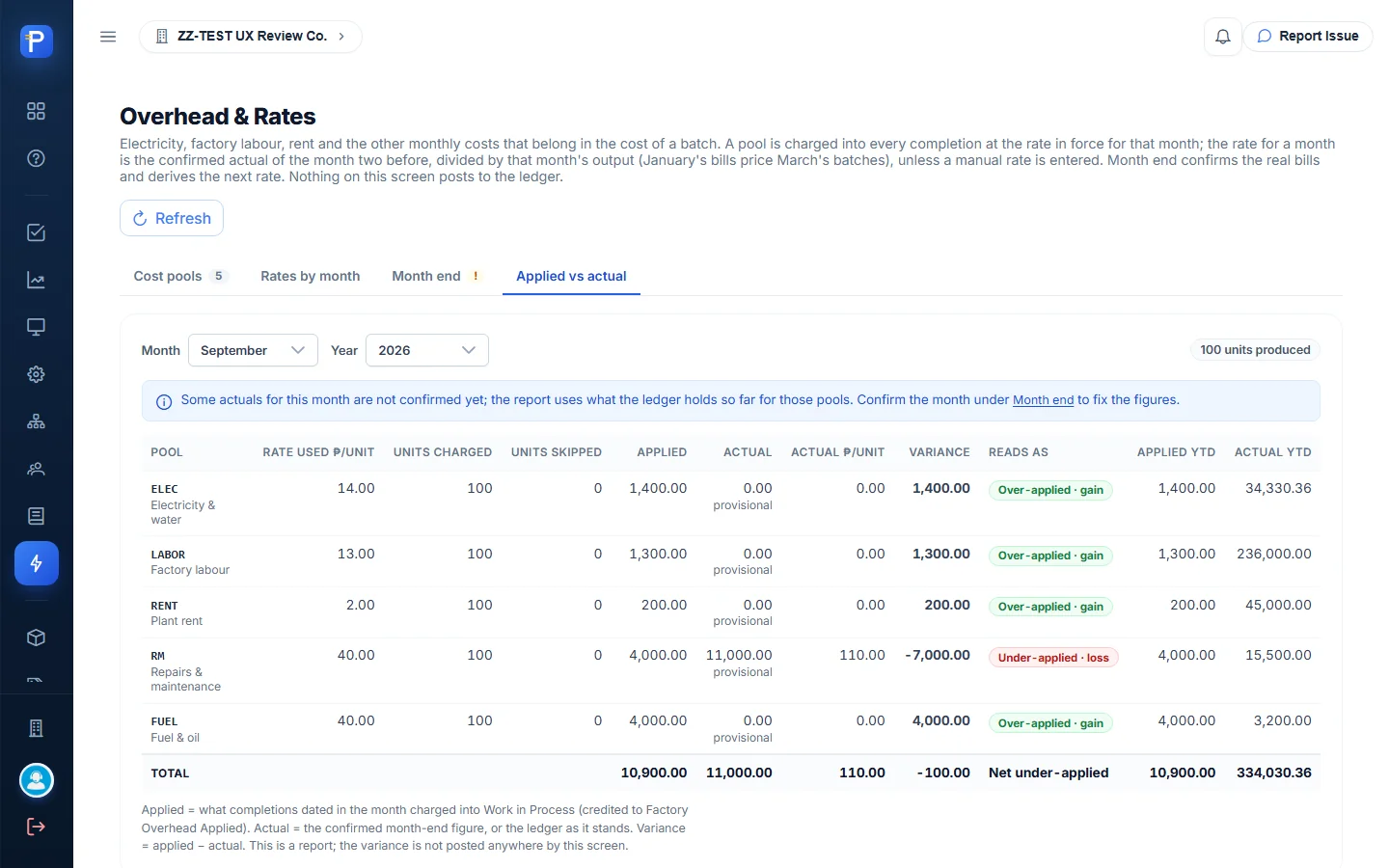
Month end proposes each pool’s actual from the ledger for you to confirm. I didn’t confirm a month. Applied vs actual reports the variance; September showed ₱10,900 applied vs ₱11,000 actual, net under-applied ₱100. The screen says nothing on it posts to the ledger.

Posting completion
- Back on the production order, press Post completion.
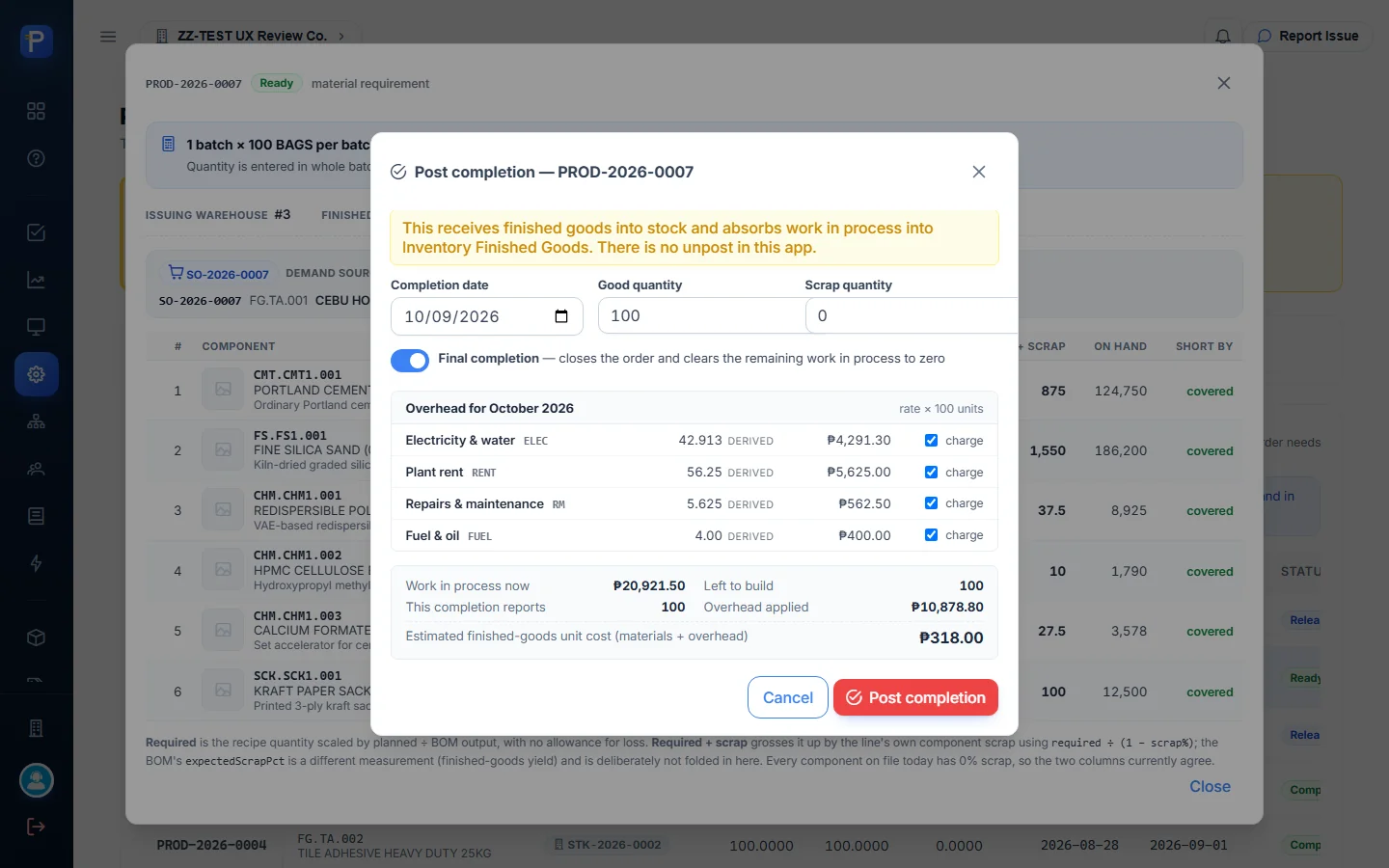
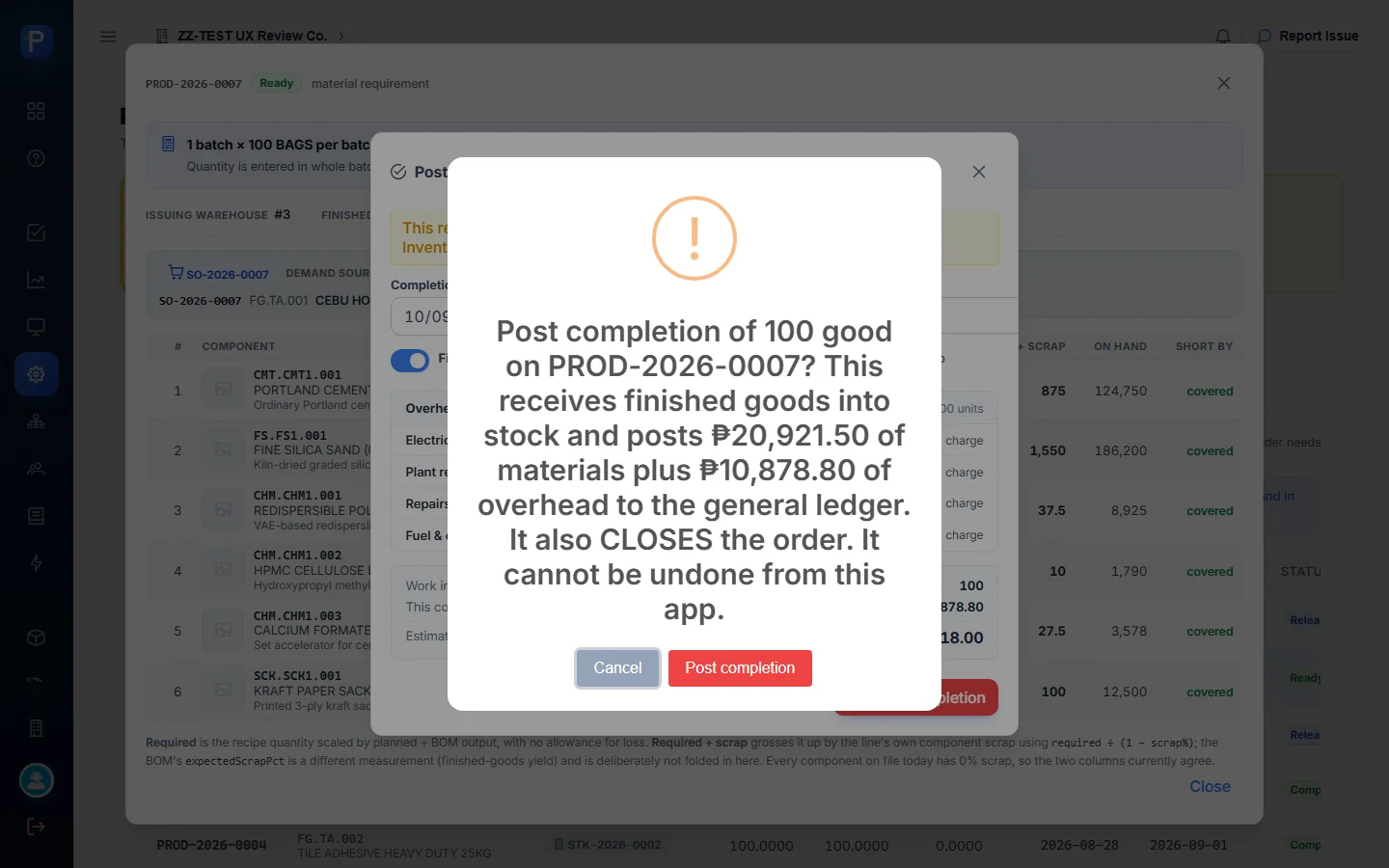
- Enter the Completion date, Good quantity (100) and Scrap quantity (0). Leave Final completion on; it “closes the order and clears the remaining work in process to zero”.
- The overhead block lists each pool at the October rate × 100 units, each with a “charge” tick box: ₱4,291.30 + ₱5,625.00 + ₱562.50 + ₱400.00 = ₱10,878.80 overhead applied. The summary shows WIP ₱20,921.50 and an estimated unit cost of ₱318.00 ((20,921.50 + 10,878.80) ÷ 100).
- Press Post completion and confirm.
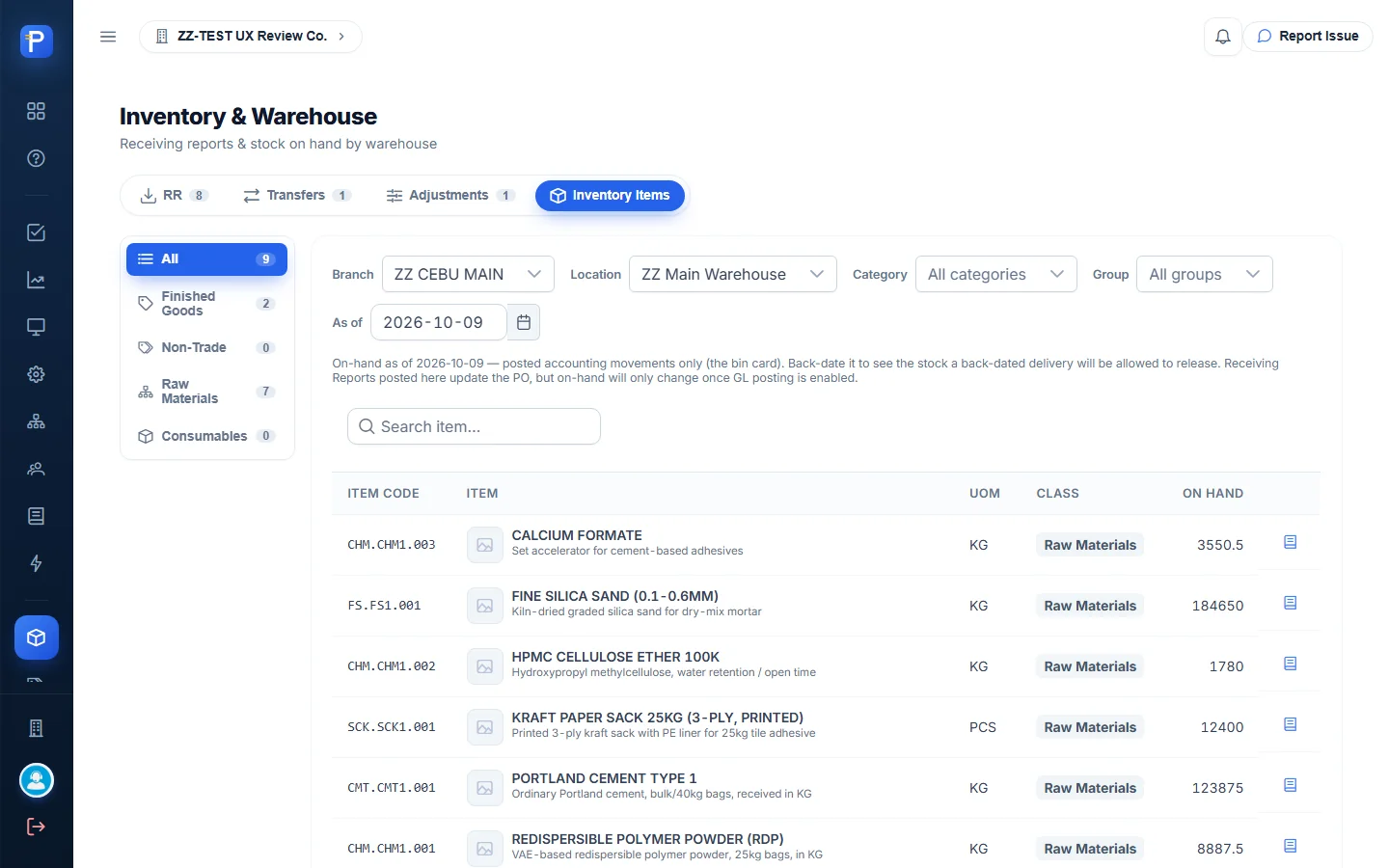
PROD-2026-0007 is now Completed: completed 100, remaining 0, WIP balance 0.00. The board KPIs went back to 0 orders with open WIP. On the sales order the allocation row now reads Completed, planned 100, completed 100, surplus +98. The batch left the Floor Queue. Stock Position for ZZ Main Warehouse showed FG.TA.001 on hand at 100 bags.

How the documents connect
- A DMS Sales Order (Approved or Partial) shows up in Sales Order Demand. It’s read-only here.
- Build creates a Production Order (Released) and an allocation on the sales order line. Nothing is posted yet.
- Issue materials moves stock out of the materials warehouse and debits WIP. The order becomes In Process and appears on the WIP & Cost Sheet.
- On the Floor Queue, Call onto line and Mark ready are floor signals only, with no cost. The order becomes Ready.
- Post completion receives the finished goods, charges overhead at the month’s pool rates (credit Factory Overhead Applied) and absorbs WIP into Finished Goods inventory. The order becomes Completed.
- Month end in Overhead confirms actuals, which set the rate two months ahead. Applied vs actual reports the variance.
- DMS then ships the finished goods against the sales order. Delivery and sales order status belong to Distribution, not to this app.
Notes from testing
- The default Date needed blocks the build. The Build dialog copies the customer’s promised date (2026-09-07). For any overdue order that’s before today’s order date, so Create stays disabled with “Date needed is before the order date.” You have to change the date before you can raise the order.
- At 1440 px wide, the row’s Build button sits past the right edge of the visible table (about x = 1489 px), and the automated browser couldn’t click it normally. The Build button inside the View dialog didn’t respond to automated clicks either. Several dialog buttons (Create production order, Issue materials, Call onto line) also needed a direct script trigger. Someone using a mouse may never hit this, but it points to a layout or overlay problem.
- “Call next · 0006” stayed disabled because 0006 had no materials, even though 0007 behind it was ready. So Call next is held up by whatever’s at the head of the queue. Call onto line on the card itself worked.
- The requirement panel shows the warehouse as an ID, “Issuing warehouse #3 / Finished goods to #3”, instead of its name.
- The Scrap quantity field runs off the right edge of the Post completion dialog.
- The Dashboard doesn’t know about manufacturing. It shows the Supply Chain/procurement overview (plans, PRs, POs, approvers) and looked the same before and after.
- One batch makes 100 bags, so answering a 2-bag order left 98 bags of surplus stock. That’s intended and the app warns about it clearly, but it matters for small orders.
- Issue and completion say they post to the general ledger, but this app has no journal or voucher view to check. The only evidence of the postings here is the change in WIP, status and stock.
- I didn’t try Send back, posting an ingredient adjustment, Release allocation, Month-end confirm, or creating recipes, crews or stations. I left those alone so I wouldn’t change shared setup. SO-2026-0008 (ZZ-DOC CUSTOMER TRADING) couldn’t be used because it’s already Delivered, and the app only lists Approved and Partial orders.
- Other agents were working in the same company at the same time. PROD-2026-0008 (from STK-2026-0005) and a draft recipe ZZ-DOC-BOM-TA-STD-10 appeared while I was testing. They aren’t part of this walkthrough.